kayx23 commented on code in PR #11891:
URL: https://github.com/apache/apisix/pull/11891#discussion_r1905516433
########## docs/en/latest/plugins/zipkin.md: ########## @@ -27,249 +27,239 @@ description: This document contains information about the Apache zipkin Plugin. # --> -## Description +<head> + <link rel="canonical" href="https://docs.api7.ai/hub/zipkin"; /> +</head> -[Zipkin](https://github.com/openzipkin/zipkin) is an open source distributed tracing system. The `zipkin` Plugin supports collecting and reporting traces to Zipkin collector based on the [Zipkin API specification](https://zipkin.io/pages/instrumenting.html). +## Description -It also works with [Apache SkyWalking](https://skywalking.apache.org/docs/main/latest/en/setup/backend/zipkin-trace/#zipkin-receiver) and [Jaeger](https://www.jaegertracing.io/docs/1.31/getting-started/#migrating-from-zipkin), both of which support Zipkin [v1](https://zipkin.io/zipkin-api/zipkin-api.yaml) and [v2](https://zipkin.io/zipkin-api/zipkin2-api.yaml) APIs. It can also work with other tracing systems adapted to Zipkin v1/v2 API format. +[Zipkin](https://github.com/openzipkin/zipkin) is an open-source distributed tracing system. The `zipkin` Plugin instruments APISIX and sends traces to Zipkin based on the [Zipkin API specification](https://zipkin.io/pages/instrumenting.html). -## Attributes +The Plugin can also send traces to other compatible collectors, such as [Jaeger](https://www.jaegertracing.io/docs/1.51/getting-started/#migrating-from-zipkin) and [Apache SkyWalking](https://skywalking.apache.org/docs/main/latest/en/setup/backend/zipkin-trace/#zipkin-receiver), both of which support Zipkin [v1](https://zipkin.io/zipkin-api/zipkin-api.yaml) and [v2](https://zipkin.io/zipkin-api/zipkin2-api.yaml) APIs. -| Name | Type | Required | Default | Valid values | Description | -|--------------|---------|----------|----------------|--------------|---------------------------------------------------------------------------------| -| endpoint | string | True | | | Zipkin HTTP endpoint. For example, `http://127.0.0.1:9411/api/v2/spans`. | -| sample_ratio | number | True | | [0.00001, 1] | How often to sample the requests. Setting to `1` will sample all requests. | -| service_name | string | False | "APISIX" | | Service name for the Zipkin reporter to be displayed in Zipkin. | -| server_addr | string | False | `$server_addr` | | IPv4 address for the Zipkin reporter. You can specify your external IP address. | -| span_version | integer | False | 2 | [1, 2] | Version of the span type. | +## Static Configurations -Each traced request will create the spans shown below: - -``` -request -├── proxy: from the beginning of the request to the beginning of header filter -└── response: from the beginning of header filter to the beginning of log -``` +By default, `zipkin` Plugin NGINX variables configuration is set to false in the [default configuration](https://github.com/apache/apisix/blob/master/apisix/cli/config.lua): -For older versions (set `span_version` attribute to `1`), these spans are created: +To modify this value, add the updated configuration to `config.yaml`. For example: -``` -request -├── rewrite -├── access -└── proxy - └── body_filter +```yaml +plugin_attr: + zipkin: + set_ngx_var: true ``` -:::note +Reload APISIX for changes to take effect. -The span name doesn't represent the corresponding Nginx phase. +## Attributes -::: +See the configuration file for configuration options available to all Plugins. -### Sample code for upstream configuration +| Name | Type | Required | Default | Valid values | Description | Review Comment: I don't think the names need to be in inline code? <img width="830" alt="image" src="https://github.com/user-attachments/assets/dc463c24-b046-4fe0-80f7-eac76a59d41c"; /> ########## docs/zh/latest/plugins/zipkin.md: ########## @@ -27,250 +27,239 @@ description: 本文介绍了关于 Apache APISIX zipkin 插件的基本信息及 # --> +<head> + <link rel="canonical" href="https://docs.api7.ai/hub/zipkin"; /> +</head> + ## 描述 -[Zipkin](https://github.com/openzipkin/zipkin) 是一个开源的分布调用链追踪系统。`zipkin` 插件基于 [Zipkin API 规范](https://zipkin.io/pages/instrumenting.html),支持收集跟踪信息并上报给 Zipkin Collector。 +[Zipkin](https://github.com/openzipkin/zipkin) 是一个开源的分布式链路追踪系统。`zipkin` 插件为 APISIX 提供了追踪功能,并根据 [Zipkin API 规范](https://zipkin.io/pages/instrumenting.html) 将追踪数据上报给 Zipkin。 -该插件也支持 [Apache SkyWalking](https://skywalking.apache.org/docs/main/next/en/setup/backend/zipkin-trace/#zipkin-receiver) 和 [Jaeger](https://www.jaegertracing.io/docs/1.31/getting-started/#migrating-from-zipkin),因为它们都支持了 Zipkin [v1](https://zipkin.io/zipkin-api/zipkin-api.yaml) 和 [v2](https://zipkin.io/zipkin-api/zipkin2-api.yaml) API。当然 `zipkin` 插件也可以与其他支持了 Zipkin v1 和 v2 API 格式的调用链追踪系统集成。 +该插件还支持将追踪数据发送到其他兼容的收集器,例如 [Jaeger](https://www.jaegertracing.io/docs/1.51/getting-started/#migrating-from-zipkin) 和 [Apache SkyWalking](https://skywalking.apache.org/docs/main/latest/en/setup/backend/zipkin-trace/#zipkin-receiver),这两者都支持 Zipkin [v1](https://zipkin.io/zipkin-api/zipkin-api.yaml) 和 [v2](https://zipkin.io/zipkin-api/zipkin2-api.yaml) API。 -## 属性 +## 静态配置 -| 名称 | 类型 | 必选项 | 默认值 | 有效值 | 描述 | -| ------------ | ------ | ------ | ------------ | ------------ | -------------------------------------------------------------------- | -| endpoint | string | 是 | | | Zipkin 的 HTTP 节点。例如:`http://127.0.0.1:9411/api/v2/spans`。 | -| sample_ratio | number | 是 | | [0.00001, 1] | 对请求进行采样的比例。当设置为 `1` 时,将对所有请求进行采样。 | -| service_name | string | 否 | "APISIX" | | 需要在 Zipkin 中显示的服务名称。 | -| server_addr | string | 否 | $server_addr | | 当前 APISIX 实例的 IPv4 地址。 | -| span_version | integer| 否 | 2 | [1, 2] | span 类型的版本。 | +默认情况下,`zipkin` 插件的 NGINX 变量配置在 [默认配置](https://github.com/apache/apisix/blob/master/apisix/cli/config.lua) 中设置为 `false`: -在当前版本中,每个被跟踪的请求都会创建如下所示的 span: +要修改此值,请将更新后的配置添加到 `config.yaml` 中。例如: +```yaml +plugin_attr: + zipkin: + set_ngx_var: true ``` -request -├── proxy: from the beginning of the request to the beginning of header filter -└── response: from the beginning of header filter to the beginning of log -``` - -在旧版本(将 `span_version` 属性设置为 `1`)中,将创建如下 span: - -``` -request -├── rewrite -├── access -└── proxy - └── body_filter -``` - -:::note -上述 span 的名称与同名的 NGINX phase 没有联系。 +重新加载 APISIX 以使更改生效。 -::: +## 属性 -### 上游服务示例 +查看配置文件以获取所有插件可用的配置选项。 -```go title="Go with Gin" -func GetTracer(serviceName string, port int, enpoitUrl string, rate float64) *zipkin.Tracer { - // create a reporter to be used by the tracer - reporter := httpreporter.NewReporter(enpoitUrl) - // set-up the local endpoint for our service host is ip:host +| 名称 | 类型 | 是否必需 | 默认值 | 有效值 | 描述 | +|--------------|---------|----------|----------------|-------------|------------------| +| `string` | 字符串 | 是 | | | 要 POST 的 Zipkin span 端点,例如 `http://127.0.0.1:9411/api/v2/spans`。 | +|`sample_ratio`| 数字 | 是 | | [0.00001, 1] | 请求采样频率。设置为 `1` 表示对每个请求进行采样。 | +|`service_name`| 字符串 | 否 | "APISIX" | | 在 Zipkin 中显示的服务名称。 | +|`server_addr` | 字符串 | 否 | `$server_addr` 的值 | IPv4 地址 | Zipkin 报告器的 IPv4 地址。例如,可以将其设置为你的外部 IP 地址。 | +|`span_version`| 整数 | 否 | `2` | [1, 2] | span 类型的版本。 | Review Comment: <img width="282" alt="image" src="https://github.com/user-attachments/assets/0e7a310d-6340-44d6-a07d-cf15805d3ec0"; /> this col was not translated in other docs ########## docs/en/latest/plugins/zipkin.md: ########## @@ -27,249 +27,239 @@ description: This document contains information about the Apache zipkin Plugin. # --> -## Description +<head> + <link rel="canonical" href="https://docs.api7.ai/hub/zipkin"; /> +</head> -[Zipkin](https://github.com/openzipkin/zipkin) is an open source distributed tracing system. The `zipkin` Plugin supports collecting and reporting traces to Zipkin collector based on the [Zipkin API specification](https://zipkin.io/pages/instrumenting.html). +## Description -It also works with [Apache SkyWalking](https://skywalking.apache.org/docs/main/latest/en/setup/backend/zipkin-trace/#zipkin-receiver) and [Jaeger](https://www.jaegertracing.io/docs/1.31/getting-started/#migrating-from-zipkin), both of which support Zipkin [v1](https://zipkin.io/zipkin-api/zipkin-api.yaml) and [v2](https://zipkin.io/zipkin-api/zipkin2-api.yaml) APIs. It can also work with other tracing systems adapted to Zipkin v1/v2 API format. +[Zipkin](https://github.com/openzipkin/zipkin) is an open-source distributed tracing system. The `zipkin` Plugin instruments APISIX and sends traces to Zipkin based on the [Zipkin API specification](https://zipkin.io/pages/instrumenting.html). Review Comment: Update frontmatter description. ########## docs/zh/latest/plugins/zipkin.md: ########## @@ -27,250 +27,239 @@ description: 本文介绍了关于 Apache APISIX zipkin 插件的基本信息及 # --> +<head> + <link rel="canonical" href="https://docs.api7.ai/hub/zipkin"; /> +</head> + ## 描述 -[Zipkin](https://github.com/openzipkin/zipkin) 是一个开源的分布调用链追踪系统。`zipkin` 插件基于 [Zipkin API 规范](https://zipkin.io/pages/instrumenting.html),支持收集跟踪信息并上报给 Zipkin Collector。 +[Zipkin](https://github.com/openzipkin/zipkin) 是一个开源的分布式链路追踪系统。`zipkin` 插件为 APISIX 提供了追踪功能,并根据 [Zipkin API 规范](https://zipkin.io/pages/instrumenting.html) 将追踪数据上报给 Zipkin。 Review Comment: Update frontmatter description. ########## docs/zh/latest/plugins/zipkin.md: ########## @@ -27,250 +27,239 @@ description: 本文介绍了关于 Apache APISIX zipkin 插件的基本信息及 # --> +<head> + <link rel="canonical" href="https://docs.api7.ai/hub/zipkin"; /> +</head> + ## 描述 -[Zipkin](https://github.com/openzipkin/zipkin) 是一个开源的分布调用链追踪系统。`zipkin` 插件基于 [Zipkin API 规范](https://zipkin.io/pages/instrumenting.html),支持收集跟踪信息并上报给 Zipkin Collector。 +[Zipkin](https://github.com/openzipkin/zipkin) 是一个开源的分布式链路追踪系统。`zipkin` 插件为 APISIX 提供了追踪功能,并根据 [Zipkin API 规范](https://zipkin.io/pages/instrumenting.html) 将追踪数据上报给 Zipkin。 -该插件也支持 [Apache SkyWalking](https://skywalking.apache.org/docs/main/next/en/setup/backend/zipkin-trace/#zipkin-receiver) 和 [Jaeger](https://www.jaegertracing.io/docs/1.31/getting-started/#migrating-from-zipkin),因为它们都支持了 Zipkin [v1](https://zipkin.io/zipkin-api/zipkin-api.yaml) 和 [v2](https://zipkin.io/zipkin-api/zipkin2-api.yaml) API。当然 `zipkin` 插件也可以与其他支持了 Zipkin v1 和 v2 API 格式的调用链追踪系统集成。 +该插件还支持将追踪数据发送到其他兼容的收集器,例如 [Jaeger](https://www.jaegertracing.io/docs/1.51/getting-started/#migrating-from-zipkin) 和 [Apache SkyWalking](https://skywalking.apache.org/docs/main/latest/en/setup/backend/zipkin-trace/#zipkin-receiver),这两者都支持 Zipkin [v1](https://zipkin.io/zipkin-api/zipkin-api.yaml) 和 [v2](https://zipkin.io/zipkin-api/zipkin2-api.yaml) API。 -## 属性 +## 静态配置 -| 名称 | 类型 | 必选项 | 默认值 | 有效值 | 描述 | -| ------------ | ------ | ------ | ------------ | ------------ | -------------------------------------------------------------------- | -| endpoint | string | 是 | | | Zipkin 的 HTTP 节点。例如:`http://127.0.0.1:9411/api/v2/spans`。 | -| sample_ratio | number | 是 | | [0.00001, 1] | 对请求进行采样的比例。当设置为 `1` 时,将对所有请求进行采样。 | -| service_name | string | 否 | "APISIX" | | 需要在 Zipkin 中显示的服务名称。 | -| server_addr | string | 否 | $server_addr | | 当前 APISIX 实例的 IPv4 地址。 | -| span_version | integer| 否 | 2 | [1, 2] | span 类型的版本。 | +默认情况下,`zipkin` 插件的 NGINX 变量配置在 [默认配置](https://github.com/apache/apisix/blob/master/apisix/cli/config.lua) 中设置为 `false`: -在当前版本中,每个被跟踪的请求都会创建如下所示的 span: +要修改此值,请将更新后的配置添加到 `config.yaml` 中。例如: +```yaml +plugin_attr: + zipkin: + set_ngx_var: true ``` -request -├── proxy: from the beginning of the request to the beginning of header filter -└── response: from the beginning of header filter to the beginning of log -``` - -在旧版本(将 `span_version` 属性设置为 `1`)中,将创建如下 span: - -``` -request -├── rewrite -├── access -└── proxy - └── body_filter -``` - -:::note -上述 span 的名称与同名的 NGINX phase 没有联系。 +重新加载 APISIX 以使更改生效。 -::: +## 属性 -### 上游服务示例 +查看配置文件以获取所有插件可用的配置选项。 -```go title="Go with Gin" -func GetTracer(serviceName string, port int, enpoitUrl string, rate float64) *zipkin.Tracer { - // create a reporter to be used by the tracer - reporter := httpreporter.NewReporter(enpoitUrl) - // set-up the local endpoint for our service host is ip:host +| 名称 | 类型 | 是否必需 | 默认值 | 有效值 | 描述 | +|--------------|---------|----------|----------------|-------------|------------------| +| `string` | 字符串 | 是 | | | 要 POST 的 Zipkin span 端点,例如 `http://127.0.0.1:9411/api/v2/spans`。 | +|`sample_ratio`| 数字 | 是 | | [0.00001, 1] | 请求采样频率。设置为 `1` 表示对每个请求进行采样。 | +|`service_name`| 字符串 | 否 | "APISIX" | | 在 Zipkin 中显示的服务名称。 | +|`server_addr` | 字符串 | 否 | `$server_addr` 的值 | IPv4 地址 | Zipkin 报告器的 IPv4 地址。例如,可以将其设置为你的外部 IP 地址。 | +|`span_version`| 整数 | 否 | `2` | [1, 2] | span 类型的版本。 | - thisip, _ := GetLocalIP() +## 示例 - host := fmt.Sprintf("%s:%d", thisip, port) - endpoint, _ := zipkin.NewEndpoint(serviceName, host) - // set-up our sampling strategy - sampler, _ := zipkin.NewCountingSampler(rate) - // initialize the tracer - tracer, _ := zipkin.NewTracer( - reporter, - zipkin.WithLocalEndpoint(endpoint), - zipkin.WithSampler(sampler), - ) - return tracer -} +以下示例展示了使用 `zipkin` 插件的不同用例。 -func main(){ - r := gin.Default() +### 将追踪数据发送到 Zipkin - tracer := GetTracer(...) +以下示例演示了如何追踪对路由的请求,并将追踪数据发送到使用 [Zipkin API v2](https://zipkin.io/zipkin-api/zipkin2-api.yaml) 的 Zipkin。还将介绍 span 版本 2 和 版本 1 之间的区别。 - // use middleware to extract parentID from http header that injected by APISIX - r.Use(func(c *gin.Context) { - span := this.Tracer.Extract(b3.ExtractHTTP(c.Request)) - childSpan := this.Tracer.StartSpan(spanName, zipkin.Parent(span)) - defer childSpan.Finish() - c.Next() - }) +在 Docker 中启动一个 Zipkin 实例: -} +```shell +docker run -d --name zipkin -p 9411:9411 openzipkin/zipkin ``` -## 启用插件 +创建一条路由,开启 `zipkin` 插件,并使用其默认的 `span_version`,即 `2`。同时请根据需要调整 Zipkin HTTP 端点的 IP 地址,将采样比率配置为 `1` 以追踪每个请求。 -以下示例展示了如何在指定路由中启用 `zipkin` 插件: - -:::note +```shell +curl "http://127.0.0.1:9180/apisix/admin/routes"; -X PUT \ + -H "X-API-KEY: ${admin_key}" \ + -d '{ + "id": "zipkin-tracing-route", + "uri": "/anything", + "plugins": { + "zipkin": { + "endpoint": "http://127.0.0.1:9411/api/v2/spans";, + "sample_ratio": 1, + "span_version": 2 + } + }, + "upstream": { + "type": "roundrobin", + "nodes": { + "httpbin.org": 1 + } + } + }' +``` -您可以这样从 `config.yaml` 中获取 `admin_key` 并存入环境变量: +向路由发送请求: -```bash -admin_key=$(yq '.deployment.admin.admin_key[0].key' conf/config.yaml | sed 's/"//g') +```shell +curl "http://127.0.0.1:9080/anything"; ``` -::: +你应该收到一个类似于以下的 `HTTP/1.1 200 OK` 响应: -```shell -curl http://127.0.0.1:9180/apisix/admin/routes/1 -H "X-API-KEY: $admin_key" -X PUT -d ' +```json { - "methods": ["GET"], - "uri": "/index.html", - "plugins": { - "zipkin": { - "endpoint": "http://127.0.0.1:9411/api/v2/spans";, - "sample_ratio": 1, - "service_name": "APISIX-IN-SG", - "server_addr": "192.168.3.50" - } - }, - "upstream": { - "type": "roundrobin", - "nodes": { - "127.0.0.1:1980": 1 - } - } -}' + "args": {}, + "data": "", + "files": {}, + "form": {}, + "headers": { + "Accept": "*/*", + "Host": "127.0.0.1", + "User-Agent": "curl/7.64.1", + "X-Amzn-Trace-Id": "Root=1-65af2926-497590027bcdb09e34752b78", + "X-B3-Parentspanid": "347dddedf73ec176", + "X-B3-Sampled": "1", + "X-B3-Spanid": "429afa01d0b0067c", + "X-B3-Traceid": "aea58f4b490766eccb08275acd52a13a", + "X-Forwarded-Host": "127.0.0.1" + }, + ... +} ``` -<!-- 你也可以通过 web 界面来完成上面的操作,先增加一个 route,然后在插件页面中添加 zipkin 插件: +导航到 Zipkin Web UI [http://127.0.0.1:9411/zipkin](http://127.0.0.1:9411/zipkin) 并点击 __Run Query__,你应该看到一个与请求对应的 trace: ---> + -## 测试插件 +点击 __Show__ 查看更多 trace 细节: -首先你需要通过以下命令创建一个 Zipkin 实例: +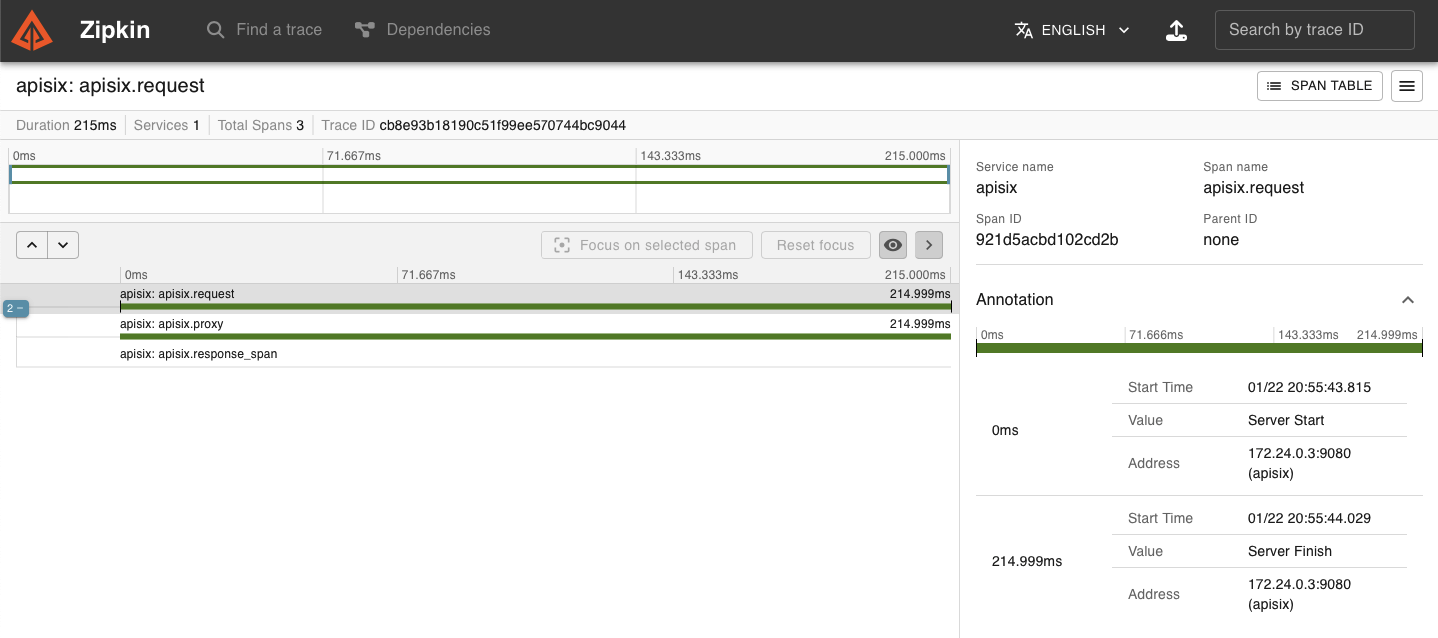 -``` -docker run -d -p 9411:9411 openzipkin/zipkin +请注意,使用 span 版本 2 时,每个被 trace 的请求会创建以下 span: + +```text +request +├── proxy +└── response ``` -接下来你可以通过以下命令发起请求,该请求记录会出现在 Zipkin 中: +其中 `proxy` 表示从请求开始到 `header_filter` 开始的时间,而 `response` 表示从 `header_filter` 开始到 `log` 开始的时间。 + +现在,更新路由上的插件以使用 span 版本 1: ```shell -curl http://127.0.0.1:9080/index.html +curl "http://127.0.0.1:9180/apisix/admin/routes/zipkin-tracing-route"; -X PATCH \ + -H "X-API-KEY: ${admin_key}" \ + -d '{ + "plugins": { + "zipkin": { + "span_version": 1 + } + } + }' ``` -``` -HTTP/1.1 200 OK -... +向路由发送另一个请求: + +```shell +curl "http://127.0.0.1:9080/anything"; ``` -最后你可以在浏览器中输入 `http://127.0.0.1:9411/zipkin` 访问 Zipkin UI 查询 traces: +在 Zipkin Web UI 中,你应该看到一个具有以下细节的新 trace: - +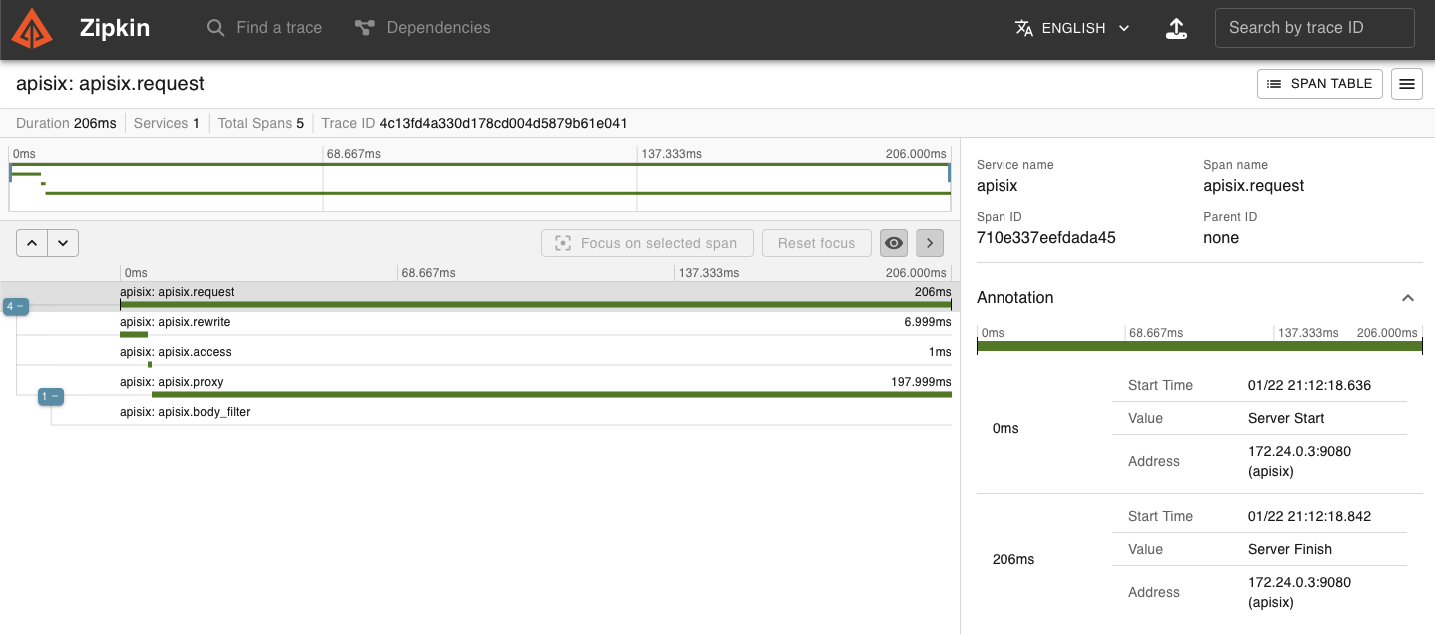 - +请注意,使用较旧的 span 版本 1 时,每个被追踪的请求会创建以下 span: -### 上报到 Jaeger +```text +request +├── rewrite +├── access +└── proxy + └── body_filter +``` -除了对接 Zipkin,该插件也支持将 traces 上报到 Jaeger。 +### 将追踪数据发送到 Jaeger -首先,请使用以下命令运行 Jaeger 后端服务: +以下示例演示了如何追踪对路由的请求并将追踪数据发送到 Jaeger。 -``` +在 Docker 中启动一个 Jaeger 实例: + +```shell docker run -d --name jaeger \ - -e COLLECTOR_ZIPKIN_HOST_PORT=:9411 \ + -e COLLECTOR_ZIPKIN_HOST_PORT=9411 \ -p 16686:16686 \ -p 9411:9411 \ - jaegertracing/all-in-one:1.31 + jaegertracing/all-in-one ``` -通过以下命令创建路由并启用插件: +创建一条路由并开启 `zipkin` 插件。请根据需要调整 Zipkin HTTP 端点的 IP 地址,并将采样比率配置为 `1` 以追踪每个请求。 ```shell -curl http://127.0.0.1:9180/apisix/admin/routes/1 -H "X-API-KEY: $admin_key" -X PUT -d ' -{ - "methods": ["GET"], - "uri": "/index.html", +curl "http://127.0.0.1:9180/apisix/admin/routes"; -X PUT \ + -H "X-API-KEY: ${admin_key}" \ + -d '{ + "id": "zipkin-tracing-route", + "uri": "/anything", "plugins": { - "zipkin": { - "endpoint": "http://127.0.0.1:9411/api/v2/spans";, - "sample_ratio": 1, - "service_name": "APISIX-IN-SG", - "server_addr": "192.168.3.50" - } + "zipkin": { + "endpoint": "http://127.0.0.1:9411/api/v2/spans";, + "sample_ratio": 1 + } }, "upstream": { - "type": "roundrobin", - "nodes": { - "127.0.0.1:1980": 1 - } + "type": "roundrobin", + "nodes": { + "httpbin.org": 1 + } } -}' + }' ``` -接下来你可以通过以下命令发起请求,该条请求记录将会出现在 Jaeger 中: +向路由发送请求: ```shell -curl http://127.0.0.1:9080/index.html +curl "http://127.0.0.1:9080/anything"; ``` -``` -HTTP/1.1 200 OK -... -``` - -最后你可以在浏览器中输入 `http://127.0.0.1:16686` 访问 Jaeger UI 查看 traces: - - +你应该收到一个 `HTTP/1.1 200 OK` 响应。 - +导航到 Jaeger Web UI [http://127.0.0.1:16686](http://127.0.0.1:16686),选择 APISIX 作为服务,并点击 __Find Traces__,您应该看到一个与请求对应的 trace: -## 删除插件 +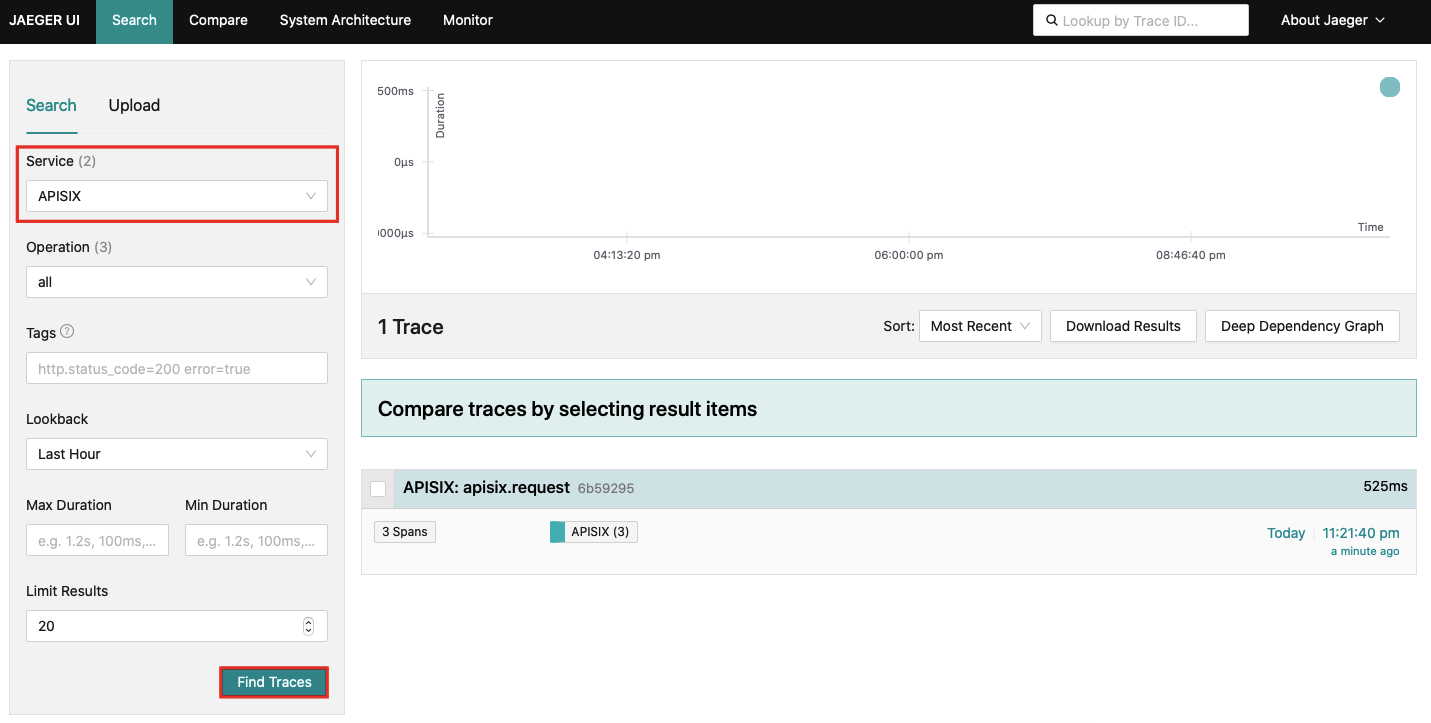 -当你需要禁用 `zipkin` 插件时,可以通过以下命令删除相应的 JSON 配置,APISIX 将会自动重新加载相关配置,无需重启服务: +同样地,一旦点击进入一个追踪,你应该会找到更多 span 细节: -```shell -curl http://127.0.0.1:9180/apisix/admin/routes/1 -H "X-API-KEY: $admin_key" -X PUT -d ' -{ - "methods": ["GET"], - "uri": "/index.html", - "plugins": { - }, - "upstream": { - "type": "roundrobin", - "nodes": { - "127.0.0.1:1980": 1 - } - } -}' -``` +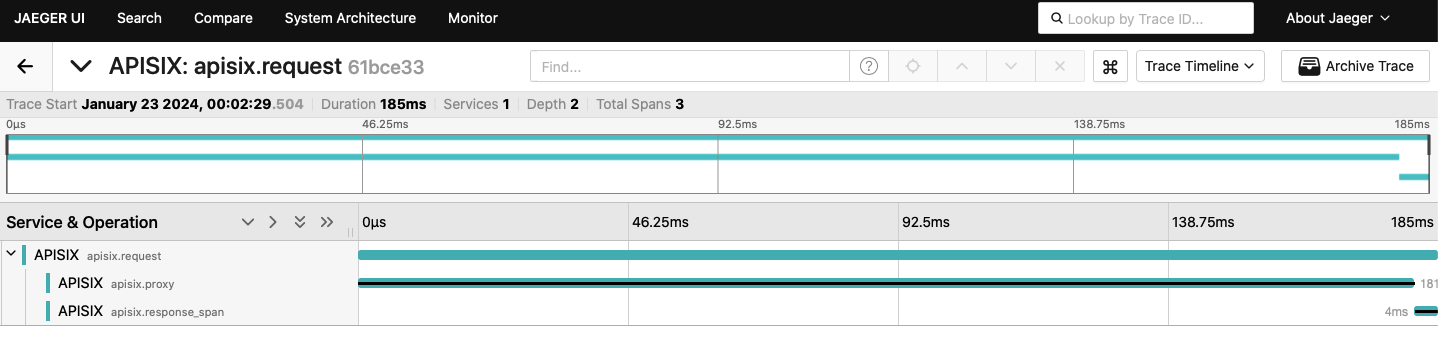 -## 如何使用变量 +### 在日志中使用追踪变量 -以下`nginx`变量是由`zipkin` 设置的。 +以下示例演示了如何配置 `zipkin` 插件以设置以下内置变量,这些变量可以在日志插件或访问日志中使用: -- `zipkin_context_traceparent` - [W3C trace context](https://www.w3.org/TR/trace-context/#trace-context-http-headers-format), 例如:`00-0af7651916cd43dd8448eb211c80319c-b9c7c989f97918e1-01` -- `zipkin_trace_id` - 当前 span 的 trace_id -- `zipkin_span_id` - 当前 span 的 span_id +- `zipkin_context_traceparent`: [W3C trace context](https://www.w3.org/TR/trace-context/#trace-context-http-headers-format) +- `zipkin_trace_id`: 当前 span 的 trace_id +- `zipkin_span_id`: 当前 span 的 span_id -如何使用?你需要在配置文件(`./conf/config.yaml`)设置如下: +按照以下方式更新配置文件(`./conf/config.yaml`)。你可以自定义访问日志格式以使用 `zipkin` 插件变量,并在 `set_ngx_var` 字段中设置 `zipkin` 变量。 Review Comment: ```suggestion 按照以下方式更新配置文件。你可以自定义访问日志格式以使用 `zipkin` 插件变量,并在 `set_ngx_var` 字段中设置 `zipkin` 变量。 ``` The code block below is titled ########## docs/en/latest/plugins/zipkin.md: ########## @@ -27,249 +27,239 @@ description: This document contains information about the Apache zipkin Plugin. # --> -## Description +<head> + <link rel="canonical" href="https://docs.api7.ai/hub/zipkin"; /> +</head> -[Zipkin](https://github.com/openzipkin/zipkin) is an open source distributed tracing system. The `zipkin` Plugin supports collecting and reporting traces to Zipkin collector based on the [Zipkin API specification](https://zipkin.io/pages/instrumenting.html). +## Description -It also works with [Apache SkyWalking](https://skywalking.apache.org/docs/main/latest/en/setup/backend/zipkin-trace/#zipkin-receiver) and [Jaeger](https://www.jaegertracing.io/docs/1.31/getting-started/#migrating-from-zipkin), both of which support Zipkin [v1](https://zipkin.io/zipkin-api/zipkin-api.yaml) and [v2](https://zipkin.io/zipkin-api/zipkin2-api.yaml) APIs. It can also work with other tracing systems adapted to Zipkin v1/v2 API format. +[Zipkin](https://github.com/openzipkin/zipkin) is an open-source distributed tracing system. The `zipkin` Plugin instruments APISIX and sends traces to Zipkin based on the [Zipkin API specification](https://zipkin.io/pages/instrumenting.html). -## Attributes +The Plugin can also send traces to other compatible collectors, such as [Jaeger](https://www.jaegertracing.io/docs/1.51/getting-started/#migrating-from-zipkin) and [Apache SkyWalking](https://skywalking.apache.org/docs/main/latest/en/setup/backend/zipkin-trace/#zipkin-receiver), both of which support Zipkin [v1](https://zipkin.io/zipkin-api/zipkin-api.yaml) and [v2](https://zipkin.io/zipkin-api/zipkin2-api.yaml) APIs. -| Name | Type | Required | Default | Valid values | Description | -|--------------|---------|----------|----------------|--------------|---------------------------------------------------------------------------------| -| endpoint | string | True | | | Zipkin HTTP endpoint. For example, `http://127.0.0.1:9411/api/v2/spans`. | -| sample_ratio | number | True | | [0.00001, 1] | How often to sample the requests. Setting to `1` will sample all requests. | -| service_name | string | False | "APISIX" | | Service name for the Zipkin reporter to be displayed in Zipkin. | -| server_addr | string | False | `$server_addr` | | IPv4 address for the Zipkin reporter. You can specify your external IP address. | -| span_version | integer | False | 2 | [1, 2] | Version of the span type. | +## Static Configurations -Each traced request will create the spans shown below: - -``` -request -├── proxy: from the beginning of the request to the beginning of header filter -└── response: from the beginning of header filter to the beginning of log -``` +By default, `zipkin` Plugin NGINX variables configuration is set to false in the [default configuration](https://github.com/apache/apisix/blob/master/apisix/cli/config.lua): -For older versions (set `span_version` attribute to `1`), these spans are created: +To modify this value, add the updated configuration to `config.yaml`. For example: -``` -request -├── rewrite -├── access -└── proxy - └── body_filter +```yaml +plugin_attr: + zipkin: + set_ngx_var: true ``` -:::note +Reload APISIX for changes to take effect. -The span name doesn't represent the corresponding Nginx phase. +## Attributes -::: +See the configuration file for configuration options available to all Plugins. -### Sample code for upstream configuration +| Name | Type | Required | Default | Valid values | Description | +|--------------|---------|----------|----------------|--------------|---------------------------------------------------------------------------------| +| `string` | string | True | | | Zipkin span endpoint to POST to, such as `http://127.0.0.1:9411/api/v2/spans`. | +|`sample_ratio`| number | True | | [0.00001, 1] | Frequency to sample requests. Setting to `1` means sampling every request. | +|`service_name`| string | False | "APISIX" | | Service name for the Zipkin reporter to be displayed in Zipkin. | +|`server_addr` | string | False |the value of `$server_addr` | IPv4 address | IPv4 address for the Zipkin reporter. For example, you can set this to your external IP address. | +|`span_version`| integer | False | `2` | [1, 2] | Version of the span type. | Review Comment: ```suggestion | span_version | integer | False | 2 | [1, 2] | Version of the span type. | ``` ########## docs/en/latest/plugins/zipkin.md: ########## @@ -27,249 +27,239 @@ description: This document contains information about the Apache zipkin Plugin. # --> -## Description +<head> + <link rel="canonical" href="https://docs.api7.ai/hub/zipkin"; /> +</head> -[Zipkin](https://github.com/openzipkin/zipkin) is an open source distributed tracing system. The `zipkin` Plugin supports collecting and reporting traces to Zipkin collector based on the [Zipkin API specification](https://zipkin.io/pages/instrumenting.html). +## Description -It also works with [Apache SkyWalking](https://skywalking.apache.org/docs/main/latest/en/setup/backend/zipkin-trace/#zipkin-receiver) and [Jaeger](https://www.jaegertracing.io/docs/1.31/getting-started/#migrating-from-zipkin), both of which support Zipkin [v1](https://zipkin.io/zipkin-api/zipkin-api.yaml) and [v2](https://zipkin.io/zipkin-api/zipkin2-api.yaml) APIs. It can also work with other tracing systems adapted to Zipkin v1/v2 API format. +[Zipkin](https://github.com/openzipkin/zipkin) is an open-source distributed tracing system. The `zipkin` Plugin instruments APISIX and sends traces to Zipkin based on the [Zipkin API specification](https://zipkin.io/pages/instrumenting.html). -## Attributes +The Plugin can also send traces to other compatible collectors, such as [Jaeger](https://www.jaegertracing.io/docs/1.51/getting-started/#migrating-from-zipkin) and [Apache SkyWalking](https://skywalking.apache.org/docs/main/latest/en/setup/backend/zipkin-trace/#zipkin-receiver), both of which support Zipkin [v1](https://zipkin.io/zipkin-api/zipkin-api.yaml) and [v2](https://zipkin.io/zipkin-api/zipkin2-api.yaml) APIs. -| Name | Type | Required | Default | Valid values | Description | -|--------------|---------|----------|----------------|--------------|---------------------------------------------------------------------------------| -| endpoint | string | True | | | Zipkin HTTP endpoint. For example, `http://127.0.0.1:9411/api/v2/spans`. | -| sample_ratio | number | True | | [0.00001, 1] | How often to sample the requests. Setting to `1` will sample all requests. | -| service_name | string | False | "APISIX" | | Service name for the Zipkin reporter to be displayed in Zipkin. | -| server_addr | string | False | `$server_addr` | | IPv4 address for the Zipkin reporter. You can specify your external IP address. | -| span_version | integer | False | 2 | [1, 2] | Version of the span type. | +## Static Configurations -Each traced request will create the spans shown below: - -``` -request -├── proxy: from the beginning of the request to the beginning of header filter -└── response: from the beginning of header filter to the beginning of log -``` +By default, `zipkin` Plugin NGINX variables configuration is set to false in the [default configuration](https://github.com/apache/apisix/blob/master/apisix/cli/config.lua): -For older versions (set `span_version` attribute to `1`), these spans are created: +To modify this value, add the updated configuration to `config.yaml`. For example: -``` -request -├── rewrite -├── access -└── proxy - └── body_filter +```yaml +plugin_attr: + zipkin: + set_ngx_var: true ``` -:::note +Reload APISIX for changes to take effect. -The span name doesn't represent the corresponding Nginx phase. +## Attributes -::: +See the configuration file for configuration options available to all Plugins. -### Sample code for upstream configuration +| Name | Type | Required | Default | Valid values | Description | +|--------------|---------|----------|----------------|--------------|---------------------------------------------------------------------------------| +| `string` | string | True | | | Zipkin span endpoint to POST to, such as `http://127.0.0.1:9411/api/v2/spans`. | Review Comment: ```suggestion | endpoint | string | True | | | Zipkin span endpoint to POST to, such as `http://127.0.0.1:9411/api/v2/spans`. | ``` ########## docs/zh/latest/plugins/zipkin.md: ########## @@ -27,250 +27,239 @@ description: 本文介绍了关于 Apache APISIX zipkin 插件的基本信息及 # --> +<head> + <link rel="canonical" href="https://docs.api7.ai/hub/zipkin"; /> +</head> + ## 描述 -[Zipkin](https://github.com/openzipkin/zipkin) 是一个开源的分布调用链追踪系统。`zipkin` 插件基于 [Zipkin API 规范](https://zipkin.io/pages/instrumenting.html),支持收集跟踪信息并上报给 Zipkin Collector。 +[Zipkin](https://github.com/openzipkin/zipkin) 是一个开源的分布式链路追踪系统。`zipkin` 插件为 APISIX 提供了追踪功能,并根据 [Zipkin API 规范](https://zipkin.io/pages/instrumenting.html) 将追踪数据上报给 Zipkin。 -该插件也支持 [Apache SkyWalking](https://skywalking.apache.org/docs/main/next/en/setup/backend/zipkin-trace/#zipkin-receiver) 和 [Jaeger](https://www.jaegertracing.io/docs/1.31/getting-started/#migrating-from-zipkin),因为它们都支持了 Zipkin [v1](https://zipkin.io/zipkin-api/zipkin-api.yaml) 和 [v2](https://zipkin.io/zipkin-api/zipkin2-api.yaml) API。当然 `zipkin` 插件也可以与其他支持了 Zipkin v1 和 v2 API 格式的调用链追踪系统集成。 +该插件还支持将追踪数据发送到其他兼容的收集器,例如 [Jaeger](https://www.jaegertracing.io/docs/1.51/getting-started/#migrating-from-zipkin) 和 [Apache SkyWalking](https://skywalking.apache.org/docs/main/latest/en/setup/backend/zipkin-trace/#zipkin-receiver),这两者都支持 Zipkin [v1](https://zipkin.io/zipkin-api/zipkin-api.yaml) 和 [v2](https://zipkin.io/zipkin-api/zipkin2-api.yaml) API。 -## 属性 +## 静态配置 -| 名称 | 类型 | 必选项 | 默认值 | 有效值 | 描述 | -| ------------ | ------ | ------ | ------------ | ------------ | -------------------------------------------------------------------- | -| endpoint | string | 是 | | | Zipkin 的 HTTP 节点。例如:`http://127.0.0.1:9411/api/v2/spans`。 | -| sample_ratio | number | 是 | | [0.00001, 1] | 对请求进行采样的比例。当设置为 `1` 时,将对所有请求进行采样。 | -| service_name | string | 否 | "APISIX" | | 需要在 Zipkin 中显示的服务名称。 | -| server_addr | string | 否 | $server_addr | | 当前 APISIX 实例的 IPv4 地址。 | -| span_version | integer| 否 | 2 | [1, 2] | span 类型的版本。 | +默认情况下,`zipkin` 插件的 NGINX 变量配置在 [默认配置](https://github.com/apache/apisix/blob/master/apisix/cli/config.lua) 中设置为 `false`: -在当前版本中,每个被跟踪的请求都会创建如下所示的 span: +要修改此值,请将更新后的配置添加到 `config.yaml` 中。例如: +```yaml +plugin_attr: + zipkin: + set_ngx_var: true ``` -request -├── proxy: from the beginning of the request to the beginning of header filter -└── response: from the beginning of header filter to the beginning of log -``` - -在旧版本(将 `span_version` 属性设置为 `1`)中,将创建如下 span: - -``` -request -├── rewrite -├── access -└── proxy - └── body_filter -``` - -:::note -上述 span 的名称与同名的 NGINX phase 没有联系。 +重新加载 APISIX 以使更改生效。 -::: +## 属性 -### 上游服务示例 +查看配置文件以获取所有插件可用的配置选项。 -```go title="Go with Gin" -func GetTracer(serviceName string, port int, enpoitUrl string, rate float64) *zipkin.Tracer { - // create a reporter to be used by the tracer - reporter := httpreporter.NewReporter(enpoitUrl) - // set-up the local endpoint for our service host is ip:host +| 名称 | 类型 | 是否必需 | 默认值 | 有效值 | 描述 | +|--------------|---------|----------|----------------|-------------|------------------| +| `string` | 字符串 | 是 | | | 要 POST 的 Zipkin span 端点,例如 `http://127.0.0.1:9411/api/v2/spans`。 | Review Comment: ```suggestion | endpoint | 字符串 | 是 | | | 要 POST 的 Zipkin span 端点,例如 `http://127.0.0.1:9411/api/v2/spans`。 | ``` -- This is an automated message from the Apache Git Service. To respond to the message, please log on to GitHub and use the URL above to go to the specific comment. To unsubscribe, e-mail: [email protected] For queries about this service, please contact Infrastructure at: [email protected]





