SylviaBABY commented on a change in pull request #825:
URL: https://github.com/apache/apisix-website/pull/825#discussion_r774942628
########## File path: website/i18n/zh/docusaurus-plugin-content-blog/2021/12/24/open-policy-agent.md ########## @@ -0,0 +1,242 @@ +--- +title: "再接再厉!Apache APISIX 集成 Open Policy Agent" +authors: + - name: "白泽平" + title: "Author" + url: "hhttps://github.com/bzp2010"; + image_url: "https://avatars.githubusercontent.com/u/8078418?v=4"; + - name: "曾奕霖" + title: "Technical Writer" + url: "https://github.com/yzeng25"; + image_url: "https://avatars.githubusercontent.com/u/36651058?v=4"; +keywords: +- Apache APISIX +- Open Policy Agent +- OPA +- API 网关 +description: 本文以 HTTP API 为例为大家介绍 opa 插件,并详细说明如何将 Apache APISIX 与 OPA 进行集成,实现后端服务的认证授权解耦。 +tags: [Technology] +--- + +> 本文以 HTTP API 为例为大家介绍 `opa` 插件,并详细说明如何将 Apache APISIX 与 OPA 进行集成,实现后端服务的认证授权解耦。 + +<!--truncate--> + + + +Open Policy Agent(OPA)是一个开源的轻量级通用策略引擎,可以代替软件中内置的策略功能模块,帮助用户实现服务与策略引擎的解耦。得益于 OPA 完善的生态系统,用户可以很容易地集成 OPA 和其他服务,例如程序库、HTTP API 等。 + +如下图所示,OPA 首先通过策略语言 Rego 描述策略;然后通过 JSON 存储策略数据,之后用户就可以发送查询请求。收到查询请求后,OPA 将结合策略、数据和用户输入的查询请求内容生成策略决策,并将决策发送至服务。 + +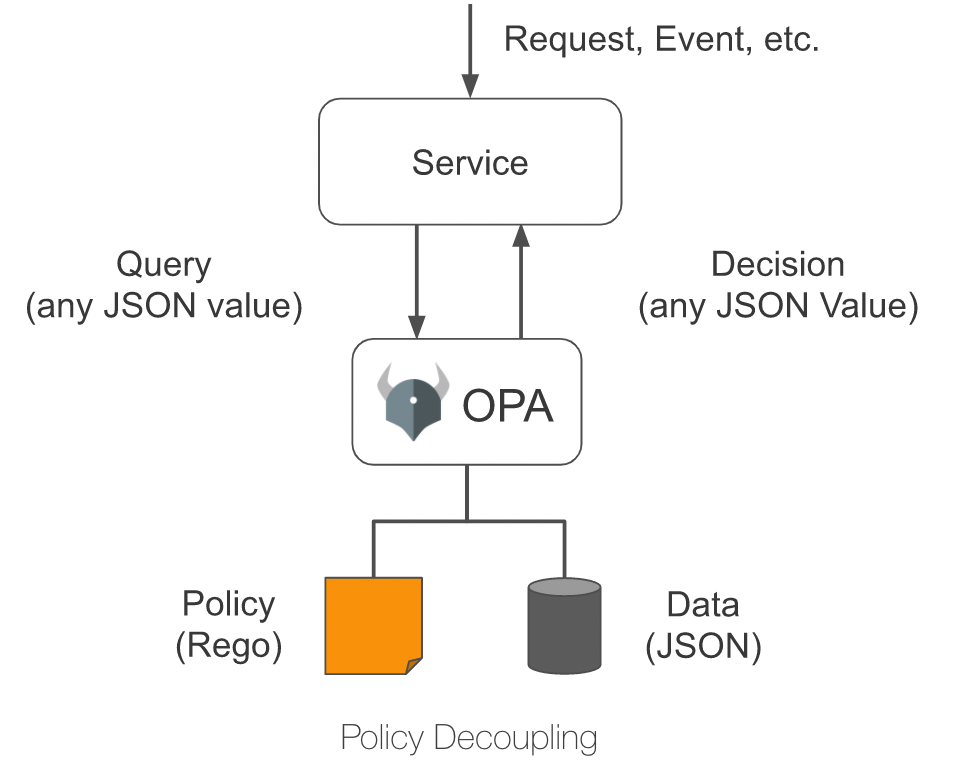 + +## 插件介绍 + +Apache APISIX 提供了一个 `opa` 插件,用户可以使用这个插件,便捷地将 OPA 提供的策略能力引入到 Apache APISIX,实现灵活的身份认证与准入控制功能。 + +将 `opa` 插件配置在路由上后,Apache APISIX 会在处理响应请求时,将请求信息、连接信息等组装成 JSON 数据,并将其发送到策略决策 API 地址。只要在 OPA 中部署的策略符合 Apache APISIX 设定的数据规范,就可以实现如通过请求、拒绝请求、自定义状态码、自定义响应头、自定义响应头等功能。 + +本文以 HTTP API 为例为大家介绍 `opa` 插件,并详细说明如何将 Apache APISIX 与 OPA 进行集成,实现后端服务的认证授权解耦。 + +## 如何使用 + +### 搭建测试环境 + +1. 使用 Docker 构建 OPA 服务。 + + ```shell + # 使用 Docker 运行 OPA + docker run -d --name opa -p 8181:8181 openpolicyagent/opa:0.35.0 run -s + ``` + +2. 创建 `example` 策略。 + + ```shell + # 创建策略 + curl -XPUT 'localhost:8181/v1/policies/example' \ + --header 'Content-Type: text/plain' \ + --data-raw 'package example + + import input.request + import data.users + + default allow = false + + allow { + # 具有名为 test-header 值为 only-for-test请求头 + request.headers["test-header"] == "only-for-test" + # 请求方法为 GET + request.method == "GET" + # 请求路径以 /get 开头 + startswith(request.path, "/get") + # GET 参数 test 存在且不等于 abcd + request.query["test"] != "abcd" + # GET 参数 user 存在 + request.query["user"] + } + + reason = users[request.query["user"]].reason { + not allow + request.query["user"] + } + + headers = users[request.query["user"]].headers { + not allow + request.query["user"] + } + + status_code = users[request.query["user"]].status_code { + not allow + request.query["user"] + }' + ``` + +3. 创建 `users` 数据。 + + ```shell + # 创建测试用户数据 + curl -XPUT 'localhost:8181/v1/data/users' \ + --header 'Content-Type: application/json' \ + --data-raw '{ + "alice": { + "headers": { + "Location": "http://example.com/auth"; + }, + "status_code": 302 + }, + "bob": { + "headers": { + "test": "abcd", + "abce": "test" + } + }, + "carla": { + "reason": "Give you a string reason" + }, + "dylon": { + "headers": { + "Content-Type": "application/json" + }, + "reason": { + "code": 40001, + "desc": "Give you a object reason" + } + } + }' + ``` + +### 创建路由并启用插件 + +运行以下命令,创建路由,并启用 `opa` 插件。 + +```shell +curl -XPUT 'http://127.0.0.1:9080/apisix/admin/routes/r1' \ +--header 'X-API-KEY: <api-key>' \ +--header 'Content-Type: application/json' \ +--data-raw '{ + "uri": "/*", + "methods": [ + "GET", + "POST", + "PUT", + "DELETE" + ], + "plugins": { + "opa": { + "host": "http://127.0.0.1:8181";, + "policy": "example" + } + }, + "upstream": { + "nodes": { + "httpbin.org:80": 1 + }, + "type": "roundrobin" + } +}' +``` + +### 测试请求 + +接下来,请运行以下命令,向 `opa` 插件发送请求,测试插件运行状态。 + +```shell +# 允许请求 +curl -XGET '127.0.0.1:9080/get?test=none&user=dylon' \ + --header 'test-header: only-for-test' +{ + "args": { + "test": "abcd1", + "user": "dylon" + }, + "headers": { + "Test-Header": "only-for-test", + "with": "more" + }, + "origin": "127.0.0.1", + "url": "http://127.0.0.1/get?test=abcd1&user=dylon"; +} + +# 拒绝请求并重写状态码和响应头 +curl -XGET '127.0.0.1:9080/get?test=abcd&user=alice' \ + --header 'test-header: only-for-test' + +HTTP/1.1 302 Moved Temporarily +Date: Mon, 20 Dec 2021 09:37:35 GMT +Content-Type: text/html +Content-Length: 142 +Connection: keep-alive +Location: http://example.com/auth +Server: APISIX/2.11.0 + +# 拒绝请求并返回自定义响应头 +curl -XGET '127.0.0.1:9080/get?test=abcd&user=bob' \ + --header 'test-header: only-for-test' + +HTTP/1.1 403 Forbidden +Date: Mon, 20 Dec 2021 09:38:27 GMT +Content-Type: text/html; charset=utf-8 +Content-Length: 150 +Connection: keep-alive +abce: test +test: abcd +Server: APISIX/2.11.0 + +# 拒绝请求并返回自定义响应(字符串) +curl -XGET '127.0.0.1:9080/get?test=abcd&user=carla' \ + --header 'test-header: only-for-test' + +HTTP/1.1 403 Forbidden +Date: Mon, 20 Dec 2021 09:38:58 GMT +Content-Type: text/plain; charset=utf-8 +Transfer-Encoding: chunked +Connection: keep-alive +Server: APISIX/2.11.0 + +Give you a string reason + +# 拒绝请求并返回自定义响应(JSON) +curl -XGET '127.0.0.1:9080/get?test=abcd&user=dylon' \ + --header 'test-header: only-for-test' + +HTTP/1.1 403 Forbidden +Date: Mon, 20 Dec 2021 09:42:12 GMT +Content-Type: application/json +Transfer-Encoding: chunked +Connection: keep-alive +Server: APISIX/2.11.0 + +{"code":40001,"desc":"Give you a object reason"} +``` + +### 关闭插件 + +得益于 Apache APISIX 的动态化特性,只需要移除路由配置中 opa 插件相关配置并保存,即可关闭路由上的 OPA 插件。 Review comment: ```suggestion 得益于 Apache APISIX 的动态化特性,只需要移除路由配置中 `opa` 插件相关配置并保存,即可关闭路由上的 OPA 插件。 ``` -- This is an automated message from the Apache Git Service. To respond to the message, please log on to GitHub and use the URL above to go to the specific comment. To unsubscribe, e-mail: [email protected] For queries about this service, please contact Infrastructure at: [email protected]


