SylviaBABY commented on a change in pull request #825:
URL: https://github.com/apache/apisix-website/pull/825#discussion_r774942784
########## File path: website/blog/2021/12/24/open-policy-agent.md ########## @@ -0,0 +1,242 @@ +--- +title: "Apache APISIX integrates with Open Policy Agent to enrich its ecosystem" +authors: + - name: "Zeping Bai" + title: "Author" + url: "hhttps://github.com/bzp2010"; + image_url: "https://avatars.githubusercontent.com/u/8078418?v=4"; + - name: "Yilin Zeng" + title: "Technical Writer" + url: "https://github.com/yzeng25"; + image_url: "https://avatars.githubusercontent.com/u/36651058?v=4"; +keywords: +- Apache APISIX +- Open Policy Agent +- OPA +- API Gateway +description: This article introduces the opa plug-in as an example of HTTP API and details how to integrate Apache APISIX with OPA to decouple the authentication authorization of back-end services. +tags: [Technology] +--- + +> This article introduces the `opa` plug-in as an example of HTTP API and details how to integrate Apache APISIX with OPA to decouple the authentication authorization of back-end services. + +<!--truncate--> + + + +Open Policy Agent (OPA) is an open source lightweight general-purpose policy engine that can replace the built-in policy function module in software and help users decouple services from the policy engine. Thanks to OPA's well-established ecosystem, users can easily integrate OPA with other services, such as program libraries, HTTP APIs, etc. + +As shown in the figure below, OPA first describes the policy through the policy language Rego; then stores the policy data through JSON, after which the user can send a query request. After receiving the query request, OPA will combine the policy, data and user input to generate a policy decision and send the decision to the service. + +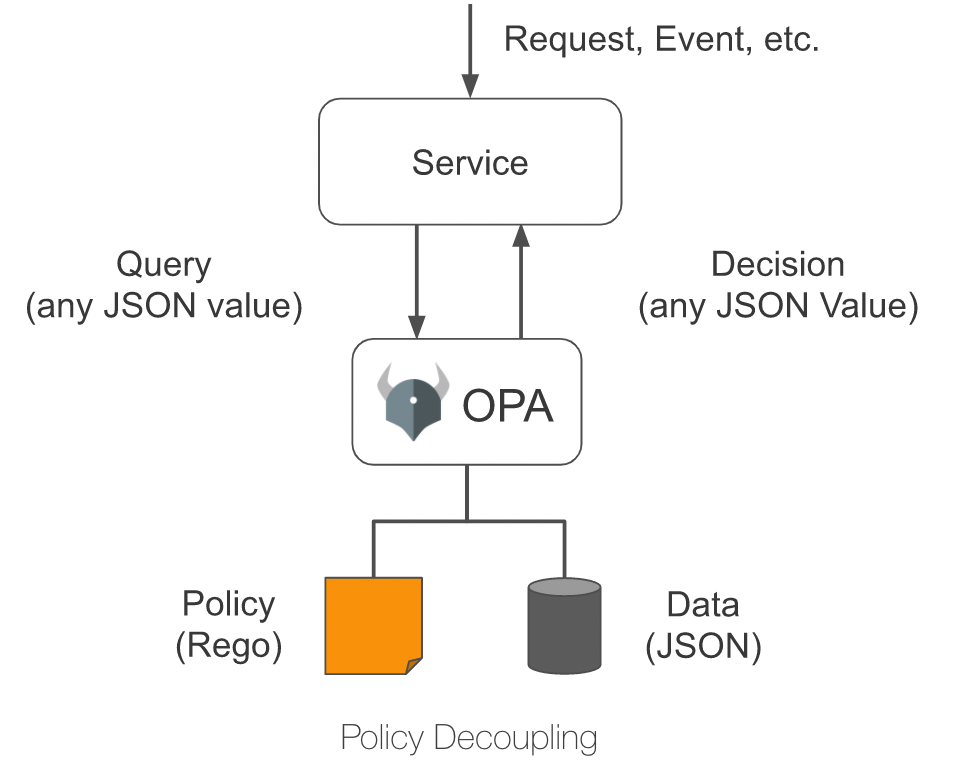 + +## Plugin Introduction + +Apache APISIX provides an `opa` plug-in that allows users to conveniently introduce the policy capabilities provided by OPA to Apache APISIX to enable flexible authentication and access control features. + +After configuring the `opa` plug-in on a route, Apache APISIX assembles request information, connection information, etc. into JSON data and sends it to the policy decision API address when processing response requests. As long as the policy deployed in OPA conforms to the data specification set by Apache APISIX, functions such as pass request, reject request, custom status code, custom response header, custom response header, etc. can be implemented. + +This article takes HTTP API as an example to introduce the `opa` plug-in and details how to integrate Apache APISIX with OPA to decouple authentication authorization for back-end services. + +## How to use + +### Build test environment + +1. Use Docker to build OPA services. + + ```shell + # Running OPA with Docker + docker run -d --name opa -p 8181:8181 openpolicyagent/opa:0.35.0 run -s + ``` + +2. Create an `example` policy. + + ```shell + # Create policy + curl -XPUT 'localhost:8181/v1/policies/example' \ + --header 'Content-Type: text/plain' \ + --data-raw 'package example + + import input.request + import data.users + + default allow = false + + allow { + # has the name test-header with the value only-for-test request header + request.headers["test-header"] == "only-for-test" + # The request method is GET + request.method == "GET" + # The request path starts with /get + startswith(request.path, "/get") + # GET parameter test exists and is not equal to abcd + request.query["test"] != "abcd" + # GET parameter user exists + request.query["user"] + } + + reason = users[request.query["user"]].reason { + not allow + request.query["user"] + } + + headers = users[request.query["user"]].headers { + not allow + request.query["user"] + } + + status_code = users[request.query["user"]].status_code { + not allow + request.query["user"] + }' + ``` + +3. Create `users` data. + + ```shell + # Create test user data + curl -XPUT 'localhost:8181/v1/data/users' \ + --header 'Content-Type: application/json' \ + --data-raw '{ + "alice": { + "headers": { + "Location": "http://example.com/auth"; + }, + "status_code": 302 + }, + "bob": { + "headers": { + "test": "abcd", + "abce": "test" + } + }, + "carla": { + "reason": "Give you a string reason" + }, + "dylon": { + "headers": { + "Content-Type": "application/json" + }, + "reason": { + "code": 40001, + "desc": "Give you a object reason" + } + } + }' + ``` + +### Create a route and enable the plugin + +Run the following command to create the route and enable the `opa` plugin. + +```shell +curl -XPUT 'http://127.0.0.1:9080/apisix/admin/routes/r1' \ +--header 'X-API-KEY: <api-key>' \ +--header 'Content-Type: application/json' \ +--data-raw '{ + "uri": "/*", + "methods": [ + "GET", + "POST", + "PUT", + "DELETE" + ], + "plugins": { + "opa": { + "host": "http://127.0.0.1:8181";, + "policy": "example" + } + }, + "upstream": { + "nodes": { + "httpbin.org:80": 1 + }, + "type": "roundrobin" + } +}' +``` + +### Test Requests + +Next, run the following command to send a request to the `opa` plugin to test the plugin's running status. + +```shell +# Allow requests +curl -XGET '127.0.0.1:9080/get?test=none&user=dylon' \ + --header 'test-header: only-for-test' +{ + "args": { + "test": "abcd1", + "user": "dylon" + }, + "headers": { + "Test-Header": "only-for-test", + "with": "more" + }, + "origin": "127.0.0.1", + "url": "http://127.0.0.1/get?test=abcd1&user=dylon"; +} + +# Reject the request and rewrite the status code and response headers +curl -XGET '127.0.0.1:9080/get?test=abcd&user=alice' \ + --header 'test-header: only-for-test' + +HTTP/1.1 302 Moved Temporarily +Date: Mon, 20 Dec 2021 09:37:35 GMT +Content-Type: text/html +Content-Length: 142 +Connection: keep-alive +Location: http://example.com/auth +Server: APISIX/2.11.0 + +# Rejects the request and returns a custom response header +curl -XGET '127.0.0.1:9080/get?test=abcd&user=bob' \ + --header 'test-header: only-for-test' + +HTTP/1.1 403 Forbidden +Date: Mon, 20 Dec 2021 09:38:27 GMT +Content-Type: text/html; charset=utf-8 +Content-Length: 150 +Connection: keep-alive +abce: test +test: abcd +Server: APISIX/2.11.0 + +# Rejects the request and returns a custom response (string) +curl -XGET '127.0.0.1:9080/get?test=abcd&user=carla' \ + --header 'test-header: only-for-test' + +HTTP/1.1 403 Forbidden +Date: Mon, 20 Dec 2021 09:38:58 GMT +Content-Type: text/plain; charset=utf-8 +Transfer-Encoding: chunked +Connection: keep-alive +Server: APISIX/2.11.0 + +Give you a string reason + +# Rejects the request and returns a custom response (JSON) +curl -XGET '127.0.0.1:9080/get?test=abcd&user=dylon' \ + --header 'test-header: only-for-test' + +HTTP/1.1 403 Forbidden +Date: Mon, 20 Dec 2021 09:42:12 GMT +Content-Type: application/json +Transfer-Encoding: chunked +Connection: keep-alive +Server: APISIX/2.11.0 + +{"code":40001,"desc":"Give you a object reason"} +``` + +### Disable the plugin + +Thanks to the dynamic nature of Apache APISIX, the OPA plug-in on a route can be turned off by simply removing the opa plug-in related configuration from the route configuration and saving it. Review comment: ```suggestion Thanks to the dynamic nature of Apache APISIX, the OPA plug-in on a route can be turned off by simply removing the `opa` plug-in related configuration from the route configuration and saving it. ``` -- This is an automated message from the Apache Git Service. To respond to the message, please log on to GitHub and use the URL above to go to the specific comment. To unsubscribe, e-mail: [email protected] For queries about this service, please contact Infrastructure at: [email protected]


