cccs-Dustin opened a new pull request #19120:
URL: https://github.com/apache/superset/pull/19120
<!--- Please write the PR title following the conventions at https://www.conventionalcommits.org/en/v1.0.0/ Example: fix(dashboard): load charts correctly --> ### SUMMARY <!--- Describe the change below, including rationale and design decisions --> When users are creating a new dataset, if that dataset contains a field with a long, complex data type, users will get an error because the field type is too long. To get around this issue, users must change the field type to JSON. This can currently only be done (in the UI) through the Legacy Datasource Editor. It should be possible to do this through the new dataset editor as well. In the new dataset editor, even if a user wanted to simply change the column's data type from one data type to another, it is not currently possible. To do it, they need to go into the Legacy Datasource Editor, again, this should be possible in the new dataset editor. Within the front-end code, there is a prop for the `ColumnCollectionTable` component named `allowEditDataType`. It is currently always set to false, but if you manually change it to true and reload, you can modify the column's data type in the new dataset editor. So it seems like the implementation was almost complete, it was just never finished off. My solution to this issue includes creating a new feature flag which would allow users to simply modify the config file instead of having to dig into the front-end code to enable this feature. I also created/modified unit tests to make sure that the UI behaves as expected when the flag is either enabled or disabled. ### BEFORE/AFTER SCREENSHOTS OR ANIMATED GIF <!--- Skip this if not applicable --> Dataset editor before: 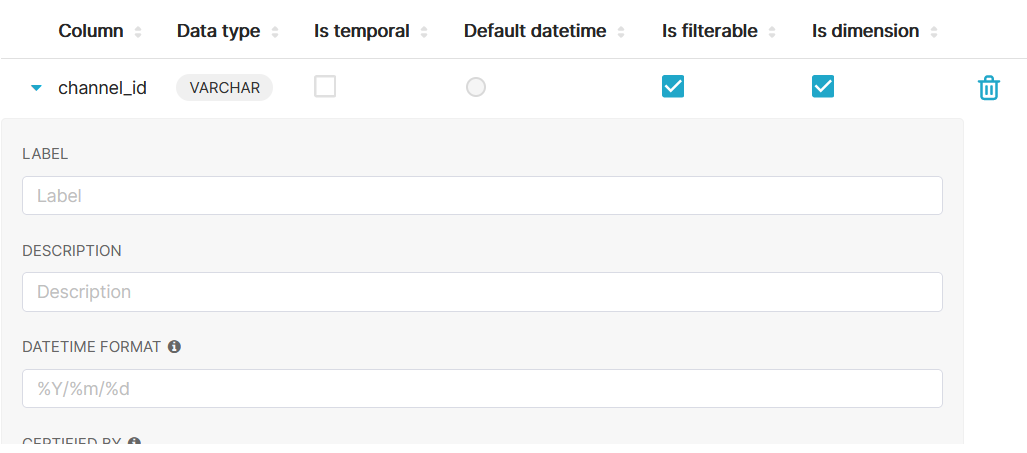 Dataset editor after (with feature flag enabled): 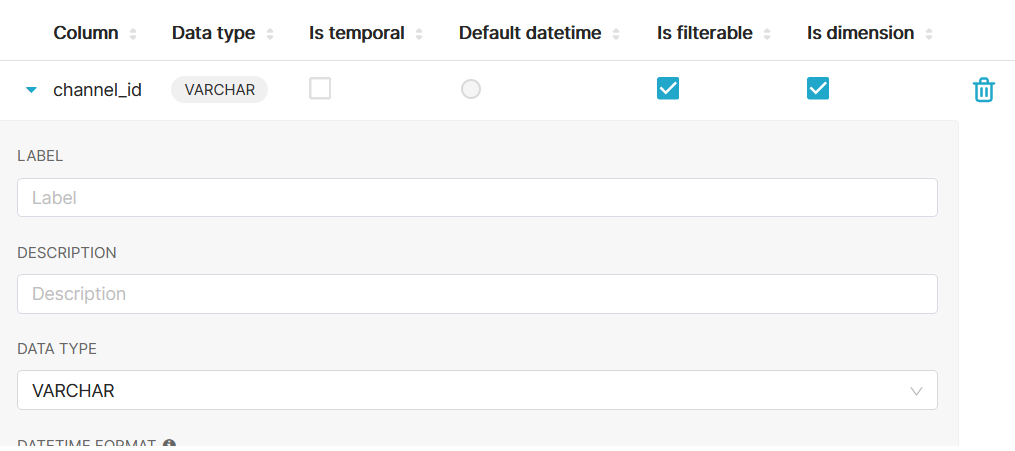 ### TESTING INSTRUCTIONS <!--- Required! What steps can be taken to manually verify the changes? --> **To test that that you can edit the column's data type when feature flag is enabled** 1. Within the config.py file, enable the `ENABLE_EDIT_COLUMN_TYPE` feature flag by setting it to be `True`. 2. When you login to Superset, select `Data > Datasets` from the menu. 3. Once you are on the screen that lists the datasets, edit one by selecting the pencil icon under the 'Actions' column. 4. Select the `Columns` option. 5. For one of the available columns, select the `Toggle Expand` button just to the left of the column name. 6. With the feature flag enabled, you should see a box that allows you to modify the data type of the column. **To test that that you cannot edit the column's data type when feature flag is disabled** 1. Within the config.py file, disable the `ENABLE_EDIT_COLUMN_TYPE` feature flag by setting it to be `False`. 2. When you login to Superset, select `Data > Datasets` from the menu. 3. Once you are on the screen that lists the datasets, edit one by selecting the pencil icon under the 'Actions' column. 4. Select the `Columns` option. 5. For one of the available columns, select the `Toggle Expand` button just to the left of the column name. 6. With the feature flag disabled, you should no longer see a box that allows you to modify the data type of the column. ### ADDITIONAL INFORMATION <!--- Check any relevant boxes with "x" --> <!--- HINT: Include "Fixes #nnn" if you are fixing an existing issue --> - [X] Has associated issue: Fixes https://github.com/apache/superset/issues/19119 - [X] Required feature flags: ENABLE_EDIT_COLUMN_TYPE - [X] Changes UI - [ ] Includes DB Migration (follow approval process in [SIP-59](https://github.com/apache/superset/issues/13351)) - [ ] Migration is atomic, supports rollback & is backwards-compatible - [ ] Confirm DB migration upgrade and downgrade tested - [ ] Runtime estimates and downtime expectations provided - [X] Introduces new feature or API - [ ] Removes existing feature or API -- This is an automated message from the Apache Git Service. To respond to the message, please log on to GitHub and use the URL above to go to the specific comment. To unsubscribe, e-mail: [email protected] For queries about this service, please contact Infrastructure at: [email protected] --------------------------------------------------------------------- To unsubscribe, e-mail: [email protected] For additional commands, e-mail: [email protected]


