comdiv opened a new issue, #20562:
URL: https://github.com/apache/superset/issues/20562
In `pivot table v2` setup, columns section (may be in all similar UI) - if you create CUSTOM SQL column, while it will be working - you will not see it's name in columns list, if you reopen it for edit - you will not see custom function - it will be lost. #### How to reproduce the bug 1. Create Pivot Table v2 for any dataset 2. In column list click `add column` 3. Choose `custom sql` 4. Assign name for query and write any legal sql function for column in text area 5. Save column 6. Empty column line will be in UI 7. Apply columns to table - all will be working fine 8. Reopen column for editing - all data - name and content will be lost! ### Expected results 1. After setup UI shows title for custom coolumn or it's function digest 2. Reopen for edit will keep custom function in editor box ### Actual results 1. Column information not shown 2. Reopen for edit opens empty editor without previous state #### Screenshots 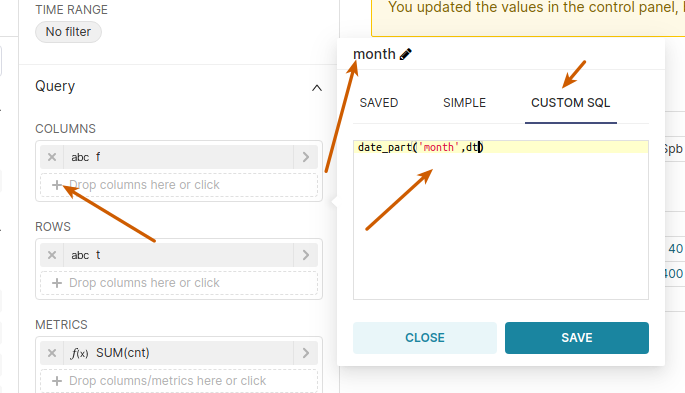 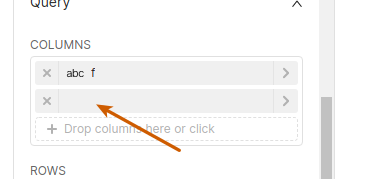 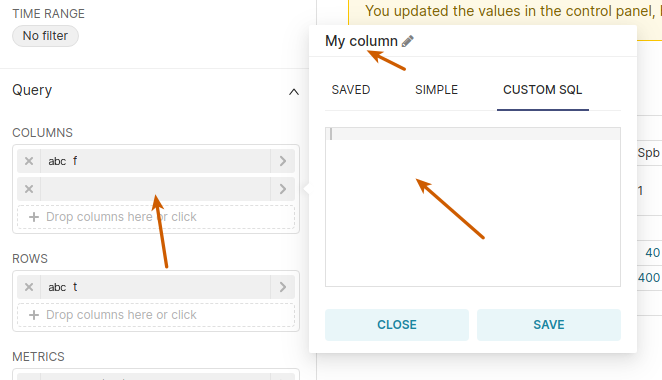 -- This is an automated message from the Apache Git Service. To respond to the message, please log on to GitHub and use the URL above to go to the specific comment. To unsubscribe, e-mail: [email protected] For queries about this service, please contact Infrastructure at: [email protected] --------------------------------------------------------------------- To unsubscribe, e-mail: [email protected] For additional commands, e-mail: [email protected]



