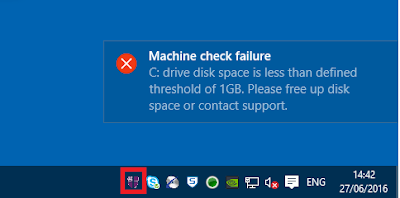
We set up a quick script to check if C: drive space is low. If it is, we throw
an error into the Notification Center using this PowerShell:-
[void] [System.Reflection.Assembly]::LoadWithPartialName("System.Windows.Forms")

$objNotifyIcon = New-Object System.Windows.Forms.NotifyIcon

$objNotifyIcon.Icon = "C:\windows\system32\icon.ico"
$objNotifyIcon.BalloonTipIcon = "Error"
$objNotifyIcon.BalloonTipText = "C: drive disk space is less than defined
threshold of 1GB. Please free up disk space or contact support."
$objNotifyIcon.BalloonTipTitle = "Machine check failure"

$objNotifyIcon.Visible = $True
$objNotifyIcon.ShowBalloonTip(10000)

This seems to work nicely:-

[https://4.bp.blogspot.com/-jZyCjx9JMes/V3EuoBBydRI/AAAAAAAAWVc/zssuAv2xTnU0LJYsRpXvz2FlD6k_C4fsACLcB/s400/1.png]

However, the drawback is that once the message disappears from the user's
screen, there is no way to view it in the Notification Center - it simply
disappears and leaves no trace.

Does anyone know how to make the message "stay" in the Notification Center
using a method like this, or should I just bite the bullet and write to the
event log through PowerShell? It would be so much nicer to have it in the
Notification Center until dismissed by the user...

Cheers,


James Rankin
EUC Solutions Architect | 07809 668579 | [email protected]<mailto:[email protected]>
One Trinity Green, Eldon Street, South Shields, Tyne & Wear, NE33 1SA
Tel: 0191 481 3446