Why not do both?

Regards,
 *ASB*
 *http://XeeMe.com/AndrewBaker <http://xeeme.com/AndrewBaker>*

 *Providing Expert Technology Consulting Services for the SMB market…*

* GPG: *1AF3 EEC3 7C3C E88E B0EF 4319 8F28 A483 A182 EF3A


On Fri, Jul 1, 2016 at 9:38 AM, James Rankin <[email protected]> wrote:

> We set up a quick script to check if C: drive space is low. If it is, we
> throw an error into the Notification Center using this PowerShell:-
>
>
>
> [void]
> [System.Reflection.Assembly]::LoadWithPartialName("System.Windows.Forms")
>
> $objNotifyIcon = New-Object System.Windows.Forms.NotifyIcon
>
> $objNotifyIcon.Icon = "C:\windows\system32\icon.ico"
> $objNotifyIcon.BalloonTipIcon = "Error"
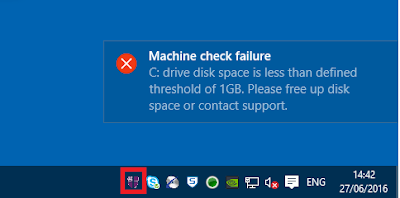
> $objNotifyIcon.BalloonTipText = "C: drive disk space is less than defined
> threshold of 1GB. Please free up disk space or contact support."
> $objNotifyIcon.BalloonTipTitle = "Machine check failure"
>
> $objNotifyIcon.Visible = $True
> $objNotifyIcon.ShowBalloonTip(10000)
>
>
>
> This seems to work nicely:-
>
>
>
> [image:
> https://4.bp.blogspot.com/-jZyCjx9JMes/V3EuoBBydRI/AAAAAAAAWVc/zssuAv2xTnU0LJYsRpXvz2FlD6k_C4fsACLcB/s400/1.png]
>
>
>
> However, the drawback is that once the message disappears from the user’s
> screen, there is no way to view it in the Notification Center – it simply
> disappears and leaves no trace.
>
>
>
> Does anyone know how to make the message “stay” in the Notification
> Center using a method like this, or should I just bite the bullet and write
> to the event log through PowerShell? It would be so much nicer to have it
> in the Notification Center until dismissed by the user…
>
>
>
> Cheers,
>
>
>
>
>
> *James Rankin*
>
> EUC Solutions Architect | 07809 668579 | [email protected]
>
> One Trinity Green, Eldon Street, South Shields, Tyne & Wear, NE33 1SA
>
> Tel: 0191 481 3446
>
>
>