Thanks Terran!
On 07/09/2015 04:26 PM, McCanna, Terran wrote:
Hi Kathy,

I'm unable to open your Google link (permission error), but I got a peek at
Bill's work a month or so ago and it looked great and it responded very
quickly. I know he's made some changes since I saw it last, though, so my
comments are based on memory.

1) In my experience, very few people ever use the view required, suggested or
all fields links, and for those people that do, I think having those options at
the top would be appropriate.
Good to know.
2) I don't mind the floating Save and Save/Clone buttons except when they
overlap other page elements. I also wouldn't mind having them at the bottom of
the form - I understand the point about keeping scrolling to a minimum, but I
also like the idea of encouraging staff to review the entire form for
errors/incomplete information each time it is updated. I wouldn't want the
buttons at the top unless they stuck on screen when the screen was scrolled
down. This would be a different approach from any of the other screens, but the
floating box is already a different approach than the other screens.
FWIW, I think the only form we have in the web client so far that we
could use as an example for an approach is the place holds form, which
really is a form for the catalog, but is also used in the client. My
first step was to see if there were precedents we should be following.
:) But I could be overlooking something.
Also - what about the alerts that appear under the Save button if there are
matching patron names/addresses? Those tend to overlap on a small resolution
monitor in the current client too (not sure if Bill was able to find a better
way to display those already).
We haven't gotten to that phase of the project yet, but I'll keep it in
mind for when it comes up.
Thanks!
Kathy
Terran McCanna
PINES Program Manager
Georgia Public Library Service
1800 Century Place, Suite 150
Atlanta, GA 30345
404-235-7138
[email protected]
----- Original Message -----
From: "Kathy Lussier" <[email protected]>
To: "Evergreen Discussion Group" <[email protected]>
Sent: Thursday, July 9, 2015 4:00:44 PM
Subject: [OPEN-ILS-GENERAL] Feedback requested on patron editor in web client

Hi all,

MassLNC has been working with Bill Erickson on a project to move the
patron editor to AngularJS. As with the other pieces of the web client
project, we are looking at maintaining feature parity with the old client.

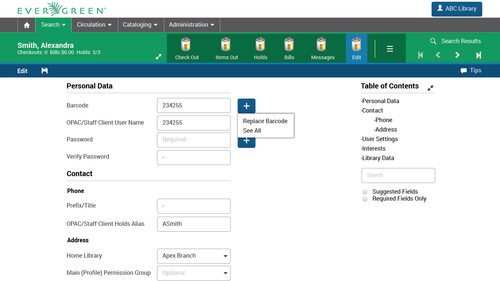
Bill has begun the work and has created a semi-functional wireframe to
demonstrate the layout of the form. The wireframe brings up one area
where an element that worked well in the xul client may not work so well
in the web client.

In the xul client, we have a floating box to the right of the form where
the Save and Save & Clone buttons are available as well as the options
to show required, suggested or all fields. The floating box follows you
along as you scroll up and down the form so that the Save buttons are
always in easy reach.

The same thing happens in the new Angularized editor, but I'm not sure
it works as well in the web client. I think it might be a good time to
consider whether the way we handled this in the old client is the way we
should handle it in the web client or if there are other ways we might
be able to provide these options.

I have a screencast showing the current version of the new patron
editor.
https://drive.google.com/file/d/0B74gDMUDwDXqM3NjbTZfRjY3RW8/view?usp=drivesdk

At a typical screen resolution, the box with the save options travels
with you without much trouble, although it does get a little awkward
when you're scrolling over the separators with the green background. If
you reduce the screen resolution, we do see a problem where the Save
area overlaps with the input boxes. I don't know how much of a problem
this will be since it seems to work fine at resolutions used by
desktops, laptops, and tablets. However, it could be problematic at
resolutions used on phones.

I have a couple of questions:

1. Although I strongly believe the Save and the Save & Clone buttons
should be in easy reach of the user at any location in the patron
registration form, I'm not so sure that the options to view required,
suggested or all fields needs to be there. What do you all think? Are
those options that you are likely to click when you are at different
places in the form? Or is it something you set as soon as you load the
form? If it's the latter, I think the top of the patron registration
form might be a nice location for them.

2. Is the floating box the best location for the Save and Save & Clone
buttons or is there some other way we can keep these options in easy
reach. When we first started working on this project, I looked at the
mockup Julia Lima worked on for the Evergreen UI Style Guide project as
a reference.
http://media.tumblr.com/69beec7802a938b889bdfa80c7e0d54b/tumblr_inline_nkn0okinXl1t572gy.png

She had placed the "Save" button along the top bar, but I could only see
that working if the top navigation bar in the web client stuck to the
top of the screen. We could certainly place the Save buttons at both the
top and bottom of the screens, but the form is long enough that I could
see cases where you would be in the middle of the form when you hit your
save point.

Any ideas on how we might be able to offer easy access to these Save
options in a different way?

Thanks in advance!
Kathy

Kathy Lussier
Project Coordinator
Massachusetts Library Network Cooperative
(508) 343-0128
[email protected]
Twitter: http://www.twitter.com/kmlussier
--
Kathy Lussier
Project Coordinator
Massachusetts Library Network Cooperative
(508) 343-0128
[email protected]
Twitter: http://www.twitter.com/kmlussier