Hello all,

This came up in Kathy's recent thread asking about the patron editor, and
rather than hijack that thread, I'd like to broaden the conversation a little,
because the same usability issues will affect many areas of the staff client.
To cut straight to the point, I strongly believe that using fixed position for
large portions of the staff client interface will have a major positive effect
on usability.  This has been applied and proven in desktop applications for
decades, and is now being rediscovered within the browser environment as web
"pages" become applications.  There is plenty of evidence out there to support
this stance, but here is a quick read which highlights the point well:
http://www.smashingmagazine.com/2012/09/11/sticky-menus-are-quicker-to-navigate/

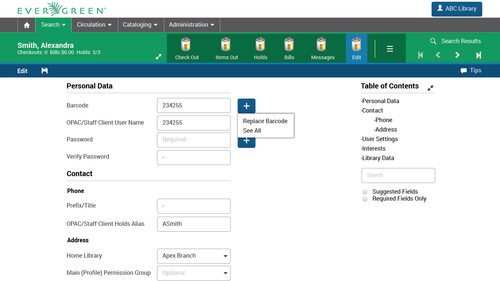
If we consider the mockups from our design internship a few months back, in the
screenshot Kathy referenced, the entire top area (and, in this case, the right
sidebar) would ideally be fixed position.  The only scrolling area should be
the actual form.  For any who attended my talk on design at the conference,
this is exactly the concern of rule of thumb #3: "Scroll the data, not the
interface", with "data" broadly including all information and workspaces which
are not "the program".  (Here is Kathy's screenshot link again for reference:
http://media.tumblr.com/69beec7802a938b889bdfa80c7e0d54b/tumblr_inline_nkn0okinXl1t572gy.png
 )

The main complaint driven at fixed screen elements is that they take up too
much space.  They do take up space, obviously, but with the amount of use these
elements get on a moment by moment basis, the space is well worth taking.  In
cases where more workspace is truly of benefit, we are better off using fixed
position with a "hide" option (auto or manual) than we would be with using
scroll, as we can retain the clear benefits of persistent availability and
predictability.  (Expert users might also choose to do without some toolbars
and rely on keyboard shortcuts, but that sort of use will never be feasible for
many staff client users and scenarios.)

As the Smashing Magazine article points out, the easiest way to understand the
situation is to simply imagine other software working with fully-scrolling
interfaces.  In this imaginary scenario, when you are using a word processor, a
spreadsheet application, or even a browser itself, all of your menus, toolbars,
tabs, etc., would simply scroll off the screen as soon as you tried to scroll
down to see additional content.  It's likely that some ancient desktop software
did exactly that, but if they did, they are now extinct, and not without good
reason.

Another valid concern sometimes raised is the effect a rich, fixed interface
might have on a small screen appliance, like a phone.  This topic should be
addressed, but I believe it is best kept separate from the problems at hand,
which are already large enough.  My personal stance would be that a full,
first-class staff client interface on a small screen device is not a realistic
concern for a community of our size, needs, and capabilities.  Our bar for
using the full client on phones should be "not impossible", and then we can
re-dedicate a portion of our energy to creating limited, purpose-built
interfaces for functions of known value on small devices (e.g. inventory
scanning), and which are also likely to best include some fixed top and/or
bottom elements.

I also want to emphasize that none if this is meant to disparage the work which
has been done so far.  It is much harder to make something out of nothing than
to take something and make it better.  I also acknowledge that, while I have
spent large amounts of time studying the web client, I have found zero time to
contribute to the actual web client code.  That said, if we can help establish
consensus around where we want to end up, I know I would feel more comfortable
jumping in, and I suspect others might as well.

Sincerely,
Dan


Daniel Wells
Library Programmer/Analyst
Hekman Library, Calvin College
616.526.7133