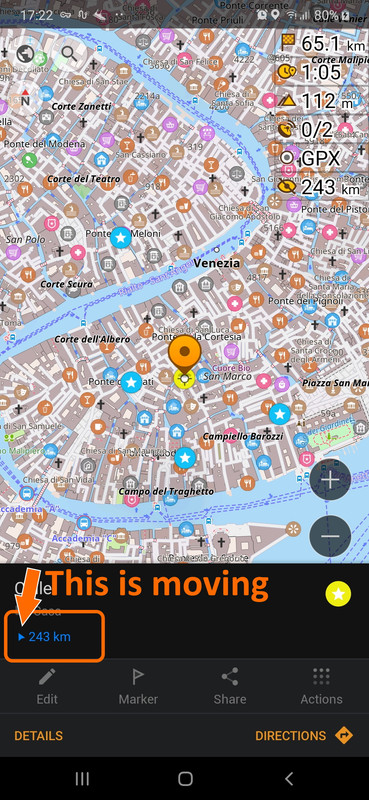
BTW: I've just discovered a little feature that could be useful in some
cases:
   1. Save your destination as a Favorite

   2. Open the "My Places" menu

   3. Select a favorite (i. e. the one you just saved ;) )

   4. In the lower part of the display, just below the map, you'll see a
   (very) small blue triangle reporting the straight distance from current
   position

   5. Rotate the device left/right and you'll see the arrow rotating as
   well, showing the relative direction.:


<https://i.postimg.cc/PrKtN0Y1/Screenshot-20200310-172207-Osm-And.jpg>

(link to image:
https://i.postimg.cc/PrKtN0Y1/Screenshot-20200310-172207-Osm-And.jpg)


Observed this on my Samsung Galaxy A50. Not sure it works also for devices
that do not have a built-in compass.

Regards,
Max

--
You received this message because you are subscribed to the Google Groups
"OsmAnd" group.
To unsubscribe from this group and stop receiving emails from it, send an email
to [email protected].
To view this discussion on the web visit
https://groups.google.com/d/msgid/osmand/45dd439e-233a-442a-8a43-22de6fcd2b62%40googlegroups.com.