Hi -
I use Paraview not for visualizing datasets, but for inspecting
polygonal meshes and the operations I perform on them. My work involves
computing various points and line segments on meshes, and I use
VTK/Paraview to see if the points and line segments are where they ought
to be (if not, I conclude that there's a bug in my code and then proceed
to hunt it down).
<Digression>
Why I use VTK for this task: VTK is the the only publicly available 3d
graphics file format I'm aware of that explicitly supports and points,
lines, and meshes, and has a viewer for viewing these entities. Most
other 3d graphics file formats either support surfaces alone or have no
ready-made viewers.
</Digression>
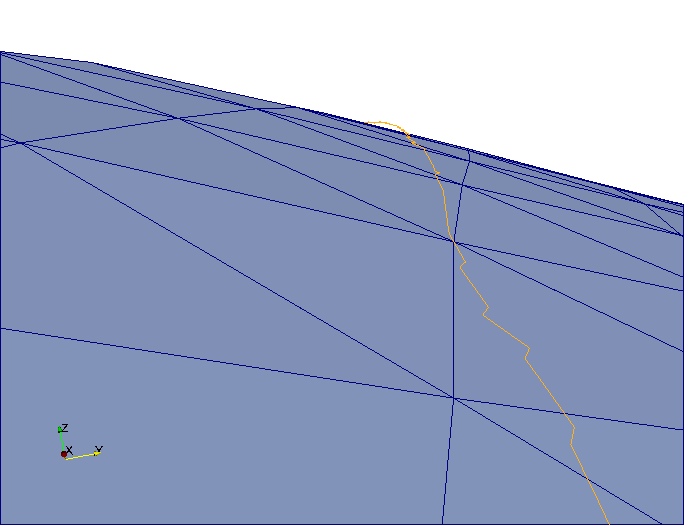
Lately however, upon closer inspection, I've noticed that many of the
points and line segments that I compute appear to hover above the mesh
they are computed from and never quite touch it, and points never seem
to lie on the line segments they are supposed to. For example, see:
http://i17.photobucket.com/albums/b52/videohead/SurfaceError.png
(note that the yellow line segment hover above the blue surface in the
horizon)
After much experimentation, debugging and consultation, I now suspect
that this is caused by polygon offset in Paraview, designed to prevent
z-fighting. I would therefore like to know:
(i.) if my suspicion is correct i.e. Paraview implement polygon offset
for preventing z-fighting in this case
(ii.) if the above is true, how polygon offset can be disabled without
recompiling the source
Thanks,

- Olumide

_______________________________________________
Powered by www.kitware.com

Visit other Kitware open-source projects at
http://www.kitware.com/opensource/opensource.html

Please keep messages on-topic and check the ParaView Wiki at:
http://paraview.org/Wiki/ParaView

Follow this link to subscribe/unsubscribe:
http://www.paraview.org/mailman/listinfo/paraview