Oluminde,

It makes sense to provide an option in the "Settings" dialog to
tweak/disable offsetting for resolving z-fighting. I've added a
feature request to the bug tracker:
http://paraview.org/Bug/view.php?id=9801
To fix this without recompiling, here's a crazy hack to overcome this
issue in builtin mode (i.e. when not connected to server):
Before loading any datasets
* open python shell
* Run the following commands:
  > import os
  > if os.name == "posix":
  >      from libvtkRendering.so import vtkMapper
  > else:
  >      from vtkRenderingPython import vtkMapper
  > vtkMapper.SetResolveCoincidentTopologyToOff()

If connected to a server, you can run the same python commands as part
of the python script for a programmable source or filter.

Utkarsh


On Fri, Oct 30, 2009 at 6:48 AM, Utkarsh Ayachit
<[email protected]> wrote:
> Ken,
>
> Offsetting the points/lines handles the cases when people try to
> render two overlapping datasets: one as surface and other as
> wireframe, and they don't necessarily want to show surface with edges
> (say they want scalar coloring for both surface and the wireframe). I
> believe Jean Favre has several such use cases.
>
> Utkarsh
>
> On Mon, Oct 26, 2009 at 1:18 PM, Moreland, Kenneth <[email protected]> wrote:
>> Utkarsh,
>>
>> After reading this question from Olumide, I noticed that ParaView now turns
>> on ZShift for lines and points (vtkProcessModule.cxx, 198-199).  I don’t
>> know why this is.  This effect is turned off when drawing surface+edges
>> (vtkOpenGLCoincidentTopologyResolutionPainter.cxx, 56-58) because it
>> automatically switches to offsetting the polygons the polygons back
>> (vtkOpenGLRepresentationPainter.cxx, 79-85).  Should we remove those two
>> lines from vtkProcessModule.cxx?
>>
>> -Ken
>>
>>
>> On 10/26/09 12:53 AM, "Olumide" <[email protected]> wrote:
>>
>> Hi -
>>
>> I use Paraview not for visualizing datasets, but for inspecting
>> polygonal meshes and the operations I perform on them. My work involves
>> computing various points and line segments on meshes, and I use
>> VTK/Paraview to see if the points and line segments are where they ought
>> to be (if not, I conclude that there's a bug in my code and then proceed
>> to hunt it down).
>>
>> <Digression>
>> Why I use VTK for this task: VTK is the the only publicly available 3d
>> graphics file format I'm aware of that explicitly supports and points,
>> lines, and meshes, and has a viewer for viewing these entities. Most
>> other 3d graphics file formats either support surfaces alone or have no
>> ready-made viewers.
>> </Digression>
>>
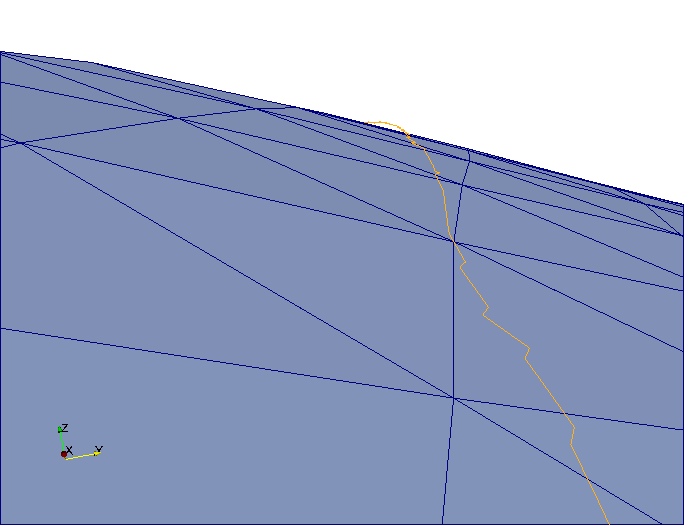
>> Lately however, upon closer inspection, I've noticed that many of the
>> points and line segments that I compute appear to hover above the mesh
>> they are computed from and never quite touch it, and points never seem
>> to lie on the line segments they are supposed to. For example, see:
>> http://i17.photobucket.com/albums/b52/videohead/SurfaceError.png
>> (note that the yellow line segment hover above the blue surface in the
>> horizon)
>>
>> After much experimentation, debugging and consultation, I now suspect
>> that this is caused by polygon offset in Paraview, designed to prevent
>> z-fighting. I would therefore like to know:
>>
>> (i.) if my suspicion is correct i.e. Paraview implement polygon offset
>> for preventing z-fighting in this case
>>
>> (ii.) if the above is true, how polygon offset can be disabled without
>> recompiling the source
>>
>> Thanks,
>>
>> - Olumide
>>
>> _______________________________________________
>> Powered by www.kitware.com
>>
>> Visit other Kitware open-source projects at
>> http://www.kitware.com/opensource/opensource.html
>>
>> Please keep messages on-topic and check the ParaView Wiki at:
>> http://paraview.org/Wiki/ParaView
>>
>> Follow this link to subscribe/unsubscribe:
>> http://www.paraview.org/mailman/listinfo/paraview
>>
>>
>>
>>
>>    ****      Kenneth Moreland
>>     ***      Sandia National Laboratories
>> ***********
>> *** *** ***  email: [email protected]
>> **  ***  **  phone: (505) 844-8919
>>     ***      web:   http://www.cs.unm.edu/~kmorel
>>
>>
>
_______________________________________________
Powered by www.kitware.com

Visit other Kitware open-source projects at
http://www.kitware.com/opensource/opensource.html

Please keep messages on-topic and check the ParaView Wiki at:
http://paraview.org/Wiki/ParaView

Follow this link to subscribe/unsubscribe:
http://www.paraview.org/mailman/listinfo/paraview