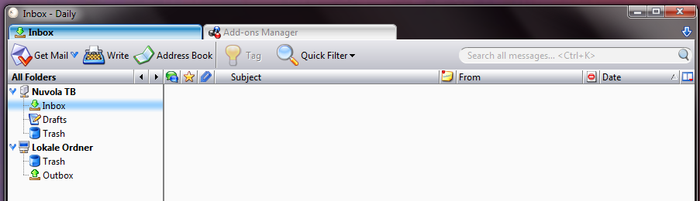
Definitely NOT the "dark" theme. The "light" theme looks the same as the
"system" theme. The column headers for "Subject", "Correspondents" ...
"Date" are still the same color as the threads.
I want to color the column headers slightly so that they will stand out
separate from the threads and I won't accidentally click on one because
I can't see where the threads begin.
Even something like this would be better than what Thunderbird has now:

https://addons.thunderbird.net/user-media/previews/full/68/68083.png?modified=1530208372

On 1/31/2022 11:21 AM, Paul Sorenson wrote:
John:

I have the latest T-Bird version and do not have that problem.  Try this:

Click on the Menu dropdown in the upper right corner
In the menu, select "Add-ons and Themes", then on the left pane select
"Themes"
Try changing to a different theme and see if that changes the color of
the headings
If I use the "light" theme I get black letters on an white background
and white letters on a black background if I switch to the "dark" theme.
-p


On 1/30/2022 1:09 PM, John Sessoms wrote:
The old versions of Thunderbird had the column headers (Subject,
Correspondents, Date) a different color than the background. The NEW
version has them the same color as the background.
I periodically scroll all the way up to the top to try to get back
before the oldest unread list message, but if I click on the Subject
header it rearranges all the messages & I lose threading.
Anyone know a way to *LOCK*" the view into "Sort by Date, Ascending,
Threaded" and/or make the headers a different color again so I can see
where they are?
PS: I hate the keyboard for this new computer. The old keyboard I
could FEEL where 'F' and 'J' are located so I can touch type. There
were *SUBSTANTIAL* little bumps on the keys.
The new keyboard the bumps are TINY, and I'm constantly searching for
the markers for those keys.
--
Vivere in aeternum aut mori conatur

--
This email has been checked for viruses by AVG.
https://www.avg.com
--
%(real_name)s Pentax-Discuss Mail List
To unsubscribe send an email to [email protected]
to UNSUBSCRIBE from the PDML, please visit the link directly above and follow
the directions.