> On 7 Feb 2017, at 10:57, Pavel Krivanek <[email protected]> wrote:
>
> The uperchase character is the symbol on the key.
>
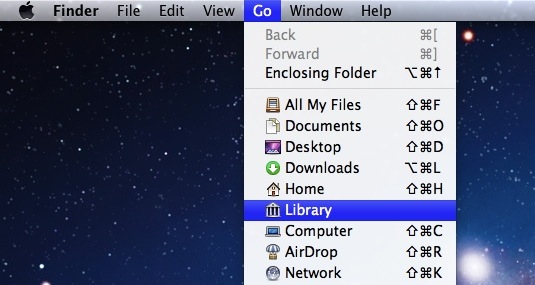
> In OS X the uppercase characters are used:
> http://cdn.osxdaily.com/wp-content/uploads/2011/07/access-library-lion.jpg
> <http://cdn.osxdaily.com/wp-content/uploads/2011/07/access-library-lion.jpg>
>
> In Chrome too:
> http://addoncrop.com/cdn/2014/12/Google-Chrome-Menu-Settions-option.png
> <http://addoncrop.com/cdn/2014/12/Google-Chrome-Menu-Settions-option.png>
>
> On Windows too:
> http://www.howtogeek.com/wp-content/uploads/2012/03/650x250xcontext-menu-shortcuts-header.png.pagespeed.gp+jp+jw+pj+js+rj+rp+rw+ri+cp+md.ic.SuZmOlpqkt.png
>
> <http://www.howtogeek.com/wp-content/uploads/2012/03/650x250xcontext-menu-shortcuts-header.png.pagespeed.gp+jp+jw+pj+js+rj+rp+rw+ri+cp+md.ic.SuZmOlpqkt.png>
>
> Cheers,
> -- Pavel
>
> 2017-02-06 17:57 GMT+01:00 Stephane Ducasse <[email protected]
> <mailto:[email protected]>>:
> https://pharo.fogbugz.com/f/cases/19660/shortcuts-are-wrongly-displayed
> <https://pharo.fogbugz.com/f/cases/19660/shortcuts-are-wrongly-displayed>
>
> The system should display Ctrl + s and not Ctrl + S
>
> Because people are pressing Shift to get S and this is not working.
> We should distinguish between uppercase and lowercase.
> The reader cannot guess that S is not the same as s + shift.
> There is no way that a user can know that they should NOT press shift when
> looking at Ctrl + S (because there is no noshiftPressed).
> Ctrl + S means press Shift.
>
key shorcuts are for key, not for character, that’s why they point to the key
in the keyboard.
this is the universal standard, so I do not think we need to change it.

as Pavel explain, is like that :

- on mac: symbols + key
- on linux and windows: modifiers + key (e.g. "Shift + S", "Ctrl + Shift + S")

cheers,
Esteban