I haven't built anything on these directly, but I've encountered them on
servers a little bit, and there are some specifics related to the kernel and
UEFI that may help clarify the interactions for your configuration.
The way the linux F/S stack (at least currently) interacts with nvme devices is
pretty good, but you do have to be a bit careful how you set it up in some
cases.
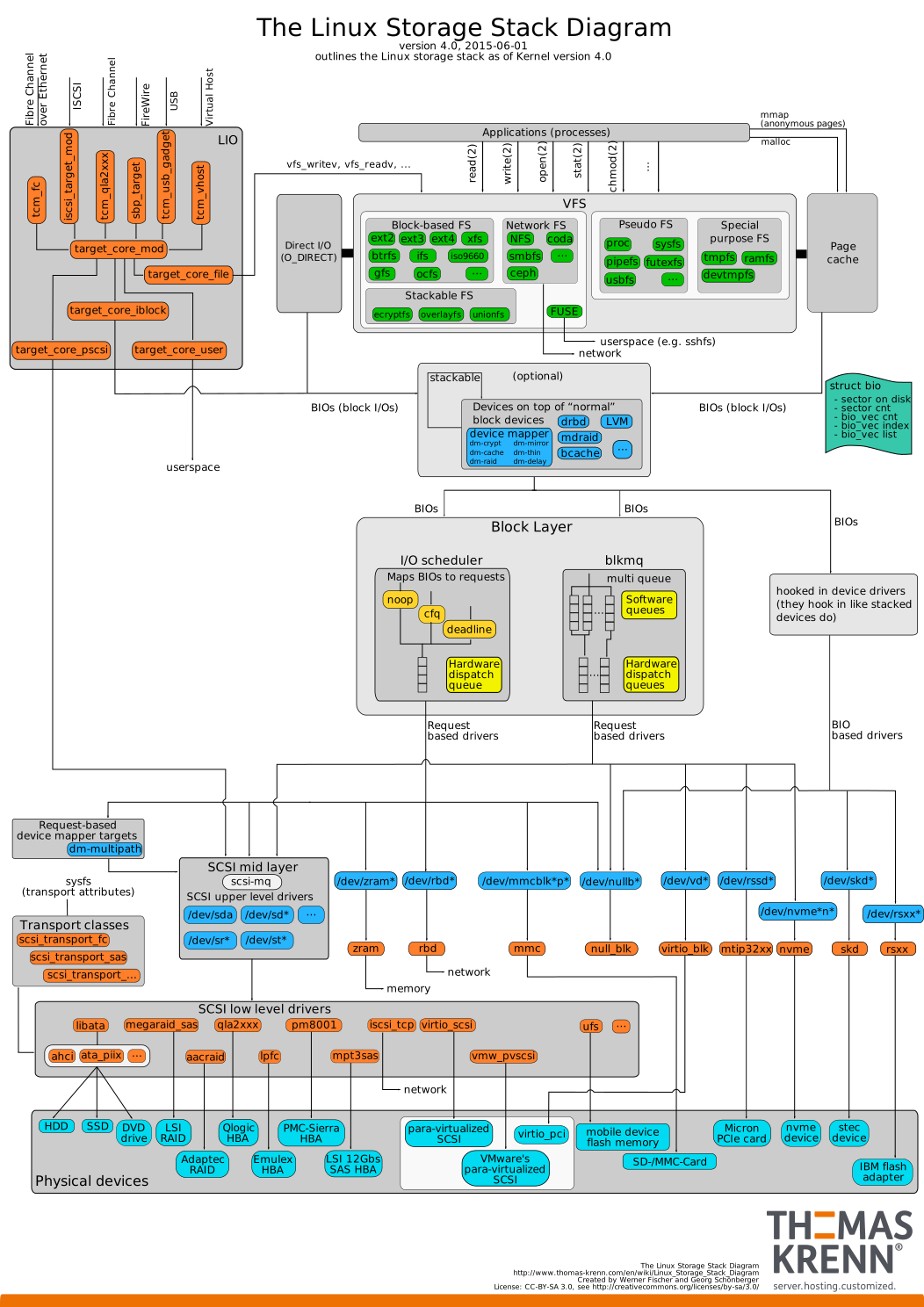
To understand this, there's a diagram that's slightly out of date, but close
enough at
https://www.thomas-krenn.com/de/wikiDE/images/5/50/Linux-storage-stack-diagram_v4.0.svg

Let's look at your stack in this diagram, and see where things fit.

1) RAID1
  If you're using mdraid and dm-raid for the RAID layer (and not a SCSI raid
driver), then you're in good shape.
  These operate in the "stackable" layer above BIO's (the Block I/O struct in
the kernel), which is good, as the primary NVMe enhancements (blkmq) operate in
the block layer below this.
2) LUKS
  If you're using dm-crypt as the backend (which should be the case), then
again you're in good shape.
  dm-crypt is also in the "stackable" layer, so it also benefits from blkmq
enhancements.
3) LVM
  This always operates in the "stackable" layer, so no worries here.
4) boot drive
  This is where things start to get troublesome.  Some distributions don't
currently support the NVMe/UEFI combination well (UEFI support itself is still
a bit weak in many ways).
  Most installation guides and benchmark tests use legacy mode for
compatibility, but you do give up some performance when doing so, and not all
motherboards handle this configuration well.
  It's possible, in most cases, to install a NVMe drive as an UEFI boot drive
(don't forget the EFI partition), but it's probably going to require some
manual tweaking, and a bit of googling for *correct* instructions relevant to
your chosen distribution.


Possible Gotchas:
  1) try to avoid mapping the device through the SCSI layer.  NVMe is all about
performance, and NVMe devices work best when they're mapped through the nvme
driver, rather than the SCSI stack and compatibility driver.
     This shouldn't happen in most recent distributions, but legacy mode in
UEFI or other issues might confuse the kernel probes.
     If you do map through the SCSI stack, you usually end up with performance
much closer to SATA3 than NVMe.  You may also encounter some weird corner cases
that affect stability.
  2) If you do get the UEFI boot working, make sure there's a recovery boot
device handy, for when UEFI gets confused.
     This seems to happen far more frequently than it should, particularly with
legacy compatibility mode enabled.
     It seems that some UEFI M/B implementations still have a long way to go in
reliability for less common setups.
  3) Avoid using any kind of EFI raid support if possible.  None of these, that
I've seen, appears to be well implemented, even on server-focused boards.
     Having UEFI get totally tangled when it's splitting blocks between devices
and it's own code is on those devices can brick a system rather thoroughly.
  4) Keep in mind that the devices will be named /dev/nvme#n# and partitions
/dev/nvme#n#p#.
     Some utilities still try to use /dev/nvme or something similar, which is
related to SCSI assumptions and won't work correctly.

Hopefully that's at least somewhat helpful.  I hope you'll let us all know how
it goes if you do end up going this route.

==Joseph++

On 10/27/2016 09:31 AM, Michael Butash wrote:
> Curious if anyone has taken the plunge to play with nvme-based ssd's under
> linux here?  Particularly around raid.
>
> Not finding a lot pertaining to them that is positive toward linux on the
> tubes, and I'm looking to reproduce my usual raid1+luks+lvm atop them, so
> feedback on doing so would be appreciated if anyone has comment.
>
> I'm building a new desktop, and considering using them in place if they can
> boot, as the system is built more as a server as a vm farm for my lab so the
> iops would be appreciated when it's also my desktop.  I see reference to
> EFI-based raid, which makes me cringe, but seem mdraid fakeraid can handle
> them to some extents.
>
> Thanks!
>
> -mb
 signature.asc
Description: OpenPGP digital signature
---------------------------------------------------
PLUG-discuss mailing list - [email protected]
To subscribe, unsubscribe, or to change your mail settings:
http://lists.phxlinux.org/mailman/listinfo/plug-discuss