I still want to try dmraid-1 plus nvme drive with lvmcache.

PS SSD based lvmcache has been running well for me.
On Oct 27, 2016 5:19 PM, "Michael Butash" <[email protected]> wrote:

> Thanks for the input, comments inline:
>
> On 10/27/2016 02:52 PM, Joseph Sinclair wrote:
>
> I haven't built anything on these directly, but I've encountered them on
> servers a little bit, and there are some specifics related to the kernel and
> UEFI that may help clarify the interactions for your configuration.
>
> The way the linux F/S stack (at least currently) interacts with nvme devices
> is pretty good, but you do have to be a bit careful how you set it up in some
> cases.
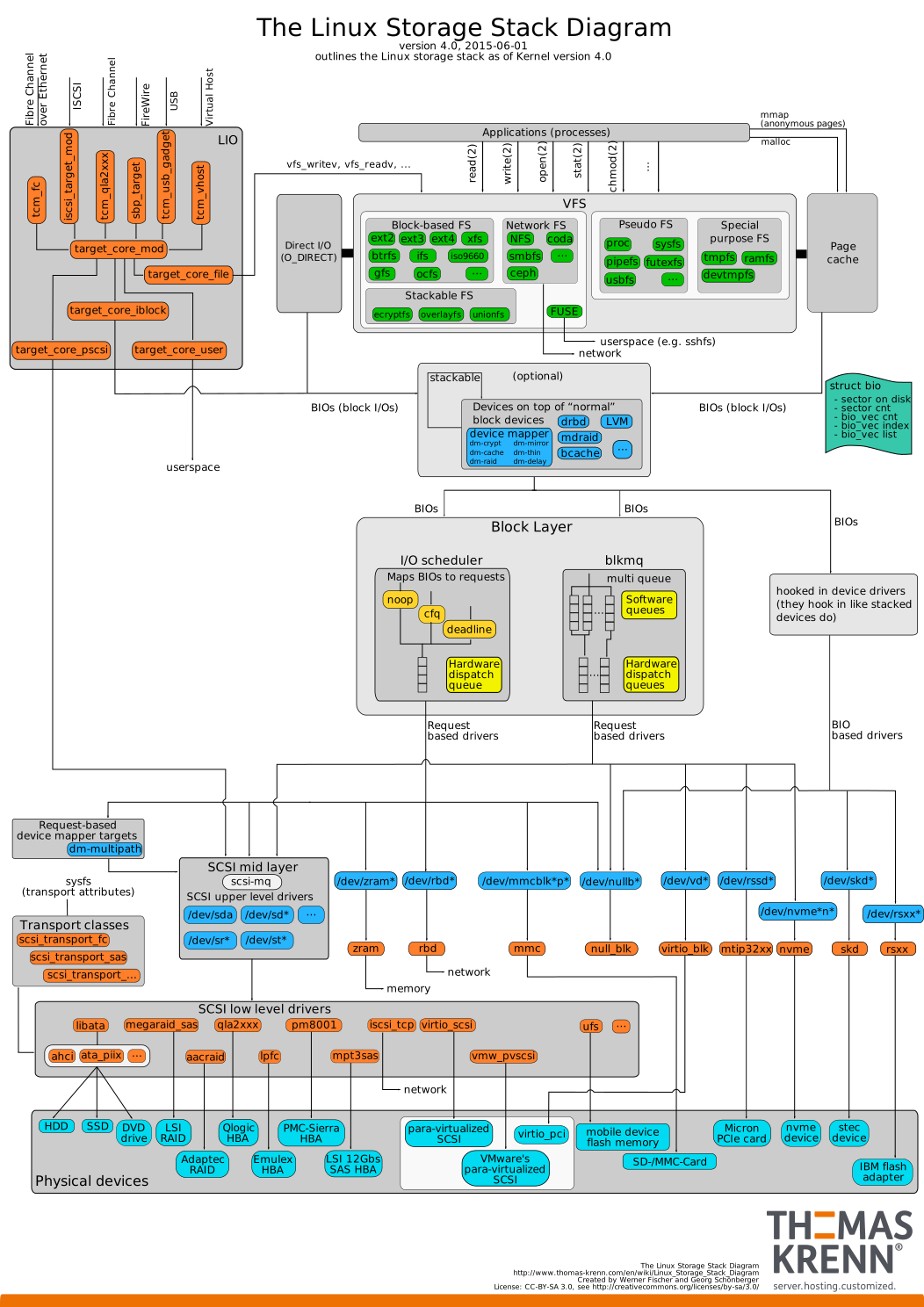
> To understand this, there's a diagram that's slightly out of date, but close
> enough at
> https://www.thomas-krenn.com/de/wikiDE/images/5/50/Linux-storage-stack-diagram_v4.0.svg
>
> Let's look at your stack in this diagram, and see where things fit.
>
> 1) RAID1
>   If you're using mdraid and dm-raid for the RAID layer (and not a SCSI raid
> driver), then you're in good shape.
>   These operate in the "stackable" layer above BIO's (the Block I/O struct in
> the kernel), which is good, as the primary NVMe enhancements (blkmq) operate
> in the block layer below this.
>
> Yep, mdraid/dm-raid is how I do all my raid1.
>
> 2) LUKS
>   If you're using dm-crypt as the backend (which should be the case), then
> again you're in good shape.
>   dm-crypt is also in the "stackable" layer, so it also benefits from blkmq
> enhancements.
>
> I've always done strict block alignments with mdraid+luks+lvm, but
> hopefully less necessary around 4k devices these days...
>
> 3) LVM
>   This always operates in the "stackable" layer, so no worries here.
>
> I'd usually fiddled with the pv block sizing here too per recommendation -
> wondering how relevant that is these days or needed still.
>
> 4) boot drive
>   This is where things start to get troublesome.  Some distributions don't
> currently support the NVMe/UEFI combination well (UEFI support itself is
> still a bit weak in many ways).
>
> Never had a problem with legacy here, only time really annoyance came up
> with kernel update-initrd bugs that removed my ability to unlock my hard
> drives with keyboard input...
>
>   Most installation guides and benchmark tests use legacy mode for
> compatibility, but you do give up some performance when doing so, and not all
> motherboards handle this configuration well.
>   It's possible, in most cases, to install a NVMe drive as an UEFI boot drive
> (don't forget the EFI partition), but it's probably going to require some
> manual tweaking, and a bit of googling for *correct* instructions relevant to
> your chosen distribution.
>
> I got this working with ubuntu at one point on a cranky asus that didn't
> have legacy mode as an option at all, so pretty sure I can hack it into
> working again, but rather avoid EFI all together if the nvme's play ball.
>
> Possible Gotchas:
>   1) try to avoid mapping the device through the SCSI layer.  NVMe is all
> about performance, and NVMe devices work best when they're mapped through the
> nvme driver, rather than the SCSI stack and compatibility driver.
>      This shouldn't happen in most recent distributions, but legacy mode in
> UEFI or other issues might confuse the kernel probes.
>      If you do map through the SCSI stack, you usually end up with
> performance much closer to SATA3 than NVMe.  You may also encounter some
> weird corner cases that affect stability.
>
> Good to note.  I saw references to the nvme* devices you mention, hoping
> those are just bootable to the bios when using an adapter (no nvme on the
> mobo, need pcie adapters).
>
>   2) If you do get the UEFI boot working, make sure there's a recovery boot
> device handy, for when UEFI gets confused.
>      This seems to happen far more frequently than it should, particularly
> with legacy compatibility mode enabled.
>      It seems that some UEFI M/B implementations still have a long way to go
> in reliability for less common setups.
>
> Ugh, thanks for the note.  I don't ever boot windoze natively, so
> hopefully it doesn't get too confused.
>
> I did have the issue of not being able to mdraid the /efi partition, all I
> could do was really rsync the partitions, but wondering what one *should*
> do for redundancy with efi data other than that...?
>
>   3) Avoid using any kind of EFI raid support if possible.  None of these,
> that I've seen, appears to be well implemented, even on server-focused boards.
>      Having UEFI get totally tangled when it's splitting blocks between
> devices and it's own code is on those devices can brick a system rather
> thoroughly.
>
> I see some windoze threads and posts about using the bios raid vs. RST EFI
> raid.  Either smells like fakeraid voodoo, but wondering how bad it is
> under linux to use either.  Need to dig more here.
>
>   4) Keep in mind that the devices will be named /dev/nvme#n# and partitions
> /dev/nvme#n#p#.
>      Some utilities still try to use /dev/nvme or something similar, which is
> related to SCSI assumptions and won't work correctly.
>
> Great, more regressions where developers forget there's anything out there
> but /dev/sd*.  Sort of like the old days of /dev/hd* vs /dev/sd*.
>
>
> Hopefully that's at least somewhat helpful.  I hope you'll let us all know
> how it goes if you do end up going this route.
>
> Yes, helpful and a good sanity check.  Thanks for the thoughtful post
> here.  I'm probably going to hail-mary and try them, and really hope I
> don't make a mistake here.  Worst case, normal sata disks are cheap enough
> I'll get a few drives to put /boot on, and everything else on the nvme's.
>
> ==Joseph++
>
> On 10/27/2016 09:31 AM, Michael Butash wrote:
>
> Curious if anyone has taken the plunge to play with nvme-based ssd's under
> linux here?  Particularly around raid.
>
> Not finding a lot pertaining to them that is positive toward linux on the
> tubes, and I'm looking to reproduce my usual raid1+luks+lvm atop them, so
> feedback on doing so would be appreciated if anyone has comment.
>
> I'm building a new desktop, and considering using them in place if they can
> boot, as the system is built more as a server as a vm farm for my lab so the
> iops would be appreciated when it's also my desktop.  I see reference to
> EFI-based raid, which makes me cringe, but seem mdraid fakeraid can handle
> them to some extents.
>
> Thanks!
>
> -mb
>
>
>
>
> ---------------------------------------------------
> PLUG-discuss mailing list - [email protected]
> To subscribe, unsubscribe, or to change your mail
> settings:http://lists.phxlinux.org/mailman/listinfo/plug-discuss
>
>
>
> ---------------------------------------------------
> PLUG-discuss mailing list - [email protected]
> To subscribe, unsubscribe, or to change your mail settings:
> http://lists.phxlinux.org/mailman/listinfo/plug-discuss
>
---------------------------------------------------
PLUG-discuss mailing list - [email protected]
To subscribe, unsubscribe, or to change your mail settings:
http://lists.phxlinux.org/mailman/listinfo/plug-discuss