On Mon, 19 Aug 2013 11:35:18 -0700
Paul Mullen <[email protected]> wrote:
> On Mon, Aug 19, 2013 at 11:18:58AM -0700, Dale Snell wrote:
> > My desktop system doesn't like booting to random USB devices.  I
> > have to reset the BIOS for every drive (but only one at a time!),
> > and it loses that setting once the drive's been removed.
>
> You can don't have to enter the Setup screen and alter the boot device
> priorities each time you plug in a new device if your BIOS supports
> the BIOS Boot Specification (which it should, unless the system is
> quite old).  When you first power-on your system, you should see
> something similar to "Press F8 for BBS Popup".  (It may be Escape or
> F5 or some other key, depending on how the vendor configured the
> BIOS.)
>
>   https://imageshack.us/a/img60/6793/bbsjpgne7.jpg

Nope, I don't get the BBS popup notification at all.  The Press DEL to
Setup shows up, of course, but not the other.  Obviously the desktop's
motherboard is a bit on the elderly side.  :-)  It's an Asus M2N-MX.

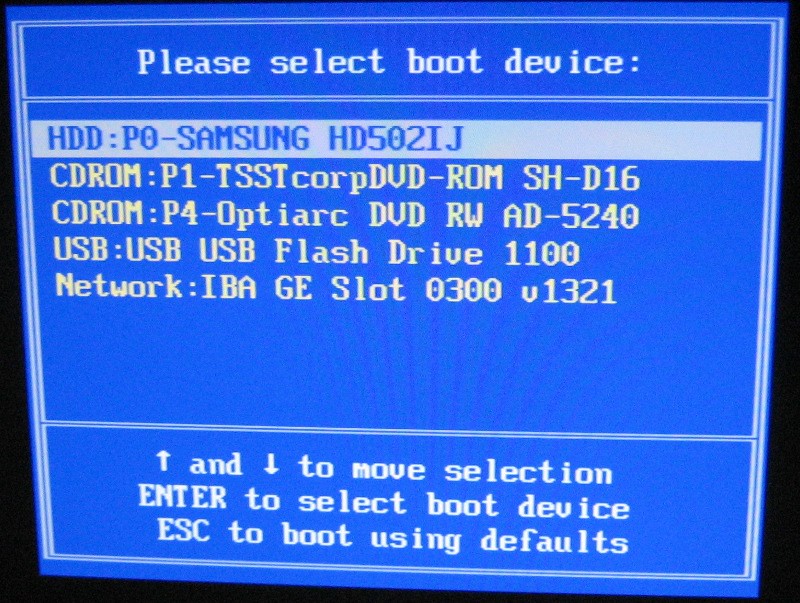
> The BBS "popup" menu presents a list of all bootable devices currently
> available.
>
>   https://farm9.staticflickr.com/8049/8350750816_f589819597_b.jpg

This doesn't show on my desktop machine, either.  I do get it on my
laptop, though (a Dell Inspiron 9300).

--Dale

--
"I say to you that the VCR is to the American film producer and
the American public as the Boston strangler is to the woman home
alone."    -- Jack Valenti, MPAA president, testimony to the
House of Representatives, 1982.
_______________________________________________
PLUG mailing list
[email protected]
http://lists.pdxlinux.org/mailman/listinfo/plug