Hi guys,

I've recently ported my Open Source project Metawidget
<http://metawidget.org>to Web Components/Polymer, and would really value
your feedback.
*What is Metawidget?*

Metawidget is a smart widget that populates itself, at runtime, with UI
components to match the properties of domain objects. For example, this Web
Components code...


> <!DOCTYPE HTML>
> <html>
>    <head>
>       *<script src="metawidget-core.min.js"></script>*
>       <style>
>          #metawidget {
>             border: 1px solid #cccccc;
>             width: 250px;
>             border-radius: 10px;
>             padding: 10px;
>             margin: 50px auto;
>             display: block;
>          }
>       </style>
>       <script>
>          var person = {
>             firstname: 'Homer',
>             surname: 'Simpson',
>             age: 36,
>             save: function() {
>
> *document.getElementById( 'metawidget' ).save();*               console.log(
> person );
>             }
>          }
>       </script>
>    </head>
>    <body>
>       *<x-metawidget id="metawidget" path="person"></x-metawidget>*
>    </body>
> </html>


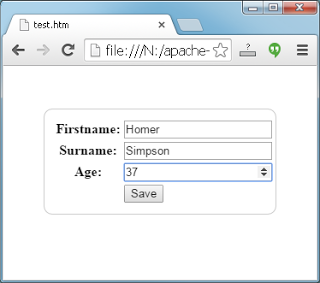
...will produce...

<https://lh3.googleusercontent.com/-t1vLRJiSDV0/VFbJ9YUvqVI/AAAAAAAABFk/2BnegKpKI28/s1600/webcomponent.png>
The 'x-metawidget' tag is configured to inspect JSON objects, and create
simple HTML components, by default. However you can easily swap in support
for JSON Schema to define your UIs, or to pull in your UI definition over a
REST service, or many other approaches. Equally you can easily swap in new
component libraries, or different layouts, or many other third-party
features.

Metawidget is a mature project that supports over a dozen front-end
frameworks, but Web Components is very new to me so I'd love any 'best
practice' advice!

Regards,

Richard.

Follow Polymer on Google+: plus.google.com/107187849809354688692
---
You received this message because you are subscribed to the Google Groups
"Polymer" group.
To unsubscribe from this group and stop receiving emails from it, send an email
to [email protected].
To view this discussion on the web visit
https://groups.google.com/d/msgid/polymer-dev/4f9c2f0f-2b6d-4b84-89dd-5864f6c27710%40googlegroups.com.
For more options, visit https://groups.google.com/d/optout.