Tony Firshman wrote:
> To a non-QPC2 user like me, the changes you made may not be obvious.
> How about blowing your own trumpet a little - I am sure we won't mind.
Well OK, the whole story goes like this:

Step one of course was to introduce advanced colour codes into WMAN, I
did this quite a long time ago and is already part of current release
QPCs for testing purposes. After that the system palette was
introduced. Hmm, it might not be clear what a "system palette" really
does:

In principle it is a normal colour palette, i.e. you have indexes from
0 to x which all contain some colour. The difference between a normal
palette and the system palette is that each index has a specific
meaning, i.e. index 0 is the colour of the main window border. In
principle parts of the normal palette could have been allocated for
that, but I wanted to keep things separate.

Applications can now use this system palette colour instead of a real
colour (like "red"). This way the user himself can define how the
borders of the application should look like just by altering the
system palette.

The hardest task in all this was actually to define what items should
be in the system palette. In the end I very much oriented myself with
TT's colour definitions for his QPAC style windows. And of course the
palette must come with some default colours. This was easier, I just
filled the colours so that it resembles the old white/green look.

After having done this and specified the interface functions the
implementation was not too difficult. Only some minor details were
tricky (for example, I allowed a system palette colour to point to yet
another system palette colour. By doing this an endless loop could be
introduced which would make the application hang. The solution I chose
was to set a maximum recursion level. But those are details that have
to be taken into account)

The next step of course was to build an application that uses the
system palette. For this purpose I first disassembled the shown
"colours" application and changed the appropriate bytes. That's why it
always shows up in my test pictures ;-) Later I also disassembled and
partly rewrote other things I use like FreeMemBt or SystemJob to use
the palette. Finally as the big task QPAC2 itself got a new colourway
named "System palette". All the others colourways (white/green,
red/black etc) are emulated to allow backwards compatibility.
Compatibility was always my goal and the biggest challenge in all
this.

The new high colour sprites you see in the QPAC window were mostly
done by Phoebus. In 4 colour mode the old ones will automatically be
used (compatibility again).

> The '3d' shading on boxes is obvious.

Yes, the 3d stuff is another big point. With only little visual effort
very nice effects can be done. The problem I had to deal with is again
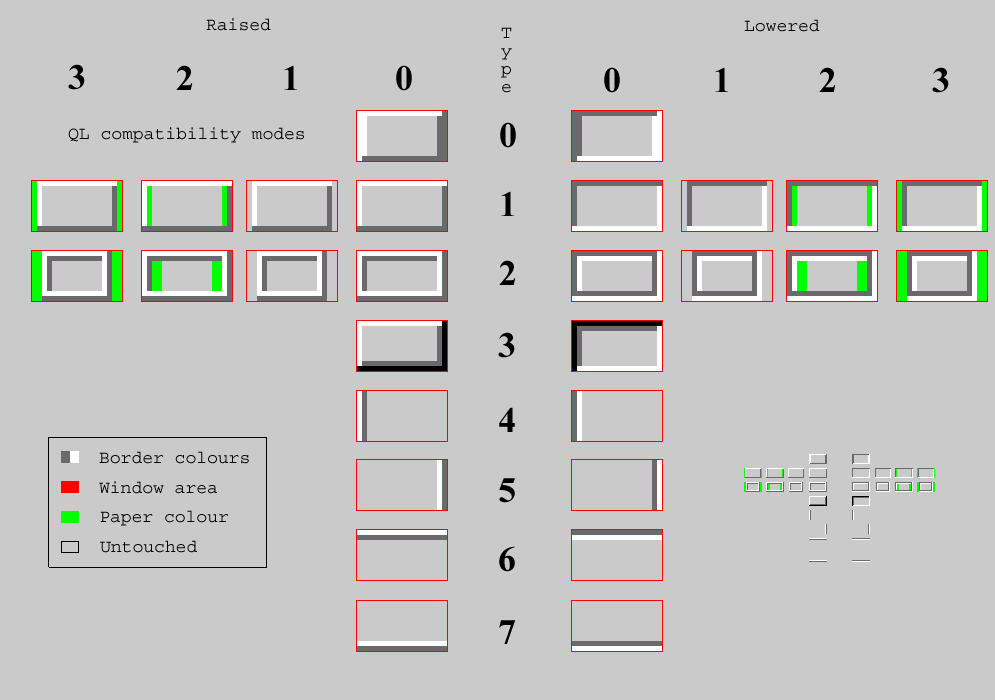
compatibility. QL borders have the unfortunate property of having a
2:1 aspect ratio (i.e. they are always twice as thick than high). This
is not ideal for 3d borders, which prefer a regular 1:1 ratio. I
implemented numerous different borders and compatibility modes, have a
look at http://www.kilgus.net/images/qlborder.gif

Border 0 is most compatible as it represents a normal QL border. All
other use non standard layouts. That means that either the border will
actually have a different layout or the free space a QL border would
have occupied must be filled somehow (or not). You see the choices in
the chart. The implementation of all this, though very tricky in some
places, was again done in a few days (all in all only a bit over 700
lines). What actually took so long was to define what is needed and
how to implement it. Caused me headaches for weeks.

You have probably noticed that most border styles are not used in my
examples. This is because in most application there's not enough space
reserved for bigger borders (or they don't make much sense like the
"line" style borders). Therefore those are mostly for application
developers who specifically take them into account in the future.

> Is the 3d effect on scroll bar what you are proud of?

Yes. Though the old bar (fortunately!) exactly resembles a QL border
the original routine did draw them using block operations. The new
routine use border calls, so that the new border styles can be applied
here, too. This way the 3d effect comes for free if demanded. With
only one changed system palette value one could also have a 3d bar
that goes into the window (lowered style), a bar that is a bit less
wide (QL compatibility mode 1), a bar that has more depth (type 3)
etc, everything's possible. For anybody with the sources, the file in
question is ee_wman_drbar_asm. Well, at least I found that file a bit
hard to read/understand enough to modify it. All in all it took me one
day.

By the way, did anybody ever wonder why the "bar colour" never seems
to be used (the code always uses the window background colour)? Or
does anybody even know the reason?

As byproducts I also created some new SBASIC commands like WM_PAPER
for directly using the WMAN colour codes (was handy for debugging) or
SP_SET for changing the system palette.

Wow, this almost turned into a Nasta style epic (although I even left
out some parts and most of the details). Anyway, you asked for it ;-)

Cheers, Marcel