At 09:46 PM 5/10/2016, Tom Frederick wrote:
Is there a good way to count the characters in a text while typing
in DB Memo?
Effects> Max Length can limit Text to 500 characters. I need some way to tell
a user they are coming close to their 500 limit.  This code will do that when
I first enter a field and all the other EEP options except On Key Press:
SET VAR vZHousCurr = (SLEN(.vZHousCurrLivNote))
RECALC VARIABLES
PROPERTY vZHousCurr REFRESHLIST 'True'

vZHousCurr gives an integer which  the user can see. Putting this code in On
Key Press simply adds characters but does not return a value. Adding Saverow
creates a long delay. Click to another field and returning gives an immediate
correct response since it is an Enter EEP. I assume On Key Press
fires whenever
I hit a text key. I use On Key Press regularly as part the Keyword process in
EEPs to search column data, never used it for text like this. What
am I missing?
Tom,

Here's how ...

01. Define two variables as "On Before Start EEP"

    Example:
    SET VAR vCallNotes NOTE = NULL
    SET VAR vCharacters_Remaining TEXT = NULL

02. Assign a Component ID to DB Memo field
    Example: CallNotes

03. Define a variable to capture contents of DB Memo field
    Example:
    GETPROPERTY CallNotes TEXTVALUE vCallNotes

04. Define an expression to concatenate text string to display the message
    SET VAR vCharacters_Remaining = +
    ('Characters Remaining:'&(CTXT(500-(SLEN(.vCallNotes)))))

05. Put this all together as "Custom Form Action"
    Example:
    Custom Form Action: Count_Characters
    -- Count Characters
    GETPROPERTY CallNotes TEXTVALUE vCallNotes
    SET VAR vCharacters_Remaining = +
    ('Characters Remaining:'&(CTXT(500-(SLEN(.vCallNotes)))))
    RECALC VARIABLES
    RETURN

06. Place a Variable Label to display vCharacters_Remaining variable

07. Finally, call that form action as "On Entry EEP" and "On Key Press EEP"
    for DB Memo field (CallNotes).

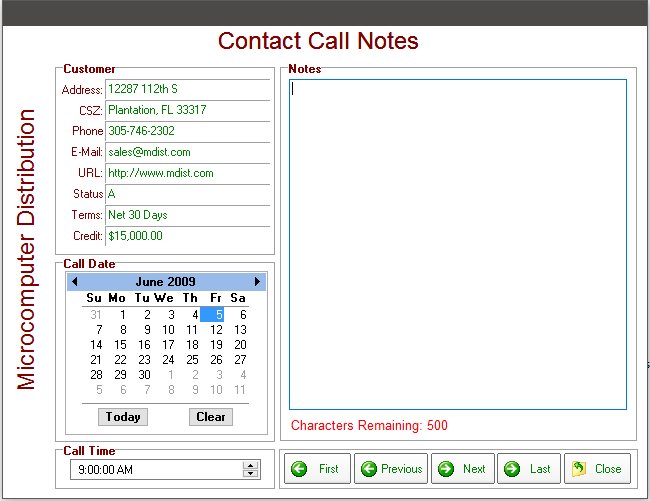
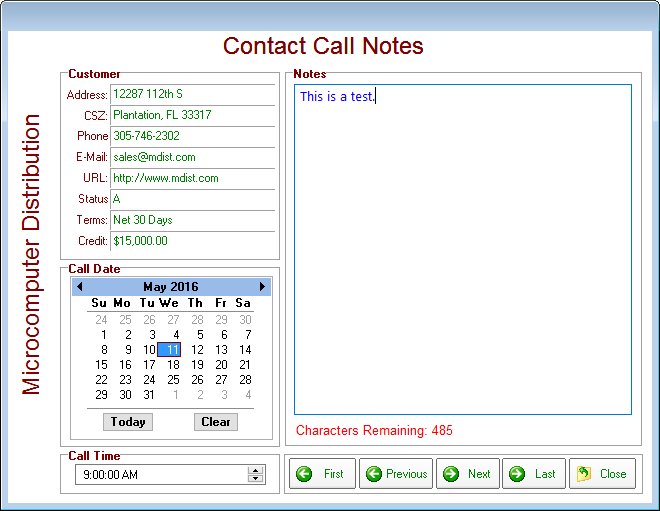
Once everything is defined accordingly, your form should look like this:

http://www.razzak.com/tips/Counting_Characters_01.jpg
http://www.razzak.com/tips/Counting_Characters_02.jpg

Feel free to reach out to me if you need that form to understand the technique.

Very Best R:egards,

Razzak.


--
You received this message because you are subscribed to the Google Groups
"RBASE-L" group.
To unsubscribe from this group and stop receiving emails from it, send an email
to [email protected].
For more options, visit https://groups.google.com/d/optout.