This was very informative. Thank you for the posting the question!

On Wednesday, May 11, 2016 at 8:58:19 AM UTC-5, tom.frederick wrote:
>
> Albert and Razzak,
> Those ideas worked perfectly first time I ran them. I had never used
> Getproperty with Textvalue so I never thought about it. It took some time
> to understand what was going on. Looks like Chapter 26 of the ongoing Rbase
> education process just got unlocked. This will get used a lot. Thank you
> very much.
>
> Tom Frederick
>
> -----Original Message-----
> From: [email protected] <javascript:> [mailto:
> [email protected] <javascript:>] On Behalf Of A. Razzak Memon
> Sent: Wednesday, May 11, 2016 12:16 AM
> To: [email protected] <javascript:>
> Subject: Re: [RBASE-L] - Counting Characters as you type
>
> At 09:46 PM 5/10/2016, Tom Frederick wrote:
>
> >Is there a good way to count the characters in a text while typing in
> >DB Memo?
> >Effects> Max Length can limit Text to 500 characters. I need some way
> >Effects> to tell
> >a user they are coming close to their 500 limit.  This code will do
> >that when I first enter a field and all the other EEP options except On
> Key Press:
> >
> >SET VAR vZHousCurr = (SLEN(.vZHousCurrLivNote)) RECALC VARIABLES
> >PROPERTY vZHousCurr REFRESHLIST 'True'
> >
> >vZHousCurr gives an integer which  the user can see. Putting this code
> >in On Key Press simply adds characters but does not return a value.
> >Adding Saverow creates a long delay. Click to another field and
> >returning gives an immediate correct response since it is an Enter EEP.
> >I assume On Key Press fires whenever I hit a text key. I use On Key
> >Press regularly as part the Keyword process in EEPs to search column
> >data, never used it for text like this. What am I missing?
>
>
> Tom,
>
> Here's how ...
>
> 01. Define two variables as "On Before Start EEP"
>
>      Example:
>      SET VAR vCallNotes NOTE = NULL
>      SET VAR vCharacters_Remaining TEXT = NULL
>
> 02. Assign a Component ID to DB Memo field
>      Example: CallNotes
>
> 03. Define a variable to capture contents of DB Memo field
>      Example:
>      GETPROPERTY CallNotes TEXTVALUE vCallNotes
>
> 04. Define an expression to concatenate text string to display the message
>      SET VAR vCharacters_Remaining = +
>      ('Characters Remaining:'&(CTXT(500-(SLEN(.vCallNotes)))))
>
> 05. Put this all together as "Custom Form Action"
>      Example:
>      Custom Form Action: Count_Characters
>      -- Count Characters
>      GETPROPERTY CallNotes TEXTVALUE vCallNotes
>      SET VAR vCharacters_Remaining = +
>      ('Characters Remaining:'&(CTXT(500-(SLEN(.vCallNotes)))))
>      RECALC VARIABLES
>      RETURN
>
> 06. Place a Variable Label to display vCharacters_Remaining variable
>
> 07. Finally, call that form action as "On Entry EEP" and "On Key Press
> EEP"
>      for DB Memo field (CallNotes).
>
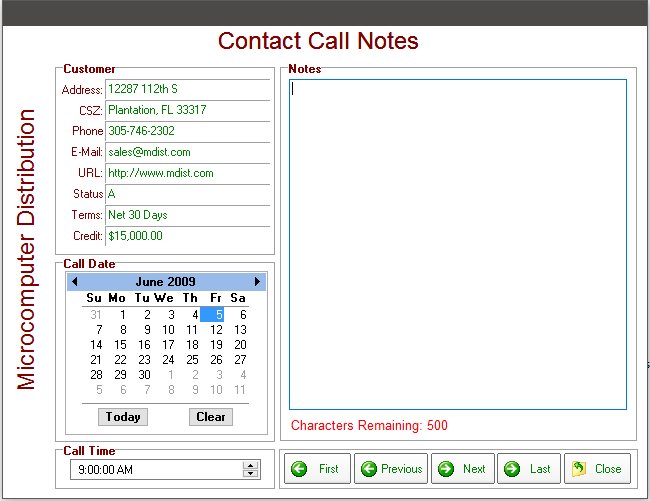
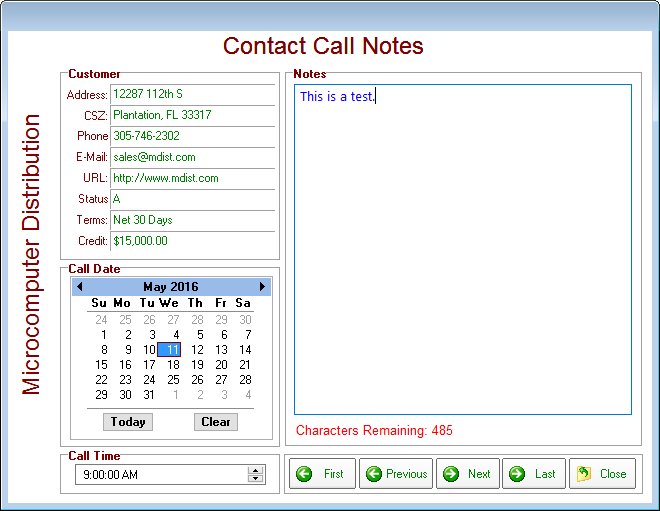
> Once everything is defined accordingly, your form should look like this:
>
> http://www.razzak.com/tips/Counting_Characters_01.jpg
> http://www.razzak.com/tips/Counting_Characters_02.jpg
>
> Feel free to reach out to me if you need that form to understand the
> technique.
>
> Very Best R:egards,
>
> Razzak.
>
>
>
> --
> You received this message because you are subscribed to the Google Groups
> "RBASE-L" group.
> To unsubscribe from this group and stop receiving emails from it, send an
> email to [email protected] <javascript:>.
> For more options, visit https://groups.google.com/d/optout.
>
--
You received this message because you are subscribed to the Google Groups
"RBASE-L" group.
To unsubscribe from this group and stop receiving emails from it, send an email
to [email protected].
For more options, visit https://groups.google.com/d/optout.