The best is yet to come!

Just watch me.
Razzak

On Fri, Sep 9, 2016 at 1:51 PM, Albert Berry <[email protected]> wrote:

> That is the neatest new thing I have seen in quite a while! Thanks Razzak
> and team.
>
> Albert
>
>
>
> On 2016-09-09 7:44 AM, A. Razzak Memon wrote:
>
>> Friday, September 9, 2016
>>
>> Tip of the Day: Using New Scratch Pad in R:BASE X
>> Product.......: R:BASE/Runtime/R:Compiler - X/X Enterprise (Version 10)
>> Build.........: 10.0.1.10909 or higher
>> Section.......: Productivity Tools
>> Keywords......: Scratch Pad
>>
>> Did you know that you can keep track of all your development notes, and
>> favorite command templates, etc., while developing applications?
>>
>> These notes can be general (Global) or specific to the connected database.
>>
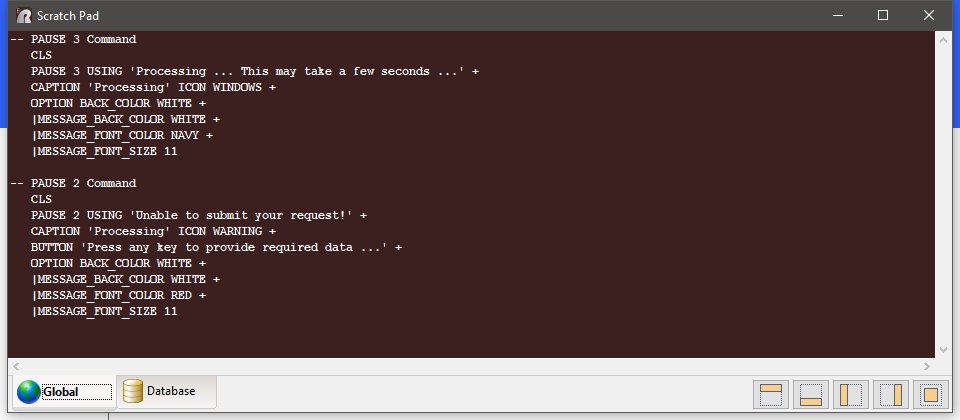
>> A new "Scratch Pad" utility has been implemented to increase productivity
>> during active development.
>>
>> The scratch pad can hold any text or command template that is frequently
>> used during development. The Scratch Pad utility window can be positioned
>> several different ways to not obstruct R:BASE use. Global and Database
>> tabs are available for database-specific or global development.
>>
>> The Scratch Pad is available from the Utilities menu bar option, and can
>> be displayed using the [Ctrl+F11] key combination, on demand.
>>
>> http://www.razzak.com/tips/RBGX_Scratch_Pad.jpg
>>
>> Have fun!
>>
>> Very Best R:egards,
>>
>> Razzak.
>>
>> www.rbase.com
>> www.facebook.com/rbase
>>
>
> --
> You received this message because you are subscribed to the Google Groups
> "RBASE-L" group.
> To unsubscribe from this group and stop receiving emails from it, send an
> email to [email protected].
> For more options, visit https://groups.google.com/d/optout.
>

--
You received this message because you are subscribed to the Google Groups
"RBASE-L" group.
To unsubscribe from this group and stop receiving emails from it, send an email
to [email protected].
For more options, visit https://groups.google.com/d/optout.