Paul,
Here is another example of Enhanced DB Grid with customized "Row
Color" as green when a project task is completed.
Notice the Enhanced DBGrid with Checkboxes for "Administrative
Checklist" and "Job Flow Checklist".
Freaking awesome, isn't it?

Very Best R:egards,

Razzak


At 04:29 PM 2/20/2018, Paul C. Buckley wrote:
Razzak,
I'm sorry it has taken me so long to get back to this but I've read
thru your email and looked again in R:DOCS and can't see how to
change the color on an individual cell or row. Sorry to bug you but
what am I missing? I'm using the latest R:DOCS, I think, 10.0.3.20116.
Thanks,
Paul

-----Original Message-----
From: [email protected] [mailto:[email protected]] On
Behalf Of A. Razzak Memon
Sent: December 22, 2017 4:47 PM
To: [email protected]
Subject: Re: [RBASE-L] - Change Individual Row Colors in Enhanced DB Grid

Paul,
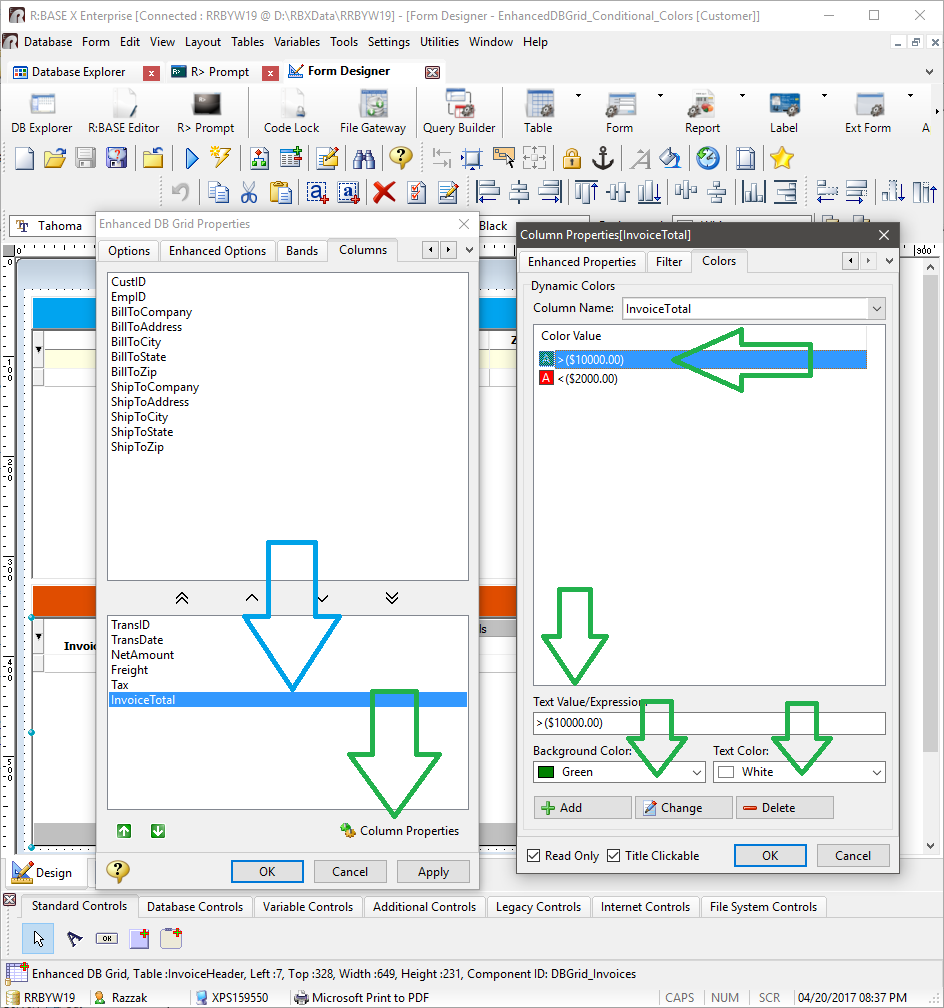
Within the Enhanced DB Grid's Column properties, the ability to
alter the Background Color, based upon the data within the cell, was
implemented some time ago.
However, did you know
that now the ability to alter the "Text Color" has been implemented as well?
The Enhanced DB Grid control feature was previously named Background
Color Mapping, but is now appropriately designated as "Dynamic
Colors", with the support for both background and text colors for
completely dynamic color behaviors.
The Dynamic Colors feature allows for the background and text colors
to change based upon the data values within the cell. Text values
and expressions can be defined to reflect the cell data. Form
variables can also be used to base dynamic colors.
Examples:

01: Highlight all negative values: <(0)
02: Highlight dates that are later than today: >(.#DATE)
03: Highlight all dollar amount greater than $100: >($100.00)
04: Highlight all values that match a defined variable: =(.VarName)
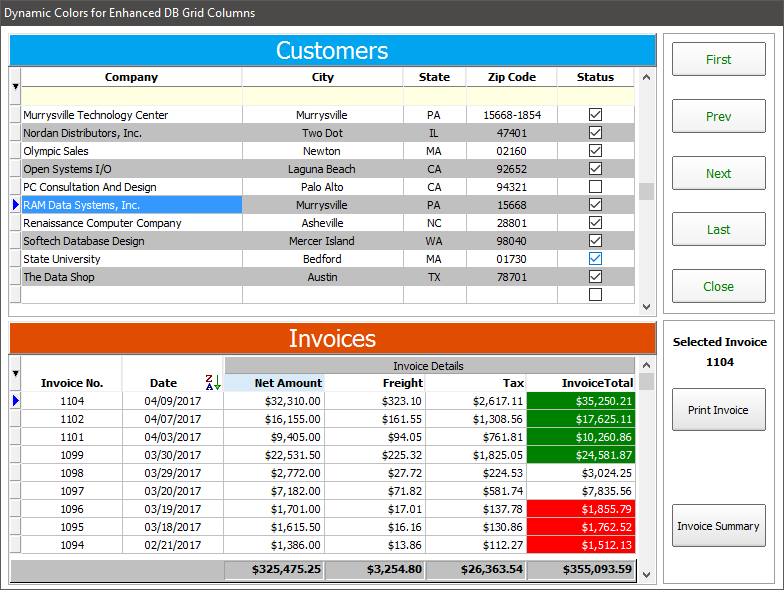
For the following screen shot examples, dynamic colors are defined
to highlight invoice total values that are greater than $10,000.00
and less than $2,000.00.
   >($10000.00) : Background Color as Green and Text Color as White
   <($2000.00)  : Background Color as Red and Text Color as White

http://www.razzak.com/tips/EnhancedDBGrid_DynamicColumnColors_01.png
http://www.razzak.com/tips/EnhancedDBGrid_DynamicColumnColors_02.png

The whole purpose of the implementation of this feature ...
A very complex and intuitive application was recently deployed for
one of our major Manufacturing and Fabrication Services clients, to
dynamically display an unattended, auto-scroll, production schedule
and priorities based on live employee time throughout the shop on
NEC E425 42" Full HD LED Commercial Large Format Display Monitors.
These display monitors are similar to what is usually seen inside
airport terminals.
RBGXE Deployed Project Name: Production Priorities Display System (PPDS)
Dynamic Colors in Enhanced DB Grids is just one more feature
allowing R:BASE users to let the data speak for itself!
Very Best R:egards,

Razzak.

www.rbase.com
www.facebook.com/rbase
--
For group guidelines, visit
http://www.rbase.com/support/usersgroup_guidelines.php
---
You received this message because you are subscribed to the Google Groups "RBASE-L" group.
To unsubscribe from this group and stop receiving emails from it, send an email
to [email protected].
For more options, visit https://groups.google.com/d/optout.