Razzak & everyone else,

Thanks for the help. I was so focused on looking in R:DOCS for a property I
missed this being available in the form. It's working great. This group makes
me look better than I am to my bosses, thanks again.
Razzak - I will always agree with you when you proclaim R:BASE as "freaking
awesome" - thanks again,

Paul

-----Original Message-----
From: [email protected] [mailto:[email protected]] On Behalf Of
A. Razzak Memon
Sent: February 21, 2018 11:22 AM
To: [email protected]
Subject: RE: [RBASE-L] - Change Individual Row Colors in Enhanced DB Grid

Paul,

Here is another example of Enhanced DB Grid with customized "Row Color" as
green when a project task is completed.

Notice the Enhanced DBGrid with Checkboxes for "Administrative Checklist" and
"Job Flow Checklist".

Freaking awesome, isn't it?

Very Best R:egards,

Razzak


At 04:29 PM 2/20/2018, Paul C. Buckley wrote:

>Razzak,
>
>I'm sorry it has taken me so long to get back to this but I've read
>thru your email and looked again in R:DOCS and can't see how to change
>the color on an individual cell or row. Sorry to bug you but what am I
>missing? I'm using the latest R:DOCS, I think, 10.0.3.20116.
>
>Thanks,
>Paul
>
>-----Original Message-----
>From: [email protected] [mailto:[email protected]] On
>Behalf Of A. Razzak Memon
>Sent: December 22, 2017 4:47 PM
>To: [email protected]
>Subject: Re: [RBASE-L] - Change Individual Row Colors in Enhanced DB
>Grid
>
>Paul,
>
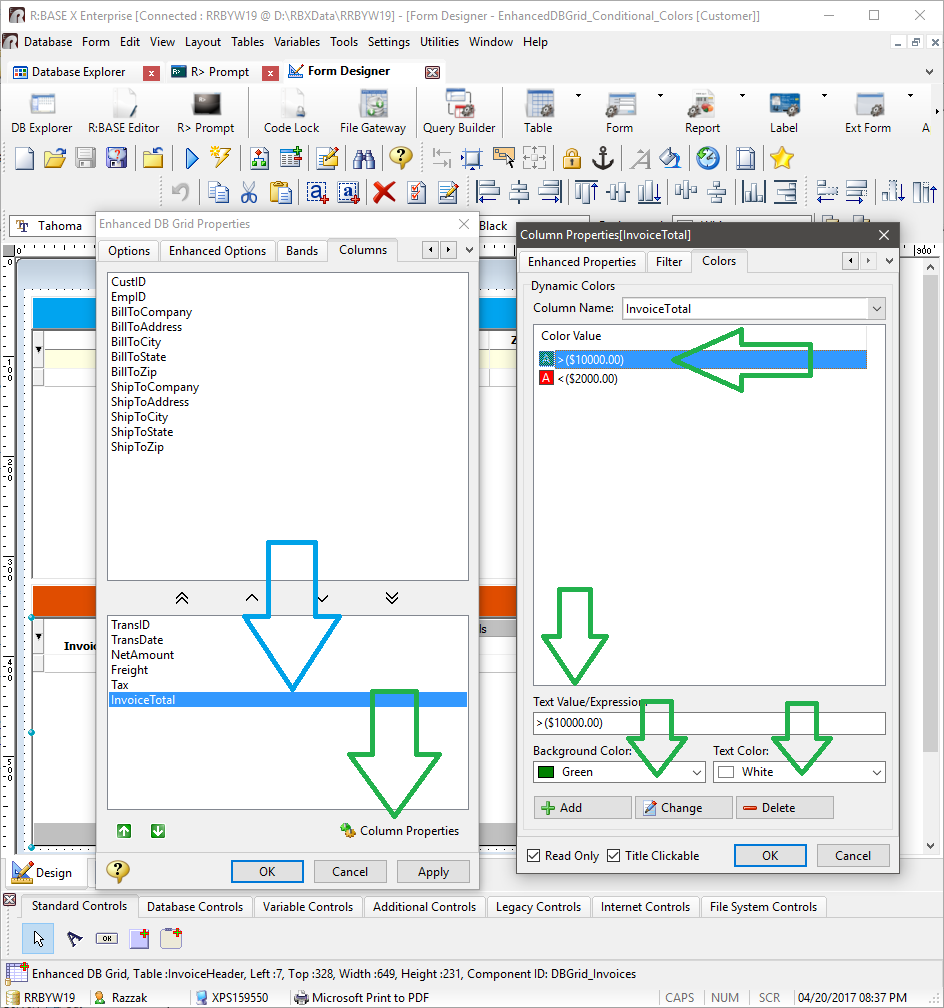
>Within the Enhanced DB Grid's Column properties, the ability to alter
>the Background Color, based upon the data within the cell, was
>implemented some time ago.
>However, did you know
>that now the ability to alter the "Text Color" has been implemented as well?
>
>The Enhanced DB Grid control feature was previously named Background
>Color Mapping, but is now appropriately designated as "Dynamic Colors",
>with the support for both background and text colors for completely
>dynamic color behaviors.
>
>The Dynamic Colors feature allows for the background and text colors to
>change based upon the data values within the cell. Text values and
>expressions can be defined to reflect the cell data. Form variables can
>also be used to base dynamic colors.
>
>Examples:
>
>01: Highlight all negative values: <(0)
>02: Highlight dates that are later than today: >(.#DATE)
>03: Highlight all dollar amount greater than $100: >($100.00)
>04: Highlight all values that match a defined variable: =(.VarName)
>
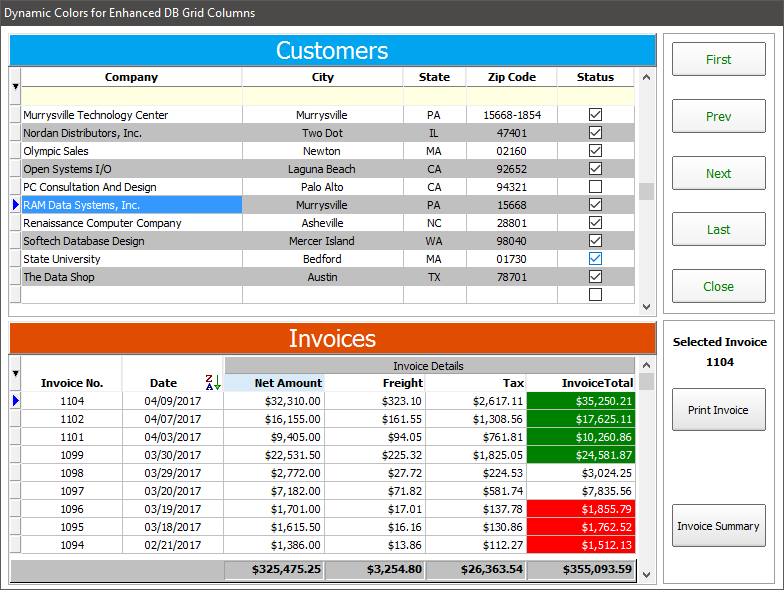
>For the following screen shot examples, dynamic colors are defined to
>highlight invoice total values that are greater than $10,000.00 and
>less than $2,000.00.
>
>    >($10000.00) : Background Color as Green and Text Color as White
>    <($2000.00)  : Background Color as Red and Text Color as White
>
>http://www.razzak.com/tips/EnhancedDBGrid_DynamicColumnColors_01.png
>http://www.razzak.com/tips/EnhancedDBGrid_DynamicColumnColors_02.png
>
>The whole purpose of the implementation of this feature ...
>
>A very complex and intuitive application was recently deployed for one
>of our major Manufacturing and Fabrication Services clients, to
>dynamically display an unattended, auto-scroll, production schedule and
>priorities based on live employee time throughout the shop on NEC E425
>42" Full HD LED Commercial Large Format Display Monitors.
>These display monitors are similar to what is usually seen inside
>airport terminals.
>
>RBGXE Deployed Project Name: Production Priorities Display System
>(PPDS)
>
>Dynamic Colors in Enhanced DB Grids is just one more feature allowing
>R:BASE users to let the data speak for itself!
>
>Very Best R:egards,
>
>Razzak.
>
>www.rbase.com
>www.facebook.com/rbase


--
For group guidelines, visit
http://www.rbase.com/support/usersgroup_guidelines.php
---
You received this message because you are subscribed to the Google Groups
"RBASE-L" group.
To unsubscribe from this group and stop receiving emails from it, send an email
to [email protected].
For more options, visit https://groups.google.com/d/optout.

--
For group guidelines, visit
http://www.rbase.com/support/usersgroup_guidelines.php
---
You received this message because you are subscribed to the Google Groups
"RBASE-L" group.
To unsubscribe from this group and stop receiving emails from it, send an email
to [email protected].
For more options, visit https://groups.google.com/d/optout.