I forgot the PS.. I assume this is in the Thanksgiving release by the build
date ?
Frank Taylor - Information Technology Administrator
F.J. O'Hara & Sons,  Inc - Araho Transfer Inc.
Boston, MA - Rockland, ME - Miami, FL
Direct Dial - 617-790-3093
email:
[email protected]<http://mail.whitewolftechnologies.com/cgi-bin/compose.exe?id=01ef7f9322f8a76400dacb6a1fe342bb5a7&new=&xsl=compose.xsl&[email protected]>

From: [email protected] [mailto:[email protected]] On Behalf Of Frank Taylor
Sent: Monday, October 24, 2011 7:27 AM
To: RBASE-L Mailing List
Subject: [RBASE-L] - Re: Tree View Property Command

Razzak,

You guys never fail to let me keep my promise to my users. I promised them "if
they can think it, I can do it.."

Thanks for helping me find this... You guys are the best.


-          Frank

Frank Taylor - Information Technology Administrator
F.J. O'Hara & Sons,  Inc - Araho Transfer Inc.
Boston, MA - Rockland, ME - Miami, FL
Direct Dial - 617-790-3093
email:
[email protected]<http://mail.whitewolftechnologies.com/cgi-bin/compose.exe?id=01ef7f9322f8a76400dacb6a1fe342bb5a7&new=&xsl=compose.xsl&[email protected]>

From: [email protected] [mailto:[email protected]] On Behalf Of A. Razzak Memon
Sent: Thursday, October 20, 2011 9:41 PM
To: RBASE-L Mailing List
Subject: [RBASE-L] - Re: Tree View Property Command

At 07:36 AM 10/20/2011, Frank Taylor wrote:
A request was made by my users to "highlight" some specific items in
my main menu. I am using a tree view as my main menu in RB9.1, prior
to this I used Group bars in 7.6.  I assigned a component ID to the
sub-nodes that they wanted to be highlighted, but I cannot seem to
find a property command that would allow me to change the color or
font of that sub-node.  For the time being I added an image next to
those Items, and removed the images from the others, but my users
are not quite sold on it. Is there a property command that I am not
seeing that will allow me to control a sub-node's caption, color,
or font ?  If not, anyone have any work around suggestions?

Frank,

Here's the syntax for PROPERTY command to dynamically change the
FONT COLOR as well as background COLOR of the Tree View Nodes and
Sub-Items.

Syntax:

-- Changing Tree View Node or Sub-Item Font Color
   PROPERTY <TreeViewNodeORSubItemComponentID> FONT_COLOR 'WHITE'

-- Changing Tree View Node or Sub-Item Background Color
   PROPERTY <TreeViewNodeORSubItemComponentID> COLOR 'RED'

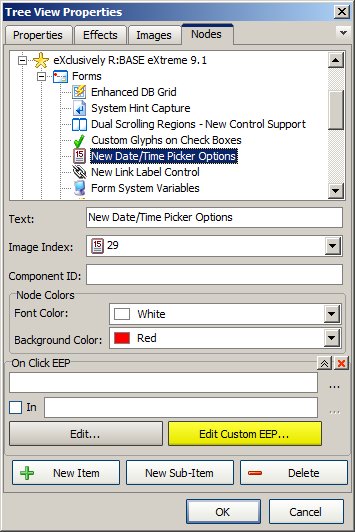
While in form designer, you may also customize the Font Color
as well as Background Color of the Tree View Nodes/Sub-Items
using the Tree View control Properties panel.

Here's how:

01. Start R:BASE eXtreme 9.1 (32/64) Build: 9.1.5.11124 or higher
02. CONNECT RRBYW17
03. Database Explorer | External Forms | RRBYW17
04. Form Designer | Tree View Control | Object Properties | Nodes

    Notice the additional panel [Node Colors]

    http://www.razzak.com/tips/TreeView_Node_Properties.jpg

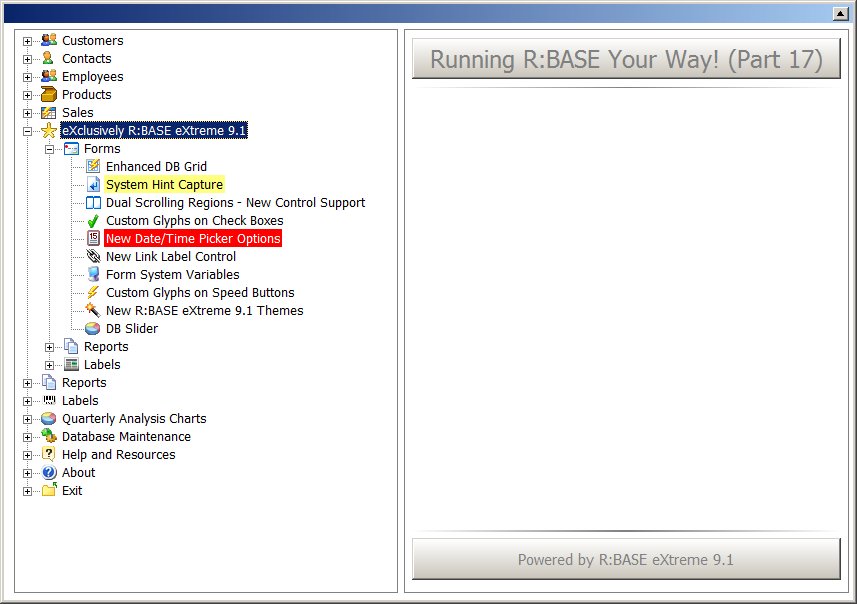
    Now you may customize the Node or Sub-Item Font Color and
    Background Color.

    http://www.razzak.com/tips/TreeView_Node_Colors.jpg

That's all there is to it!

Have fun highlighting some specific item(s) in you main menu!

Very Best R:egards,

Razzak.