At 12:26 PM 12/8/2011, Dennis McGrath wrote:
Using current 9.1 32
I've got a listview on which I use a 12 point font.
The headers don't get tall enough to show the character descenders.
Am I missing a setting?
Thanks for any input.
Dennis,

Setting the Header Size for Variable Lookup List View is as easy as 1-2-3.

Here's how:

01. Start R:BASE eXtreme 9.1 (32/64), Build: 9.1.5.11212 or higher ...

02. CONNect the database, and then open the form in form designer

03. Right-click on Variable Lookup List View control and select Object Property
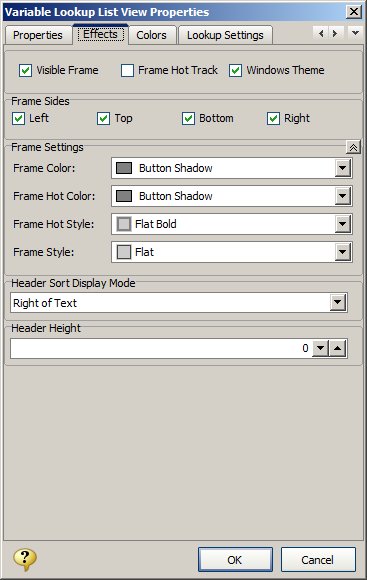
04. Click on [Effects] tab and notice the option for Header Size
(screen pixels)
05. The default is set to 0 (dynamic). However, you may adjust the Header Size
depending on the selected font used in List View, and most
importantly the
Operating System, such as Windows 7 (Professional).
Example:
http://www.razzak.com/tips/Variable_Lookup_ListView_Header_Size.jpg
That's all there is to it!

Enjoy and make sure to have fun.

Very Best R:egards,

Razzak.

--- RBASE-L
================================================
TO POST A MESSAGE TO ALL MEMBERS:
Send a plain text email to [email protected]

(Don't use any of these words as your Subject:
INTRO, SUBSCRIBE, UNSUBSCRIBE, SEARCH,
REMOVE, SUSPEND, RESUME, DIGEST, RESEND, HELP)
================================================
TO SEE MESSAGE POSTING GUIDELINES:
Send a plain text email to [email protected]
In the message SUBJECT, put just one word: INTRO
================================================
TO UNSUBSCRIBE:
Send a plain text email to [email protected]
In the message SUBJECT, put just one word: UNSUBSCRIBE
================================================
TO SEARCH ARCHIVES:
Send a plain text email to [email protected]
In the message SUBJECT, put just one word: SEARCH-n
(where n is the number of days). In the message body,
place any
text to search for.
================================================