Dennis,

The clue is the last 4 of the build 1212 in MMDD.
Jan


-----Original Message-----
From: Dennis McGrath <[email protected]>
To: [email protected] (RBASE-L Mailing List)
Date: Fri, 9 Dec 2011 07:57:22 -0600
Subject: [RBASE-L] - Re: Variable Listview column header height


Thanks Buddy,

This old head still can't dope out those build numbers.
Are they YMMDD ?????

Dennis McGrath
Software Developer
QMI Security Solutions
1661 Glenlake Ave
Itasca IL 60143
630-980-8461
[email protected]

-----Original Message-----
From: [email protected] [mailto:[email protected]] On Behalf Of Walker,
Buddy
Sent: Friday, December 09, 2011 7:52 AM
To: RBASE-L Mailing List
Subject: [RBASE-L] - Re: Variable Listview column header height

Dennis
  By the build number Razzak is showing bellowing it should be Monday
December 12

Buddy


-----Original Message-----
From: [email protected] [mailto:[email protected]] On Behalf Of Dennis
McGrath
Sent: Friday, December 09, 2011 8:47 AM
To: RBASE-L Mailing List
Subject: [RBASE-L] - Re: Variable Listview column header height

Thanks,

When will the next update be available?  I think 11111 was the last.

Dennis McGrath
Software Developer
QMI Security Solutions
1661 Glenlake Ave
Itasca IL 60143
630-980-8461
[email protected]
-----Original Message-----
From: [email protected] [mailto:[email protected]] On Behalf Of A.
Razzak Memon
Sent: Thursday, December 08, 2011 11:02 PM
To: RBASE-L Mailing List
Subject: [RBASE-L] - Re: Variable Listview column header height

At 12:26 PM 12/8/2011, Dennis McGrath wrote:

>Using current 9.1 32
>I've got a listview on which I use a 12 point font.
>The headers don't get tall enough to show the character descenders.
>Am I missing a setting?
>
>Thanks for any input.

Dennis,

Setting the Header Size for Variable Lookup List View is as easy as
1-2-3.

Here's how:

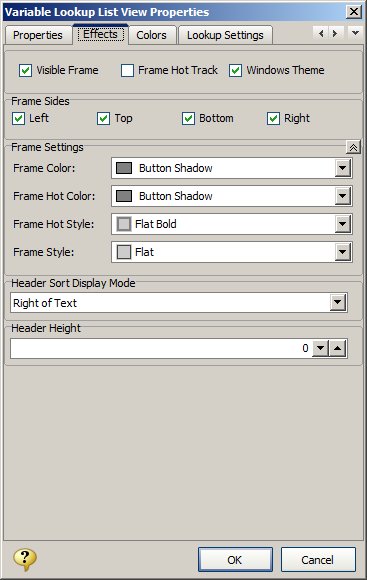
01. Start R:BASE eXtreme 9.1 (32/64), Build: 9.1.5.11212 or higher ...

02. CONNect the database, and then open the form in form designer

03. Right-click on Variable Lookup List View control and select Object
Property

04. Click on [Effects] tab and notice the option for Header Size (screen
pixels)

05. The default is set to 0 (dynamic). However, you may adjust the
Header Size
     depending on the selected font used in List View, and most
importantly the
     Operating System, such as Windows 7 (Professional).

     Example:
http://www.razzak.com/tips/Variable_Lookup_ListView_Header_Size.jpg

That's all there is to it!

Enjoy and make sure to have fun.

Very Best R:egards,

Razzak.

--- RBASE-L
================================================
TO POST A MESSAGE TO ALL MEMBERS:
Send a plain text email to [email protected]

(Don't use any of these words as your Subject:
INTRO, SUBSCRIBE, UNSUBSCRIBE, SEARCH,
REMOVE, SUSPEND, RESUME, DIGEST, RESEND, HELP)
================================================
TO SEE MESSAGE POSTING GUIDELINES:
Send a plain text email to [email protected] In the message SUBJECT, put
just one word: INTRO ================================================
TO UNSUBSCRIBE:
Send a plain text email to [email protected] In the message SUBJECT, put
just one word: UNSUBSCRIBE
================================================
TO SEARCH ARCHIVES:
Send a plain text email to [email protected] In the message SUBJECT, put
just one word: SEARCH-n (where n is the number of days). In the message
body, place any text to search for.
================================================