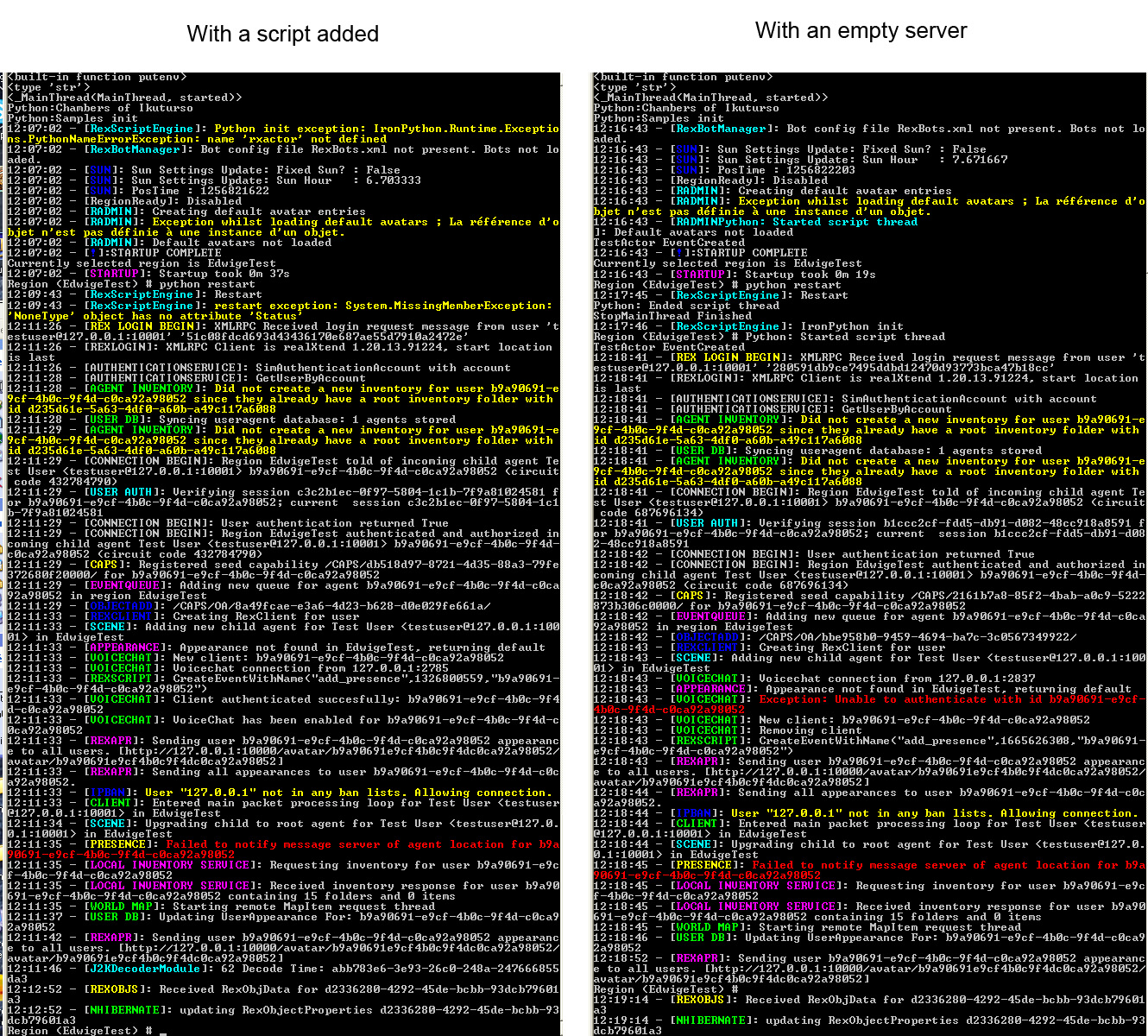
Edwige Lelievre - ENER lab wrote:
> I import rxactor in my scripts, is that the issue ? It worked fine on
>
Apparently you don't use rxactor anywhere in your code, so the import is
there in vain.

Python works so that nothing pollutes your namespace: when you say
'import rxactor', the *only* thing it does to your namespace is that
there is now in object called 'rxactor' you can use (and it's a module
that has been loaded in the memory, the code in it executed).

By doing a search for 'rxactor' in this email it seemed that nothing was
using that module for anything, there is nothing saying
rxactor.SomeThing(), so there is no way anything in the code here would
be using it.

~Toni


> 0.4 server and these are scripts from rex wiki.
>
> This is a script I tested (but I tested at least 5 differents scripts)
> and there is a problem with server 0.5. I tested with 3 different
> computers on windows xp and vista.
>
> ---------------------------------------------------------------
> # script that turns on post processing effect for everyone that enters
> the world
>
>
> import rxactor
> import rxavatar
> import rxworldinfo
> import sys
> import math
> import clr
>
> asm = clr.LoadAssemblyByName('OpenSim.Region.ScriptEngine.Common')
> Vector3 = asm.OpenSim.Region.ScriptEngine.Common.LSL_Types.Vector3
>
> class PostPro(rxworldinfo.WorldInfo):
>     def GetScriptClassName():
>         return "edwigePostprocess.PostPro"
>
>     def EventCreated(self):
>         super(self.__class__,self).EventCreated()
>         self.MyWorld.MyEventManager.onAddPresence +=
> self.handleOnAddPresence
>
>     def EventDestroyed(self):
>         self.MyWorld.MyEventManager.onAddPresence -=
> self.handleOnAddPresence
>         super(Truc,self).EventDestroyed()
>
>     def handleOnAddPresence(self,vAvatar):
>         vAvatar.rexSetPostProcess(3,True)
>         #change the number here to change the post processing effect
>         #see Postprocess.compositor in the viewer media\materials
> \scripts\
>
> -----------------------------------------------------
>
> If the import rxactor is the issue, can I remove it without any change
> in the script behavior ?
>
> Thanks !
>
> Edwige
>
> On Oct 29, 1:49 pm, Mikko Pallari <[email protected]> wrote:
>
>> From the screen shot I can see that something is going wrong in the server
>> with the script added.
>>
>> For some reason it cant find the rxactor in some script. Did you use "import
>> rxactor" in script which you added?
>>
>> -Mikko
>>
>> On Thu, Oct 29, 2009 at 1:40 PM, Edwige Lelievre - ENER lab <
>>
>> [email protected]> wrote:
>>
>>
>>> Thank you both for your answers.
>>>
>>> James, I already know that, and the fact that my scripts work fine
>>> with the 0.4 server makes me think this is not the problem (or
>>> something change in the syntax with server 0.5 ?)
>>>
>>> Toni, this is a screenshot comparing the opensim.exe window with an
>>> empty server, and with a script added to the server :
>>> http://www.armaghia.fr/phd/python_modrex.jpg
>>>
>>> It looks like python initialization is a problem, but I don't know
>>> why...
>>>
>>> Edwige
>>>
>>> On 27 oct, 06:51, James_Ross <[email protected]> wrote:
>>>
>>>> Your problem is either one of two issues.
>>>>
>>>> 1) in the way that the server handles python scripts. The reason why
>>>> your python stops functioning is because the __init__ file is loaded
>>>> during server start-up. If you edit the __init__ file to add a new
>>>> python script to the server, you must restart the server. If you edit
>>>> a script and it has an error, it will tell you the error in the server
>>>> console window when you try to run the script.
>>>>
>>>> 2) When you added your files, you made a mistake in the __init__ file
>>>> or in the files you added. Be very careful of spacing, it has caused
>>>> scripts that I thought would work fine, not function at all.
>>>>
>>>> Possible Solution:
>>>>
>>>> Without your server running, make a copy of one of the files already
>>>> in the Samples folder. I suggest testobject.py as it will produce an
>>>> easy to see result. Rename this file to testMe.py.
>>>> Add the import command to your __init__.py file. These files are case-
>>>> sensitive. Start your server. If you made a mistake you will see an
>>>> error message in the server console window. Attempt to use your
>>>> script.
>>>>
>>>> Example of what to class to point the object to if you used the
>>>> testobject.py file.
>>>>
>>>>    testMe.Test
>>>>
>>>> Click on the object and see if it works.
>>>>
>>>> Hope this helps,
>>>> James
>>>>
>>>> On Oct 25, 12:31 pm, Edwige Lelievre - ENER lab
>>>>
>>>> <[email protected]> wrote:
>>>>
>>>>> Hi everyone,
>>>>>
>>>>> I'm trying Modrex right now (server 0.5 and viewer 0.42) and I have a
>>>>> really strange scripting issue : when I add any python script in my
>>>>> local server, python doesn't work anymore (for any script, even python
>>>>> restart doesn't work). I add my scripts in rexserver\ScriptEngines
>>>>> \PythonScript\Samples folder, and then add it to the __init__.py
>>>>>
>>>>> I added scripts the same way with the 0.4 server, and it worked just
>>>>> fine.
>>>>>
>>>>> But when I don't add no script to the server, python works, I can even
>>>>> modify the scripts, it's ok.
>>>>>
>>>>> Thanks in advance.
>>>>>
>>>>> Edwige Lelièvre of ENER research groupwww.armaghia.fr
>>>>>
> >


--~--~---------~--~----~------------~-------~--~----~
http://groups.google.com/group/realxtend
http://www.realxtend.org
-~----------~----~----~----~------~----~------~--~---