*Whats up?*
*
*
After the Virtual Gallery Weekend Berlin event was over, we got back to
Tundra client experience and our server hosting service development. We've
done some exiting things, so I figured to post something about them.
Our Tundra hosting has been developed now for a long time. One big problem
for me was that it was really hard to find Tundra worlds even if they
existed somewhere on the web. Our initial logins to Tundra scenes was
always done via a "web portal" like we like to call them. A good example
for this is http://login.realxtend.org/ that we host for the realXtend
foundation to have some demo and sandbox scenes. The problem with this is
that the end users needs to know the URL to that login portal or they will
never end up there, sure we advertised that login portal on the mailing
lists here every now and then, but its still too hard. Additionally the
flow to visit a world is not very good when you first have to authenticate
yourself to a web page, then your main application start. Why cant the
client do this?

Well now it can. We have made a new client user interface/experience from
scratch. This login portal inside Tundra is only shipped in Adminotech
client releases. You need to keep in mind everything we do with Tundra is
open sourced via pull requests and the main Tundra benefits from virtually
everything we do with Tundra. Good example of this is the rewritten
MumblePlugin that we made, that finally got us working fully open source
VOIP to Tundra. My point here is, the login UI we have made
to accommodate simpler access to Adminotech hosted Tundra servers is not
something that belongs to the core. Not in my or any other devs opinion.
Adminotech hosted servers have nothing to do with the core Tundra, we just
ship a different looking login UI than the "classic" write your IP:PORT and
username here :)

*Get started*
*
*
http://tundra-adminotech.s3.amazonaws.com/post-images/admino-tundra-auth.png.

*
*
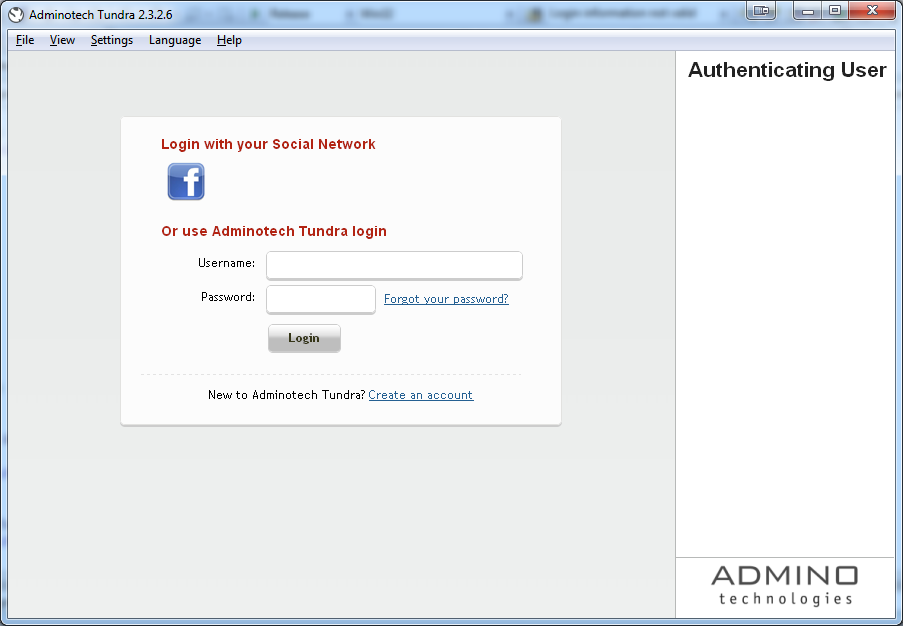
Enough of that for now then, lets get to the features. When you install and
run Adminotech Tundra (version where this feature ships is 2.3.2.6 to be
exact) you will land to a authentication page. Here you authenticate
yourself with facebook (more 3rd party auths coming, like gmail) or with a
Adminotech account. If you are skeptic about giving facebook auth, as I
know some are, you can create a new adminotech account from the same UI.
There is nothing to be scared about the facebook authentication though, we
only request your email and your public profile picture (that is always
public, even on your web profile). Facebook password is never given to us
(of course right? :), it uses OAuth and takes a small trip on facebook own
login page to verify who you are. Once you are logged in you will be
remembered for as long as you click the "logout" link below your profile
picture or if you auth to any web login portals, your Tundra login will be
expired and you need to relogin.

*Selecting a Tundra scene and login*
*
*
http://tundra-adminotech.s3.amazonaws.com/post-images/admino-tundra-login-lobby.png

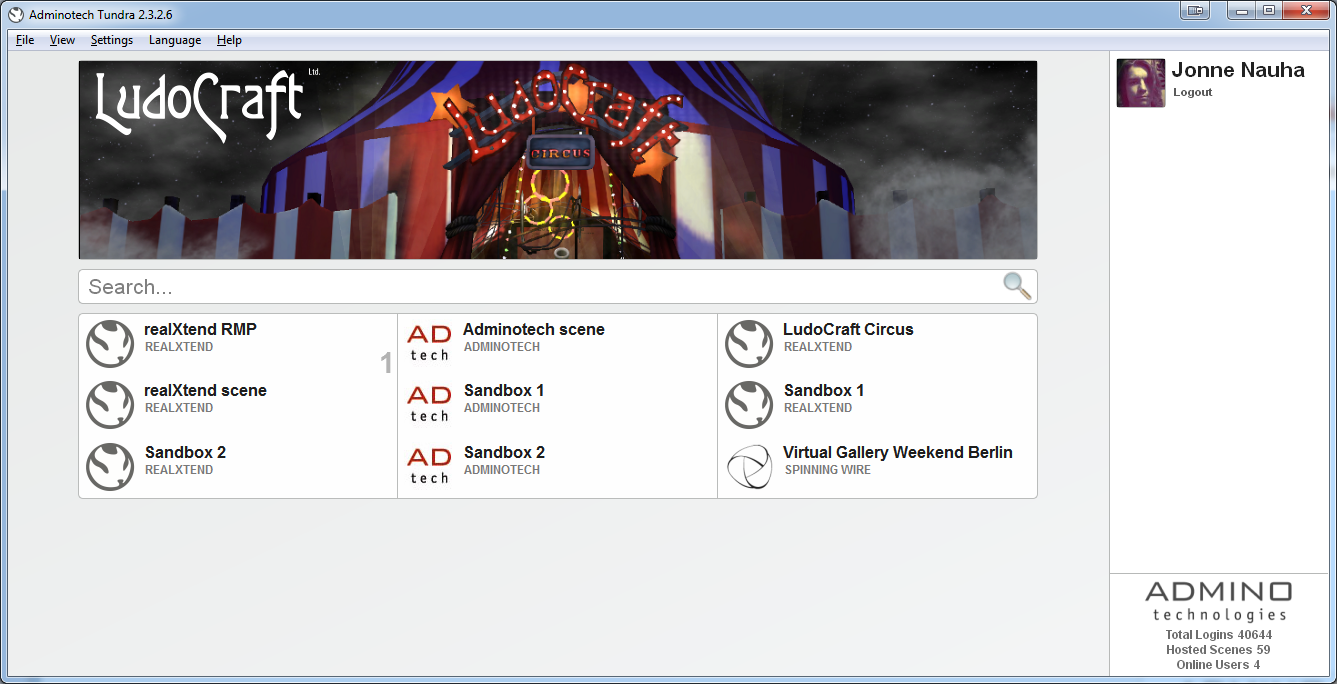
Next you will land to a view that will show you all the public servers in
our hosting. Public means the client is ok with giving public visibility
and login access to their scene. Currently there are 9 public scenes, but
as you can see from the bottom right corner stats we have about 60 scenes
hosted total, so we expect the public visibility to grow in the future. The
top part of the view is reserved for promoted servers. Currently Ludocraft
Circus, rex/ensad RMP and Virtual Gallery Weekend Berlin are shown there to
give people the idea. Basically its a nice place to highlight new scene or
ongoing virtual events. The promotions and the servers listings are of
course always fetched live from our backend, no client releases needed for
updates :)

http://tundra-adminotech.s3.amazonaws.com/post-images/admino-tundra-server-info.png

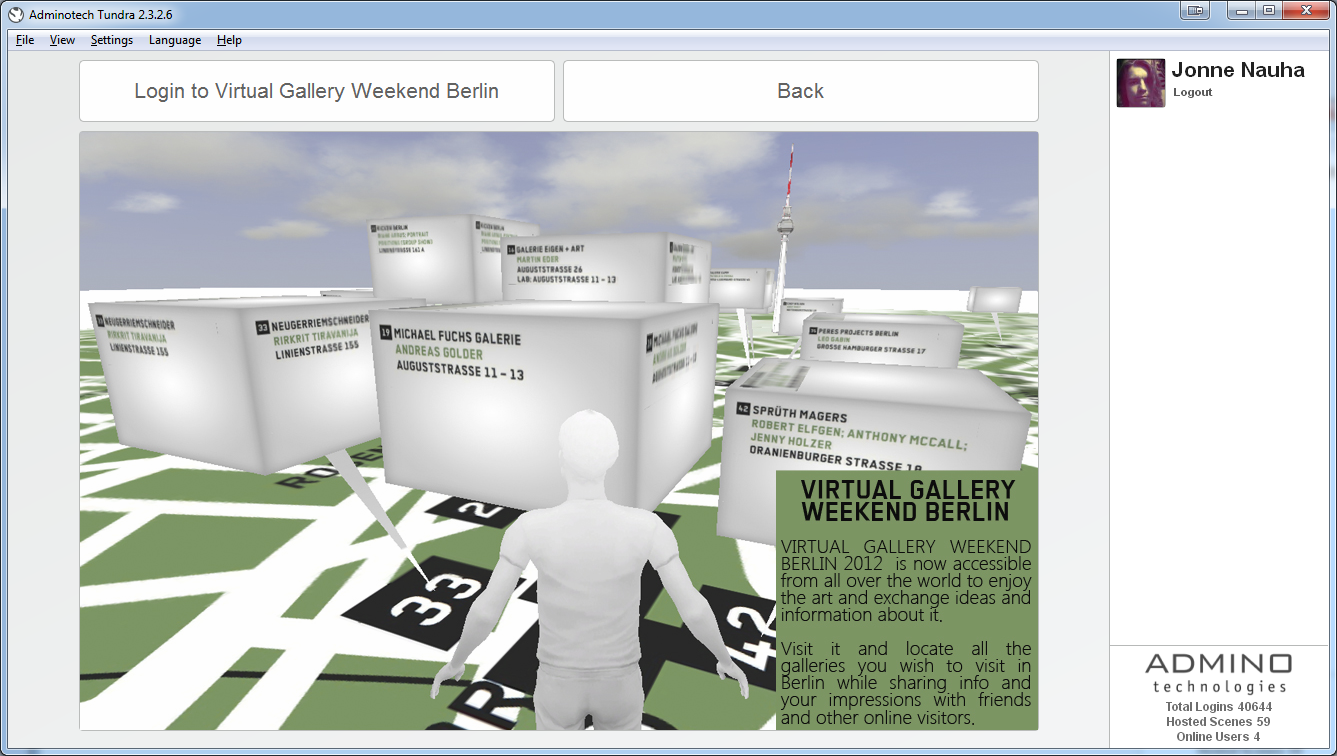
Clicking a promotion image or server in the grid view will take you to a
focus view. If the server is promoted it will show custom graphics that
will tell you more about the scene or anything the client wants to relay to
the user. If the server is not promoted it will show a screen shot of the
last time you visited the scene, meaning the image area will be blank if
you haven't visited that world yet. This view gives you the login option or
you can go back to the main view. The grid view of the servers also shows
you what worlds currently have other avatars, the ones with users are
always sorted first in the list.

http://tundra-adminotech.s3.amazonaws.com/post-images/admino-tundra-filter-resizing.png

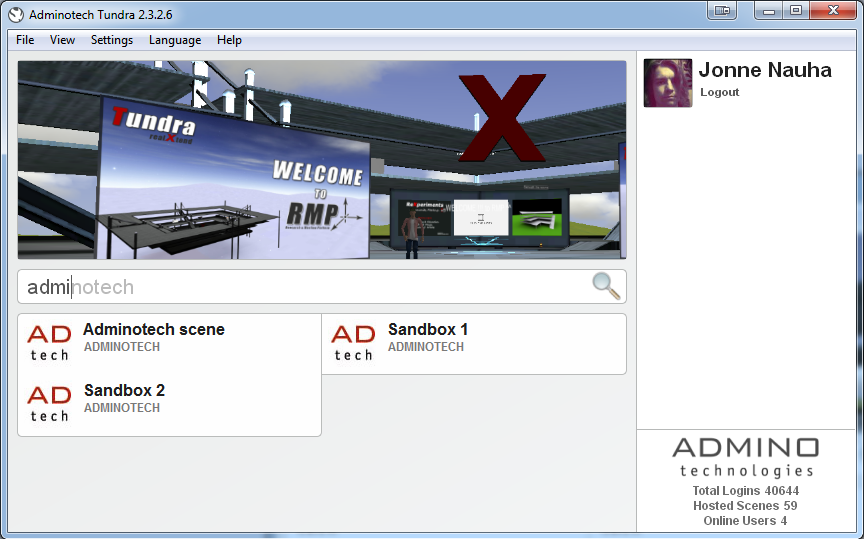
The UI will adapt to any sized screens as you can see on this screenshot.
It also has filtering feature with auto suggestions if you cant remember
something exactly. This search also works for avatar usernames that are
inworld, so you can quickly find the server your friend is in. Granted this
filter is not very useful when you only have 9 scenes in the grid view, but
for example as i have the full ~60 scenes it sure comes handy :)

*Download and try it*
*
*
Our client is available for both mac and windows. Mac now has a nicer pkg
installer, props to Cvetan for that. It will give you a more classic
next-next-finish kind of install UI. It will also do checks that your OS is
new enough to run Tundra etc.

Auto update is live for both Adminotech Tundra windows and mac as usual.
Additionally all web login portal client download links are also up to date
and point to the latest installers, so if you'd prefer you can use those.

Windows installer:
https://github.com/downloads/Adminotech/tundra/Adminotech-Tundra-2.3.2.6.msi
Mac installer:
https://github.com/downloads/Adminotech/tundra/Adminotech-Tundra-2.3.2.6.pkg

*Login portal future*
*
*
All login portals will remain working, this client will work well with web
initiated logins as well. We will evaluate later if we want to fade out the
web portals at some points, but right now there is no reason for that. They
have many uses still and people have gotten used to those, it will take
time to win people to the new way of doing things :) Also we need more
features to the Tundra login portal for it to replace web logins for good
(anonymous login etc.)

*Tundra contributions*
*
*
One big thing that we focused was making multiple logins with one Tundra
instance. The norm nowadays is to visit a world, close the client, then
login to another. That seems like a ass backwards way of doing things, and
its slow with booting up the client all the time. I've hunted some (crash)
bugs from the Tundra core that prevented us from simply logging out and
connecting to another view. With the new Tundra, you can keep tundra
running as long as you want :) This includes some threaded ogre asset load
crash fixes, cleaning the asset memory when you disconnect or eventually
your memory would end, some AssetAPI fixes to properly abort ongoing asset
transfers if disconnected etc. All these ill be putting into a pull request
in the upcoming days and send it to main Tundra.

*Adminotech hosting*
*
*
We have also made major improvements to our backend and we have more in the
pipes. Soon our clients will be able to create new scenes, mark down
applications from a web admin UI into that scene and the apps will be
running next time you login :) This might be exiting for you SL/OpenSim
type of folks that want the basic virtual worlds experience: avatar, chat,
voip and terrain (possibly giving a height map to the admin web page etc.)
with a click of a button. Then you can start building your worlds from
there, we accommodate cloud hosting space for your scenes and assets. Now
relative refs also work perfectly in our scenes so you don't have to work
with cumbersome long URL to make things. This is not a company view (yet?
:) but I'm dreaming of making solid primitive building tools to top the
thing off, for ease of use for users that don't have 3D modeling
experience, or just no need to make complicated meshes but are happy
building with the good old prims. Who knows maybe someone in Tundra core
beats me to it.

If your company/organisation/project/etc. is interested in Tundra hosting
please contact us admino (at) adminotech.com / http://www.adminotech.com. We
don't offer anything official for individual people yet, but we will be
working on that for the future. Individuals of course can also be in touch
and let us know if you are interested.

*Long rant...*
*
*
Well it was, congrats if you read it to the end :) We will be making new
features and develop this client UI further. Like allowing a manual login
with ip+port+username to be done, people/devs need it, just didnt have time
to put it in to the first release. Anyhow please let us know what you think
and report bugs here or to our issue tracker
https://github.com/Adminotech/tundra/issues

Best regards,
Jonne Nauha
Adminotech developer

--
http://groups.google.com/group/realxtend
http://www.realxtend.org