Github user hirakendu commented on the pull request:
https://github.com/apache/spark/pull/79#issuecomment-39390268
In terms of running time performance, here are some scalability results for
a large scale dataset. Results look satisfactory :).
The code was tested on a dataset for a binary classification problem. A
regression tree with `Variance` (square loss) was trained because it's
computationally more intensive. The dataset consists of about `500,000`
training instances. There are 20 features, all numeric. Although there are
categorical features in the dataset and the algorithm implementation supports
it, they were not used since the main program doesn't have options.
The dataset is of size about 90 GB in plain text format. It consists of 100
part files, each about 900 MB. To _optimize_ number of tasks to align with
number of workers, the task split size was chosen to be 160 MB to have 300
tasks.
The model training experiements were done on a Yahoo internal Hadoop
cluster. The CPUs are of type Intel Xeon 2.4 GHz. The Spark YARN adaptation was
used to run on Hadoop cluster. Both master-memory and worker-memory were set to
`7500m` and the cluster was under light to moderate load at the time of
experiments. The fraction of memory used for caching was `0.3`,
leading to about `2 GB` of memory per worker for caching. The number of
workers used for various experiments were `20, 30, 60, 100, 150, 300, 600` to
evenly align with 600 tasks. Note that with 20 and 30 workers, only `48%` and
`78%` of the 90 GB data could be cached in memory. The decision tree of depth
10 was trained and minor code changes were made to record the individual level
training times. The training command (with additional JVM settings) used is
time \
SPARK_JAVA_OPTS="${SPARK_JAVA_OPTS} \
-Dspark.hadoop.mapred.min.split.size=167772160 \
-Dspark.hadoop.mapred.max.split.size=167772160" \
-Dspark.storage.memoryFraction=0.3 \
spark-class org.apache.spark.deploy.yarn.Client \
--queue ${QUEUE} \
--num-workers ${NUM_WORKERS} \
--worker-memory 7500m \
--worker-cores 1 \
--master-memory 7500m \
--jar ${JARS}/spark_mllib_tree.jar \
--class org.apache.spark.mllib.tree.DecisionTree \
--args yarn-standalone \
--args --algo --args Regression \
--args --trainDataDir --args ${DIST_WORK}/train_data_lp.txt \
--args --testDataDir --args ${DIST_WORK}/test_data_0p1pc_lp.txt \
--args --maxDepth --args 10 \
--args --impurity --args Variance \
--args --maxBins --args 100
The training times for training each depth and for each choice of number of
workers is in the attachments
[workers_times.txt](https://raw.githubusercontent.com/hirakendu/temp/master/spark_mllib_tree_pr79_review/workers_times.txt).
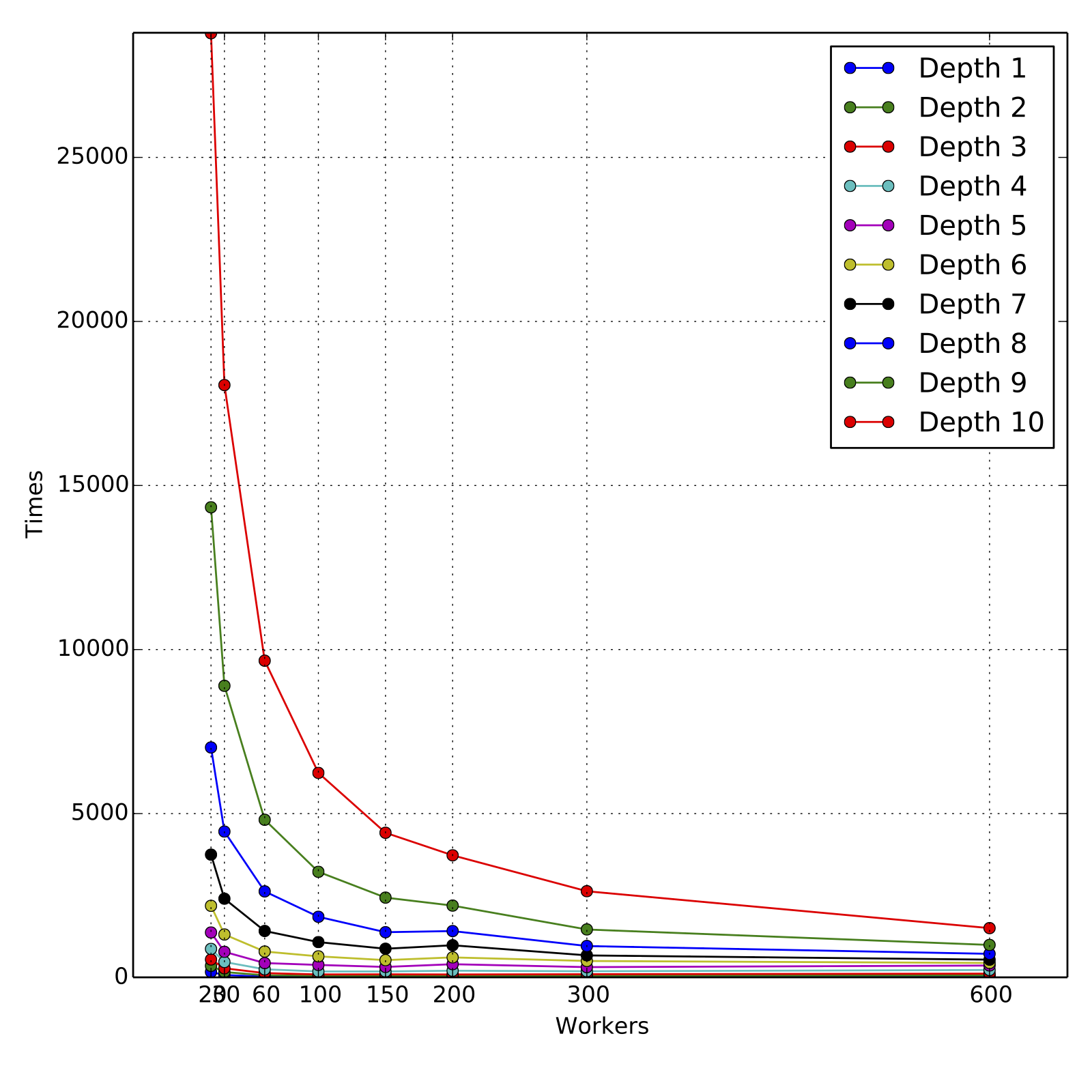
The attached graphs demonstrate the scalability in terms of
cumulative training times for various depths and various number of workers.
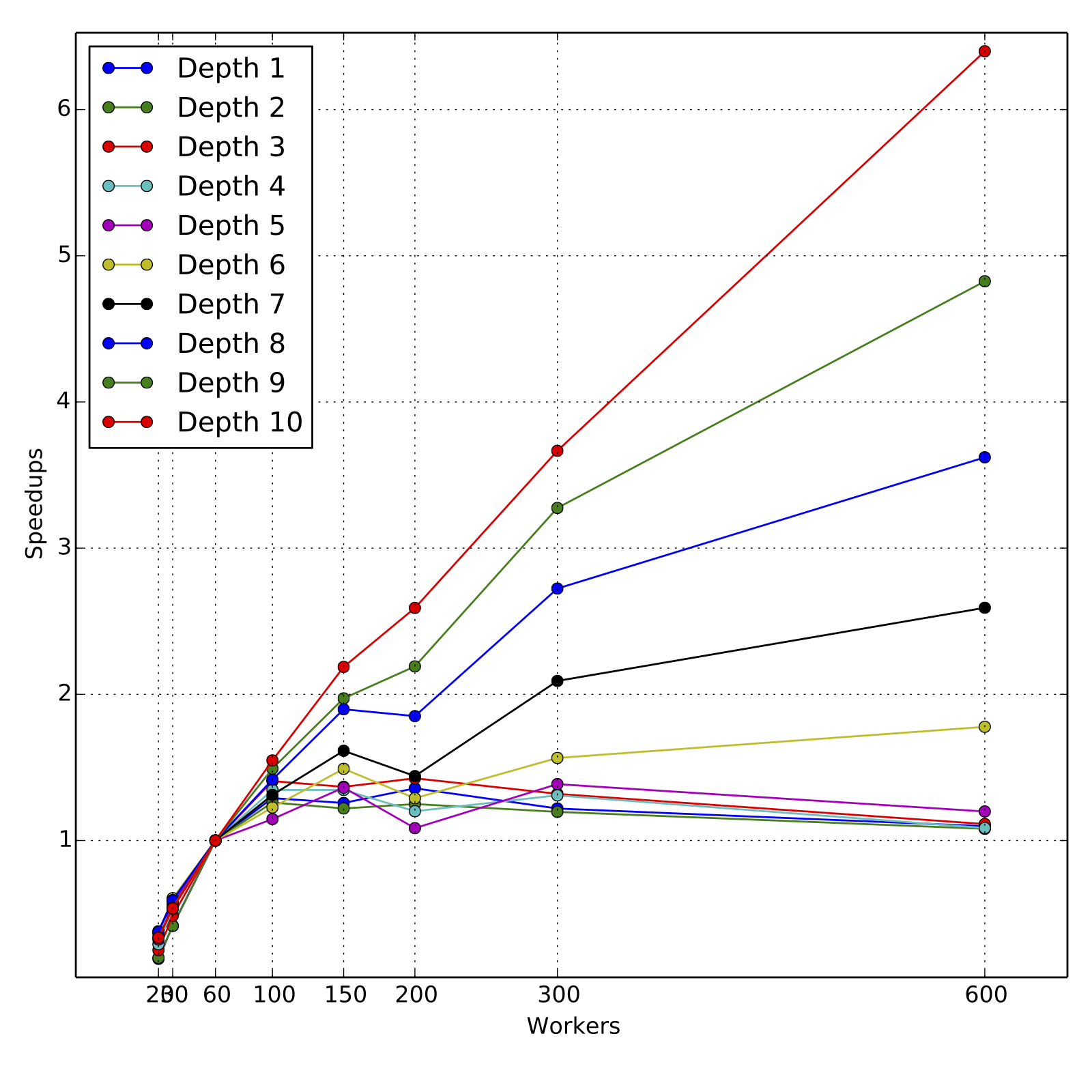
For obtaining the speed-ups, the training times are compared to those for
60 workers, since the data could not be cached completely for 20 and 30
workers. For all experiments, the resources requested
were fully allocated by the cluster and all experiments ran to completion
in their first and only run.
As we can see, the scaling is nearly linear for higher depths 9 and 10,
across the range of 60 workers to 600 workers, although the slope is less than
1 as expected. For such loads, 60 to 100 workers are a reasonable computing
resource and the total training times are about 160 minutes and 100 minutes
respectively. Overall, the performance is satisfactory, in particular when trees
of depth 4 or 5 are trained for boosting models. But clearly, there is room
for improvement in the following sense. The dataset when fully cached takes
about 10s for a count operation, whereas the training time for first level that
involves simple histogram calculation of three error statistics takes roughly
30 seconds.
The error performance in terms of RMSE was verified to be close to that of
alternate implementations.
---
If your project is set up for it, you can reply to this email and have your
reply appear on GitHub as well. If your project does not have this feature
enabled and wishes so, or if the feature is enabled but not working, please
contact infrastructure at [email protected] or file a JIRA ticket
with INFRA.
---


