itholic commented on a change in pull request #31827:
URL: https://github.com/apache/spark/pull/31827#discussion_r603915655
########## File path: docs/sql-data-sources-csv.md ########## @@ -0,0 +1,54 @@ +--- +layout: global +title: CSV Files +displayTitle: CSV Files +license: | + Licensed to the Apache Software Foundation (ASF) under one or more + contributor license agreements. See the NOTICE file distributed with + this work for additional information regarding copyright ownership. + The ASF licenses this file to You under the Apache License, Version 2.0 + (the "License"); you may not use this file except in compliance with + the License. You may obtain a copy of the License at + + http://www.apache.org/licenses/LICENSE-2.0 + + Unless required by applicable law or agreed to in writing, software + distributed under the License is distributed on an "AS IS" BASIS, + WITHOUT WARRANTIES OR CONDITIONS OF ANY KIND, either express or implied. + See the License for the specific language governing permissions and + limitations under the License. +--- + +<div class="codetabs"> + +<div data-lang="scala" markdown="1"> + +Spark SQL provides `spark.read.csv("file_name")` to read a CSV file into Spark DataFrame and `dataframe.write.csv("path")` to save or write to the CSV file. Function `option()` provides customized behavior during reading csv files. The customized behavior includes but not limit to configuring header, delimiter, charset. The detailed usage about `option()` can be found in [spark-csv](https://github.com/databricks/spark-csv), notice that some contents might be outdated in spark-csv. + +`spark.read.csv()` also can be used to read all files in a directory by passing a directory path. Please notice that Spark will not check the file name extension and all files will be read into dataframe. + +{% include_example csv_dataset scala/org/apache/spark/examples/sql/SQLDataSourceExample.scala %} + +</div> + +<div data-lang="java" markdown="1"> + +Spark SQL provides `spark.read().csv("file_name")` to read a CSV file into Spark DataFrame and `dataframe.write().csv("path")` to save or write to the CSV file. Function `option()` provides customized behavior during reading csv files. The customized behavior includes but not limit to configuring header, delimiter, charset. The detailed usage about `option()` can be found in [spark-csv](https://github.com/databricks/spark-csv), notice that some contents might be outdated in spark-csv. Review comment: +1 for the comment from @srowen . @twoentartian, How about write the contents simply such as "Spark SQL support read and write methods for CSV file, to read a CSV file into Spark DataFrame and to write the Spark DataFrame to the CSV file. `option()` can be used to customize behavior of reading or writing, such as controlling behavior of the header, delimiter character, character set, and so on." outside of the language-specific block, after then maybe we can just simply show the code example for each language. Refer to the "Hive Tables" page for the reference. 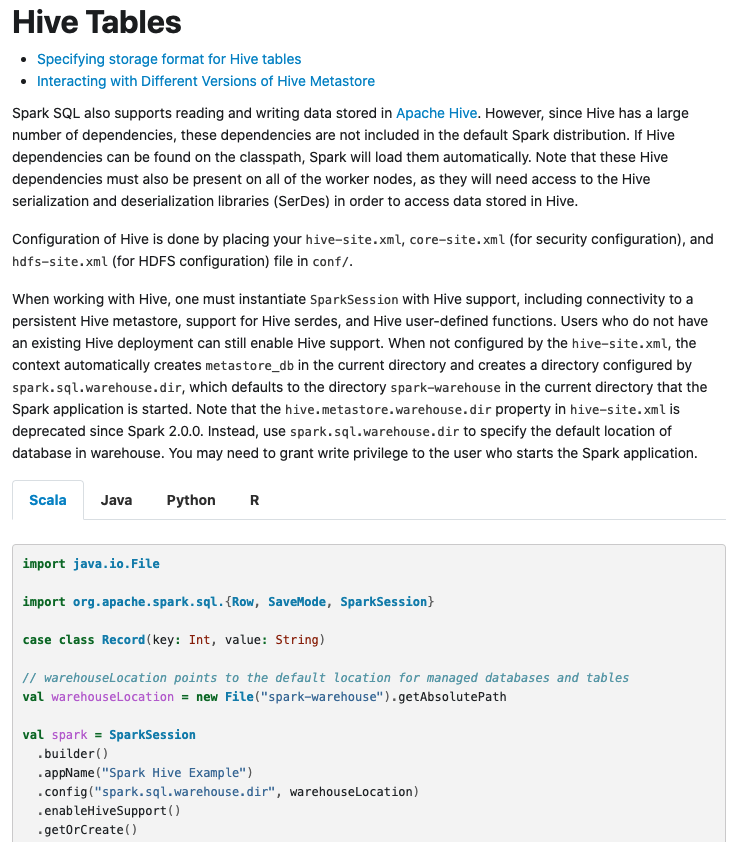 -- This is an automated message from the Apache Git Service. To respond to the message, please log on to GitHub and use the URL above to go to the specific comment. For queries about this service, please contact Infrastructure at: [email protected] --------------------------------------------------------------------- To unsubscribe, e-mail: [email protected] For additional commands, e-mail: [email protected]

