Github user jerryshao commented on the issue:
https://github.com/apache/spark/pull/10506
@jiangxb1987 , to reproduce this issue, you can:
1. Configure to enable standalone HA, for example
"spark.deploy.recoveryMode FILESYSTEM" and "spark.deploy.recoveryDirectory
recovery"
1. Start a local standalone cluster (master and worker on one the same
machine).
2. Submit a spark application with standalone cluster mode, for example
"./bin/spark-submit --master spark://NT00022.local:6066 --deploy-mode cluster
--class org.apache.spark.examples.SparkPi
examples/target/scala-2.11/jars/spark-examples_2.11-2.3.0-SNAPSHOT.jar 10000"
3. During application running, stop the master process and restart it.
4. Wait for application to finish, you will see the unexpected core/memory
number in master UI.
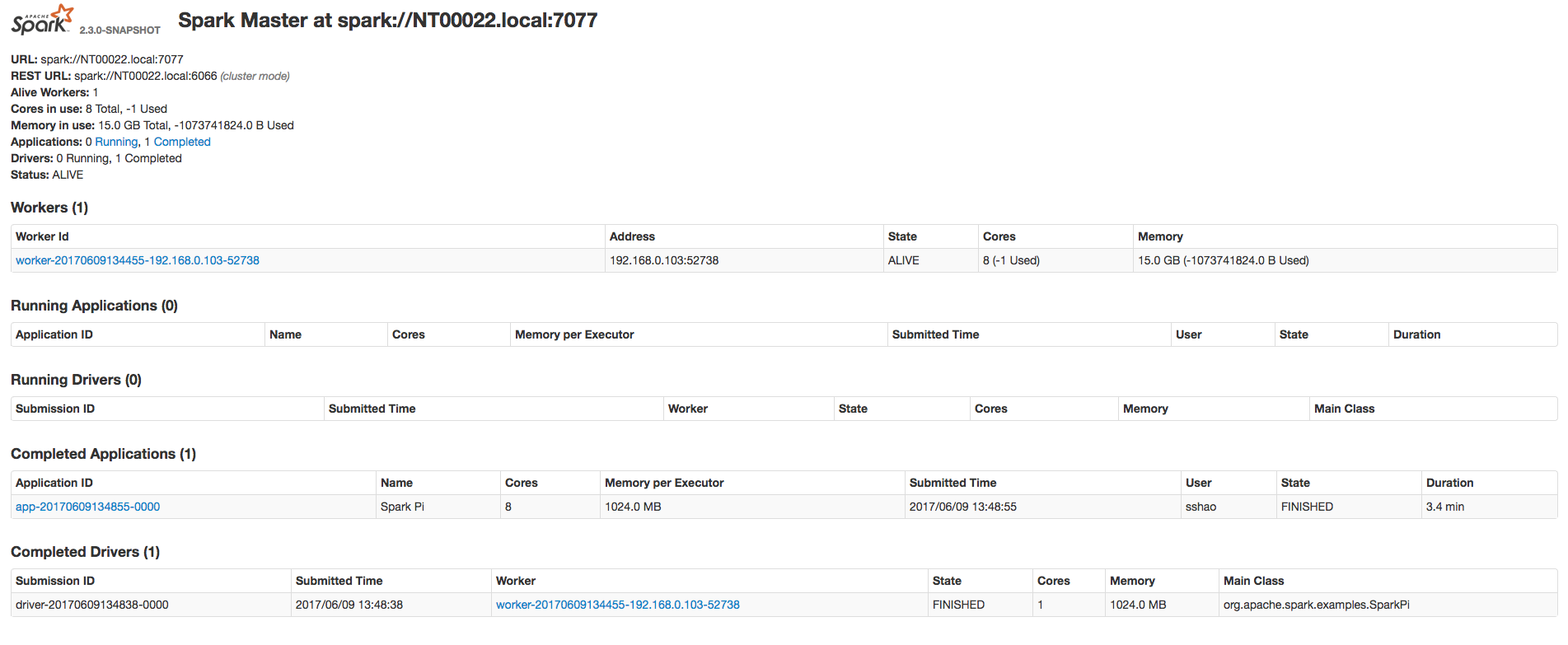
This is mainly because when Master recover Driver, Master don't count the
resources (core/memory) used by Driver, so this part of resources are free,
which will be used to allocate a new executor, when the application is
finished, this over-occupied resource by new executor will make the worker
resources to be negative.
Besides, in the current Master, only when new executor is allocated, then
application state will be changed to "RUNNING", recovered application will
never have the chance to change the state from "WAITING" to "RUNNING" because
there's no new executor allocated.
Can you please take a try, this issue do exist and be reported in JIRA and
mail list several times.
---
If your project is set up for it, you can reply to this email and have your
reply appear on GitHub as well. If your project does not have this feature
enabled and wishes so, or if the feature is enabled but not working, please
contact infrastructure at [email protected] or file a JIRA ticket
with INFRA.
---

---------------------------------------------------------------------
To unsubscribe, e-mail: [email protected]
For additional commands, e-mail: [email protected]

