Hello Vratislav,

----- Original Message -----
> From: "Lee Kinser" <[email protected]>
> To: "SCAP Security Guide" <[email protected]>
> Cc: "oscap-anaconda-addon" <[email protected]>,
> "open-scap-list"
> <[email protected]>
> Sent: Wednesday, February 26, 2014 2:53:24 PM
> Subject: Re: Ignoring SCAP content in the OAA
>
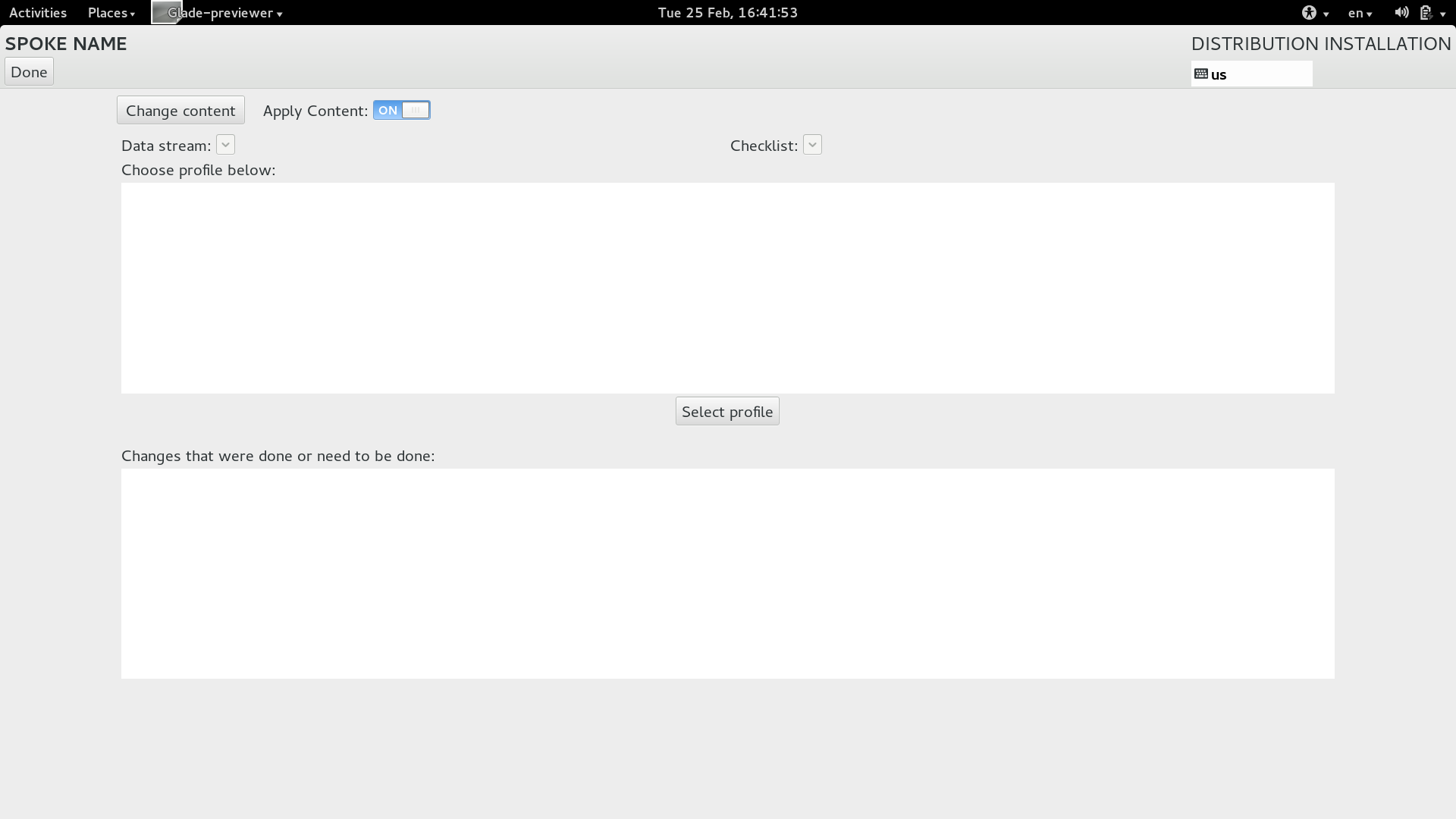
  to share my vote / opinion - I also like the second option (ON / OFF) more.

> Personally, I like the look of option 2, but would go with wording like
> "Select Security Policy" and "Apply Security Policy".

"Select Security Policy / Apply Security Policy" proposed by Lee look fine to
me.

Thank you && Regards, Jan.
--
Jan iankko Lieskovsky / Red Hat Security Technologies Team

>  Just my .02.
>
>
> --
> Lee Kinser
> Solutions Architect
> Navy & Marine Corps
> Red Hat Federal
> 843-868-1024 (Mobile)
> [email protected]
>
>
> ----- Original Message -----
> > From: "Vratislav Podzimek" <[email protected]>
> > To: "oscap-anaconda-addon" <[email protected]>
> > Cc: "scap-security-guide" <[email protected]>,
> > "open-scap-list" <[email protected]>
> > Sent: Wednesday, February 26, 2014 4:07:02 AM
> > Subject: Ignoring SCAP content in the OAA
> >
> > Hello everybody,
> > I'd like to ask you for a favour. In the development cycle of the
> > release 0.5 of the OSCAP Anaconda Addon, I've added an autodetection of
> > the SCAP Security Guide content which means that if the
> > scap-security-guide package is installed in the compose and no other
> > content is specified in the kickstart file, the addon automatically
> > loads SSG content. I believe this brings us a big improvement in UX for
> > testing and finally moves us closer to including the OAA+SSG in the
> > default composes for next Fedora (and others) release.
> > However, this also brings the need to allow user changing the content
> > used by the addon (to switch from autodetected SSG to some different
> > content) and "not applying" content to the system (to easily turn of the
> > functionality once it gets included in the default composes). Turns out
> > it's quite hard to come up with the right widgets and proper labels
> > (wording) that would explain user what's going on.
> > The two mockup suggestions I've made so far are:
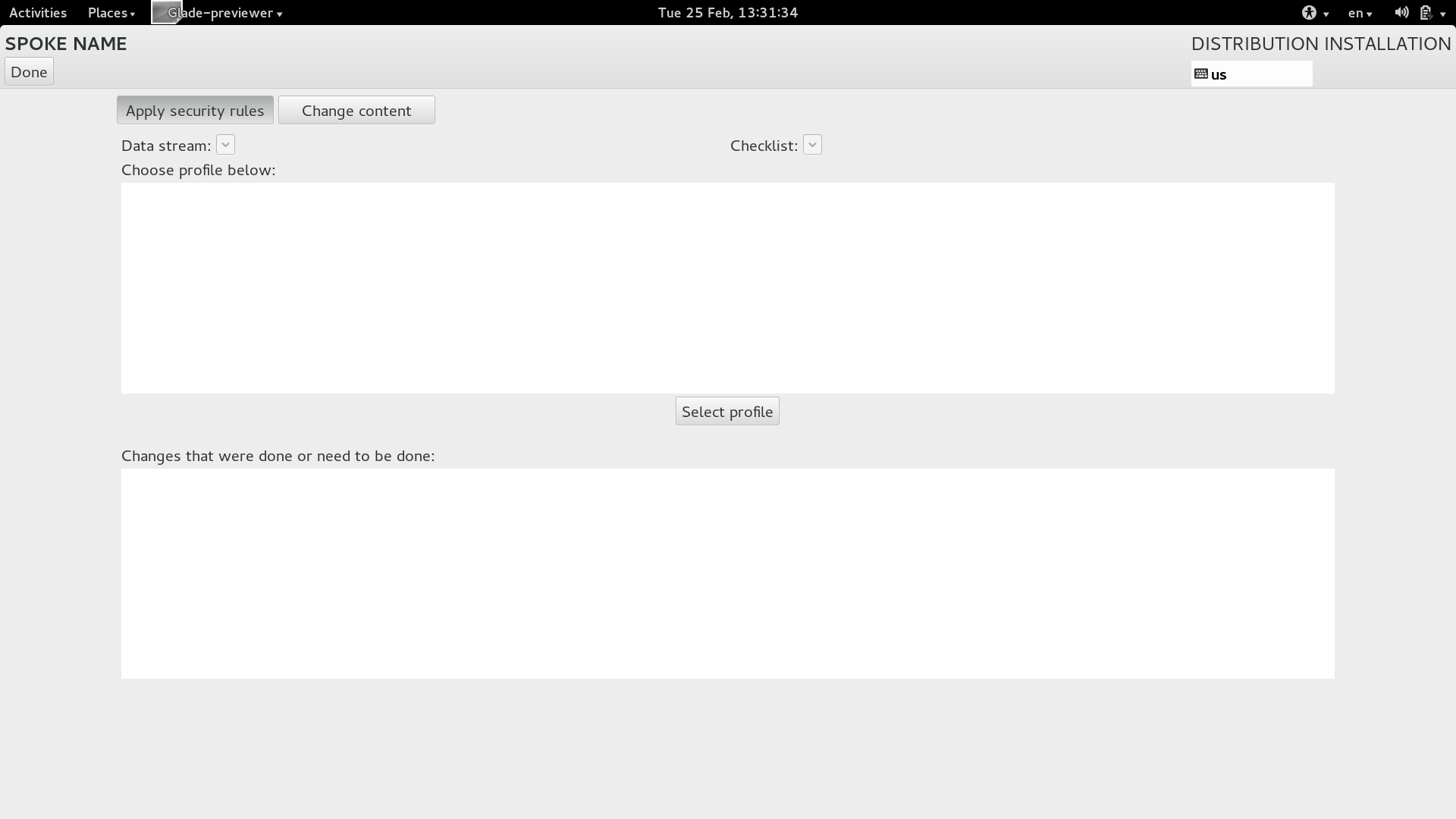
> > 1. http://vpodzime.fedorapeople.org/OAA_control_buttons.png
> > 2. http://vpodzime.fedorapeople.org/OAA_control_buttons2.png
> >
> > The 1. uses a GtkToggleButton that can be pushed down and stays in that
> > state and I think it should have some better wording catching the
> > process -- something like "Applying security rules"/"Ignoring security
> > rules" -- that would change when the button is toggled.
> >
> > The 2. uses a switch which relies on the related label next to it and
> > again even in this case, the right wording of the label is the key, I
> > think. What about "Apply security rules"?
> >
> > Please keep in mind the fact, that we would like this screen to be shown
> > even to unexperienced users who have no idea about SCAP and the special
> > terms/keywords it uses. We don't want to confuse users and we want to
> > give them an easy way to opt out.
> >
> > Any suggestions welcome! I'd like to release OAA 0.5 by the end of this
> > week, so it will come with the best layout and wording we will be able
> > to come up till that time.
> >
> > Thanks,
> >
> > --
> > Vratislav Podzimek
> >
> > Anaconda Rider | Red Hat, Inc. | Brno - Czech Republic
> >
> > _______________________________________________
> > scap-security-guide mailing list
> > [email protected]
> > https://lists.fedorahosted.org/mailman/listinfo/scap-security-guide
> >
> _______________________________________________
> scap-security-guide mailing list
> [email protected]
> https://lists.fedorahosted.org/mailman/listinfo/scap-security-guide
>
_______________________________________________
scap-security-guide mailing list
[email protected]
https://lists.fedorahosted.org/mailman/listinfo/scap-security-guide