Thank you for the answer :) Maybe I could create a plugin for this feature,
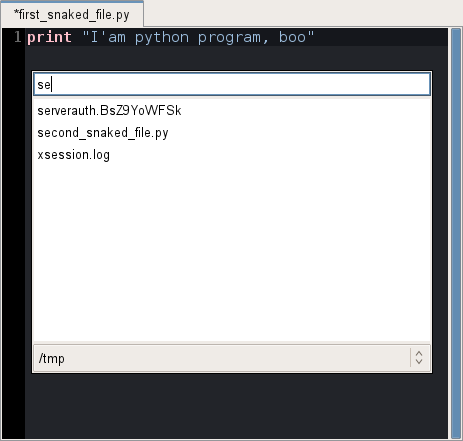
the aim would be to quickly have a listing of files matching a given name,
watching the PYTHONPATH for the folders where to search
Le jeudi 14 novembre 2013 15:41:38 UTC+1, Carlos Córdoba a écrit :
>
> Hi Colin
>
> There is no feature like that at moment. As I've seen it in other IDEs,
> it's used to open a given file from your current project. Unfortunately
> our support for projects is quite limited but we hope to improve it in
> the future.
>
> However, if you are using an IPython console in Spyder, you can type in
> it:
>
> %edit /tmp/foo.txt
>
> and foo.txt will be opened in our Editor.
>
> Cheers,
> Carlos
>
> El 14/11/13 05:18, Colin Guyon escribió:
> > Hello, I didn't find existing related issues/discussions about this
> > subject: is a "quick open" feature planned ? In code editors there is
> > a often a shortcut permitting to directly enter a file name to open
> > it, instead of using the file browser (or classic ctrl+o).
> > For example in snaked:
> > http://pythonhosted.org/snaked/_images/quick-open.png
> >
> > I saw the open_in_spyder function, that could be helpfull maybe...
> > Thank you :)
> > --
> > You received this message because you are subscribed to the Google
> > Groups "spyder" group.
> > To unsubscribe from this group and stop receiving emails from it, send
> > an email to [email protected] <javascript:>.
> > To post to this group, send email to [email protected]<javascript:>.
>
> > Visit this group at http://groups.google.com/group/spyderlib.
> > For more options, visit https://groups.google.com/groups/opt_out.
>
>

--
You received this message because you are subscribed to the Google Groups
"spyder" group.
To unsubscribe from this group and stop receiving emails from it, send an email
to [email protected].
To post to this group, send email to [email protected].
Visit this group at http://groups.google.com/group/spyderlib.
For more options, visit https://groups.google.com/groups/opt_out.