On 12/01/14 20:00, Allen wrote:
Michael Lueck wrote:
Greetings Paul,
Paul Bergsagel wrote:
I have never experienced this behavior with Junk email warnings. Make
sure you have the preference set "When I mark messages as junk: Move
them to the account's 'Junk' folder"
I have it configured thusly.


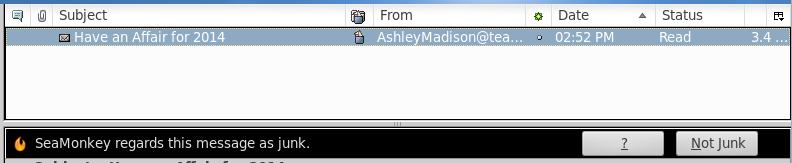
Here is a sort of screen shot of it playing its nonsense with me...

http://www.lueckdatasystems.com/pub/bugs/SMJunkOpensPreviewWindowPane/ScreenshotSMJunkOpensPreviewWindowPaneCrop.jpg


1) The preview pane is opened
2) The new Mozilla text stating that "gee, I think this is junk"

Never mind the junk status icon, I had to mock up the small screen
capture.

Normal behavior had been to simply move it to the junk folder. I find
annoying that SM is suddenly opening the preview pane and saying "gee, I
think this is junk". Ddduuuaaa, seriously Mozilla!?

Blessings,
I have the same issue on three machines. Does anyone know of a
configuration setting to eliminate the preview pane entirely?  The
settings under "Layout" don't seem to stick when tagging a message as
junk. I've always worried about security with the preview pane
displaying content that I don't want to view and I fear it's doing just
that in the background or in some one-line preview pane.

Allen
Allen, if you currently have your SM display set up for three panes
(Accounts, Threads and Messages Panes), you can get rid of the Messages
Pane by dragging the bar between the Threads Pane and the Accounts Pane
to the bottom of the screen. Then, when you click on a message in the
Threads Pane, a new window should open, displaying the selected message.
Alternatively, if you want to keep the three pane view but not see any
messages until you click on one, go to Edit->Preferences->Mail &
Newsgroups and, under Mail Start Pane, tick the "When Mail launches,
.....". This will cause the Start Page message to be displayed in the
Message Pane until you select an e-mail/news post to display.
HTH

--
Daniel

Seasons Greetings to one and all!!
User agent: Mozilla/5.0 (Windows NT 6.1; WOW64; rv:26.0) Gecko/20100101
Firefox/26.0 SeaMonkey/2.23 Build identifier: 20131203183810
or
User agent: Mozilla/5.0 (X11; Linux x86_64; rv:25.0) Gecko/20100101
Firefox/25.0 SeaMonkey/2.22 Build identifier: 20131023190942
_______________________________________________
support-seamonkey mailing list
[email protected]
https://lists.mozilla.org/listinfo/support-seamonkey