Aadhaar Must for Booking Online Train Tickets - How to enable?
<https://4.bp.blogspot.com/-nuyyuxpS_6A/WLu4czLJJaI/AAAAAAAADdE/mG-llbZBSUESd3SoWKjUqN04_kLT4z4OgCLcB/s1600/adhaar%2Bcard.png>
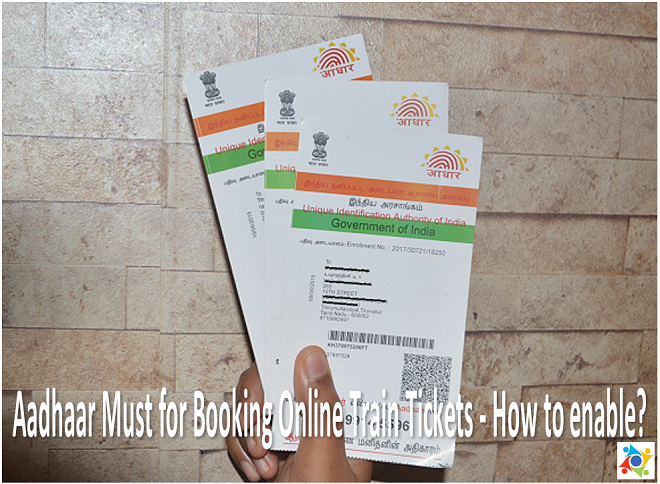
*The Indian Railways is planning to move further Aadhaar based train ticket
booking system through online to prevent touts. Now, IRCTC requested to all
passengers who are all registered with this portal, entry their passenger
detail with Aadhaar number.*

Aadhaar verification is going to be mandatory to avail Senior Citizen
concession in Railway booking soon, Please provide Aadhaar ID to add and
verify Senior Citizen Passenger details through IRCTC Web portal. You can
add the passengers list with Aadhaar number. Aadhaar verification is
available only for Senior Citizens and not for all.

How to enable Aadhaar Authentication Service for Senior Citizen Passengers
through IRCTC.

Steps to Authenticate Aadhaar Details
1. Login using your IRCTC User ID and Password on IRCTC eTicketing website.
2. Click “Master List” link under “My Profile” menu.
<https://3.bp.blogspot.com/-s7u5svK_WMw/WLu3WolstxI/AAAAAAAADco/yyN4C5isg94PNB4ul5RObpIM36OuxNcDQCLcB/s1600/IRCTC-1.png>
3. While adding new senior citizen passengers in the Master list, provide
correct and complete details i.e. Name, Date of Birth, Gender as mentioned
in the Aadhaar Card. Thereafter, select Senior Citizen concession option as
Yes/No, ID card type as Aadhaar ID and provide Aadhaar number.
<https://1.bp.blogspot.com/-h-dEuIHhiEk/WLu3XR9aQpI/AAAAAAAADcw/0X1EH1ZlxUwQ1fkzkMw-sLgNjucsrUdowCLcB/s1600/IRCTC-2.png>

4. Ensure that correct details as per Aadhaar Card have been submitted.

5. Click on “Add Passenger” button to Add Senior Citizen passenger and
authenticate Aadhaar details.

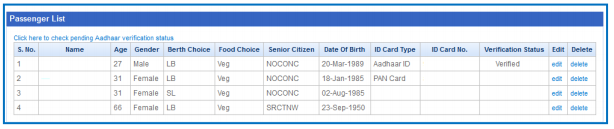
6. Passengers will be added in the Master list with Verification Status as
“Pending”.

7. To check the verification status of Aadhaar details, use “Click here to
check pending Aadhaar verification status” option provided in the section.
<https://2.bp.blogspot.com/-XCfIs1vxFF4/WLu3XPI0_-I/AAAAAAAADcs/9usC54PVqAk2aHS7U3Uu8v20T6ITxcVYgCLcB/s1600/IRCTC-3.png>
8. Verification status of Senior Citizen passengers who have authenticated
their Aadhaar details successfully will be “Verified” and for failed
authentications verification status will “Not Verified”.

9. Senior Citizen passengers already available in the Master list without
Aadhaar verification can also be verified by using “Edit” option and
submitting complete details including Aadhaar number.

*Steps to Select Aadhaar verified Senior Citizen passengers during
Ticketing Booking*

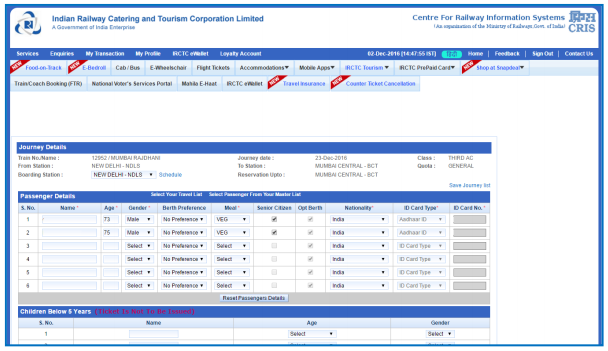
1. After successful verification of Aadhaar details, Senior Citizen
passengers can be selected from Master List and added to the Passenger
Details while booking ticket.
<https://4.bp.blogspot.com/-HSv9Pxmf1FI/WLu3YC_GnHI/AAAAAAAADc0/VRp2fISDR8c0y3AU53yqereBJbAOfz4WwCLcB/s1600/IRCTC-4.png>
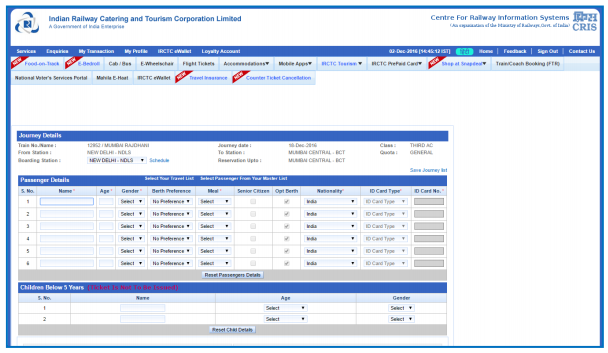
2. To add Aadhaar verified Senior Citizen passengers in the Passenger
details page, use “Select Passenger From Your Master List” link. A pop up
with complete details of Passengers in the Master List will be displayed.
Passengers selected from this page will be added to the Passenger entry
form.
<https://1.bp.blogspot.com/--04FCANWaS0/WLu3YWYuGJI/AAAAAAAADc4/Wcxk1hVevu8ZK08ocId6aX5vgtEgvY2TQCLcB/s1600/IRCTC-5.png>

<https://2.bp.blogspot.com/-N2yRwPUp9d0/WLu3ZODWZJI/AAAAAAAADc8/8cTul8_kPjMzwe2zuf48DNfdwJhD8XVfQCLcB/s1600/IRCTC-6.png>


--
With best wishes

S Chander

--
You received this message because you are subscribed to the Google Groups
"Thatha_Patty" group.
To unsubscribe from this group and stop receiving emails from it, send an email
to [email protected].
For more options, visit https://groups.google.com/d/optout.