Hmm! For my Yahoo and Hotmail accounts the first time I used webmail it
asked for the password for [EMAIL PROTECTED]/hotmail.com. I would have
expected something similar for other services. Check your account
settings, a common error is by default Thunderbird just puts username in
the username field in server settings, Yahoo and Hotmail both need the
full email address as username. For sending messages the username
setting will be in the SMTP server section at the bottom of the account
settings box.
sgt_deacon wrote:
> When I type in the password again when it asks for the password for
> [EMAIL PROTECTED] it just pops up with the question again if I hit
> ok.
>
> On Oct 26, 12:57 pm, Chris Clifton <[EMAIL PROTECTED]> wrote:
>
>> I haven't got an AOL account myself, but when using webmail extensions,
>> a request for password usually means the password for the relevant
>> account. The webmail extension receives this password using "Local
>> Host", then passes it on to the webmail provider's remote server.
>> With the Yahoo account, one of the first things to check is that the
>> Yahoo webmail extension and your account on Yahoo are set to the same
>> mode. You have choices of; "Production Website", this is the original
>> Yahoo mail site, (Yahoo have, I believe moved most users off this),
>> "Beta Website", this is the new Yahoo site, or "New Classic Website",
>> Yahoo's replacement for the old Production site.
>>
>>
>>
>> sgt_deacon wrote:
>>
>>
>>> On Oct 26, 7:53 am, Webmail Author <[EMAIL PROTECTED]> wrote:
>>>
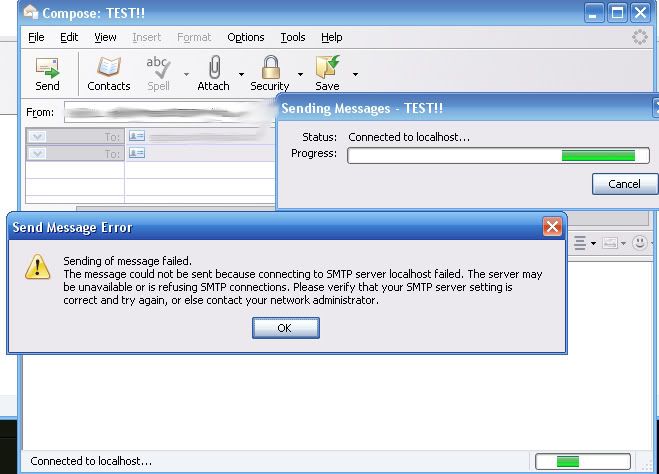
>>>>> Set up AOL for Thunderbird and when I get an email I can read/Download
>>>>> it fine, but when I go to send a message from it I get it asking for
>>>>> my "Local host" password, where do I set/change that? If I click
>>>>> cancel to that I get this error:
>>>>>
>>>>> http://i59.photobucket.com/albums/g316/sgt_deacon/error.jpg
>>>>>
>>>> Can you check the server settings.
>>>>
>>> Not sure what you mean by that, I checked the outgoing server on
>>> Thunderbird and it seems fine.
>>>
>>>>> Also with yahoo when I try to connect to it it says that I have an
>>>>> invalid username/password, which I know I have a valid one since I
>>>>> just logged into their site with it.
>>>>>
>>>> What's the error console message (see tools menu)
>>>>
>>> The error console does not have anything after the error occurs, but
>>> it says "Send of password did not succeed. Mail server
>>> pop.mail.yahoo.com responded: invalid user/password"
>>>
>>> ------------------------------------------------------------------------
>>>
>>> No virus found in this incoming message.
>>> Checked by AVG -http://www.avg.com
>>> Version: 8.0.175 / Virus Database: 270.8.3/1746 - Release Date: 10/25/2008
>>> 5:55 PM
>>>
>> --
>>
> >
> ------------------------------------------------------------------------
>
>
> No virus found in this incoming message.
> Checked by AVG - http://www.avg.com
> Version: 8.0.175 / Virus Database: 270.8.3/1746 - Release Date: 10/25/2008
> 5:55 PM
>
>

--

--~--~---------~--~----~------------~-------~--~----~
You received this message because you are subscribed to the Google Groups
"Thunderbird Webmail Extension" group.
To post to this group, send email to
[email protected]
To unsubscribe from this group, send email to [EMAIL PROTECTED]
For more options, visit this group at
http://groups.google.com/group/thunderbird-webmail-extension?hl=en
-~----------~----~----~----~------~----~------~--~---