Would you mind posting a link to the tutorial you used for it (if you
used one) I figure if I can just delete this one and try again I can
void some trouble shooting in various areas.
On Oct 26, 2:29 pm, Chris Clifton <[EMAIL PROTECTED]> wrote:
> Hmm! For my Yahoo and Hotmail accounts the first time I used webmail it
> asked for the password for [EMAIL PROTECTED]/hotmail.com. I would have
> expected something similar for other services. Check your account
> settings, a common error is by default Thunderbird just puts username in
> the username field in server settings, Yahoo and Hotmail both need the
> full email address as username. For sending messages the username
> setting will be in the SMTP server section at the bottom of the account
> settings box.
>
>
>
> sgt_deacon wrote:
> > When I type in the password again when it asks for the password for
> > [EMAIL PROTECTED] it just pops up with the question again if I hit
> > ok.
>
> > On Oct 26, 12:57 pm, Chris Clifton <[EMAIL PROTECTED]> wrote:
>
> >> I haven't got an AOL account myself, but when using webmail extensions,
> >> a request for password usually means the password for the relevant
> >> account. The webmail extension receives this password using "Local
> >> Host", then passes it on to the webmail provider's remote server.
> >> With the Yahoo account, one of the first things to check is that the
> >> Yahoo webmail extension and your account on Yahoo are set to the same
> >> mode. You have choices of; "Production Website", this is the original
> >> Yahoo mail site, (Yahoo have, I believe moved most users off this),
> >> "Beta Website", this is the new Yahoo site, or "New Classic Website",
> >> Yahoo's replacement for the old Production site.
>
> >> sgt_deacon wrote:
>
> >>> On Oct 26, 7:53 am, Webmail Author <[EMAIL PROTECTED]> wrote:
>
> >>>>> Set up AOL for Thunderbird and when I get an email I can read/Download
> >>>>> it fine, but when I go to send a message from it I get it asking for
> >>>>> my "Local host" password, where do I set/change that? If I click
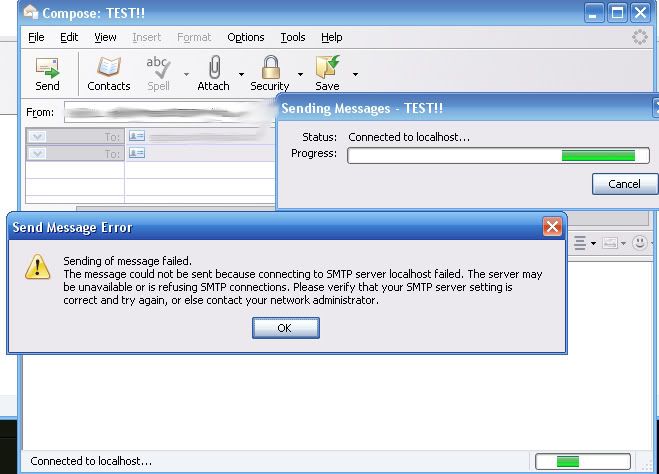
> >>>>> cancel to that I get this error:
>
> >>>>>http://i59.photobucket.com/albums/g316/sgt_deacon/error.jpg
>
> >>>> Can you check the server settings.
>
> >>> Not sure what you mean by that, I checked the outgoing server on
> >>> Thunderbird and it seems fine.
>
> >>>>> Also with yahoo when I try to connect to it it says that I have an
> >>>>> invalid username/password, which I know I have a valid one since I
> >>>>> just logged into their site with it.
>
> >>>> What's the error console message (see tools menu)
>
> >>> The error console does not have anything after the error occurs, but
> >>> it says "Send of password did not succeed. Mail server
> >>> pop.mail.yahoo.com responded: invalid user/password"
>
> >>> ------------------------------------------------------------------------
>
> >>> No virus found in this incoming message.
> >>> Checked by AVG -http://www.avg.com
> >>> Version: 8.0.175 / Virus Database: 270.8.3/1746 - Release Date:
> >>> 10/25/2008 5:55 PM
>
> >> --
>
> > ------------------------------------------------------------------------
>
> > No virus found in this incoming message.
> > Checked by AVG -http://www.avg.com
> > Version: 8.0.175 / Virus Database: 270.8.3/1746 - Release Date: 10/25/2008
> > 5:55 PM
>
> --
--~--~---------~--~----~------------~-------~--~----~
You received this message because you are subscribed to the Google Groups
"Thunderbird Webmail Extension" group.
To post to this group, send email to
[email protected]
To unsubscribe from this group, send email to [EMAIL PROTECTED]
For more options, visit this group at
http://groups.google.com/group/thunderbird-webmail-extension?hl=en
-~----------~----~----~----~------~----~------~--~---