TidBITS#733/14-Jun-04
=====================

  Now that Office 2004 is out, Tonya takes a look at the new
  features in Entourage 2004 in conjunction with the release of
  Tom Negrino's ebook "Take Control of What's New in Entourage
  2004." Speaking of email, our poll this week asks which email
  client you use. Also in this issue, Travis Butler compares two
  portable speakers for the iPod, Adam and Tonya invite you to
  the Mediterranean in November, and we note the releases of Apple's
  new liquid-cooled Power Mac G5, SyncDeK 5.0, the German translation
  of "Take Control of Upgrading to Panther," and a money-saving
  update to "Take Control of Spam with Apple Mail."
Topics:
    MailBITS/14-Jun-04
    Poll Redux: Your Preferred Email Client
    Join Us in the Mediterranean in November
    Two Portable Speakers for the iPod
    Entourage 2004: Important Incremental Changes
    Hot Topics in TidBITS Talk/14-Jun-04

<http://www.tidbits.com/tb-issues/TidBITS-733.html>
<ftp://ftp.tidbits.com/issues/2004/TidBITS#733_14-Jun-04.etx>

Copyright 2004 TidBITS: Reuse governed by Creative Commons license
   <http://www.tidbits.com/terms/> Contact: <[EMAIL PROTECTED]>
   ---------------------------------------------------------------

This issue of TidBITS sponsored in part by:
* READERS LIKE YOU! Help keep TidBITS great via our voluntary <------ NEW!
   contribution program. Special thanks this week to Harold Appel,
   Charles Meyerson, and Dantz Development for their support!
   <http://www.tidbits.com/about/support/contributors.html>

* SMALL DOG ELECTRONICS: Wireless Bundles! <------------------------- NEW!
   15-inch PowerBook G4/1.25 GHz with AirPort Network: $2249
   14-inch iBook G4/1 GHz with Combo Drive & AirPort: $1469
   Visit: <http://www.smalldog.com/tb/> 802-496-7171

* FETCH SOFTWORKS: With FTP, Fetch does it all! Upload, <------------ NEW!
   download, mirror, and manage your web site. Fetch works
   with Mac OS X, Mac OS 9, Mac OS 8, and even System 7!
   Get your free trial version at <http://fetchsoftworks.com/>!

* Dr. Bott, LLC: If you're a Mac or iPod reseller and you're <------- NEW!
   not buying from Dr. Bott, here's what you're missing:
   All the best products, same day shipping, and we answer
   on the first ring. <http://www.drbott.com/>

* Web Crossing: Did you know Web Crossing does Blogs?!? Used for
   workgroup reports, entertainment, advice columns, politics, or
   whatever, Web Crossing's Blogs can integrate w/discussions,
   access lists, etc. Try it! <http://www.webcrossing.com/tb-504>

* "The best keyboard Apple ever made" is reborn! The Tactile Pro <--- NEW!
   Keyboard is built from the same premium keyswitch technology
   as the legendary Apple Extended and Extended II keyboards
   Order yours today! <http://tactilepro.com/index.php?refID=5>

* MindFortress: Need a secure digital wallet to store passwords, <--- NEW!
   serial numbers, credit card info? Notes? Pictures? Movies?
   Custom templates to make your own cards to fit your needs?
   Get MindFortress! Free trial at <http://www.mindfortress.com/>
   ---------------------------------------------------------------

MailBITS/14-Jun-04
------------------

**Dual-Processor, Liquid-Cooled Power Mac G5s Announced** -- Apple
  last week announced a new line of Power Mac G5 desktop computers,
  featuring dual PowerPC G5 processors in each model. The top-of-
  the-line dual 2.5 GHz configuration ($3,000) sports a new liquid
  cooling system, circulating liquid past the G5 processors and
  through a radiant grille, where the liquid is cooled by air
  flowing through one of the Mac's four thermal zones. Mac OS X
  dynamically adjusts the flow of the cooling fluid and the speed
  of the fans based on the temperature. A dual 2.0 GHz G5 retails
  for $2,500, and the entry-level model, featuring two 1.8 GHz G5
  processors, starts at $2,000. These models, featuring Nvidia
  GeForce FX 5200 Ultra video cards, are available immediately, and
  the high-end, liquid-cooled dual 2.5 GHz model with an ATI Radeon
  9600 XT graphics card, will be available in July. Apple has also
  ended production on the 1.25 GHz Power Mac G4; remaining units
  will be available for prices starting at $1,300 while supplies
  last.

<http://www.apple.com/powermac/>
<http://www.apple.com/powermac/design.html>

  Apple has also added a nifty software improvement, too. A new
  Mac OS X setup assistant can migrate your data from an existing
  Mac - including user accounts, applications, system preferences,
  and permissions - to the Power Mac G5 over a FireWire connection
  (using the Mac's target disk mode). For now this feature exists
  only in the new Power Mac G5s, no doubt part of Apple's strategy
  to encourage customers to retire their Power Mac G4 production
  machines, though it will undoubtedly appear in new Mac models
  or in an upcoming revision to Mac OS X. [MHA]


**Web Information Systems Sponsoring TidBITS** -- I'm pleased to
  welcome our latest long-term sponsor, a small developer called Web
  Information Systems that has recently released the $25 application
  MindFortress for Mac OS X 10.3. On the face of it, MindFortress is
  a highly secure card-based database for personal information, much
  like Web Confidential or PasswordWallet, but when I looked more
  deeply, I realized that MindFortress goes well beyond acting as a
  secure digital wallet. That's because MindFortress lets you create
  your own card templates, so you can define what fields, and what
  field types, appear on the card. Also, because MindFortress allows
  unstructured text notes (with all the Cocoa text handling features
  like inline spell checking), you can use it as a general snippet
  keeper. It also supports importing graphics and movies, offers
  AppleScript support, provides automatic update checking, and more.
  MindFortress is an elegant application now, and Alexander Kac,
  its developer, has big plans for future releases that have me
  intrigued. If you're looking for a place to store all sorts of
  data, give MindFortress a look. We're happy to see Web Information
  Systems supporting the Macintosh community through their TidBITS
  sponsorship. [ACE]

<http://www.mindfortress.com/>


**SyncDeK Synchronizes FileMaker Databases** -- At the last
  Macworld Expo in San Francisco, I saw an interesting product
  called SyncDeK that offered a unique feature: field-level
  synchronization of the data within FileMaker databases even when
  the databases aren't on the same network. SyncDeK accomplishes
  this through the clever use of standard Internet email to move
  data in XML format between databases. It's an intriguing approach
  that will be useful for organizations with remote offices or
  travelling employees, or even loosely knit groups without any
  sort of centralized location that would benefit from shared
  databases. WorldSync has now released SyncDeK 5.0, supporting
  both FileMaker 6 and FileMaker 7 on both the Mac and Windows.
  Introductory prices range from $200 to $1,300, depending on
  what you need, and there's also a SyncDeK Developer Kit for
  $500 that enables FileMaker developers to include synchronization
  capabilities in customized solutions. A demo is available by
  request. [ACE]

<http://www.worldsync.com/>
<http://db.tidbits.com/getbits.acgi?tbart=07511>
<http://www.worldsync.com/s_uses.html>


**SpamSieve Coupon Reduces Effective Price of Ebook to $0** -- Our
  recently released 1.0.1 revision to Joe Kissell's $5 "Take Control
  of Spam in Apple Mail" ebook now includes a coupon for $5 off the
  purchase of Michael Tsai's highly regarded SpamSieve, which can
  replace the Junk Mail filter in Apple Mail. Joe's ebook also
  explains how to get up and running quickly with SpamSieve in Apple
  Mail. If you already purchased the 1.0 version of the ebook, you
  can upgrade for free by clicking the Check For Updates button on
  the cover. The $5 off coupon is located on the last page of the
  1.0.1 ebook; click the link on that page to order. The $5 discount
  appears when you check out. [TJE]

<http://www.tidbits.com/takecontrol/spam-Apple-Mail.html>
<http://www.c-command.com/spamsieve/>
<http://db.tidbits.com/getbits.acgi?tbart=07076>


**Take Control of Upgrading to Panther in German** -- Thanks to
  the hard work of German translator Hartmut Greiser, the German
  translation of Joe Kissell's best-selling "Take Control of
  Upgrading to Panther" ebook is now available for sale. As with our
  Japanese translations, we felt that Hartmut should be compensated
  for his efforts, so we're splitting the proceeds from the US$7.50
  ebook equally between us, Joe, and Hartmut. To thank any German
  speakers who have already purchased the English version, we are
  offering them a free copy of the translation. If you are a German
  speaker and already own the English version, contact Tonya at
  <[EMAIL PROTECTED]> so we can look you up in our sales
  database and send it to you. [TJE]

<http://www.tidbits.com/takecontrol/de/panther/upgrading.html>


Poll Redux: Your Preferred Email Client
---------------------------------------
  by Adam C. Engst <[EMAIL PROTECTED]>

  Over four years ago, we ran a poll asking which program was your
  preferred email client. We've meant to run that poll again on a
  variety of occasions, and with the recent major releases of
  Entourage 2004 and PowerMail 5.0, and with Eudora jumping to
  version 6.1.1 and Apple Mail taking a small step to version
  1.3.8, it's clearly time to revisit the question.

<http://db.tidbits.com/getbits.acgi?tbart=05664>

  We are, of course, also interested in the topic now that we've
  started to publish Take Control ebooks about some of the major
  email programs, including Tom Negrino's just-released "Take
  Control of What's New in Entourage 2004" and Joe Kissell's "Take
  Control of Spam with Apple Mail." We've had requests for Take
  Control ebooks about other email programs as well, notably Eudora,
  but without knowing roughly how the usage percentages break down
  among the different programs, it's been hard to determine how
  many people would be aided by such books.

  So tell us which Macintosh email program you primarily use by
  voting in the poll on our home page (depending on your screen
  size, you may need to scroll down to see the poll form). Judging
  from the popularity of the previous poll on this topic, our poll
  server may have trouble dealing with a rush of simultaneous votes;
  try later in the week if you have trouble. Also, this poll
  suffered from serious ballot box stuffing last time, as fans of
  one program or another encouraged people on other lists to come
  and vote. Please don't do that this time, since it skews the
  results horribly, as we saw by the then-obsolete Cyberdog's 17
  percent response rate.

<http://www.tidbits.com/>


Join Us in the Mediterranean in November
----------------------------------------
  by Adam C. Engst <[EMAIL PROTECTED]>

  Two years ago I wrote about the MacMania cruise to Alaska, which
  was, at least to me, a fascinating and innovative combination of
  technical training and vacation adventure. That such a mix would
  succeed shouldn't be surprising, since for many of us, the
  Macintosh is as much a hobby as it may be a profession, so
  learning something new is as enjoyable as discovering a new
  city or touring some local attraction. As an added benefit,
  less-technical spouses can come along for the vacation and
  simply go off on their own during the sessions.

<http://db.tidbits.com/getbits.acgi?tbart=06847>

  Although Tonya and I haven't been able to participate in the last
  few Mac Mania cruises, we're starting to make plans with a group
  called Techie Tours for a slightly different sort of training/
  vacation combination that's even more focused. For five days in
  the middle of November, 07-Nov-04 through 13-Nov-04, Tonya and
  I will both be teaching a workshop about iPhoto in conjunction
  with a photo safari on the island of Gozo, 58 miles off the
  coast of Sicily in the Mediterranean Sea.

<http://techietours.com/MUG/>

  We're really looking forward to it, and not just because it's a
  chance to have an adult vacation that won't require train-, ship-,
  and dinosaur-intensive activities followed by early bedtimes.
  When Jim Sims of Techie Tours first approached me about it, I was
  initially astonished. "Five half-days about iPhoto?" I replied,
  "I can't imagine what I'd say after the first two hours." But
  as I talked about it with Tonya, she made the point that this
  wasn't about explaining the features of the program, but was
  instead about showing people how to accomplish real-world projects
  using iPhoto. In other words, it's not a lecture, but a workshop
  with 25 people all actually working away in iPhoto (laptops
  required!) on pictures they've just taken.

  It will also be fun to concentrate on projects that make sense
  in the context of a vacation, such as uploading photo-journal Web
  pages, printing personalized postcards to send to friends and
  relatives, creating a shared archive of the group's photos to
  share, and building and ordering an iPhoto book of the best
  pictures. And since it's going to be just us and the group, I'm
  sure there will be plenty of time for chatter about Apple, new
  Mac models, Mac OS X 10.4 Tiger, TidBITS, wireless networking,
  and anything else that comes up.

  I don't know much about Gozo beyond what Jim has told me and what
  I've read in the guidebook, but for those of us heading into the
  snowy days and frigid nights of winter, it sounds pretty darn
  attractive. Warm and sunny, with the oldest standing architecture
  and monuments in the world and an entirely modern five-star hotel
  with wireless Internet access... it's hard to imagine a better
  place to hang out with Mac folk taking photos. From what I gather,
  it's easy to fly to Malta and take the ferry to Gozo, and the cost
  of the conference is highly reasonable for this sort of thing:
  $1,100 (discounted for TidBITS readers through 15-Aug-04), which
  includes six nights at the hotel and five days of photo safaris
  around Gozo, plus ferry and museum tickets, and mini-van
  transportation around the islands. Spouses not attending the
  morning workshops pay only $800. Space is limited.

  And besides, it's a great excuse to get a new digital camera
  that's completely different from my Canon PowerShot S400. We
  hope to see some TidBITS readers there!


Two Portable Speakers for the iPod
----------------------------------
  by Travis Butler <[EMAIL PROTECTED]>

  An iPod is a wonderful way to carry your music library around
  with you... but sometimes, you just don't want to mess around
  with using headphones. I travel a lot, and want an external
  sound option I can carry with me. The portable FM transmitters
  I reviewed a while back can also be used to broadcast to any FM
  radio, but you can run into the same signal issues you do in a
  car, and often there isn't even an FM radio to use.

<http://db.tidbits.com/getbits.acgi?tbart=07191>

  Hence, portable speakers. You can buy cheap unpowered/unamplified
  speakers for $10-15 at just about any consumer electronics store
  like Best Buy, but even the best ones I've heard sound pretty
  lousy. You can also acquire a set of regular powered computer
  speakers and travel with them, but they're a mess to travel with
  and set up, and they need a wall outlet.

  Or you can go somewhere in between by purchasing a set of battery-
  powered portable speakers. These are easy to carry around (smaller
  than some of the unpowered sets I've seen), but the batteries
  allow amplification, giving a much louder, richer sound than
  unpowered speakers can manage. I've used two of them: the Sony
  SRS-T55 and the Monster Cable iSpeaker Portable.

<http://www.sonystyle.com/is-bin/INTERSHOP.enfinity/eCS/Store/en/-/USD/
SY_DisplayProductInformation-Start?ProductSKU=SRST57>
<http://www.monstercable.com/computer/productPageComputer.asp?pin=2184>


**Sony SRS-T55** -- I found these speakers at an Apple Store
  in Indianapolis about a year ago (they have apparently been
  superseded by the SRS-T57), and they've been faithful performers
  since then. These are traditional magnet-cone speakers, mounted
  in "wings" on a folding case, with the batteries in the central
  box. The whole thing folds to a block about as long as an iPod,
  half an inch (12.7 mm) taller, and about twice as thick.

  Overall, I've been very happy with these speakers; they seem
  well-designed and solidly built, and are a major improvement
  over unpowered speakers. A nice touch is that you can use them
  unpowered if the batteries run out, though it highlights the
  advantage amplification adds! I have only a few minor complaints:

* After a year of use, the hinges have loosened some - not enough
  to cause problems, but enough to make me wonder how well they'll
  last another few years.

* Although the shape is convenient for packing in a suitcase,
  it doesn't fit well in a laptop bag.

* The battery compartment latch is problematic; for a couple of
  months, it kept popping open unexpectedly, although it is now
  working again, for no particular reason I can see.

* The audio patch cord is permanently attached, only about two
  feet long, and can't be stored in the case; this limits how far
  apart you can put the iPod and the speakers, and makes carrying
  the whole unit around messier than it could be.

  Minor nits aside, I like these speakers and would recommend them.


**Monster Cable iSpeaker Portable** -- These speakers appear to be
  identical to the Wharfedale LoudMan Portable Flat-Panel Speakers;
  I'm not sure who originally manufactures them, but Monster Cable
  seems to have a much broader distribution network.

<http://www.iagamerica.com/wharfedale/loudman.htm>

  The iSpeaker Portable is a flat-panel speaker set built into a
  case that looks and works like a double-CD jewel case. Although
  I've been happy with the SRS-T55, I bought an iSpeaker Portable
  a month ago for a couple of reasons: I hoped the touted NXT flat-
  panel technology might give better sound, and it fits into a
  pocket on my laptop bag. The results were mixed; it fits my bag
  beautifully, but the sound is only about equal to, though notably
  different from, the Sony (read on for sound comparisons).

  While I'd still recommend these speakers, I'm overall less
  satisfied with them than I am with the SRS-T55. The main problem
  I have is that the design seems unaccountably poor/cheap in spots:
  the swing-out panels stick in the closed position, the battery
  compartment door doesn't fit solidly and has to be fiddled with
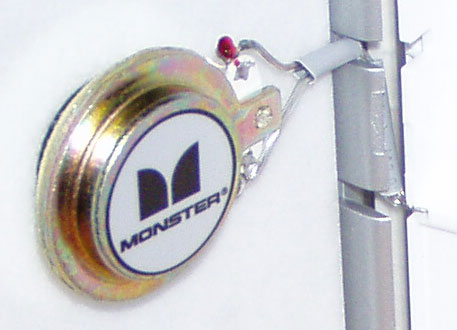
  to latch properly, and the wires leading to the speaker elements
  are bare and exposed. I expect to see things like this when I
  disassemble a speaker, not when I flip it open to use.

<http://www.tidbits.com/resources/733/MonsterSpeaker.jpg>
<http://www.tidbits.com/resources/733/MonsterSpeakerDetail.jpg>

  Other minor nits:

* The speaker/iPod cable is a separate piece, and is solidly made
  with what appear to be gold-plated connectors - appropriate for
  a company that made its fame from high-quality audio cables.
  However, there's no place to store the cable inside the speaker
  case, so you must carry it separately.

* It needs more room to set up than the SRS-T55, and the panels
  must be spread fully open for best sound.

* It's more fragile than the Sony; I feel like I need to treat
  it with special care to make sure it lasts.

  The iSpeaker Portable's defining characteristic is the way it
  packs decent sound into a slim package; I just wish it had better
  attention to detail, both in design and construction.


**Overall Performance and Notes** -- I'm not an audiophile. That
  said, neither of these speakers will win any audio awards, except
  in their own narrow category. Both have decent highs and midrange,
  but are seriously lacking in bass. The iSpeaker Portable's flat-
  panel technology has a crisp, clean sound to it, but feels
  somewhat flat and hollow compared with the Sony; the SRS-T55 has
  a deeper, richer sound, but it's not as clear or well-defined.
  Overall, I'd rate them about equal in sound quality, with my
  preference flip-flopping between them depending on my mood. Both
  are capable of filling a 30-foot by 40-foot (9.1-meters by 12.2-
  meters) room and being heard another 50 feet (15.2 m) down the
  hallway, which is reasonably impressive for something this size
  running off batteries.

  Both speakers use 4 AA batteries, and they both have a level of
  battery drain that's low enough to last several hours with NiMH
  rechargeable batteries. I like to sleep to music, and they usually
  last about two nights before needing to change batteries. (As with
  most power-hungry devices, I highly recommend NiMH rechargeable
  batteries, which sell for extremely reasonable prices these days.)
  Both can also be used with optional AC adapters, sold separately.

  If I had to pick between them, it would be tough; in the end, I'd
  probably decide on the iSpeaker Portable, just because it fits in
  my laptop bag and operates well enough otherwise, though I wish
  it were more solidly built.

  Both of these speakers are designed for general use and work with
  any device sporting a headphone jack (such as a PowerBook). One
  other choice designed specifically for the iPod is the Altec
  Lansing inMotion. For third generation iPods, it acts as a dock
  as well as a speaker set, allowing you to sync and even charge
  your iPod. However, with a list price of $150, it's three times
  the $50 list price of the SRS-T57 and the $60 list price of the
  iSpeaker Portable; even at usual discounted prices, it's still
  double the price of the others. Dan Frakes thought highly of it
  in his iPod Gift Guide, and it's gotten some good buzz elsewhere,
  but it's a little too rich for my blood right now.

<http://db.tidbits.com/getbits.acgi?tbart=07480>

  [Travis Butler is the computer geek for a small distribution
  company located in Kansas City. He has dreamed of computer-based
  jukeboxes since the late 1980s, but is still boggled sometimes
  at how far things have come in the last few years.]`

   PayBITS: Did Travis's article help you decide which set of
   iPod speakers to buy? Say thanks with a few bucks via PayBITS!
   <https://www.paypal.com/xclick/business=tbutler%40mac.com>
   Read more about PayBITS: <http://www.tidbits.com/paybits/>


Entourage 2004: Important Incremental Changes
---------------------------------------------
  by Tonya Engst <[EMAIL PROTECTED]>

  Although I normally use Eudora as my email client, I recently had
  a chance to spend quite some time in Microsoft's new Entourage
  2004, because I just finished editing our latest Take Control
  ebook, Tom Negrino's "Take Control of What's New in Entourage
  2004." Editing the book gave me the opportunity to experiment
  with the software and reflect on its new features, and, of course,
  I had the benefit of Tom's excellent advice for rapidly finding
  and learning about Entourage's new features. More on the ebook
  in a bit.

<http://www.tidbits.com/takecontrol/entourage-2004.html>

  Entourage 2004 is at its heart email software, but unlike other
  email clients, it goes well beyond email with integrated
  organizational options such as a contacts database, calendar,
  to-do list, and project management capabilities. It ships with
  Office 2004 (but not separately), so you'd probably buy it only
  if you also need, as many Mac users do, one or more of its suite
  mates: Word, Excel, and PowerPoint.

  I'm struck by how much more youthful Entourage seems compared
  to other Office programs. For example, Word, though chirpy on
  the surface with its new Office 2004 interface, seems grumpy
  underneath, with its complex mix of views, comments, revisions,
  field codes, and styles that comprise a typical document.
  Entourage feels like the happy-go-lucky younger brother who is
  not yet overwhelmed with feature requests from every profession
  on the planet.

  We last looked at Entourage in depth a number of years ago, with
  Matt Neuburg's "Entourage: The Grand Tour" in TidBITS-550_. In
  Entourage 2004, Microsoft has created a slightly more fluid
  interface and made an effort to respond to concerns about the
  never-ending struggle to stay organized, the growing importance of
  online collaboration, and Entourage's one-file-holds-all database.
  Let's look at some of the more interesting changes.

<http://db.tidbits.com/getbits.acgi?tbart=06139>


**New View on Email** -- Entourage offers a few optional interface
  changes for working with email: along with the old, vertical
  display with messages opening in a new window or previewing
  beneath the message list, you can now work horizontally with email
  messages showing in a third column at the right. Obviously, this
  approach works best on larger (and wider) screens, but given the
  dimensions of most of Apple's current monitors, it's worth trying.

  Entourage also optionally provides a notification window that
  appears and fades away whenever you receive email while working in
  another program. These window-dressing type changes may or may not
  be handy to you, depending on your working style.


**New Views on Data** -- If you (like most of us) have trouble
  organizing your email or finding messages once they've arrived,
  you'll probably like Entourage's new grouping feature, which lets
  you view messages in a mailbox folder in about a dozen different
  default ways. And if that's not enough, you can customize the
  display by making your own groupings. So, for instance, you can
  quickly switch between viewing a date-sorted list of all messages
  with attachments from a particular sender and a priority-sorted
  list of older messages. Lots of email programs have similar
  features, but Entourage does an especially nice job by including
  an easy-to-use customization interface and offering a particularly
  clear presentation of the sorted groups.

  Entourage's Calendar view also has new ways to view data,
  primarily through an easily understood filtering feature that lets
  you see only certain types of data on your calendar at any one
  time. Given the level to which many of us fill up our schedules,
  being able to limit the view to particular types of entries is
  a welcome addition.


**The Project Center** -- Initially, I thought the Office-wide
  Project Center looked extremely promising for lots of purposes,
  but upon closer examination, I worry that it falls short of what I
  was hoping it would do, leaving room for improvement. For personal
  use, Project Center is a useful way to manage not only Entourage
  items, such as email messages, tasks, contacts, and so on, but
  also files (any type of file, not just Office documents). The new
  Project view makes it possible to see an item on your to-do list
  and click an icon to open the file immediately and get to work. If
  I used Entourage as my primary email program, I would be excitedly
  making projects for the different books that I edit. I think it
  would be an elegant way to work, since it's easy to put items into
  a project, and so many of my projects combine calendar events and
  to-do-list items with email messages and files from Word, BBEdit,
  and miscellaneous graphics applications.

  Where Project Center falls short is in its sharing feature, which
  lets you move a project to a shared server so that multiple people
  can work with it at once. When you share a project, external files
  physically move to the server; some Entourage items can be shared
  or kept private, other Entourage items, including email, cannot be
  shared.

  Sounds good so far, but because a shared project offers no
  sophisticated features for collaboration and version control,
  I can't recommend it in situations that would routinely risk
  two people editing the same document at the same time. Even for
  situations that wouldn't routinely risk such a conflict, you must
  weigh the potential benefits against the potential loss of time
  if multiple people lose edits (or get confused) while trying to
  work on the same document at the same time. I'd like to see some
  sort of a check-in/check-out system added to the project-sharing
  feature.


**Dealing with the Database** -- Microsoft made an effort to
  improve working with the single-file database that holds Entourage
  data. The database, previously limited to 4 GB in size, wasn't
  capacious enough (or stable enough) for some people to consider
  using Entourage, and for others it proved a frequent source of
  concern and frustration. Entourage 2004 eliminates the file size
  limit, instead limiting the number of items that can be tracked
  in the database to one million. Microsoft believes this will help
  users store more data in Entourage than they could previously.

  Equally as important, Microsoft has taken steps to help users keep
  their databases free of corruption. Because the Entourage database
  holds all your Entourage data - email, contact information, to-do
  list, and more - using it equates to putting all your eggs in the
  same basket, and a corrupted database can put serious brakes on
  your productivity until you restore from backup (you have backups,
  right?). The aptly named Database Utility scans databases for
  potential problems and (in theory, I didn't see any problems in
  my testing) repairs them. I haven't yet heard reports of any
  exciting successes or dismaying failures with the Database
  Utility.

  Finally, Entourage has a new archiving feature that lets you copy
  or move items out of the database file into a separate archive
  file. Items can be archived based on various ways of sorting them,
  such as by date, type, or project. This handy feature should help
  users keep their database file size down and - should you not
  routinely do full backups - offers a helpful way to make an
  additional copy of important data. Archives can be imported
  when desired.


**Slamming Spam** -- Entourage X's spam filtering technology
  wasn't keeping pace with spammer tricks, so Entourage 2004 adopts
  the technology used by Outlook 2003 for Windows (which appears
  to be a form of probability-based filtering generated by Microsoft
  based on submitted spam). Instead of individual users training
  their individual filters (as people do in, say, Eudora or Apple
  Mail), the idea is that Microsoft updates the filter frequently,
  and users can run a new utility, Microsoft AutoUpdate, to download
  and install updates automatically in much the same manner as
  Apple's Software Update system.

<http://www.microsoft.com/office/outlook/prodinfo/filter.mspx>

  Tom reports that the new filter works so well on his email that
  he no longer uses Matterform's rule-based Spamfire Pro to bolster
  Entourage's spam filtering. Other TidBITS and Take Control
  staffers have seen extremely good results from Michael Tsai's
  SpamSieve, which uses a statistical filtering method and works
  with Entourage 2004.

<http://www.matterform.com/index.php?page=/spamfire/>
<http://www.c-command.com/spamsieve/>
<http://db.tidbits.com/getbits.acgi?tbart=07076>


**In the End** -- Entourage 2004's new capabilities may inspire
  some people to switch to Entourage, and they certainly add up
  to a better user experience with the software. A remaining
  disappointment for some is the failure of Entourage to better
  integrate its contact and calendaring information with Apple's
  Address Book, although you can download an AppleScript-based
  solution for synchronizing your Entourage and Address Book
  contacts.

<http://blogs.msdn.com/dancre/archive/2004/04/07/109601.aspx>
<http://homepage.mac.com/berkowit28/>

  Whether you switch or upgrade to Entourage 2004 will probably
  relate more to your overall Office-related needs. Must you upgrade
  because your system administrator insists that you do, perhaps
  for reasons of project sharing or automatic updates? Are you
  considering an Office upgrade in order to access the new change
  tracking or Unicode features in Word? Do you just like to stay up
  to date? Those all might be important reasons to use Entourage
  2004. Or, you might have wanted to use Entourage all along, but
  found the idea of the single-file database too scary until now.

  On the other hand, if you are already happy with a different
  email program or system for managing contacts, calendaring, and
  to do lists, you likely won't find the features in Entourage so
  compelling that it merits the time and money necessary to switch.

  The only way to purchase Entourage 2004 is as part of the full
  Microsoft Office suite, which lists for $400 or costs $150 for
  educational users; upgrades cost $240. You can also download a
  "test drive" version of Office 2004 (186 MB) that works for 30
  days. Office 2004 requires Mac OS X 10.2.8 or higher.

<http://www.microsoft.com/mac/products/office2004/howtobuy/howtobuy.aspx>
<http://www.microsoft.com/mac/default.aspx?pid=office2004td>


**Take Control of What's New in Entourage 2004** -- I've tried to
  give you an idea here of what's new in Entourage 2004, along with
  a sense of how successful these new features are. What I haven't
  done is tell you _how_ to use Entourage's new capabilities; that's
  the topic that Tom Negrino has ably tackled in our latest Take
  Control ebook, "Take Control of What's New in Entourage 2004."
  Sure, you could wait another few months for the traditional books
  on Office 2004 to appear and hope that they provide the necessary
  coverage of Entourage's new features, but why wait? Tom looks at
  each of the features I've discussed here (and more), describing
  how they work and giving step-by-step usage instructions where
  appropriate, along with tips and strategies for making the most
  of each feature. And like all our Take Control ebooks, any minor
  changes we make as more information is learned about Entourage
  2004 will be free to people who buy the ebook.

  "Take Control of What's New in Entourage 2004" is 64 pages and
  costs $5. If you wish to use SpamSieve instead of Entourage's spam
  filtering capabilities, we've made Tom's ebook even more valuable
  with the inclusion of a coupon for $5 off SpamSieve at the back
  of the book, effectively reducing the price of the book to $0.

<http://www.tidbits.com/takecontrol/entourage-2004.html>


Hot Topics in TidBITS Talk/14-Jun-04
------------------------------------
  by TidBITS Staff <[EMAIL PROTECTED]>

  The second URL below each thread description points to the
  discussion on our Web Crossing server, which will be much
  faster, though it doesn't yet use our preferred design.

<http://emperor.tidbits.com/TidBITS/Talk/>


**New Liquid-cooled Power Mac G5s** -- Are the new Power Macs
  a significant upgrade, or does their speed fall short of
  expectations? And what about the new liquid-cooling technology?
  (1 message)

<http://db.tidbits.com/getbits.acgi?tlkthrd=2245>
<http://emperor.tidbits.com/TidBITS/Talk/111>


**Problems with Security Update 2004-06-07** -- Problems with
  Apple's recent security fix? Readers offer a couple of solutions.
  (7 messages)

<http://db.tidbits.com/getbits.acgi?tlkthrd=2246>
<http://emperor.tidbits.com/TidBITS/Talk/112>


**Problems with excessive password prompting** -- Mac OS X's
  default window behavior and the way it stores passwords can
  create user interface problems that could, in theory, expose
  you to a security risk. (3 messages)

<http://db.tidbits.com/getbits.acgi?tlkthrd=2247>
<http://emperor.tidbits.com/TidBITS/Talk/113>


**Educational games software lacking** -- Where are the quality
  educational programs for Mac OS X? (3 messages)

<http://db.tidbits.com/getbits.acgi?tlkthrd=2248>
<http://emperor.tidbits.com/TidBITS/Talk/114>


**AirPort Express** -- Apple's new compact AirPort base station
  and wireless music streaming device is generating a lot of buzz.
  Can it be used to bridge a wireless network to a wired one?
  (3 messages)

<http://db.tidbits.com/getbits.acgi?tlkthrd=2249>
<http://emperor.tidbits.com/TidBITS/Talk/115>


$$

 Non-profit, non-commercial publications may reprint articles if
 full credit is given. Others please contact us. We don't guarantee
 accuracy of articles. Caveat lector. Publication, product, and
 company names may be registered trademarks of their companies.

 For information: how to subscribe, where to find back issues,
 and more, see <http://www.tidbits.com/>. TidBITS ISSN 1090-7017.
 Send comments and editorial submissions to: <[EMAIL PROTECTED]>
 Back issues available at: <http://www.tidbits.com/tb-issues/>
 And: <ftp://ftp.tidbits.com/issues/>
 Full text searching available at: <http://www.tidbits.com/search/>
 -------------------------------------------------------------------