TidBITS#749/04-Oct-04
=====================

  Charles Maurer continues his exploration of making better
  digital images by focusing on how you and your Mac view and
  work with color. On the music front, Apple releases Logic Pro 7,
  Logic Express 7, and two new GarageBand Jam Packs. Adam discovers
  ManOpen, a tool for viewing Unix man pages outside of the Terminal
  application. In the news, Apple ups the storage of .Mac accounts,
  registration for Macworld Expo 2005 in San Francisco opens,
  and look for Matt Neuburg's sessions at the AppleScript Pro
  conference.
Topics:
    MailBITS/04-Oct-04
    Save on .Mac Renewals
    Logic Pro 7, Logic Express 7, and Jam Packs Released
    ManOpen Opens Man Pages
    Colour & Computers
    Hot Topics in TidBITS Talk/04-Oct-04

<http://www.tidbits.com/tb-issues/TidBITS-749.html>
<ftp://ftp.tidbits.com/issues/2004/TidBITS#749_04-Oct-04.etx>

Copyright 2004 TidBITS: Reuse governed by Creative Commons license
   <http://www.tidbits.com/terms/> Contact: <[EMAIL PROTECTED]>
   ---------------------------------------------------------------

This issue of TidBITS sponsored in part by:
* READERS LIKE YOU! Help keep TidBITS great via our voluntary <------ NEW!
   contribution program. Special thanks this week to Edward Reid,
   Shalom Avital, and Carsten Pruser their generous support!
   <http://www.tidbits.com/about/support/contributors.html>

* SMALL DOG ELECTRONICS: LaCie On Sale! <---------------------------- NEW!
   Selected LaCie Drives, Displays, & More
   250 GB Drive - $195; DVD+/-RW - $215; 1T - $975
   Visit: <http://www.smalldog.com/tb/> 800-511-MACS

* FETCH SOFTWORKS: Want to copy files between FTP servers? <--------- NEW!
   Use Fetch, the FTP client for Mac OS 9 and X, and you can
   drag and drop files for fast and easy file copying.
   Download your free trial version! <http://fetchsoftworks.com/>

* Dr. Bott, LLC: With PocketDock Combo, you can leave your docking <- NEW!
   cable at home where it belongs. PocketDock connects your iPod
   to any Mac or PC using standard FireWire or USB cables. Three
   versions available. <http://www.drbott.com/>

* Web Crossing: Did you know Web Crossing does Blogs?!? Used for
   workgroup reports, entertainment, advice columns, politics, or
   whatever, Web Crossing's Blogs can integrate w/discussions,
   access lists, etc. Try it! <http://www.webcrossing.com/tb-504>

* "The best keyboard Apple ever made" is reborn! The Tactile Pro <--- NEW!
   Keyboard is built from the same premium keyswitch technology
   as the legendary Apple Extended and Extended II keyboards
   Order yours today! <http://tactilepro.com/index.php?refID=5>

* MindFortress: Need a secure digital wallet to store passwords, <--- NEW!
   serial numbers, credit card info? Notes? Pictures? Movies?
   Custom templates to make your own cards to fit your needs?
   Get MindFortress! Free trial at <http://www.mindfortress.com/>

* StuffIt Deluxe 9 from Allume Systems improves on the Mac's
   essential compression utility! Now featuring faster performance
   and improved Finder integration and data management options.
   Upgrade for only $29.99! <http://www.stuffit.com/mac/deluxe/>

* HAND CANDY!  Amuse yourself during those long, dull phone calls <-- NEW!
   with a fine transforming robot toy direct from Japan! They make
   great monitor decorations, too. Thousands of toys and kits
   online at HobbyLink Japan! <http://www.hlj.com/tb>

* easyDNS: Worried about your ISP going under? Get lifetime email <-- NEW!
   and Web addresses with easyDNS's DNS-Plus package. Change ISPs
   or Web hosting companies anytime YOU want. Take control.
   easyDNS: the way things should work. <http://www.easyDNS.com>
   ---------------------------------------------------------------

MailBITS/04-Oct-04
------------------

**Apple Increases .Mac Storage to 250 MB, but Still Lags** -- In a
  bow to the decreased costs of storage and competition from free
  Web mail services, Apple has increased the storage included with
  a .Mac account for combined iDisk storage and email from 100 MB
  to 250 MB. Of that, you can choose the ratio of storage used by
  Mail and your iDisk, which starts at 125 MB each by default.
  Apple has also dropped the price tremendously for additional
  storage: 1 gigabyte (GB) total is now available for $50 per
  year. The maximum email attachment size is also now 10 MB.

<http://www.mac.com/>

  The previous storage size for .Mac was appearing increasingly
  paltry in the face of Google's Gmail service - still in beta
  testing - which upped the ante for free Web-based email to 1 GB.
  Services like Yahoo and Hotmail only included a few megabytes
  of storage with their free accounts. One gigabyte has now become
  a magic number for email services. [GF]


**Macworld Expo SF 2005 Free Registration** -- IDG World Expo
  has opened up registration for the upcoming Macworld Expo in
  San Francisco from 10-Jan-05 through 14-Jan-05 (the exhibit
  hall opens on Tuesday, 11-Jan-05). If you register now through
  05-Nov-04 using priority code B0201, you can receive a free
  exhibit hall pass; such a pass costs between $20 and $40
  afterwards (although we can often work with Peachpit to
  make free exhibit hall passes available to TidBITS readers
  later on). If you're also planning to attend the conferences
  at Macworld, make sure to register with the same priority code
  before 10-Dec-04 for the lowest price. [ACE]

<http://www.macworldexpo.com/live/20/register///CC961706>


**Learn Some Serious AppleScript in Newport, RI** -- Having
  written a book about AppleScript (AppleScript: The Definitive
  Guide from O'Reilly), I like being asked to do cool AppleScript-
  related things; and having been a college professor for many
  years, there's nothing I enjoy so much as live teaching in front
  of a classroom. So I'm really looking forward to November 11th
  and 12th, when I'll be teaching a minor session on scripting
  Microsoft Word 2004 and a major session on AppleScript Studio,
  in Newport, Rhode Island, as part of the AppleScript Pro
  Sessions. (I participated once already, back in May, in Monterey,
  CA, and had a great time.) There will be lots of other great
  teaching and learning going on in other sessions too; check
  out the AppleScript Pro Sessions site for more info. [MAN]

<http://press.oreilly.com/pub/pr/1129>
<http://www.amazon.com/exec/obidos/ASIN/0596005571/tidbitselectro00/ref=nosim/>
<http://www.scriptingmatters.com/aspro>


Save on .Mac Renewals
---------------------
  by Adam C. Engst <[EMAIL PROTECTED]>

  Like many people who subscribed to .Mac back when Apple morphed
  the service over from iTools, I recently received an email message
  reminding me that my .Mac membership would automatically renew for
  $100 plus tax, making the total cost nearly $110. On the same day,
  I happened to notice that Small Dog was selling .Mac membership
  boxes for only $80, and even with $7 of shipping, it was a savings
  of about $20 over renewing through Apple. The Small Dog folks
  confirmed that their boxes were good for renewals, so as much
  as I don't really need a box and CD-ROM with .Mac software on
  it, there seemed to be no advantage to renewing through Apple.

<http://www.mac.com/>
<http://www.smalldog.com/product/12653455/>

  When I received the box from Small Dog, I opened it up and typed
  in the URL on the CD-ROM's activation sticker. That brought me to
  a nice form asking if I was creating a new membership or renewing.
  I clicked the Renewing radio button, entered my activation code,
  and then was presented with a form asking if I wanted to upgrade
  my account with more email accounts, more email storage, or more
  iDisk storage. Answering no to all of the above, I then hit a
  credit card information screen, which bothered me a bit, since I
  saw no reason I should be asked for credit card information while
  renewing an account with an activation code. Figuring that the
  credit card information might be used just for iPhoto and the
  like, I submitted, and got a Review Order screen that said my
  total was $0.00. All well and good, so I submitted the order,
  only to see on my Account Settings screen that my account was
  still set to renew on 13-Oct-04.

  There was absolutely no indication that the system had taken my
  activation code, short of the zero-dollar total on the Review
  Order screen. So I turned off the Auto-Renew option in the credit
  card screen, and we'll see what happens when October 13th rolls
  around in a few weeks. The moral of the story? Everything points
  toward this being a perfectly good way to save $20 on renewing a
  .Mac membership, but Apple needs to work on the account interface
  to eliminate the confusion on whether an activation code-based
  renewal actually happened.

  It's worth noting that deals on .Mac are available from other
  Internet retailers too, as discussed in TidBITS Talk, and the
  approach may not work for Canadian orders.

<http://db.tidbits.com/getbits.acgi?tlkthrd=2331>


Logic Pro 7, Logic Express 7, and Jam Packs Released
----------------------------------------------------
  by Jeff Carlson <[EMAIL PROTECTED]>

  Apple's music focus lately has been on the iTunes Music Store,
  but the company sang a different tune last week when it introduced
  Logic Pro 7, Logic Express 7, and two additional Jam Packs that
  can be used with those applications as well as GarageBand.

<http://www.apple.com/software/logic/>
<http://www.apple.com/software/logicexpress/>
<http://www.apple.com/ilife/garageband/jampacks/>

  Logic Pro 7 adds three new software instruments: Sculpture, a
  "component-modeling based synthesizer;" UltraBeat, a drum machine;
  and Guitar Amp Pro, a guitar amplifier simulator. (Apple previewed
  these components at the NAMM exhibition last January; see "Apple
  Clarifies Logic at NAMM" in TidBITS-713_.) Logic Pro 7 also adds
  support for Apple Loops and features distributed processing,
  enabling other networked Macs to work on audio files concurrently.

<http://db.tidbits.com/getbits.acgi?tbart=07510>

  Logic Express 7 is a streamlined version of Logic Pro 7, much as
  Apple's Final Cut Express is an intermediate version of Final Cut
  Pro; see Apple's comparison chart at the URL below for specific
  differences between the two Logic applications.

<http://www.apple.com/software/logicexpress/comparison.html>

  For GarageBand users who have now played every instrument and loop
  available in the program, Apple also released two new Jam Packs.
  Jam Pack 2: Remix Tools adds beats, bass lines, and synth hooks
  for your next dance party. Jam Pack 3: Rhythm Section expands
  GarageBand's lineup of drum kits, percussion, and other
  instruments.

  The full version of Logic Pro 7 costs $1,000; upgrades from Logic
  Gold/Platinum 5 or 6, or Logic Pro 6, cost $300. Logic Express 7
  sells for $300, with upgrades from Logic Express 6 priced at $100.
  The new Jam Packs are $100 each. Both Logic applications require
  Mac OS X 10.3 or later.


ManOpen Opens Man Pages
-----------------------
  by Adam C. Engst <[EMAIL PROTECTED]>

  As much as I'm perfectly capable of getting around via the Unix
  command line, I won't pretend I'm fluent or comfortable in that
  environment. Usually, I just spend some time figuring out the
  syntax and all the obscure little switches for some command, then
  record it in NoteBook so I don't have to go through the process
  again if I don't remember everything the next time I need the
  command.

  In that process of learning how to express a particular Unix
  command, I rely on the Unix man pages, like everyone else. Just
  type "man commandName" at the command line and you're presented
  with documentation that at least approximates helpful information
  on the command in question.

  Unfortunately, since the man command uses another Unix tool called
  less to display the information, if the man entry fills more than
  a screen, you can't easily scroll back up in the Terminal window
  to refer back to something at the beginning. Although you can of
  course scroll around in less itself using the d and u keys - refer
  to the man page for less for details - I prefer to stick to
  Macintosh programs and interface conventions whenever possible.
  I also find myself jumping in and out of a particular man page
  while I'm figuring out a command, at least until I realize what
  I'm doing and open another Terminal window.


**Fixing the Man** -- So, if you're like me, and occasionally need
  to refer to a man page but are annoyed by the user experience
  of working with man pages in a Terminal window, check out Carl
  Lindberg's ManOpen 2.4, which is a free Mac OS X application for
  viewing man pages in normal Macintosh windows. It's a simple
  program, but has a number of useful features, including:

<http://www.clindberg.org/projects/ManOpen.html>

* A list of all available man pages, presented both as one big
  list and broken up into a number of categories. This is helpful if
  you're not exactly sure which man page you need and want to browse
  through the possibilities.

* An Apropos menu item that lets you search across all available
  man pages. If you're really not sure which man page you want,
  the Apropos command can help you narrow the choices.

* A nice remapping of Command-O from Open File (which opens any
  text file) to Open Man Page, which lets you type the name of
  the man page you want to open.

* A hierarchical Open Recent menu that lists man pages you've
  examined recently.

* A button in every window that, when clicked, tries to open a man
  page whose name corresponds with the selected text. Since a lot
  of man pages contain a See Also section listing related man pages,
  this button simplifies following cross-references.

* A basic Find function that locates specified text within the
  open window, which is quite handy on longer man pages.

* A Unix command line utility called openman that you can use at
  the command line to open man pages in ManOpen. Since you're often
  working at the command line when you want to refer to a man page,
  it can be more convenient to use the openman command than to
  launch ManOpen manually from the Finder.


**Improving the Man** -- As much as I appreciate how ManOpen
  improves the experience of working with man pages, there's plenty
  of room for improvement, should anyone be interested in working
  with the source code that Carl Lindberg provides. A few thoughts:

* I'd like to see ManOpen automatically build links for words in
  man pages that correspond to the names of other man pages. That
  would make moving around within the document space of the man
  pages even easier.

* It would also be nice if URLs were made clickable in the man
  page text; this is apparently already the case in the OpenStep
  version of ManOpen.

* A drawer listing all the commands, with controls to switch
  between the full alphabetical list and a disclosure triangle-
  enabled categorized list, would make browsing the list of man
  pages easier.

* Including a permanent Search field at the top of every window
  would simplify the process of searching within a man page window.

* Although you can change the font and set the window size for new
  windows, ManOpen could be smarter about making sure the window is
  large enough to display its contents.

  Despite these desires, ManOpen is plenty useful in its current
  incarnation, and I've installed it everywhere I find myself using
  man pages. It's a great example of how using a graphical interface
  can improve the Unix experience for those who prefer a graphical
  approach. For other opinions about the process of viewing man
  pages, check out the TidBITS Talk discussion on the topic.

<http://db.tidbits.com/getbits.acgi?tlkthrd=2320>


Colour & Computers
------------------
  by Charles Maurer

  A cynic might be tempted to say that there are two categories
  of photographer, those who admit they have problems matching
  colour, and liars. Matching colour ought to be simple, according
  to the ads, yet it rarely seems to be.

  The problem is not you, the problem is that colour is
  astonishingly complex. Controlling colour is a minefield.
  You need to know where you can walk, where you cannot, and
  where the path is uncertain. In this article I shall map the
  minefield and suggest one safe route through it.


**Colour Basics** -- We learned in school that all colours are
  formed from combinations of red, green, and blue. Unfortunately,
  this explanation is a distortion of reality and is so overly
  simple as to be wrong.

  Colours do not exist in nature, colours exist solely within
  an observer's head. Colours are perceptions. Light striking
  the eye triggers a chain of neurochemical reactions that end in
  perceptions of colour. Light has no colour itself, it is merely
  electromagnetic radiation. Different wavelengths of light induce
  different perceptions of colour but the relationship between
  wavelength and colour is neither simple nor straightforward.
  Consider:

* Any number of different wavelengths can induce the same colour.

* The same wavelength can induce different colours in different
  circumstances.

* Two people viewing the same wavelength may see different
  colours.

  All of the eye's colour receptors respond to a broad range of
  wavelengths but they each respond to some wavelengths more
  readily than to others. The receptors fall into three groups
  with different ranges of sensitivity. If you look at the light
  that each group is most sensitive to, you will perceive red,
  green, and blue: that is why red light, green light, and blue
  light can induce any colour. However, although there are three
  primary colours of light, there are actually _four_ primary
  colours. Red, green, yellow, and blue are perceptual primaries:
  all other colours can be identified as variants of them, even
  in cultures that do not distinguish any colours by name.

  In short, three sets of wavelengths will induce three colours of
  light and mixtures of those wavelengths will induce variants of
  four colours. Moreover, the colours induced by any particular
  combination of wavelengths may differ from one circumstance to
  the next or from one person to the next.

  This is the reason that everyone has problems matching and
  balancing colour. The transformation is not a straightforward
  mathematical function nor even a constant one. Balancing colour
  is like cooking fudge that will be sweet enough for all and
  overly sweet for none.

  Engineers can deal with wavelengths but they cannot deal with
  mathematical functions that change in shape like an amoeba. To
  get around this, to relate wavelengths to colours, a group of
  scientists and engineers have got together to define the shape
  of those amoebas. This group is the Commission International de
  l'Eclairage (CIE). The CIE has defined several amoebas suitable
  for several purposes. Standard Observers they are called. All of
  the CIE's standards are based on them, as are most instruments
  that measure light, including exposure meters and
  spectrophotometers.

  These standards are designed to facilitate repeatable and precise
  measurements of mechanical and electronic devices, of sensors,
  dyes, pigments and the like, and to standardize information. Thus,
  engineers create an image sensor that corresponds as closely as
  possible to the latest CIE standard amoeba in terms of how it
  matches wavelengths of light to specific colors. They measure
  how their sensor deviates from the standard, and they note those
  deviations in a profile. Other engineers create a printer, trying
  to make its output correspond as closely as possible to the
  standard amoeba. They also note the deviations between their
  printer's output and the standard in a profile. Then, when a
  computer sends the image file captured by the sensor to the
  printer, it adjusts the image according to the two profiles. The
  resulting picture comes out of the printer using colours that more
  or less match the relationships between wavelength and colour
  defined by that standard amoeba.

  This approach to matching colour would be all you'd need if you
  invited the Standard Observer to dinner and wanted to impress him
  with your photos. However, if he came, he would not deign to look
  at them hanging on your living room wall without repainting the
  wall a particular shade of grey. He would also insist on drawing
  the curtains to block out the sun and installing a special lamp.
  Moreover, this would not be a normal social experience. He would
  not view them before dinner when he was hungry, or during dinner
  when he is distracted, or after dinner when he is relaxed.

  Put bluntly, it is never practical to match colours based solely
  and precisely on CIE specs and the Standard Observer. Realistic
  calibration is imprecise at best, and more an art than a science.
  The specifications (ICC.1:2003-09) for International Color
  Consortium (ICC) profiles - the profiles used by Apple's ColorSync
  technology - make this clear:

  "Clearly, there is considerable art involved in shaping the tone-
  reproduction and color-reproduction characteristics of different
  media and much of this art is based on subjective, aesthetic
  judgments. As a result, the substrate and the colorants used in a
  medium will be exploited to impart a particular personality to the
  reproduction that is characteristic of the medium. In reproducing
  an image on various types of media, it may be desirable to adjust
  the colorimetry to accommodate the differing characteristics of
  those media. In any case, it is necessary to accommodate the gamut
  differences. Such considerations go beyond the simplistic matching
  of color stimuli or even of color appearance. These adjustments
  need to be incorporated in the color transforms of the device
  profiles."

<http://www.color.org/ICC1-V41.pdf>

  The reality is that matching colour is a chimera. The colour of
  a person's face as you perceive it may change with the background
  or a hat. When different pigments and dyes are involved, matching
  colour becomes a game spread across two ballparks. Except by
  accident, flesh tones on a monitor will never look just like
  the flesh tones in a print when the two are compared directly.

  On the other hand, it does not matter if the monitor and
  print do not match. These two versions of the picture will
  never be compared under normal circumstances. What matters is
  that the flesh tones (or whatever) always look appropriate
  _within_their_context_. The flesh tones on the monitor need
  to look natural within the photo. The flesh tones on the print
  need to look natural within the print and next to the other
  portraits on the wall.

  Your task is to calibrate your monitor and printer not so that
  their images match, but so that when a picture looks good on the
  monitor, it also looks good printed out. How the two compare side
  by side is immaterial.


**Colour Profiles** -- It is possible to spend a lot of time and
  money calibrating equipment to absurd levels of precision. Since
  fudge is a basic ingredient of profiles and colour-matching, ICC
  profiles from different sources will give different results, and
  there is no way to tell whether you will like a profile without
  buying it and trying it. Fortunately, most people don't need to
  profile their printer at all and can get by fine with the default
  settings. Long ago Microsoft and HP proposed, and the computer
  industry adopted as a formal standard, a colour-matching
  technology that's simpler than the full ICC standard while
  still being sufficient for most people outside the graphics-arts
  industry. All devices are assumed to be able to produce a range
  of colours that will fit within a range or "colour space" called
  sRGB. A standard set of numbers defines every colour within this
  space. All devices are supposed to interpret those numbers
  sensibly. It is the norm for photos on the Web, and most
  commercial printing services use it, so I've set my Mac to use
  sRGB by default (ColorSync Utility > Preferences pane > Default
  Profiles tab > RGB Default pop-up menu).

  Most inks on most papers are limited to the range of sRGB,
  although some do exceed sRGB's range. From some inks a larger
  colour space defined by Adobe, called "Adobe RGB," allows more
  vivid colours. The difference is likely to matter in print
  competitions and some corners of the graphic arts trade, but it
  not clear to me that it would matter elsewhere. Using a larger
  colour space incurs a cost: it is likely to require 16-bit colour,
  which requires more storage and processing time. A good
  description of those and other colour spaces is at:

<http://www.babelcolor.com/download/
RGB%20Coordinates%20of%20the%20Macbeth%20ColorChecker.pdf>

  The sRGB standard ought to make colour-matching simple and
  invisible but Microsoft is not known for support of standards,
  even its own. When I was exploring some of Photoshop's
  preferences, I noticed some curious results. The pure green on
  the Macbeth ColorChecker showed up with these different amounts
  of red using different programs and different versions of the
  sRGB profile:

                                          Profile
                                       sRGB     sRGB IEC61966-2.1
 ----------------------------------------------------------------
 Photoshop using ColorSync             0%       11.0%
 Photoshop using Adobe Color Engine    0%        5.9%
 Preview and GraphicConverter          0%        5.5%

  The first profile was supplied by Apple as part of Mac OS X.
  The second was supplied by Microsoft, was installed as part of
  Photoshop, and is built into some other applications as well.
  I don't know which of these is correct but it appears to be
  the profile that Apple supplied. In any case, that profile
  is consistent, which is more important.


**Calibrating Your Equipment** -- Before you can use a monitor to
  balance the colour of photographs, you need to calibrate it under
  its normal ambient lighting. I work with my PowerBook sometimes
  under incandescent lighting and sometimes under fluorescent
  lighting, so I have calibrations for both and switch between them.
  Apple's calibrator, accessible from the Display preference pane,
  is adequate to set up a computer for ordinary purposes but it is
  not good enough for editing photos. I suggest instead the $20
  shareware package SuperCal. However, do not use it with the photo
  built into the program. Instead use an electronic version of the
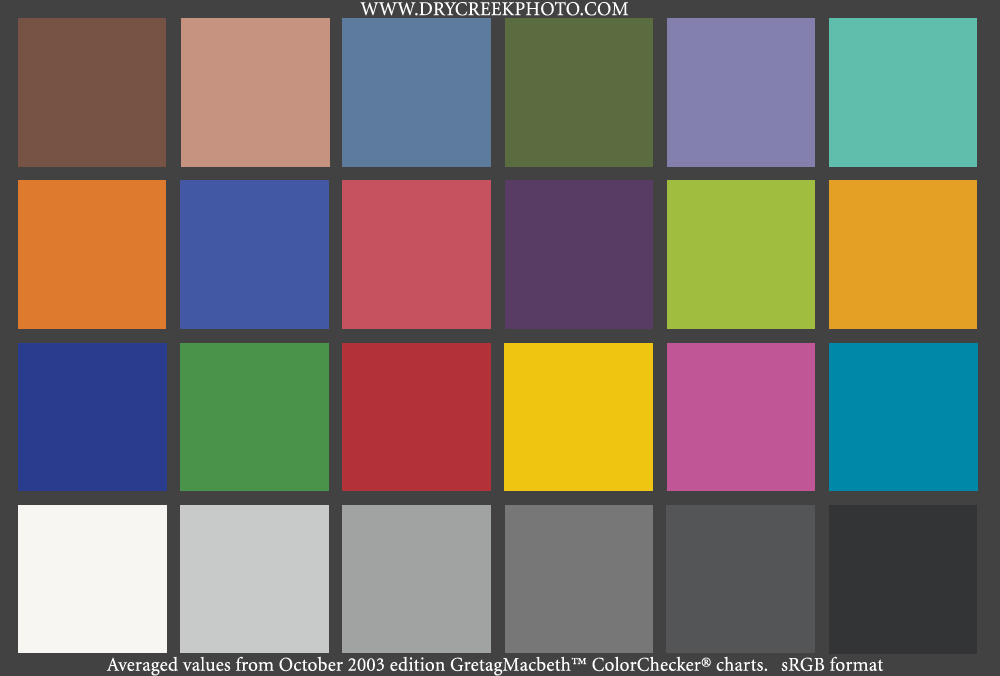
  Macbeth ColorChecker (free from the second link below). If you
  are taking the sRGB route and using only a single printer, then
  it would be reasonable just to compare your monitor directly
  to a printout of that file, but if you are using a different
  colour space or want to use multiple printers, compare it to
  a real Macbeth card. In any case, be sure to set the gamma to
  2.2. That is the de facto standard for working with colour.
  The Mac's standard of 1.8 was intended to make a grey-scale
  monitor look like a printed page.

<http://www.bergdesign.com/supercal/>
<http://www.drycreekphoto.com/images/Charts/MacbethCC-sRGB.jpg>

  Your goal in calibrating the monitor should be to make the two
  images of the ColorChecker match as closely as possible overall
  and to fudge the inevitable differences so that none of the
  colours is further off than any other. From such different
  technologies any kind of real match is impossible; you are
  after the best approximation.

  To compare the target photo to the monitor, and to assess the
  colour of prints, you don't need fancy instruments - you are
  pleasing your eye, not the Standard Observer - but you do need
  a suitable lamp. Ideally this will be the same kind of lamp you
  always view your pictures with, but since most pictures are viewed
  under a variety of conditions, you really need an average lamp.
  Although there is no such thing as an average lamp, there is a
  graphic-arts standard for judging colour. It is an arbitrary
  standard that has proven to be functional. Ordinary light bulbs
  are redder than this and most fluorescent tubes are too green.
  A reasonable compromise is a desk lamp that combines a 60-watt
  incandescent bulb with a circular fluorescent tube. If you need
  to buy something, you might find a desk lamp that uses a compact
  fluorescent tube and replace the tube with an Ott-Light TrueColor.

<http://www.ottlite.com/productsview.asp?product_type=bulb&;
product_phosphor=truecolor&category=truecolor>

  If you want professional-looking 8" x 10" prints that are tough
  and durable, and if you want to keep things simple, then you might
  take the sRGB approach with a $500 Olympus P-440 dye-sublimation
  printer. That's what I do. If you use the P-440 from a Macintosh,
  all you do is switch it on. It needs no special set-up and, to my
  eye, its native colour management works better than any ColorSync
  profile I have found for the machine, including a couple from the
  QImage folks and the one supplied by Olympus themselves. The
  printer requires no cleaning and uses no liquid ink that can dry
  up. The running cost is $2 per 8" x 10" print, which is less than
  good ink-jet paper and ink work out to be if a print head ever
  dries out. Its range of colours is not the broadest - it lies
  completely within sRGB space - and when I compare prints of the
  Macbeth ColorChecker made from it and from my darkroom, the tones
  from the Olympus look a bit more restricted. However, this is not
  a comparison people normally make and the P-440's prints on their
  own can be stunning. The prints I get from it do not look digital
  even under a loupe. (Do note, however, that I use special-purpose
  scaling software, I do not merely send the printer a file and
  have it fill the paper. Pictures scaled by PhotoZoom Pro are
  sharper than pictures scaled in the usual ways, even with
  PhotoZoom's sharpening switched off. See "Editing Photos for the
  Perfectionist" in TidBITS-748_ for more details on PhotoZoom Pro.)

<http://www.olympus.com/cpg_section/cpg_product_lobbypage.asp?l=1&;
bc=23&p=19&product=935>
<http://www.trulyphotomagic.com/products/photozoom/>
<http://db.tidbits.com/getbits.acgi?tbart=07832>

  [Editor's note: I can vouch for the quality of these prints.
  Charles passed through Ithaca recently while on a trip and brought
  me pictures he'd taken while on a trip through the Himalayas in
  July. He used a Sigma SD-10 camera and the Olympus P-440 printer,
  and the prints were utterly gorgeous. -Adam]

  I have found only two glitches with the P-440. The first is
  trivial: the printer driver will not accept images at the
  advertised spec of 3200 pixels, it requires them to be three
  pixels shorter. The second is more serious: if the line voltage
  in your house fluctuates too much, then the printer will produce
  random blotches and lines. Fluctuating voltage is not common
  in cities but it can happen in rural areas. I need to plug the
  printer into a voltage regulator. (The computer's UPS would have
  done but I happened to have an old voltage regulator in the
  basement.)

  Last-minute addition: Kodak just announced the release of a
  comparably priced dye-sublimation printer that prints pictures
  up to 8" x 12". Kodak is aiming this printer at professional
  photographers, which is an important market for them and one that
  it has always served well. This printer looks very interesting.

<http://www.kodak.com/global/en/professional/products/printers/1400/
1400Index.jhtml?id=0.1.18.22.9.14&lc=en>


**Balancing Colours in Photos** -- Once you have a system that
  is calibrated, you need to get to work balancing the colour of
  individual photos. The easiest way I know to do this is to relate
  everything in the picture to some spot that is some shade of
  neutral, colourless grey. There is one such spot in just about
  every photo. It may be merely the reflection of a lamp on a
  metallic surface, it may be only a few pixels across, maybe just
  the glint off a ring, but it is almost certain to be there
  somewhere. Once you've found that neutral spot, adjust the overall
  colour balance so that the red, blue, and green values for that
  spot measure the same using DigitalColor Meter or the equivalent
  function in Photoshop or your raw converter. (The raw converter is
  the best place to do this. In Photoshop you can just click on the
  spot with the eyedropper.)

  Now every colour of a similar brightness ought to be properly
  balanced. Find a colour that is particularly sensitive to colour
  casts - most likely skin tones - and look for differences in that
  one hue between highlights and shadows. Those differences indicate
  colour casts that vary with brightness. In Asiva Shift+Gain
  (again, see the previous article in TidBITS-748_ for details) it
  is easy to select the range of brightness that is off and correct
  it by nudging the hue slightly warmer or softer. If that one tone
  is corrected so that it looks the same at all levels, then other
  tones ought to be similar as well, although there may be anomalies
  if the picture was taken in mixed or fluorescent or high-intensity
  lighting. If some specific tones show an anomaly, select just
  those tones in Asiva Shift+Gain and fix them.

<http://www.asiva.com/products/plugins/ShiftGainTrial.php>


**The Eyes Have It** -- The approach to controlling colour that
  I have outlined here is the simplest and cheapest I know of.
  It would be a sensible approach to start with and would be a
  good one to retreat to if you are having problems doing it another
  way. However, this is certainly not the only way to control colour
  nor can it achieve the highest quality possible. Enough time and
  enough money can buy better results. If you decide to aim higher,
  though, do always keep in mind that colour is a variable
  perception; it is not a stable, objective phenomenon. There
  is rarely an intelligent way to answer the question, "Does this
  profile (or printer) give better colour?"

  Perception also ought to be kept in mind when buying a digital
  camera. The specifications of digital cameras are not what they
  seem to be if you consider them from the perspective of the eye.
  My next article will examine cameras from this angle. Among other
  things it will calculate a finite and surprisingly low answer to
  the question, "How many pixels are enough?"


   PayBITS: If Charles's recommendations for matching colours
   helped, he asks that you make a donation to Doctors Without
   Borders: <http://www.doctorswithoutborders-usa.org/donate/>
   Read more about PayBITS: <http://www.tidbits.com/paybits/>


Hot Topics in TidBITS Talk/04-Oct-04
------------------------------------
  by TidBITS Staff <[EMAIL PROTECTED]>

  The second URL below each thread description points to the
  discussion on our Web Crossing server, which will be much
  faster.


**Digital Negative archival photo format** -- Adobe has just
  released a new digital file format, Digital Negative (DNG). Learn
  how it differs from other lossless image formats (such as TIFF),
  and why the RAW format is a good basis for DNG. (5 messages)

<http://db.tidbits.com/getbits.acgi?tlkthrd=2326>
<http://emperor.tidbits.com/TidBITS/Talk/188>


**Using remote control software for support** -- Is it possible
  to use remote control software such as Apple Remote Desktop
  or VNC to troubleshoot a family member's Mac remotely? Or more
  accurately, is it easy enough for anyone to implement?
  (7 messages)

<http://db.tidbits.com/getbits.acgi?tlkthrd=2329>
<http://emperor.tidbits.com/TidBITS/Talk/190>


**MacOS 10.3.5 - error when trying to play a DVD** -- Watching
  a DVD on an external monitor brings up an unexplained error - but
  is easily solved by switching to display in thousands of colors.
  (3 messages)

<http://db.tidbits.com/getbits.acgi?tlkthrd=2330>
<http://emperor.tidbits.com/TidBITS/Talk/192>


**Save on .Mac Renewals** -- Apple wants to charge $100 to renew
  .Mac service, but you can purchase the boxed version for less
  and save some money. (5 messages)

<http://db.tidbits.com/getbits.acgi?tlkthrd=2331>
<http://emperor.tidbits.com/TidBITS/Talk/193>


$$

 Non-profit, non-commercial publications may reprint articles if
 full credit is given. Others please contact us. We don't guarantee
 accuracy of articles. Caveat lector. Publication, product, and
 company names may be registered trademarks of their companies.

 For information: how to subscribe, where to find back issues,
 and more, see <http://www.tidbits.com/>. TidBITS ISSN 1090-7017.
 Send comments and editorial submissions to: <[EMAIL PROTECTED]>
 Back issues available at: <http://www.tidbits.com/tb-issues/>
 And: <ftp://ftp.tidbits.com/issues/>
 Full text searching available at: <http://www.tidbits.com/search/>
 -------------------------------------------------------------------