TidBITS#751/18-Oct-04
=====================

  Apple and Microsoft jostle for position in this week's jumbo
  issue. Apple reported a record $106 million quarterly profit,
  has sold 150 million songs through the iTunes Music Store, and
  just opened six new mini retail Apple Stores. Microsoft is
  now shipping Virtual PC 7 (with support for the G5) and has
  a bug-fix update to Microsoft Office 2004. Also in this issue,
  Charles Maurer zooms in on digital camera sensor technology,
  Adam and Matt Neuburg share radio air time, and we welcome
  Rogue Amoeba as a new TidBITS sponsor!
Topics:
    MailBITS/18-Oct-04
    Microsoft Office 2004 for Mac Service Pack 1 Squishes Bugs
    Virtual PC 7 Finally Arrives in Microsoft Office
    Sense & Sensors in Digital Photography
    Hot Topics in TidBITS Talk/18-Oct-04

<http://www.tidbits.com/tb-issues/TidBITS-751.html>
<ftp://ftp.tidbits.com/issues/2004/TidBITS#751_18-Oct-04.etx>

Copyright 2004 TidBITS: Reuse governed by Creative Commons license
   <http://www.tidbits.com/terms/> Contact: <[EMAIL PROTECTED]>
   ---------------------------------------------------------------

This issue of TidBITS sponsored in part by:
* READERS LIKE YOU! Help keep TidBITS great via our voluntary <------ NEW!
   contribution program. Special thanks this week to Mike Calmus
   and Montana State University Media Services for their support!
   <http://www.tidbits.com/about/support/contributors.html>

* SMALL DOG ELECTRONICS: Selected <---------------------------------- NEW!
   iBooks and PowerBooks on sale! iBook: $899
   12-in PowerBook w/ AirPort Card: $1399; 15-in PowerBook: $1629!
   Visit: <http://www.smalldog.com/tb/> 800-511-MACS

* GET FETCH FOR FREE! Fetch Softworks makes Fetch, the original <---- NEW!
   Macintosh FTP client, free for educational and charitable use.
   Apply today at <http://fetchsoftworks.com/edapply>!

* Dr. Bott, LLC: Snap a Griffin iTalk onto your iPod, click <-------- NEW!
   record, and listen to your lecture at a more appropriate time.
   Like when you're awake. This and many other 4G compatible iPod
   accessories available and shipping. <http://www.drbott.com/>

* Web Crossing: Did you know Web Crossing does Blogs?!? Used for
   workgroup reports, entertainment, advice columns, politics, or
   whatever, Web Crossing's Blogs can integrate w/discussions,
   access lists, etc. Try it! <http://www.webcrossing.com/tb-504>

* iPod Armor takes the abuse, so your iPod doesn't have to! <-------- NEW!
   Rugged aluminum construction keeps iPod safe from scratches
   and other random daily hazards. Your iPod is always safe in
   iPod Armor. <http://ipodarmor.com/index.php?refID=5>

* MindFortress: Need a secure digital wallet to store passwords, <--- NEW!
   serial numbers, credit card info? Notes? Pictures? Movies?
   Custom templates to make your own cards to fit your needs?
   Get MindFortress! Free trial at <http://www.mindfortress.com/>

* StuffIt Deluxe 9 from Allume Systems improves on the Mac's
   essential compression utility! Now featuring faster performance
   and improved Finder integration and data management options.
   Upgrade for only $29.99! <http://www.stuffit.com/mac/deluxe/>

* Bare Bones Software BBEdit 8.0 -- More than 100 new features
   and improvements including Text Factories, Codeless Language
   Modules, a Documents Drawer, and much more! To download a
   demo or to purchase a copy, visit <http://www.barebones.com/>.

* "I USED TO BUILD MODELS when I was a kid..." Why did you stop? <--- NEW!
   Get a state-of-the-art scale model kit direct from Japan
   through us! Planes, tanks, cars, ships, sci-fi stuff and more!
   Over 30,000 items online. <http://www.hlj.com/tb>

* easyDNS: Is your present Domain Registration company taking you <-- NEW!
   for granted? Easily transfer your domains to the leading DNS
   company on the Net. It's fast & simple. Now YOU have control.
   easyDNS: the way things should work. <http://www.easyDNS.com/>

* AUDIO HIJACK PRO: Gain total audio control with Audio Hijack Pro <- NEW!
   Now you can record and enhance ANY audio, from Internet streams
   (Real, WMP, and more) to DVD audio. Even import vinyl records
   and tapes! Download it now! <http://www.rogueamoeba.com/tb/>
   ---------------------------------------------------------------

MailBITS/18-Oct-04
------------------

**Rogue Amoeba Sponsoring TidBITS** -- We're pleased to welcome
  our latest long-term sponsor, the audio utility company Rogue
  Amoeba Software. They're probably best known for Audio Hijack,
  which helps you record any audio from any application, and Audio
  Hijack Pro, which adds support for more audio formats, can enhance
  the incoming sound in a variety of ways, and much more. These
  applications are fabulous for recording music from your old LPs
  or for timeshifting live Internet radio shows; the first thing
  I did to test Audio Hijack Pro was to start recording the new
  radio episodes of Hitchhiker's Guide to the Galaxy from BBC Radio
  so I could listen to them on my iPod during a long car trip. Rogue
  Amoeba has also used their expertise in Macintosh audio to create
  Nicecast (which enables you to create your own Internet radio
  station) and Detour (which redirects audio from different programs
  to different output devices). They've also created a couple of
  free applications that help you quickly switch between different
  audio input and output sources and play sound from any input
  device. It's great to see a small company carving out a niche for
  itself like this, particularly when they're a fun little company
  with a great name and hilarious iconic mascot. If you're at all
  interested in audio, whether it's for making your own beep sounds,
  timeshifting Internet radio shows from any application, converting
  your vinyl to MP3, or just making your Mac's audio inputs and
  outputs do your bidding, you'd be well served by checking out
  Rogue Amoeba's software. We're glad to count them among our
  sponsors. [ACE]

<http://www.rogueamoeba.com/tb/>
<http://www.bbc.co.uk/radio4/hitchhikers/>


**Apple Reports $106 Million Fourth Quarter Profit** -- Apple
  Computer surprised both analysts and markets last week by
  announcing its strongest fourth quarter in nine years, with
  a $106 million profit on a whopping $2.35 billion in revenue
  for the company's final fiscal quarter of 2004. Moreover,
  Apple shipped more than 2 million iPod music players during
  the quarter, and the quarter represents a startling 37 percent
  revenue increase compared to the same quarter last year. The
  results include a $4 million restructuring charge. Gross margins
  for the quarter stayed high at 27 percent, and international
  sales represented 37 percent of revenue. Significantly, Apple's
  retail store revenue was up 95 percent from the same quarter
  last year.

<http://www.apple.com/pr/library/2004/oct/13results.html>
<http://www.apple.com/ipod/>

  Despite a delay caused by shortages of G5 processors, Apple says
  the new iMac G5 is off to a strong start; Apple shipped 836,000
  Macs during the quarter, more than half of which were iBooks and
  PowerBooks. The 2.02 million iPods Apple shipped represents a 500
  percent increase over the same quarter a year ago; some 6 percent
  of those iPods were manufactured by Hewlett-Packard as part of
  the companies' production alliance. What's stunning is that Apple
  moved over a third of _all_ iPods (5.7 million) ever sold in just
  the last three months. Looking forward, the company expects its
  next fiscal quarter (which includes the holiday buying season)
  to be strong, with revenues between $2.8 and $2.9 billion. [GD]


**Apple Sells Its One Hundred and Fifty Millionth Song** -- Apple
  continued to remind everyone it's the 400-pound gorilla of the
  online music industry by announcing it has now sold over 150
  million songs on its iTunes Music Service. What's more, just
  in time for the holiday shopping season, iTunes gift cards will
  now be available in Best Buy stores in addition to Target and
  Apple's own retail stores. The announcement follows yesterday's
  financial results where Apple noted it shipped more than 2 million
  iPods during its fourth fiscal quarter. Apple says it's selling
  more than 4 million songs a week, which puts it at a pace to sell
  over 200 million songs per year.

<http://www.apple.com/pr/library/2004/oct/14itunes.html>
<http://www.apple.com/itunes/>

  This announcement's timing on the heels of fourth quarter results
  permits me to note Apple's "other music products" (anything but
  iPods) brought in $98 million last quarter, which is roughly
  a one-third increase over the same quarter a year ago. Combined
  with revenue from iPods, that means right now roughly one quarter
  of Apple's revenue has to do with music, not computers. [GD]


**Apple Opens Mini Retail Stores** -- Further refining the retail
  experience of buying a Mac or iPod, Apple opened six new retail
  stores that feature a "mini" layout compared to existing stores.
  The smaller design puts products and information along the side
  walls (which are made up of aluminum panels, like a real-world
  Finder!), with the main floor space open. A single retail counter
  doubles as a Genius Bar. Most intriguing is a new self-checkout
  kiosk built into one wall, where customers can scan and purchase
  products without employee assistance. The stores appear to be
  geared toward more general users: the iPod is heavily represented,
  as are portables and the iMac, but the eMac and Power Mac G5 don't
  appear at all. Apple now operates 93 Apple Stores in the United
  States and Japan. [JLC]

<http://www.apple.com/retail/>
<http://www.apple.com/pr/library/2004/oct/14retail.html>


**Take Control of Upgrading to Panther Now in Dutch** -- Our
  untiring Dutch translation team has gone beyond translating
  TidBITS each week to bring Dutch-speaking Macintosh users a
  translation of Joe Kissell's "Take Control of Upgrading to
  Panther." As with our other translations, it's $7.50, with
  a third of the price going to the translators. Continuing our
  policy of supporting our early adopters, Dutch speakers who
  already purchased the English version of "Take Control of
  Upgrading to Panther" are entitled to a free copy of the Dutch
  translation. If your English copy of the ebook has a Check for
  Updates button on the first page, click it to access the download
  page for the translation. If your copy of the ebook is too old
  to have a Check for Updates button, you may be able to download
  a new copy from eSellerate if you still have your receipt, or you
  may still have the free coupon code we sent to purchasers before
  we implemented the Check for Updates mechanism. We'll be sending
  a direct download link to readers in the Netherlands and Belgium
  as well, but if all else fails, please use the form on our FAQ
  page to ask Tonya for help. [ACE]

<http://www.tidbits.com/takecontrol/nl/panther/upgrading.html>
<http://www.tidbits.com/takecontrol/faq.html>


**TidBITS Night on The Mac Night Owl Live** -- It was a TidBITS
  double-header on The Mac Night Owl Live radio show with Gene
  Steinberg on 15-Oct-04, as both Contributing Editor Matt Neuburg
  and I talked with Gene. Matt's topic was his two new Take Control
  ebooks on what's new in Word 2004, whereas Gene and I spent quite
  a while talking about Apple's $106 million fourth quarter profit
  and what all those numbers really mean. (Kudos to Geoff Duncan,
  Mark Anbinder, and Glenn Fleishman for their coverage of Apple's
  quarterly report on our ExtraBITS page, allowing me to sound way
  more prepared than I might have been otherwise!) You can listen
  to The Mac Night Owl Live on the Internet from the show archive;
  it's worth the visit.

<http://www.macradio.com/Friday/>
<http://www.tidbits.com/extrabits/>


Microsoft Office 2004 for Mac Service Pack 1 Squishes Bugs
----------------------------------------------------------
  by Adam C. Engst <[EMAIL PROTECTED]>

  A few weeks ago, the PR person at Edelman who works with
  Microsoft's Macintosh Business Unit contacted me to let me
  know that there would be an automatic update to the Microsoft
  AutoUpdate utility, a new part of Office 2004. Trying to figure
  out if this warranted coverage, I asked, "So you're telling me
  that AutoUpdate is going to kick in automatically to update
  itself to better kick in automatically?" The answer was yes,
  and I decided it fit into the same news category as a tree
  falling in an uninhabited forest.

  But now you really do want that 927K update to Microsoft
  AutoUpdate (which you can find and launch manually in your
  Applications folder if you turned off the Microsoft AU Daemon
  in your Startup Items list), because the utility now has some
  real work to do in downloading and installing Microsoft's 22.8 MB
  Service Pack 1 for Office 2004, which fixes numerous security and
  stability issues in the Office suite of programs.

<http://www.microsoft.com/mac/autoupdate/description/AUOffice2004111EN.htm>

  Most important from my perspective is that Microsoft stamped out
  the maddening selection bug in Word 2004, by which selecting by
  word would often also select the word preceding the selection.
  This fix alone makes Service Pack 1 essential in my mind. Other
  Word improvements include the proper functioning of AutoRecover
  when FileVault is enabled (note that we do not recommend the use
  of FileVault except in very specific situations), text correctly
  changing to the font selected from the Font menu, and correct
  detection of Swiss German proofing tools. For additional help with
  Word 2004's new features, see our just-released "Take Control of
  What's New in Word" ebooks.

<http://www.tidbits.com/takecontrol/word-1.html>
<http://www.tidbits.com/takecontrol/word-2.html>

  In Service Pack 1, PowerPoint 2004 sees improved performance when
  you play movies in a slide show, better compatibility with fonts,
  and corrected dragging of objects when the ruler is turned on.
  The only change to Excel is also shared by Word and PowerPoint:
  improved security when you open a document containing macros.

<http://support.microsoft.com/?kbid=886633>

  Entourage 2004 also picks up a number of fixes. The Entourage icon
  no longer bounces in the Dock when a connection error occurs, sent
  messages display the sent status in the Microsoft Outlook Info
  Bar, modem usage has been improved, SMTP over SSL has been
  improved, attaching photos from iPhoto now works better, the
  Microsoft User Data folder can now live on a network volume,
  Entourage no longer eats certain keyboard shortcuts for Adobe's
  CS products, and connections both to normal POP servers and Domino
  IMAP servers now work better. If you need assistance learning to
  use Entourage 2004's new features, check out our "Take Control of
  What's New in Entourage 2004" ebook.

<http://www.tidbits.com/takecontrol/entourage-2004.html>

  Lastly, the Remote Desktop Connection client 1.0.3 is more stable
  when you minimize the window and when you copy and paste data to
  Macintosh applications. Other stability improvements should help
  those using Mac OS X 10.3 or later, and those running on Macs
  with PowerPC G5 processors.


Virtual PC 7 Finally Arrives in Microsoft Office
------------------------------------------------
  by Mark H. Anbinder <[EMAIL PROTECTED]>

  Microsoft has released a long-awaited update to Virtual PC,
  the emulation software acquired from Connectix over a year
  and a half ago. Virtual PC 7, which is available as a standalone
  product or as part of Microsoft Office Professional, boasts
  faster performance, better integration with the Mac's fast
  graphics processors, easier printing from Windows to the Mac's
  printer, and, perhaps most importantly, compatibility with the
  Power Mac G5.

<http://db.tidbits.com/getbits.acgi?tbart=07087>
<http://www.microsoft.com/mac/products/virtualpc/virtualpc.aspx?pid=virtualpc>

  That Virtual PC was incompatible with Apple's flagship Power Mac
  G5 desktops gave a black eye to both Apple and Microsoft, so the
  mere resolution of this problem makes Virtual PC 7 newsworthy.
  The G5 was announced at Apple's Worldwide Developer Conference
  in June 2003, and Microsoft released Virtual PC 6.1 in September
  2003 (and rolled it into an Office Professional bundle) with the
  known limitation that it wouldn't work on a G5.

<http://db.tidbits.com/getbits.acgi?tbart=07325>

  Microsoft claims performance improvement of 10 to 30 percent for
  Virtual PC 7, which will be a welcome boost for users on the lower
  end of the system requirements curve. (Virtual PC requires a 700
  MHz or faster PowerPC G3, G4, or G5 computer and at least 512 MB
  of RAM.)

  Available now in English editions are a $250 Virtual PC 7
  with Windows XP Professional, and a $500 Microsoft Office 2004
  Professional Edition, including Virtual PC. An upgrade edition
  of Office Professional is available for $330. The company says
  French, German, Japanese, and Swedish editions will be available
  in the months ahead, as will Virtual PC versions featuring Windows
  XP Home or Windows 2000 Professional, and standalone (without
  an OS) and upgrade editions.


Sense & Sensors in Digital Photography
--------------------------------------
  by Charles Maurer

  In another incarnation I was a commercial photographer. At the
  end of that life I sold all of my studio equipment and all of
  my cameras save one, a Horseman 985, a contraption with a black
  bellows that resembles the Speed Graphic press cameras you
  see in pre-war movies. It uses roll film and allows the front
  and back of the camera to be twisted in every direction when
  it's parked on a tripod. You can also hold it in your hands
  and pretend you're acting in "Front Page." Never have I found
  a camera so useful. Nowadays, however, digital sensors are
  pushing the optical limits of lenses and software has become
  more pliable than leather bellows, not just for adjusting
  colour but for optical manipulations as well. This year a
  modestly priced (as such things go) digital SLR supplanted my
  Horseman. I can no longer see owning a camera that uses film.

  In this article I am going to examine the technology of digital
  cameras, but in an unconventional way. I am going approach it
  from basic principles. This approach may seem abstract and
  theoretical at first, but it won't for long. You will see that
  if you understand the scientific principles, you can ignore a
  lot of marketing hype and save significant sums of money.


**Photocells** -- Imagine a small windowpane with bits of a
  special metal embedded in the glass and a wire touching
  those bits. Photons of light bang against the glass. The impact
  unsettles electrons in the metal. They bang into electrons within
  the wire, which bump into electrons further down the wire, which
  bump into still more electrons, so that a wave of moving electrons
  passes along the wire - an electrical current. The more photons
  that bang into the pane, the more electricity flows.

  This is a photocell, a sensor that is sensitive to the intensity
  of light. Now imagine millions of cells like this assembled into
  a checkerboard and shrunk to the size of a postage stamp. Put this
  stamp-sized collection of photocells inside a camera where the
  film usually goes. The lens projects an image onto it. Each cell
  receives a tiny portion of the image and converts that portion
  into an electrical charge proportionate to the amount of light
  forming that portion of the picture. Now we have a photosensor.

  The complete matrix of charges on this photosensor forms an
  electrical equivalent of the complete image - but only of the
  intensity of the image. Since the eye interprets the intensity
  of light as brightness, brightness devoid of colour, this
  photosensor provides the information of a colourless photograph,
  of a black-and-white photograph. If we feed the output of the
  photosensor to the input of a printer, and if we let the printer
  spray ink on paper in inverse proportion to the voltage (lower
  voltage, more ink), then we will see a black-and-white photograph
  appear. The output of the photosensor can be connected directly
  to the printer through an amplifier, or it can be converted
  into digital numbers and the digital numbers can be sent to the
  printer. The first approach is analog, the second is digital.
  The greater the range of digital numbers, the finer the steps
  from black to white. If there are enough steps, the printout
  will look like a continuous-tone photograph.

  To make a photosensor record colour, we need to make it sensitive
  to wavelengths of light as the eye is sensitive to them. We see
  long wavelengths weakly as reds, short wavelengths very weakly as
  blues, and medium wavelengths strongly as greens. The easiest way
  to make a black-and-white photosensor record colour is to put
  filters over the cells so that alternate cells respond to short
  wavelengths, medium ones and long ones. Since the eye is most
  sensitive to medium wavelengths, it is practical to use twice
  as many of these as the others: one blue, one red, two greens.
  Such a set of filtered cells - red, green, blue, green - forms
  the Bayer photosensor (named after its inventor) that is used
  in nearly every digital camera.

  Now consider what happens when a spot of light is smaller than
  a group of four cells, when it is small enough to strike only a
  single cell. Assume the spot to be white light, which includes
  every wavelength. If the white spot falls on a blue-filtered cell,
  then the picture will show the spot to be blue. If the white spot
  falls on a red-filtered cell, the picture will show the spot
  to be red. If it falls on a green-filtered cell, the spot will
  look green. This can cause so many errors in the image that
  manufacturers try to prevent it from happening by blurring the
  image, by putting a diffusing filter in front of the sensor
  to smear small spots of light over more than one cell.

  Note that in a sensor like this, four cells form the smallest
  unit that can capture full information about some part of a
  picture. That is, four cells form the basic element of a picture,
  the basic "picture element" or "pixel". Unfortunately, to make
  their products sound more impressive, manufacturers count cells
  as pixels. That's like saying a piano has 234 notes, not 88,
  because it is built with 234 strings. Since the sensors function
  differently at the level of the cell and the level of the pixel,
  it is important to ignore the advertising and to discriminate
  appropriately between pixel and cell. I shall do that in this
  article.

  A simpler approach would be to design a sensor in which every
  cell is sensitive to every wavelength. Such a sensor was patented
  by Foveon, Inc., in 2002, and is currently in its second
  commercial generation. Foveon's sensor uses no coloured filters
  but instead embeds photo-sensitive materials within the silicon
  at three depths. The longer the wavelength of the light,
  the farther it penetrates the semi-transparent silicon and the
  deeper the photo-sensitive material it stimulates. With a Foveon
  sensor, every cell records a complete pixel with all wavelengths.
  (Note, however, that Foveon have taken to multiplying the number
  of pixels by three, to sound competitive in their ads.)


**How many pixels do you need?** The smallest detail usable in a
  print is defined by the finest lines that a person can see. At a
  close reading distance (about 10 inches, or 25 cm), somebody with
  perfect vision can resolve lines slightly finer than those on the
  20/20 (6/6) line of the eye chart, lines of about 8 line-pairs per
  millimetre (l-p/mm), which is the unit of optical resolution.

  However, those are black-and-white lines. No ordinary photograph
  contains black-and-white lines so thin because no camera can
  produce them on photographic (as distinct from lithographic) film.
  No lens can create such fine lines without beginning to blur the
  blacks and whites into grey. Dark-grey-and-light-grey lines need
  to be thicker than black-and-white lines to be seen. In the
  perception of fine lines, a halving or a doubling of thickness
  is usually the smallest difference of any practical significance,
  so this pronouncement of Schneider-Kreuznach sounds perfectly
  reasonable to me: "A picture can be regarded as impeccably sharp
  if, when viewed from a distance of 25 cm, it has a resolution
  of about 4 l-p/mm." On an 8" x 12" photo, this is 1,600 by 2,400
  pixels, or 3.8 megapixels. (8" x 12" is about the size of A4
  paper. It isn't quite a standard size of a photo but will prove
  more convenient for discussion than 8" x 10".)

  In short, 4 million pixels carry all of the useful information
  that you can put into an 8" x 12" photograph. Finer detail
  than this will matter to technical aficionados making magnified
  comparisons, and it may matter for scientific or forensic tasks,
  but it will not matter for ordinary purposes. The same holds for
  larger prints because we don't normally view larger photographs
  from only 10 inches away. It holds even for the gigantic images
  in first-run movie theatres. The digital processing used routinely
  for editing and special effects generates movies with no more than
  2,048 pixels of information from left to right, no matter how wide
  the screen. The vertical dimension differs among cinematic formats
  but is typically around 1,500 pixels.

  This, of course, presents quite a paradox: a frame of a
  Cinemascope print obviously contains a lot more than 4 million
  pixels. Even an 8" x 12" print from a 300-dpi printer contains
  2,400 pixels by 3,600 pixels, or 8.6 million pixels. Large prints
  need those additional pixels to prevent our seeing jagged edges
  on diagonal lines, because the eye will see discontinuities in
  lines that are finer than the lines themselves.

  Since no photograph of any size can contain more than 3 to 4
  million elements of information, even when made from film,
  any substantial enlargement needs to be composed primarily
  of pixels that do not exist in the original. These pixels need
  to be interpolated: interpolated through continuous optical
  integration (film), interpolated mechanically (high-resolution
  scanner), or interpolated logically by software (digital
  photography). This need for interpolation in enlargements
  makes interpolating algorithms fundamentally important to
  digital photography. For most enlargements, the quality of
  the interpolating algorithm matters more than the resolution
  of the sensor or the quality of the lens. We shall come back
  to this.

  For the moment - indeed, forevermore - it is essential to keep
  straight the distinction between (1) the information that is
  contained within an image and (2) the presentation of this
  information. Both are often measured by pixels but they are
  orthogonal dimensions. The information within a picture can be
  described by a certain number of pixels. That information may
  be interpolated into any number of additional pixels but doing
  so adds nothing to the information, it merely presents the
  information in smaller pieces.

To illustrate this, here are some examples:

* A good 8" x 12" photograph and the same photo run full-page in a
  tabloid newspaper both contain about 1 megapixel of information.

* A slightly better photograph and the same photo run full-page
  in a glossy magazine and a broadsheet newspaper all contain about
  1.9 megapixels of information.

* A slightly better photograph still - the best possible - and the
  same photo spread over two pages in a glossy magazine both contain
  about 3.8 megapixels of information.

  If you have an 8" x 10" photo printer, you can compare those
  levels of information by printing out a set of pictures
  (linked below, about 30 MB) that I took at approximately
  those resolutions, keeping everything else the same. (The test
  pictures were shot at 3.4, 1.5 and 0.86 megapixels: I used
  a Foveon sensor and, to generate the lower resolutions, used
  its built-in facility to average cells electronically in pairs
  or in groups of four.) I enlarged the pictures using the best
  interpolator I could find to 3,140 by 2,093 pixels.

<http://www.tidbits.com/resources/751/HighMedLowResolution.zip>

  The photos are JPEG 2000 files, saved in GraphicConverter
  at 100 percent quality using QuickTime lossless compression.
  To prepare them I adjusted the levels, cleaned up some dirt in
  the sky, then enlarged them in PhotoZoom Pro using the default
  settings for "Photo - Regular." Those settings include a modest
  and appropriate amount of sharpening.

  What you will see, if you print them, is surprisingly small
  differences from one level of resolution to the next. Each of
  these photos looks sharp on its own, and at arm's length they all
  look the same. You can see a difference only if you compare them
  up close. That, of course, is because the only information that's
  missing from the lower-resolution pictures is information that
  is close to the limit of the eye's acuity and thus is difficult
  to see.


**Bayer vs. Foveon in Theory** -- Cameras today fall into two
  categories, those with a Bayer sensor and those with a Foveon
  sensor, which at this writing include only two, a theoretical
  Polaroid 530 and a very real Sigma SD-10.

<http://www.pdcameras.com/usa/catalog.php?itemname=x530>
<http://www.foveon.com/SD10_info.html>

  In a Bayer sensor, a single cell records a single colour, but a
  pixel in the print can be any colour. Carl Zeiss explain this:
  "Each pixel of the CCD has exactly one filter color patch in front
  of it. It can sense the intensity for this color only. But how can
  the two remaining color intensities be sensed at the very location
  of this pixel? They cannot. They have to be generated instead
  through interpolation (averaging) by monitoring the signals from
  the surrounding pixels which have filters of these other two
  colors in front of them."

  Since the cells provide a lot of partial information, the
  interpolation can be accurate, but it can be inaccurate as well.
  Patterns of coloured light can interact with the checkerboard
  pattern of filters over the cells to generate grotesque moire
  patterns. To avoid these, Bayer sensors are covered with a filter
  that blurs every spot of light over more that one cell. The net
  result proves to be interpolated resolution that varies with
  colour and peaks with black-and-white at about 50 percent more
  line-pairs/millimetre than the intrinsic resolution of the sensor.
  This sounds like a lot but cannot be seen unless you look closely.

  More problematic is the fact that this filter does not merely
  prevent moire patterns, it also blurs edges. With a Bayer sensor,
  every edge of every line is blurred. You can see the interpolated
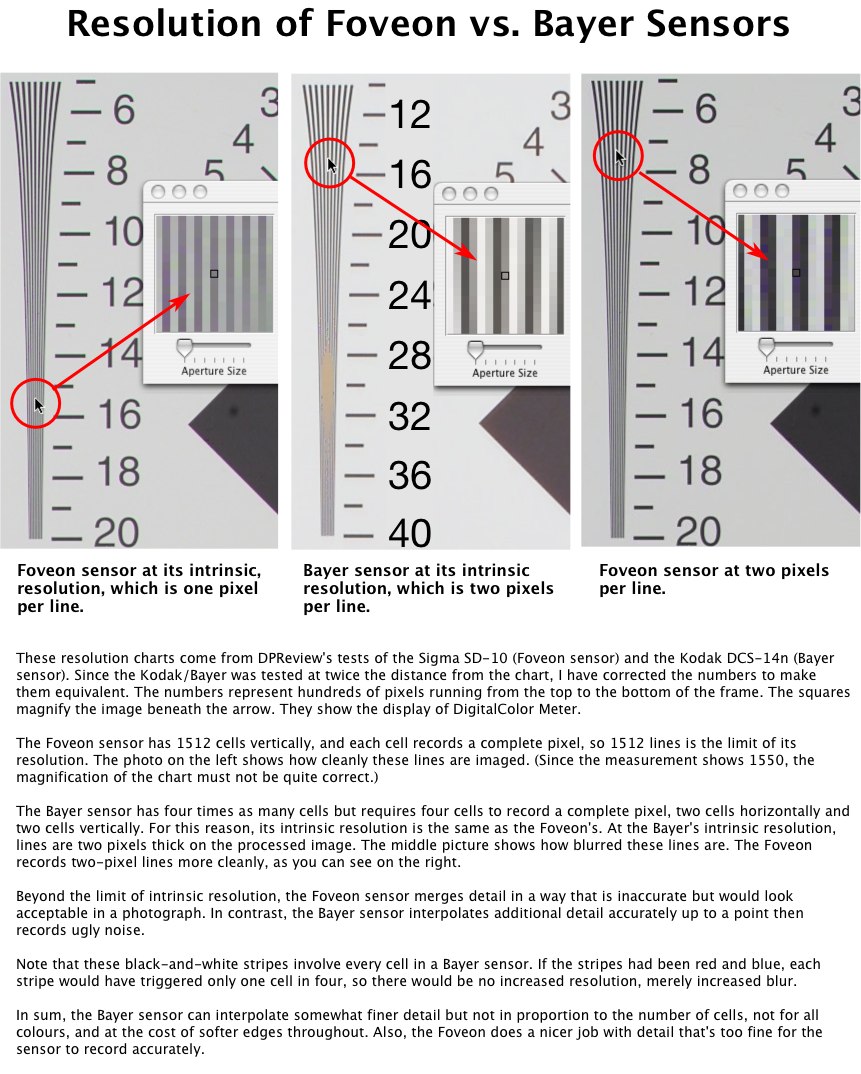
  resolution and the blurring in the magnified tests in the picture
  linked below. There I have compared cameras with a Foveon and a
  Bayer sensor containing the same number of pixels - pixels, not
  cells. Both have 3.4 million pixels (although the Bayer has 13.8
  million cells).

<http://www.tidbits.com/resources/751/Resolution.jpg>

  People make a big deal about resolution because it sounds
  important and is easy to test, but aside from special cases
  like astronomical observation, fine resolution actually matters
  little. By definition, at the limits of resolution, we can
  only just make out detail. Anything that is barely visible will
  not obtrude itself upon our attention or be badly missed if it
  is not there. What we see easily is what matters to us, what
  determines our impression of sharpness. Our impression of
  sharpness is determined by the abruptness and contrast at the
  edges of lines that are broad enough to be easily made out. You
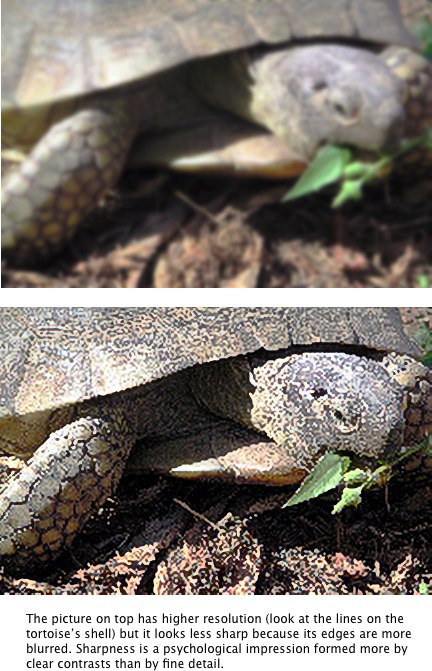
  can see this with the two tortoises in this picture linked below.
  The sharper tortoise has less resolution but its edges are more
  clearly defined.

<http://www.tidbits.com/resources/751/Sharpness.jpg>

  The Bayer sensor resolves finer black-and-white lines but a Bayer
  sensor will not reproduce any line so sharply as the Foveon. As a
  result, when comparing two top-quality images, I would expect the
  Bayer's image to look slightly more impressive when large blow-ups
  are examined up close, but I would expect the Foveon's to look
  slightly clearer when held a little farther away. Moreover, when
  detail is too fine for the sensor to resolve, the Bayer looks ugly
  or blank but the Foveon interpolates pseudo-detail. This means
  that in some areas, large enlargements examined closely might
  actually look better with the Foveon. In sum, I would expect
  the 3.4 megapixel Foveon and what is marketed as a 13.8-megapixel
  Bayer to be in the same league. I would expect photographs from
  them to be different but comparable overall, if they are enlarged
  with an appropriate algorithm.


**Bayer vs. Foveon in Practice** -- "If they are enlarged with
  an appropriate algorithm..." - that statement is critical to a
  sensible comparison. Usually, if you magnify an object a little,
  it won't change its appearance much. If you simply interpolate
  according to some kind of running average, you can increase its
  size to a certain extent and it will still look reasonable. This
  is how most enlargements are made. It is the basis of the bicubic
  algorithm used in most photo editors, including Photoshop and,
  apparently, Sigma's PhotoPro. It is also the basis of most
  comparisons between Bayer and Foveon. However, a running average
  will widen transitions at the edges of lines, and it will destroy
  the Foveon's sharp edges, softening them into the edges of
  a Bayer. A better class of algorithm will stop averaging at
  lines. Any form of averaging, though, tends to distort small
  regularities (wavelets) that occur in similar forms at different
  scales. Best of all are algorithms that look for wavelets,
  too. The only Macintosh application I know of in that class
  is PhotoZoom Pro. PhotoZoom Pro has a limited set of features
  and some annoying bugs - version 1.095 for the Mac feels like
  a beta release - but it creates superb enlargements.

<http://www.trulyphotomagic.com/>

  An appropriate comparison of the Bayer and Foveon sensors would
  see how much information these sensors capture overall. (How much
  spatial information, that is: comparing colour would be comparing
  amoebas, as I explained in "Colour & Computers" in TidBITS-749_.)
  To do this, I tested an SD-10 against an SLR that was based on a
  larger Bayer sensor, a sensor 70 percent larger than the Foveon
  that contained 13.8 million cells. Kodak were most helpful in
  supplying this camera once they heard Doctors Without Borders
  (Medecins sans Frontiers) was to benefit (see the PayBITS block
  at the bottom of this article to make a donation if you've found
  this article helpful). Also, Sigma sent me a matched pair of
  50-mm macro lenses to use with the cameras.

<http://db.tidbits.com/getbits.acgi?tbart=07840>

  I copied an oil painting with a wide variety of colours and a
  lot of fine textural detail. With each camera I photographed
  a large chunk of the painting, cropped out a small section from
  the centre, blew up that section to the same size as the original
  using PhotoZoom Pro (the defaults for "Photo - Regular"), and
  compared that blow-up to a gold standard, a close-up that had
  not seen any enlargement, interpolation, or blurring filter in
  front of the sensor. Before blowing them up I balanced all three
  photos to be as similar as I could, then, to prevent unavoidable
  differences in colour from confounding the spatial information,
  I converted all three images to black-and-white. I did this in
  ImageJ. First I split each image into its three channels, then
  I equalized the contrast of each channel across the histogram,
  then I combined the channels back into a colour picture, converted
  the new colour picture to 8-bit, and equalized the contrast of
  the 8-bit file. (See the second link below for an explanation
  of contrast-equalization.) I chose a painting in which most of
  the coloured brush strokes were outlined with black brush strokes,
  so that adjacent colours would not merge after conversion into
  a similar shades of grey. With my 314-dpi printer, the two
  enlargements are the equivalent of chunks from a 14" x 21".

<http://rsb.info.nih.gov/ij/>
<http://homepages.inf.ed.ac.uk/rbf/HIPR2/histeq.htm#1>

  The difference between the photos from the Bayer and Foveon is
  very slight. The two pictures are indistinguishable unless you
  compare them closely. Fine, contrasty lines on the standard are
  finer on the Bayer, more contrasty on the Foveon. The one that
  looks more like the standard depends upon the distance from the
  eye and the lighting but the differences are trivial. The two
  images do contain slightly different information, but they
  contain comparable amounts overall.

  On the other hand, for efficiency of storage and speed of
  processing, the Foveon wins hands down. This is how two identical
  pictures compared:

>                 Foveon       Bayer
> RAW             7.8 MB       14.7 MB
> 8-bit TIFF      9.8 MB       38.7 MB

  If you would like to print out my test pictures, you can
  download them. However, for the comparison to be meaningful,
  you must specify a number of dots per inch for the pictures
  that your printer can resolve in both directions. I know that
  an Olympus P-440 can resolve 314 dpi, with no more than occasional
  one-pixel errors in one colour's registration. I have not found
  any resolution that an Epson 9600 can handle cleanly in both
  directions, although I have not been able to test it exhaustively.
  Other printers I know nothing about. You will have to experiment
  with the test patterns in the Printer Sharpness Test file linked
  below. For this purpose, only the black-and-white stripes matter.

<http://www.tidbits.com/resources/748/PrinterSharpnessTest.zip>

  Each picture in the 5.8 MB file below is 1512 pixels by
  approximately 2270. If a picture has been printed correctly,
  the width in inches will be 1512 divided by the number of dots
  per inch. Print them from Photoshop or GraphicConverter; Preview
  will scale them to fit the paper.

<http://www.tidbits.com/resources/751/Bayer_vs_Foveon.zip>

  Remember that the question to ask is not which picture looks
  better or which picture shows more detail but which picture looks
  more like the gold standard overall. I suggest that you compare
  the pictures upside down. Remember, too, that these are small
  sections from big enlargements that you would normally view
  framed and hanging on a wall. Also, although the contrast is
  equalized overall, the original colours were not quite identical
  and the equalization of contrast amplified some tonal differences.
  If you perceive the Bayer or Foveon to be better in one or another
  area, make sure that in this area the tonality is similar. If
  the tonality is different, the difference there is probably an
  artifact. An example of this is the shadow beneath the tape on
  the left side.

  I have not been able to test this but I suspect that the most
  important optical difference between Bayer and Foveon sensors
  may be how clearly they reveal deficiencies in lenses. Since the
  Foveon sensor is sharper, I would expect blur and colour fringing
  to show up more clearly on a Foveon sensor than a Bayer.


**Megapixels, Meganonsense** -- Megapixels sell cameras as
  horsepower sells cars and just as foolishly. To fit more cells
  in a sensor, the cells need to be smaller. It is possible to
  make cells smaller than a lens can resolve. Even if the lens can
  resolve the detail more finely, doubling the number of cells makes
  a difference that is only just noticeable in a direct comparison.

  On the other hand, small pixels create problems. Electronic
  sensors pick up random fluctuations in light that we cannot see.
  These show up on enlargements like grain in film. Larger cells
  smooth out the fluctuations better than smaller cells. Also,
  larger cells can handle more light before they top out at their
  maximum voltage, so they can operate farther above the residual
  noise. For both reasons, images taken with larger cells are
  cleaner. Enlargements from my pocket-sized Minolta Xt begin
  to fall apart from too much noise, not from too few pixels.

  In contrast, enlargements from my Sigma SD-10 have so little noise
  that they can be enormous. A 30" x 44" test print looked as though
  it came from my 2-1/4" x 3-1/4" Horseman. The Sigma has less
  resolution than the Horseman - it's probably less than can be
  extracted from scanning the finest 35-mm film - but its noise
  level can be reduced to something approaching 4" x 5" sheet film.
  Such a low level of noise leaves the detail that it contains,
  which is substantial, very clean. In perception, above a low
  threshold, the proportion of noise to signal matters far more to
  the brain than the absolute amount of signal. Indeed, if I look
  through a box of my old 11" x 14" enlargements, the only way I can
  distinguish the 35-mm photos from the 2-1/4 x 3-1/4" is to examine
  smooth tones for noise. I cannot tell them apart by looking at
  areas with detail.

  In sum, with the range of sensors used in cameras today, there
  is no point to worrying about a few megapixels more or less.
  Shrinking cells to fit more of them in the sensor can lose more
  information than it gains. The size of the cells is likely to
  be more important than their number. For the same money, I would
  rather buy a larger sensor with fewer pixels than a smaller sensor
  with more pixels. If nothing else, the larger sensor is likely
  to be sharper because it will be less sensitive to movement of
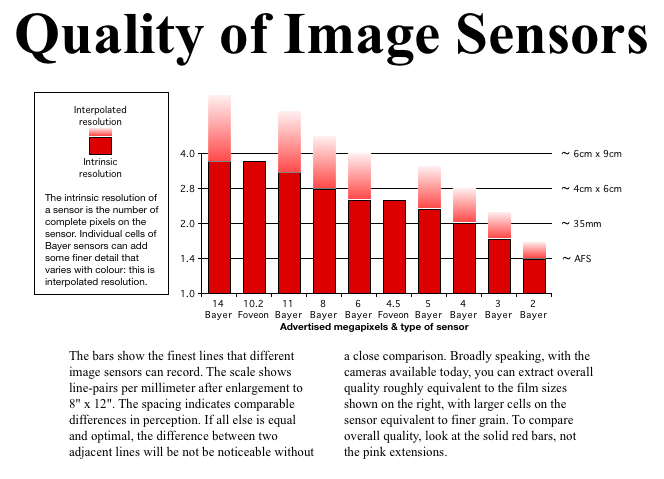
  the camera. For a realistic comparison of sensors as they are
  marketed see this chart:

<http://www.tidbits.com/resources/751/SensorChart.png>


**Tripod vs. Lens** -- Most people believe that the quality of
  the lens is of primary importance in digital photography.
  If you have stayed with me so far, you may not be surprised
  to hear me calculate otherwise. With 35mm cameras, an old rule
  of thumb holds that the slowest shutter speed that a competent,
  sober photographer can use without a tripod and still stand a good
  chance of having the picture look sharp is 1 divided by the focal
  length of the lens: 1/50" for a 50-mm lens, 1/100" for a 100-mm
  lens, etc. At these settings there will always be some slight
  blur but it will usually be too little to be noticed. This blur
  will mask any difference in sharpness between lenses. To see
  differences in sharpness requires speeds several times faster.

  With digital cameras that use 35-mm-sized sensors, the same rule
  of thumb holds, but most digital cameras use smaller sensors.
  With smaller sensors, the same amount of movement will blur more
  of the picture. If you work out the trigonometry, you'll find that
  you need shutter speeds roughly twice as fast for 4/3" sensors and
  four times faster for 2/3" and 1/1.8" sensors. (Digital sensors
  come in sizes like 4/3", 2/3" and 1/1.8". Those numbers are
  meaningless relics from the days of vacuum tubes; they are now
  just arbitrary numbers equivalent to dress sizes.) That means
  minimal speeds of 1/100" and 1/200" for a normal lens. Differences
  in sharpness among lenses would not be apparent until shutter
  speeds are several times higher again. Because of this, it strikes
  me that the weight of lenses matters more to image quality than
  the optics. The heavier a camera bag becomes, the more likely
  the tripod will be left at home.

  (Note that this does not mean that 35-mm-sized sensors are best.
  Other optical problems increase with the size of the sensor.
  As an overall compromise, the industry is beginning to adopt
  a new standard, the 4/3", or four-thirds, which is approximately
  one-half the diameter of 35-mm. This is not unreasonable.)

  Frankly, I should be astonished to find any lens manufactured
  today that does not have sufficient contrast and resolution
  to produce an impressive image in the hands of a competent
  photographer. I know that close comparisons of photos shot on
  a tripod will show differences from one lens to another, and
  I know that some lenses have weaknesses, but very few people
  will decorate a living room with test pictures. In the real
  world, nobody is likely to notice any optical deficiency unless
  the problem is movement of the camera, bad focus, distortion or
  colour fringing. It is certainly true that distortion and colour
  fringing can be objectionable but, although enough money and
  experimentation might find some lenses that evince less of these
  problems than others, as a practical matter, especially with
  zoom lenses, they seem to be inescapable. Fortunately, these
  can usually be corrected or hidden by software.

  Indeed, even a certain amount of blur can be removed with
  software. Let's say that half of the light that ought to fall
  on one pixel is spread over surrounding pixels. Knowing this,
  it is possible to move that much light back to the central pixel
  from the surrounding ones. That seems to be what Focus Magic does
  (see the discussion of Focus Magic in "Editing Photographs for
  the Perfectionist" in TidBITS-748_).

<http://www.focusmagic.com/>
<http://db.tidbits.com/getbits.acgi?tbart=07832>


**One More Myth** -- Finally, I would like to end this article
  by debunking a common myth. I have often read that Bayer
  sensors work well because half of their cells are green and
  the wavelengths that induce green provide most of the information
  used by the eye for visual acuity. This made no sense to me but
  I am not an expert on the eye so I asked an expert - three experts
  in fact, scientists known internationally for their work in visual
  perception. I happened to be having dinner with them. It made no
  sense to them, either, although I took care to ask them before
  they had much wine. Later I pestered one of them about it so much
  that eventually she got out of bed (this was my wife Daphne) and
  threw an old textbook at me, Human Color Vision by Robert Boynton.
  In it I found this explanation:

  "To investigate 'color,'" an experimenter puts a filter in front
  of a projector that is projecting an eye chart. "An observer,
  who formerly could read the 20/20 line, now finds that he or she
  can recognize only those letters corresponding to 20/60 acuity
  or worse. What can be legitimately concluded from this experiment?
  The answer is, nothing at all," because the filter reduced the
  amount of light. "A control experiment is needed, where the same
  reduction in luminance is achieved using a neutral filter....
  When such controls are used, it is typically found that varying
  spectral distribution has remarkably little effect upon visual
  acuity."

  In short, each cell in a Bayer sensor provides similar information
  about resolution. It is true that green light will provide a Bayer
  sensor with more information than red and blue light but that is
  only because the sensor has more green cells.

  If you want to shop for a digital camera, this article will help
  you make the most important decision, what kind and size of sensor
  to buy, with how many pixels. Once you have decided that, a host
  of smaller decisions await you. My next article will walk you
  through these. It is also going to incorporate a review of the
  Sigma SD-10 and will appear shortly after one more lens arrives
  from Japan.


   PayBITS: If Charles's explanation of resolution and debunking of
   the megapixel myth were useful, please support Doctors Without
   Borders: <http://www.doctorswithoutborders-usa.org/donate/>
   Read more about PayBITS: <http://www.tidbits.com/paybits/>


Hot Topics in TidBITS Talk/18-Oct-04
------------------------------------
  by TidBITS Staff <[EMAIL PROTECTED]>

  The second URL below each thread description points to the
  discussion on our Web Crossing server, which will be much faster.


**Overwhelmed by TAO** -- Following Matt Neuburg's article about
  TAO in TidBITS-750_, a couple of readers wonder whether the
  outliner's interface hinders its utility. (3 messages)

<http://db.tidbits.com/getbits.acgi?tlkthrd=2340>
<http://emperor.tidbits.com/TidBITS/Talk/202>


**Home Theater Harmony** -- Andrew Laurence's review of
  the Harmony Remote sparks discussion of all-in-one remote
  control devices. (7 messages)

<http://db.tidbits.com/getbits.acgi?tlkthrd=2339>
<http://emperor.tidbits.com/TidBITS/Talk/201>


**Digital photo editing advice** -- Readers react to Charles
  Maurer's articles on digitally correcting photos. (6 messages)

<http://db.tidbits.com/getbits.acgi?tlkthrd=2338>
<http://emperor.tidbits.com/TidBITS/Talk/200>


$$

 Non-profit, non-commercial publications may reprint articles if
 full credit is given. Others please contact us. We don't guarantee
 accuracy of articles. Caveat lector. Publication, product, and
 company names may be registered trademarks of their companies.

 For information: how to subscribe, where to find back issues,
 and more, see <http://www.tidbits.com/>. TidBITS ISSN 1090-7017.
 Send comments and editorial submissions to: <[EMAIL PROTECTED]>
 Back issues available at: <http://www.tidbits.com/tb-issues/>
 And: <ftp://ftp.tidbits.com/issues/>
 Full text searching available at: <http://www.tidbits.com/search/>
 -------------------------------------------------------------------