TidBITS#755/15-Nov-04
=====================

  After writing several articles about digital photography for
  TidBITS, Charles Maurer concludes by sharing his experience buying
  a camera to help you make your own decisions. Also in this issue,
  Adam takes note of a favorable Consumer Reports article that lauds
  the Mac (but with reservations, of course), and we note a free
  online presentation from Guy Kawasaki, the freeing of Audion,
  and the releases of Firefox 1.0 and... iPod Socks? It's true!
Topics:
    MailBITS/15-Nov-04
    Consumer Reports Almost Gets It
    How to Buy a Digital Camera
    Hot Topics in TidBITS Talk/15-Nov-04

<http://www.tidbits.com/tb-issues/TidBITS-755.html>
<ftp://ftp.tidbits.com/issues/2004/TidBITS#755_15-Nov-04.etx>

Copyright 2004 TidBITS: Reuse governed by Creative Commons license
   <http://www.tidbits.com/terms/> Contact: <[EMAIL PROTECTED]>
   ---------------------------------------------------------------

This issue of TidBITS sponsored in part by:
* READERS LIKE YOU! Help keep TidBITS great via our voluntary <------ NEW!
   contribution program. Special thanks this week to Judy Jack,
   William Lisowski, and Judy and Don Lacer for their support!
   <http://www.tidbits.com/about/support/contributors.html>

* SMALL DOG ELECTRONICS: Xserves!
   Xserve G4/1.33 GHz DP with extra drives - $2,199
   and $2,499, Single Processor Xserve - $1,499
   Visit: <http://www.smalldog.com/tb/> 800-511-MACS

* FETCH SOFTWORKS: Is maintaining your Web site tedious? Use <------- NEW!
   Fetch, the original Macintosh FTP client, and you can record
   AppleScripts that automate repetitive uploads and downloads.
   Get Fetch now at <http://fetchsoftworks.com/>!

* Dr. Bott, LLC: With PocketDock Combo, you can leave your docking <- NEW!
   cable at home where it belongs. PocketDock connects your iPod
   to any Mac or PC using standard FireWire or USB cables. Three
   versions available. <http://www.drbott.com/>

* Web Crossing: Did you know Web Crossing does Blogs?!? Used for
   workgroup reports, entertainment, advice columns, politics, or
   whatever, Web Crossing's Blogs can integrate w/discussions,
   access lists, etc. Try it! <http://www.webcrossing.com/tb-504>

* iPod Armor takes the abuse, so your iPod doesn't have to! <-------- NEW!
   Rugged aluminum construction keeps iPod safe from scratches
   and other random daily hazards. Your iPod is always safe in
   iPod Armor. <http://ipodarmor.com/index.php?refID=5>

* MindFortress: Need a secure digital wallet to store passwords, <--- NEW!
   serial numbers, credit card info? Notes? Pictures? Movies?
   Custom templates to make your own cards to fit your needs?
   Get MindFortress! Free trial at <http://www.mindfortress.com/>

* StuffIt Deluxe 9 from Allume Systems improves on the Mac's
   essential compression utility! Now featuring faster performance
   and improved Finder integration and data management options.
   Upgrade for only $29.99! <http://www.stuffit.com/mac/deluxe/>

* Bare Bones Software BBEdit 8.0 -- More than 100 new features
   and improvements including Text Factories, Codeless Language
   Modules, a Documents Drawer, and much more! To download a
   demo or to purchase a copy, visit <http://www.barebones.com/>.

* easyDNS: Need a .CA domain? Get it from Canada's leading Domain <-- NEW!
   company. All with easyDNS's world class personal tech support.
   Finally, a company that actually puts its customers first!
   easyDNS: the way things should work. <http://www.easyDNS.com/>

* AUDIO HIJACK PRO: Gain total audio control with Audio Hijack Pro <- NEW!
   Now you can record and enhance ANY audio, from Internet streams
   (Real, WMP, and more) to DVD audio. Even import vinyl records
   and tapes! Download it now! <http://www.rogueamoeba.com/tb/>
   ---------------------------------------------------------------

MailBITS/15-Nov-04
------------------

**Firefox 1.0 Released** -- The Mozilla Organization has released
  version 1.0 of Firefox, an open-source Web browser. The news is a
  little more exciting for Windows users looking for better security
  than is provided by Internet Explorer, but Mac users will find
  that the Mac OS X version is as snappy as Safari with a few extra
  features thrown in. For example, new Live Bookmarks read RSS feeds
  and provide a list of current articles (such as weblog entries
  or news updates); the Search field includes other search engines
  besides Google; and Firefox offers the capability to install
  third-party toolbars (such as Amazon's A9 search toolbar). Firefox
  1.0 is a free 8.6 MB download, and requires Mac OS X 10.1 or
  later. [JLC]

<http://www.mozilla.org/products/firefox/>
<http://toolbar.a9.com/>


**Audion Earns Its Gold Watch** - In a bittersweet move sure to
  bring a tear to the eye of skin-switching music lovers everywhere,
  Panic Inc. have decided to retire their long-standing digital
  audio jukebox program Audion. But rather than simply yanking
  the product off their servers, Panic has decided to make Audion
  available for _free_, and even sent a discount coupon to customers
  to thank them for their support.

<http://panic.com/audion/>

  In the early days of MP3 players on the Macintosh, Audion was
  locked in a neck-and-neck battle with SoundJam (then published
  by Casady & Greene, and which eventually became Apple's iTunes).
  Audion distinguished itself by adopting "skins" - essentially,
  modules which changed the application's look and interface - as
  well as offering power-user features like hierarchical playlists,
  user ratings, play counts, and even an audio editor. However,
  over time, Audion couldn't carve out a niche amidst Apple's
  ever-growing digital music offerings, and, although Audion can
  still manage tracks on an iPod, it can't support the iTunes Music
  Store's DRM protection, or offer support for Apple products like
  the AirPort Express. Still, Audion is a mature, capable music
  jukebox with features which will probably never be available in
  iTunes, and - for free! - it's a heck of a deal. Kudos to Panic
  for standing by their customers and freeing the product; Panic
  also offers the Usenet and FTP clients Unison and Transmit, as
  well as a selection of Mac utilities. Audion 3.0.2 is available
  for Mac OS 8.6 or higher, or any version of Mac OS X. Panic
  co-founder Cabel Sasser has published a humorous and revealing
  account of Audion's evolution - worth reading if you're curious
  what it might be like to receive email from Steve Jobs on
  Christmas Eve. [GD]

<http://panic.com/extras/audionstory/>


**Listen to Guy Kawasaki's Online Conference** -- Ex-Macintosh
  evangelist Guy Kawasaki has a new book out, called The Art of
  the Start, about starting new companies, projects, or anything
  else. It's based in large part on his experiences over the last
  few years as a managing director of Garage Technology Ventures,
  which is an early-stage venture capital firm. I'm still reading
  it, but the sections I've made it through so far are practical,
  sharply written, and tend to spark ideas, so I'm looking forward
  to finishing and reviewing it soon.

<http://www.guykawasaki.com/books/>
<http://www.amazon.com/exec/obidos/ASIN/1591840562/tidbitselectro00/ref=nosim/>
<http://www.garage.com/>

  In the meantime, though, Guy's giving a pair of free hour-long
  online conferences using technology from Raindance; the first
  was 21-Oct-04; the next one is scheduled for 18-Nov-04 at 10 AM
  Pacific. You'll see Guy's presentation slides while listening to
  him on the phone. Signing up was a bit involved, but it wasn't
  difficult, and despite the warnings about how it might not work
  in Safari or on the Mac in general, I had no trouble watching and
  listening to the first conference. Guy was his usual irreverent
  self, making it a enjoyable and thought-provoking hour, although
  he told me later that it felt odd to give a presentation without
  an audience there to provide immediate feedback. [ACE]

<http://www.raindance.com/rndc/solutions/marketingExecutives.jsp?it=secNav>


**Sockarooni!** Maybe it's a generational thing: you see, I think
  of receiving underwear for the holidays as, well... kind of a
  let-down. But here's Apple to the rescue! Starting in early
  December (pre-orders available now!), iPod aficionados can
  purchase a $30 six-pack of iPod Socks! First seen at the recent
  unveiling of the iPod Photo, the knit socks come in orange,
  pink, blue, grey, purple, and green, and fit all sizes of iPod.
  According to Apple, "just slide your iPod into the sock to keep
  it safe and warm. Slide it out to dock or change playlists."
  No word yet on how these socks might or might not accommodate
  iPod add-ons like voice recorders.

<http://store.apple.com/1-800-MY-APPLE/WebObjects/AppleStore?
productLearnMore=M9720G/A>

  But so many unanswered questions! Cotton? Wool? Maybe a blend -
  ooh! With spandex for elasticity? Do I wash them with similar
  colors? Do dryers eat iPod Socks? Do cats chase them? And when
  can I pre-order some iPod Shoes? [GD]


Consumer Reports Almost Gets It
-------------------------------
  by Adam C. Engst <[EMAIL PROTECTED]>

  Consumer Reports, the well-known magazine featuring reviews,
  comparisons, and recommendations of a wide variety of consumer
  products, has at long last said something nice about the
  Macintosh, to the point of printing "59,940 reasons to reconsider
  Macs" on the cover of their December 2004 issue. (The article
  quotes Symantec as saying there are 60,000 PC viruses versus
  only 60 for the Mac, hence the 59,940 number, although I'll
  bet many of those 60 don't work in Mac OS X at all.) Along with
  essentially no problems from viruses, Consumer Reports correctly
  notes that Macs don't suffer from the spyware epidemic that
  afflicts Windows-based PCs. Plus, the magazine praises Apple
  for its industry-leading ratings for reliability and support
  satisfaction, the latter of which Apple has increased over the
  past three years while the ratings of PC companies have fallen.
  (Unfortunately, the full text of the article is available only
  to Consumer Reports subscribers.)

<http://www.consumerreports.org/>

  Sounds great, doesn't it? The coverage is certainly an improvement
  from years past, when Consumer Reports tarnished its reputation
  among Mac users by making clueless statements about Macs and
  comparing them to PCs in non-representative ways. These days,
  the magazine discusses Macs and PCs separately for the most part,
  which helps, but even still, reading one of their articles about
  computers still raises my hackles. The base problem has long been
  that Consumer Reports tends to be primarily concerned with cost,
  with reliability and usability coming in later. That hasn't
  changed, and after the positive things the current article says
  initially, later statements return to the ignorance of the past.

  In terms of price, Macs are almost always more expensive than PCs,
  mostly due to the equipment that's standard on a Mac but extra on
  a PC. But in this initially laudatory article, Consumer Reports
  goes on to claim (with no data) that Macs cost more than similarly
  featured Windows PCs. When you look in their Ratings table, you
  can see that the iMac G5, at $1,674, is indeed more expensive
  than all but one of the comparable PCs (an $1,850 Sony), but
  of course, the iMac listed includes a high-quality 17-inch
  monitor, whereas none of the PCs do. So much for "similarly
  featured." (LinuxInsider features an article that claims Macs
  are in fact cheaper than similarly configured PCs from Dell.)

<http://linuxinsider.com/story/37806.html>

  More annoying, there's absolutely no acknowledgment that Macs cost
  less to support and maintain. The article states up front that
  Macs don't suffer from viruses or spyware, but nowhere is the
  connection made that such an advantage translates directly to
  lowered costs in buying software, paying for consultants, and
  lost productivity.

  Consumer Reports also praises Apple's reliability and support,
  but once again fails to make the obvious connection with price.
  Perhaps Apple's reliability ratings are due to using higher
  quality parts and workmanship, which might account for somewhat
  higher prices? Might there be a cost to the user in dealing with
  unreliable hardware? And don't you think that providing better
  support could have a cost associated with it?

  Coming from a magazine that is normally good about calculating
  ongoing and lifetime costs for different products, this complete
  avoidance of the real-world costs of a computer is shameful. The
  anti-Mac blinders are especially bothersome because the article
  does correctly identify factors that add to the cost of buying a
  Mac, namely having to buy new software and spend time transferring
  and converting data.

  Also strange is the fact that Consumer Reports ignores the
  usability of the operating system. They're not shy to complain
  about a complex interface on a washing machine, but they say
  nothing about the relative ease-of-use of Mac OS X compared to
  Windows XP. Ironically, although Consumer Reports seldom comments
  on the industrial design of computers, they find space to compare
  the iMac G5 unfavorably to the iMac G4 in terms of screen
  adjustability and to complain about the extra cost of Apple's
  Bluetooth-based wireless keyboard and mouse, which are necessary
  to avoid ugly cables from the back of the iMac. Of course, nowhere
  do they say anything about the pitiful industrial design of most
  PCs or make the connection between design and cost.

  The article's final criticism of the Mac is correct, though
  overblown. There's no question that Mac users have fewer choices
  in software, especially for entertainment and educational titles.
  Of course, the real question is if appropriate software is lacking
  for any particular purpose; the Mac certainly has thin spots, but
  for most people, I suspect they're irrelevant. As long as you can
  find software that meets your needs, the fact that you're choosing
  not to buy numerous other packages simply doesn't matter.

  In the end, I'm certainly pleased to see the truth about the Mac's
  lack of viruses and spyware being trumpeted in a consumer products
  magazine, and I'm equally as pleased to read about Apple's top
  ratings in reliability and support. But I remain frustrated that
  Consumer Reports remains incapable of making the related leaps of
  logic that explain just why Macs and PCs have the price tags they
  do, and how those price tags aren't necessarily related to the
  overall cost of ownership.


How to Buy a Digital Camera
---------------------------
  by Charles Maurer

  In my last article, "Sense & Sensors in Digital Photography," I
  tried to cut through some of the mythology about image sensors and
  bring some sense to the subject. Today I shall explain what I look
  for when examining a camera for purchase. Instead of doing this
  in the abstract, I shall detail my thinking earlier this year when
  I bought my last camera, a Sigma SD-10. You will have different
  needs than I, but this approach ought to help you figure out what
  features may be important and what gadgetry to ignore. This
  article will also provide a detailed review of the SD-10.

<http://db.tidbits.com/getbits.acgi?tbart=07860>
<http://www.sigma-photo.com/html/Cameras_sd10.htm>


**Preliminary Questions** -- The first question to ask yourself
  is what you want to use the camera for. Be very specific here.
  The more specific you are, the easier your decision will be.
  I defined three uses: (1) to take portraits of friends, some
  to be framed and some for use as publicity photos, (2) to provide
  illustrations for a book I am working on, and (3) to take pictures
  during a month of hiking in the Himalaya. The publicity pictures
  and illustrations need to be of commercial quality and the
  illustrations require maximal flexibility. For the Himalayan
  shots I wanted sufficient clarity and detail that I might enlarge
  them to the poster size and hang them on a wall. I still owned my
  professional workhorse, a 2-1/4" x 3-1/4" rangefinder camera that
  offers all the swings and tilts of a view camera. I did not want
  to buy a digital camera offering less control or quality.

  Once you have clarified the camera's purpose, you can decide on
  the level of image sensor that you need. That was the subject of
  the previous article, so I shall not discuss it here. Do read it
  now if you have not. For me the answer was clear: I wanted either
  the best of the Bayer sensors or the larger Foveon.

  Knowing the sensor and your purpose, you can decide on the
  level of camera. I put digital cameras into three categories:
  (1) simple point-and-shoot, (2) fully featured but compact,
  with a lens that is fixed to the body and cannot be swapped
  for another, and (3) fully featured with interchangeable lenses.
  I own the first and, for convenience, I would have preferred to
  buy the second, but to obtain the versatility and quality that
  I wanted, I had to buy the third. A check through the database
  at Digital Photography Review showed me that my choices were a
  Sigma SD-10 that cost $1,500 including two lenses, or models from
  Kodak and Canon that cost $5,000 and $8,000 for the body alone
  (i.e., the camera with the lenses yet to buy). I had no intention
  of spending more than $5,000, especially for technology that is
  changing so quickly and for electronic devices that usually prove
  impractical to repair a few years down the line. For me the choice
  was either the SD-10 or sticking with what I had.

<http://www.dpreview.com/>

  Since I wanted big blow-ups that would compare to those from my
  2-1/4" x 3-1/4" camera, I first checked to see whether the SD-10
  could provide them. I downloaded a raw image from Sigma's Web
  site, an image that appeared to be taken with a tripod and that
  would be a hard test of a sensor and lens, then I enlarged the
  image to 30" x 44" using PhotoZoom Pro (see the previous article)
  and had the image printed out. I could see excessive colour
  fringing and other flaws but they would have been correctable with
  software. Even without any other image-processing, the overall
  appearance was surprisingly good. I decided to examine the camera
  in person.


**Three Requirements for Any Camera** -- I have three absolute
  requirements for any level of camera. The first is that all menus
  be labeled in English. Chinese ideograms are not memorable. When
  I am taking a picture, I do not want to have to look up in an
  instruction book what some hieroglyphics on a camera's display are
  supposed to mean. If a menu isn't in English, it might as well not
  be there. If all the menus are not in English, I do not want the
  camera, no matter how good it is, not matter how cheap it is, no
  matter what. The SD-10 has menus in English, so I looked further.

  Second, if I am to use a camera, I must be able to see through its
  viewfinder. I must be able to see clearly and sharply the entire
  frame while wearing my glasses. Many cameras do not permit this
  even with simple eyeglasses, and I wear graduated lenses that are
  the equivalent of trifocals. The eyepiece of the SD-10 can be
  adjusted to let me see sharply through the portion of my glasses
  that I need to look through. It also lets me see the entire frame,
  because the viewfinder shows a lot more than the frame. This extra
  space is convenient for composition and is one reason I liked
  my big rangefinder camera. It compensates for one awkwardness:
  glasses make it difficult to see a digital readout that is at
  the very bottom of the viewfinder, below the extra space.

  The third requirement is that I be able to focus the camera
  reliably. A camera's focussing system affects sharpness more than
  almost anything else and focussing can be more problematic than it
  seems. Focussing looks easy in a good rangefinder camera, because
  lines suddenly line up, but this is merely a precise display. The
  display can mask any amount of error in the shape of the cam that
  actually adjusts the lens. A single-lens reflex camera (SLR) has
  no hidden mechanism - what you see ought to be what you get - but
  eyes are not built to focus cameras. Nobody can see the point of
  sharpest focus, all we can do is move the lens back and forth
  through that point, notice when the focus begins to get worse on
  either side, and try to find the midpoint. Few cameras are still
  made with big, bright, optical focussing systems, because
  electronic focussing systems are cheaper to make and easier to
  sell, yet most electronic devices have coarser discrimination
  than the eye, and they have other weaknesses as well, like motors
  that cannot stop instantaneously. On top of that, no automatic
  focussing system can know what it is that you want to focus on,
  all it can do is focus on the middle of the frame.

  When I tried to focus the SD-10 with the cheap lens that came with
  it, I almost decided not to buy the camera. The small, dim image
  in the viewfinder did not facilitate manual focussing, and the
  automatic focussing did not always put the lens at the same place
  when I started with the lens set too close and when I started
  with the lens set too far away. However, after playing with the
  camera for a while, I concluded that when I pointed the camera
  at something easy to focus on, the variability in the automatic
  focussing was no worse than my own variability and was probably
  close enough, considering the depth of field. I still do not like
  it but I have been able to make it work. The most important factor
  to getting well focussed pictures has proven to be a switch on the
  lens that turns automatic focussing on and off. I switch it on,
  depress the shutter halfway to focus on what I want to, switch it
  off, then frame and take the photo. For maximum reliability I have
  learned to do this habitually. I also focus with the zoom lens
  extended whenever I can. I still mistrusted the system enough
  to buy a magnifier for the viewfinder (Nikon's fits), but I have
  found it to be unnecessary. More important is a better lens that
  has a larger aperture and thus is brighter. Such a lens makes
  it easier to focus manually in light that is too dim for the
  autofocus.


**Features, Gadgets, & Gimmicks** -- The criteria above are
  absolute requirements for me. Since the SD-10 met them, I
  examined it further.

  One advantage of digital cameras is that you can see if your
  photograph is acceptable before you leave the scene - if you can
  see it, that is. A liquid-crystal display (LCD) on the back needs
  to be bright enough to be visible in bright sun. On the other
  hand, you need to be able to dim it enough that you can stand
  to use it at night. The SD-10 offers three levels of brightness,
  which I have found to be sufficient. The SD-10 also comes with a
  transparent plastic cover to protect the LCD. For taking pictures
  that cover stays in place but you can pop it off to use the menus.

  On a digital camera, a perfect exposure will record specular
  reflections of the sun as pure white but will record any whites
  containing information that matters with enough tonality - just
  enough tonality - to show detail. A histogram on the LCD ought to
  inform you of this clearly. The SD-10 does this well. It overlays
  the three colour channels (red, green and blue), and if you click
  the + button to enlarge the image, it graphs only the enlarged
  portion. This approach beats any form of exposure meter hands
  down. I take a very quick picture without aiming, check that the
  highlights are properly exposed, make any necessary adjustment,
  then take the picture for real.

  Colour slide film is designed for a range of seven f/stops between
  highlights and shadows that are not completely white or black.
  Squeezing sunlit scenes into this range can be a trick. Digital
  sensors need to have at least this much "dynamic range," and more
  is better. Much more is much better. For pictorial photography,
  dynamic range usually matters more than resolution. It doesn't
  matter if the sensor is able to resolve fine detail on an object
  if you cannot see the object at all because it is buried in
  shadow. You can do a quick-and-dirty test of dynamic range even
  in a camera shop by systematically underexposing photos of a
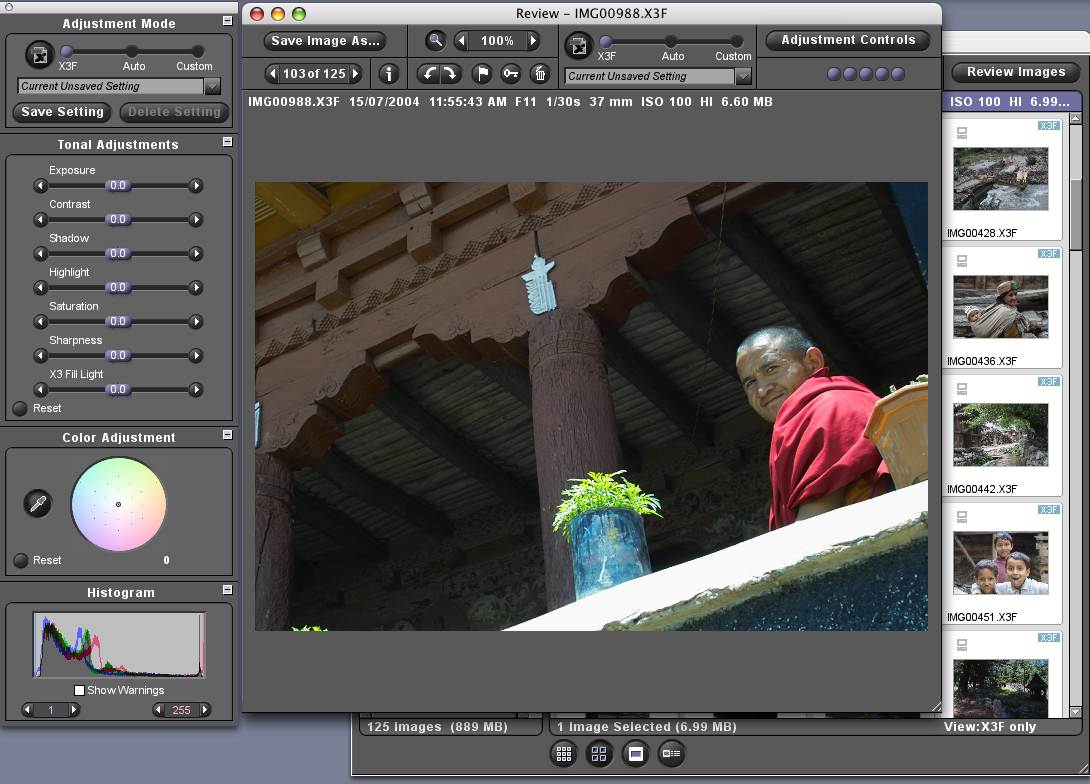
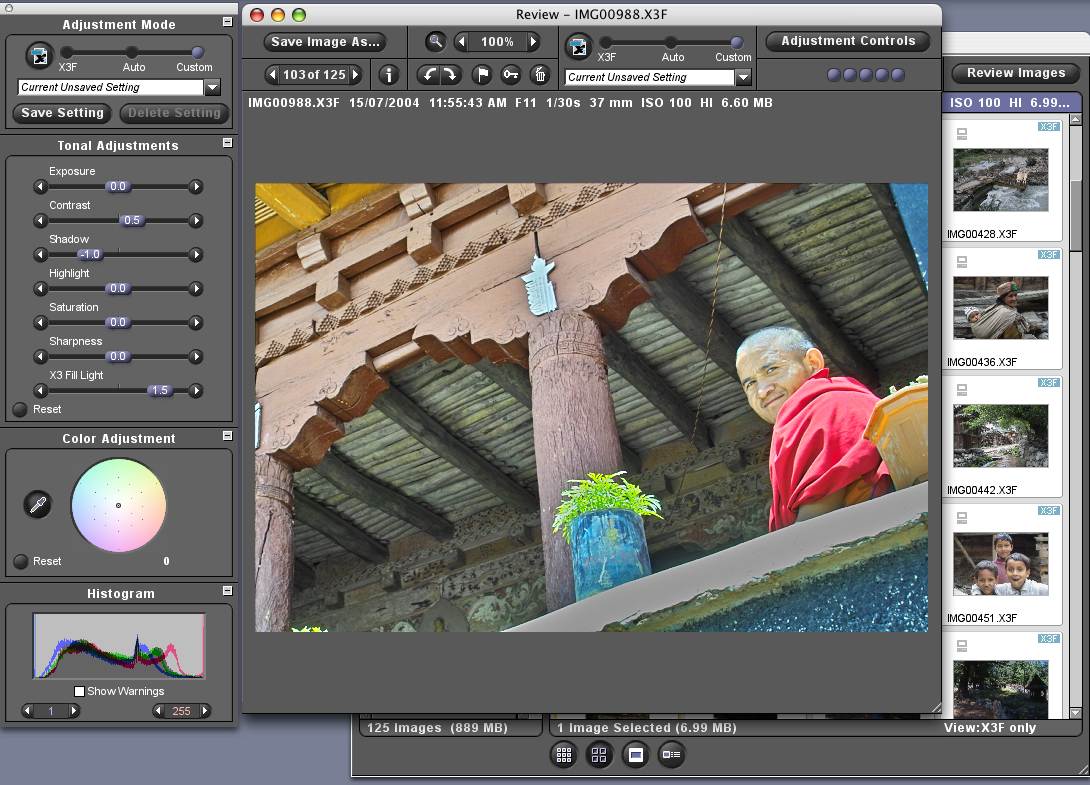
  photographic grey scale. I found the dynamic range of the SD-10
  to be remarkable. If highlights are correctly exposed, shadows
  can be 10 to 11 stops darker yet still retain some coarse detail.
  The pair of screenshots (linked below) from Sigma's PhotoPro
  software show how easily and effectively this detail can be
  extracted. This photo was exposed perfectly for the highlights.
  The dark version shows a normal dynamic range, about what a
  colour slide would have shown. The light version shows additional
  detail in the shadows that was recorded by the sensor and brought
  out by the Tonal Adjustment sliders.

<http://www.tidbits.com/resources/755/MonkRaw.jpg>
<http://www.tidbits.com/resources/755/MonkAdjusted.jpg>

  Although digital cameras offer you a choice of film speeds or
  "ISO" speeds - sensitivity would be a better term than speed -
  there is actually no ISO standard that can be applied sensibly
  to digital cameras. That's why I am putting quotation marks around
  "ISO." I have never seen a credible comparison of the sensitivity
  or exposure-metering of two digital cameras, nor do I think it's
  particularly important, since any differences are likely to be
  small and you can see the exposures instantly. However, I was
  curious to see how carefully the SD-10 was calibrated, so after
  I bought it, I checked it at "ISO" 100. In sunlight and in normal
  room light, the exposure metering on the camera agreed almost
  perfectly (to within 1/3 of an f-stop) with my studio exposure
  meter. When I photographed a scale of calibrated greys at
  different exposures, the correctly exposed 95-percent white
  was exactly where it ought to be, 2/3 to 1 stop below washing
  out. (Note that with a digital camera, increasing the "ISO" speed
  does not make the sensor more sensitive, it amplifies the signal
  and, at the same time, it amplifies the noise. "ISO" 100 is normal
  for most cameras and speeds up to 1600 are commonly available, but
  any speed over 400 is not likely to look very good.)

  Some cameras offer a choice of metering modes - spot, segment,
  averaging - so you can choose the one most likely to be accurate
  for the picture you are about to take. This is the sort of silly
  featuritis that makes so many electronic devices difficult to use.
  There is no point to trying to figure out how to set the meter to
  read a scene the most accurately, it's as fast and more certain to
  take a quick test picture and adjust the control that nudges the
  automatic exposure up or down. Automatic exposure-bracketing is
  almost as useless: there is rarely reason to bracket exposures
  when you can identify the correct exposure when you make it. The
  SD-10 dedicates push-buttons and primary display space to both of
  these "features."

  Something else I can't see worrying about is how the camera
  reproduces colour. As I explained in "Colour & Computers" in
  TidBITS-749_, this is tantamount to complimenting or castigating
  an amoeba on its figure. There is even less reason to worry about
  the colour reproduction of lenses. If a lens tints the image that
  it projects onto the sensor, the tint will be systematic and
  slight, and it will be corrected automatically by whatever
  software converts the raw image into a usable one.

<http://db.tidbits.com/getbits.acgi?tbart=07840>

  It is possible and highly desirable for a camera to compensate
  somewhat for camera shake by moving the sensor in the direction
  opposite the shake. The SD-10 does not do this. Sigma sells a
  telephoto lens that does, but the feature would be more useful
  built into the camera.

  Speed of operation is a weakness with many digital cameras. They
  can take a long time to switch on and there can be long delays
  for processing the picture and writing it to memory. Check out
  any camera to make sure its speed is adequate for your purposes.
  The SD-10 responds quickly but takes long enough to process each
  picture that sometimes I find myself waiting for it to catch up.
  Fortunately, there is a workaround for this problem that is more
  practical than it may sound: have the camera combine two or four
  pixels into one, to halve or quarter the amount of data that it
  processes for each exposure. Although this approach reduces
  resolution, usually when I need to take a lot of frames quickly,
  I have little control over the lighting or the subject. In these
  situations, the overall quality of the picture is rarely optimal
  so the loss of resolution will never be noticed. On the SD-10,
  medium resolution still records as much information as can be
  reproduced on a full page of a glossy magazine. See the last
  article, "Sense & Sensors in Digital Photography," for a
  discussion of this topic.

<http://db.tidbits.com/getbits.acgi?tbart=07860>

  Dust is the bete noire of image sensors. In almost every camera
  with interchangeable lenses, dust wafts into the camera whenever
  you remove a lens, then it lands on the sensor and creates
  innumerable specks in an enlargement. Preventing dust from
  entering the camera saves a lot of time cleaning up pictures.
  The SD-10 covers the opening behind the lens with a sheet of
  transparent plastic. Some dust manages to get on the sensor
  anyway but much less than the norm.

  For studio photography, it is useful to be able to plug the
  camera into a laptop computer and see your pictures immediately
  at a reasonable size. The SD-10 can connect by USB or FireWire.
  When connected by FireWire, pictures show up in Sigma's PhotoPro
  application in seconds. To light the poster linked below, I used
  four strobes and three halogen lamps. I found it quicker and
  easier to balance them and find the exposure by viewing the
  image than by using a meter.

<http://www.tidbits.com/resources/748/HectorVasquez.jpg>

  Digital cameras incur hidden costs for memory cards. Price
  them early in your shopping. In this respect the SD-10 has a
  significant advantage over its competition: it stores raw images
  from its Foveon sensor in only one-half the space required by
  an equivalent Bayer sensor (see my comparison of the sensors in
  "Sense & Sensors in Digital Photography"). Also, writing a picture
  to memory can take a while and some cards are faster than others.
  Lexar make some of the faster cards and use some proprietary
  technology they call write-acceleration. The SD-10 supports
  Lexar's write-acceleration technology.

  Another hidden cost with digital cameras is spare batteries,
  especially if the batteries are proprietary. I planned to use my
  camera far from electricity in the Himalaya, so it had to run on
  disposable batteries. The SD-10 uses AA or CR-V3 batteries but
  it turned out that they need to be lithium cells. Despite what
  the manual says, other kinds don't work. Also, I have found the
  SD-10's battery life to be disconcertingly short, especially in
  cool temperatures.

  Long before the batteries die, they act dead then come to life
  for a few pictures after the battery tray is removed and replaced,
  and they will continue do this a number of times. It looks to me
  as though the camera's tolerance for both internal resistance and
  voltage drop are unrealistically demanding. A second pair of
  batteries in parallel seemed called for and can be had by buying
  an accessory grip/power-pack ($130) that screws onto the base.
  I bought one immediately upon my return from India. It adds a bit
  of weight and size, but in compensation, it makes the camera more
  comfortable to use. On the other hand, it leaves the camera wobbly
  on a tripod. I tried it with ordinary alkaline cells and it
  worked, but only for a short while. (For an explanation of how
  batteries fail in digital cameras, see page 9 of this discussion
  of battery recycling.)

<http://www.ife.ee.ethz.ch/~zinniker/batak/ICBR2003_Zinniker.pdf>

  For snapshots, a built-in flash is useful. Outdoors, it is often
  convenient to have a built-in flash to fill in shadows. I wanted
  one for the latter purpose especially, but the SD-10 does not
  have one, so I bought a Sigma on-camera unit purportedly designed
  for the SD-10. This flash zooms (with a scale for a 35mm cameras),
  bounces in all directions, and adjusts its exposure automatically.
  Like all such units, I find it top-heavy, gimmicky, and
  inaccurate. Indoors I prefer a large flash with a handle that I
  can detach from the camera, hold at arm's length, and point toward
  a wall. Fortunately, I have not yet had to use the thing. I bought
  it primarily for fill light in the field but the camera's broad
  dynamic range and a "Fill Light" adjustment in Sigma's software
  have obviated it.

  Assessing quality of construction is not high on my list because
  I have no idea what on a digital camera is likely to break, aside
  from obvious things like hinges and latches. In my experience,
  the structures that fail in electronic boxes are rarely visible
  or predictable; they are usually things like solder joints, foil
  traces, and the contacts of switches. If the outside of the camera
  is mostly plastic - well, the airplane that delivered it used a
  lot of plastic too, and the SD-10 does have metal innards. What
  gives me comfort is a camera by Kodak. The SD-10 shares many,
  if not most, of its mechanical parts with one of Kodak's newest
  professional cameras and feels comparable mechanically. If Kodak's
  camera turns out to be a hunk of junk, it will be a very expensive
  hunk of junk aimed at a market that values reliability above all
  else, so their engineers must have reason to think that Sigma know
  how to construct a camera.


**Lenses** -- Most camera buffs wax expansively and expensively
  on the necessity of good lenses and which are the best. This
  strikes me as the last thing to worry about. As I explained in
  "Sense & Sensors in Digital Photography," the only way to tell
  the difference between lenses is to compare identical test photos
  shot on a tripod. Unless the lens has an unusual amount of colour
  fringing or distortion, nobody will ever look at a photo and say,
  "Gee, the lens you used was a dog."

  That said, some lenses do produce objectionable amounts of colour
  fringing, especially when used on digital cameras. I don't know
  why digital cameras show it more. I've read lots of hypotheses,
  but none can explain the problem completely, and digital cameras
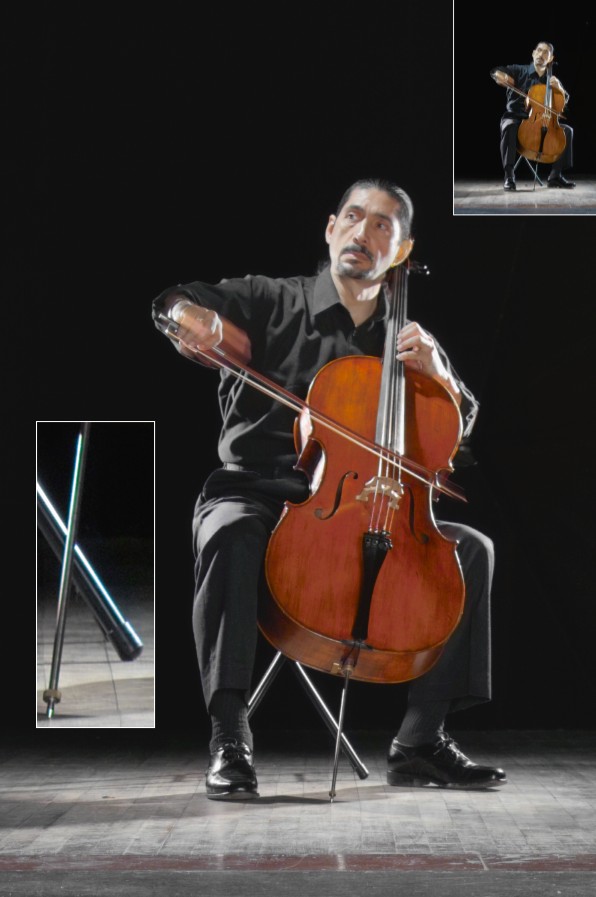
  sure can show a lot of colour fringing. Look at the inset close-up
  of the cello's endpin in the photo linked previously. (The upper
  photo shows its original state. As discussed in "Editing
  Photographs for the Perfectionist" in TidBITS-748_, I used Asiva
  Shift+Gain to even out the lighting on the cello and clean up the
  colour fringing.) Unfortunately, this problem is exacerbated by
  the Foveon sensor, which can produce a fringe every bit as sharp
  as the line that is fringed. A Bayer sensor would be a little less
  sharp but a little more forgiving.

<http://db.tidbits.com/getbits.acgi?tbart=07832>

  Even expensive lenses on film cameras can be freakish. I used
  to swear at a Leitz 90mm lens that I bought for my megabuck Leica
  M4s. It was sufficiently problematic that Leitz replaced it. The
  replacement focussed more accurately but was no better optically.
  To maintain contrast and to avoid artifacts from flare light
  (optical noise), I had to use it more carefully than any other
  lens I owned.

  Brochures often display graphs of modulation transfer
  functions (MTF) that purport to summarize the optical quality
  of a lens. However, those graphs are the results of a simplified
  mathematical model. Even if you can visualize image quality from
  them - I certainly cannot - you will not visualize, because they
  do not capture, unpredictable flaws like the blue in the cello's
  endpin. Neither do fancy diagrams of lens elements mean anything,
  nor the number of asymmetrical elements, nor the number of
  elements of exotic glass. The design of a lens is an art, not
  a science. If a lens uses a lot of elements, all you know is
  that the artist used a lot of paint.

  I really don't know any sensible way to compare lenses without
  trying them. Indeed, I don't always know what "better" means.
  Imagine two lenses: when the sun is behind you, one gives a
  sharper picture, but when the sun is in front of you, the other
  one does. Which is better? Since software can correct most
  deficiencies, it strikes me that the most important factor is
  not the degree of perfection but the degree of perfectibility.
  Consider two marginal lenses. One is soft but consistent and can
  be sharpened digitally; the other is sharper but shows occasional
  failings that cannot be helped. I would prefer the former.

  I do share the prejudice that expensive lenses are likely
  to be better, but "likely" is an important qualifier. Ease
  of production, the size of production runs, and marketing
  arrangements can all have significant effects on price. When
  I bought film cameras, I indulged my prejudice and bought only
  expensive lenses. I knew that this was silly - one of my Leicas'
  lenses made this manifest - but I found commercial film shoots so
  stressful that I wanted to feel as though I was doing everything
  I could to minimize the risk of something's going wrong. Digital
  photography is different, though. Digital images appear instantly
  and they are malleable. With digital cameras I cannot see any
  reason to buy the dubious insurance of an expensive brand name.

  The most important thing to consider about lenses is not their
  quality but the optical perspective they provide. Imagine that
  you are standing a few feet back from a small window looking out
  at your garden. You don't see it all but the part that you do see
  looks natural. Now imagine that somehow your entire garden becomes
  squeezed into the purview of the window. You would see everything
  in the garden, but the garden would look bizarre. Next imagine
  that the window were a photograph. The lens on the camera would
  have created the perspective of that photograph. A lens "seeing"
  the same angle as your eye would create a realistic photograph,
  a lens "seeing" more than your eye would create a distorted
  photograph.

  The eye can take in a scene about 45 degrees wide without moving.
  When you look at an enlarged photograph, you will probably tend
  to hold it so that it subtends an angle of about 45 degrees around
  your eye. For this reason, if you are looking at an enlargement,
  a lens that "sees" about 45 degrees will usually provide the most
  normal perspective. Smaller and larger angles of view distort
  perspective. There is a range of what looks incontestably natural,
  and it is not clearly defined, but this range does not extend
  beyond 20-30 degrees on the narrow end or 60-70 degrees on the
  wide end. Narrower and wider angles of view begin to distort
  perspective. This distortion can be effective artistically if
  handled with care, but it is distortion nonetheless. Although
  distortion can make quite a splash, it does not usually wear well.

  In round numbers, with 35mm cameras, the range of natural
  perspective is covered by lenses running from 30mm or 35mm to 80mm
  or 90mm. Nowadays, most cameras come with a zoom lens that cover
  this range. Often the lens will cover more than this range. Lenses
  that zoom over a wider range sell more cameras, so manufacturers
  push zoom ratios as they push megapixels. However, image quality
  tends to deteriorate rapidly with focal length, not for optical
  reasons but because longer lenses magnify the effect of a shaky
  hand. This problem is amplified by the small size of most digital
  image sensors. When you halve or quarter the size of the image,
  the same amount of movement doubles or quadruples the blur.
  I don't want to find out from blurry pictures that I slid
  accidentally into a focal length that demanded a tripod, so
  I do not want a general-purpose lens that extends beyond the
  equivalent of 80mm or 90mm.

  That said, if I am buying a camera with interchangeable lenses,
  I do want to have a lot of focal lengths available. For my SD-10
  I bought additional lenses above and below the normal range. My
  observations of seven lenses for the SD-10 will come at the end
  of the article.


**The Camera and the Computer** -- Most people think of digital
  cameras as optical devices, as ordinary cameras with electronic
  gadgetry replacing film. I think it's more sensible to see them
  as digital computers, digital computers that are fed by optical
  devices instead of spinning disks. Some sensors feed more
  information than others but as I showed in "Sense & Sensors in
  Digital Photography," the differences are smaller than they seem.
  Far greater differences come with the way that the image is
  processed, with the way it is interpolated, balanced, cleaned
  of noise, and sharpened.

  To convert a raw image into a usable one, a typical image-
  processing program will:

* Weight the colour channels to compensate for the sensor's
  response to the source of light
* Set a range of brightness and contrast
* Remove portions of the image that appear to be noise
* Distort edges so that they look sharper
* Throw away information that looks unnecessary, and save the file
  in JPEG format

  The image-processing program in a camera does all of this by
  default with every picture it touches. Needless to say, it cannot
  look at the picture and do this knowledgeably, it can only follow
  rules. Most reviews of digital cameras examine JPEG files produced
  by the cameras, so they are really not examining the quality of
  the optics and sensor, they are examining the results of the
  algorithms employed by the built-in image-processing software.

  If you are satisfied with snapshots from a point-and-shoot film
  camera, then a digital camera's built-in image-processing will do
  fine, but it will never extract the most from a picture or enable
  the best enlargements. You can change the camera's settings, but
  a camera does not offer anything like the convenience and control
  of a personal computer. For me, and I suspect for many TidBITS
  readers, it makes more sense to buy a camera that will save
  files in a raw, unprocessed format, and do all of the processing
  afterwards on a computer.

  The SD-10 is unique among digital cameras in that it does no
  digital processing whatsoever. To me this is a significant
  advantage. Not having this software built in markedly simplifies
  the camera's menus. With the SD-10, it is never necessary to
  negotiate a complicated tree of commands with lots of hidden
  submenus. If I want to change the brightness of the LCD, I can
  see immediately how to do it. Furthermore, with the SD-10 it is
  not possible to lose pictures by leaving some image-processing
  parameter in the wrong setting.

  For processing images, Sigma provides a program called PhotoPro.
  At first blush PhotoPro is disappointing. It looks and feels
  like a port from Windows, it embeds a Windows sRGB profile
  (see "Colour & Computers"), it hogs the CPU while idling in the
  background, and, incredible for a graphics package on the Mac,
  it does not "know" about the monitor's calibration, so that the
  colour you see in PhotoPro is not the same as the colour you see
  in Photoshop or iPhoto or coming off your printer. Nevertheless,
  PhotoPro's controls are so simple and implemented so well that
  I prefer it to the raw-file converter in Photoshop. (See the
  screenshots linked above for a look at PhotoPro's interface.)
  If you want to adjust pictures individually, PhotoPro provides
  excellent tools, and if you want to save a folder full of files
  automatically as JPEGs, it can do that too. Moreover, if you also
  copy the raw files to your hard drive, you can always revert to
  them to redo something.


**Summary** -- All in all, I think buying the SD-10 proved
  to be a sensible decision, considering what I wanted it for.
  The camera is priced for amateurs, but it feels and functions
  like a professional camera and I can extract pictures from it
  that look as though I had shot them on 2-1/4" x 3-1/4" film.
  I could not ask for more.

  Although the SD-10 suits my purposes, it may not suit yours. I am
  willing to put enough time into pictures to perfect them; you may
  not be. If you prefer to trade time for money, a full-frame Bayer
  sensor will give comparable potential quality with less care.
  A Bayer sensor the size of the SD-10's Foveon sensor will be a
  bit more limited in overall quality but more forgiving. If you
  have been happy with the quality of 35mm film, then you may be
  served just fine by a more compact camera with a smaller sensor.

  Whatever you decide, if you are buying anything more than a
  point-and-shoot, do consider your computer alongside the camera.
  As I showed in "Sense & Sensors in Digital Photography," the
  amount of information in pictures is much less than people think.
  What matters to the eye is less the amount of information than
  how that information is presented, how clearly the information
  makes it through blur, grain, pixelation, and other forms of
  visual noise. The camera codes optical information plus optical
  and electronic noise; a computer decodes all of those into a
  visible image and removes the noise. Although this computer is
  usually buried inside the camera, you can use your Mac instead.
  Better software is available for your computer than for your
  camera. That is why I started this series with an article
  on image-processing software ("Editing Photographs for the
  Perfectionist," linked above). Before you buy a camera, skim
  that article to get an idea of what is possible and what you
  might be willing to do. Keep that in mind when you decide what
  to look for and consider the cost of the software when you shop.

  Finally, for Canadian readers, I should like to add a little
  about buying these products in Canada. In March, 2004, I tried
  to find an SD-10 in a shop. I could not. While I was asking
  around, two salesmen warned against my buying any Sigma camera,
  not because of the product but because of Sigma's Canadian
  distributor, Gentec International. I came to see why. Gentec
  never had in stock a single item that I wanted to buy or that
  I wanted to borrow for this review. Everything had to await
  delivery from Japan. Predicted delivery was sometimes weeks
  but more often months, and prices were higher than in the U.S.,
  where I could buy the product off the shelf. I was expected
  to purchase the products sight unseen, yet they were so unusual
  that no shop would countenance their return for any reason.
  I hate to say it but the only practical vendors for these
  products are mail-order houses in the U.S. Not only are they
  faster and cheaper, they are more likely to accept returns.
  If you ever need to return something and recover the tax,
  the paperwork required is the one-page "Informal Adjustment
  Request" form B2G that can be downloaded from:

<http://www.cbsa-asfc.gc.ca/E/pbg/cf/b2g/b2g-02b.pdf>


**Supplemental Thoughts: Lenses for the SD-10** -- I have tried
  seven lenses with the SD-10. Except as noted, all of them seem
  to be well constructed, but all of them tend to produce colour
  fringing toward the corners that is broad enough to be noticeable
  in enlargements if you are looking for it. Except as noted I based
  my judgements of sharpness on test pictures made at infinity.

  The cheapest basic lens is an 18-50mm f/3.5-5.6 zoom that Sigma
  packages with a couple of kits. (It's not priced on its own but
  adds $10 or $100 to the other items.) At 50mm this lens seems
  respectably sharp but at 24mm and 18mm it seems softer. The lens
  often shows excessive colour fringing and below 50mm it suffers
  from convex "barrel" distortion that is asymmetrical, so that
  it cannot be corrected perfectly with software. The lens feels
  cheaply built and is slow (dim) enough to make focussing difficult
  in dim light, although closing down the aperture only one f-stop
  brings it almost to maximum sharpness. If I spend enough time in
  front of the computer, I can make most of its pictures look as
  good as any - its images are usually perfectible - but I do not
  think it is comparable in quality to the camera.

<http://www.sigmaphoto.com/html/pages/18_50_DC.htm>

  In the last few months Sigma started offering an alternative, an
  18-50mm f/2.8 zoom (street price $500). I borrowed one to review
  and decided to buy it. It shows less colour fringing, especially
  at 50mm, its distortion is more symmetrical, and it is sharper
  at 24mm and 18mm. It is maximally sharp from f/5.6 through f/11
  at all focal lengths. This lens complements the camera nicely.

<http://www.sigmaphoto.com/html/pages/18_50_EX_DC.htm>

  The cheapest telephoto lens available is a 55mm-200mm f/4-5.6 zoom
  (street price $140). On an SD-10, 200mm is the equivalent of 340mm
  on a 35mm camera. That is the equivalent of 8x binoculars. It
  reaches out so far that sharp pictures of distant objects require
  not just a tripod but also clear air without thermal currents.
  This lens feels so cheap mechanically that I mistrust it, but it
  is competent optically and is small and light. As a telephoto to
  carry for casual use it would be appropriate for anybody, amateur
  or professional. For maximum sharpness the aperture needs to be
  closed down two or three f-stops.

<http://www.sigmaphoto.com/html/pages/55_200_DC.htm>

  For my last article, I borrowed Sigma's latest 50mm f/2.8 macro
  (street price $250). Since I had it in the house, I compared to
  the 18-50mm f/2.8 at 50mm. At infinity the macro lens was a little
  softer and more sensitive to flare. Since a macro lens is designed
  for close-up work, I also tested it on a copy stand. There it
  was a little sharper. At both distances the zoom lens showed
  less colour fringing. I would buy the macro only for technical
  work. For all pictorial photography, including extreme close-ups,
  I would prefer the zoom.

<http://www.sigmaphoto.com/html/pages/50_DG.HTM>

  For a wider wide-angle lens, I bought a 14mm f/2.8 (street price
  $900). This lens is big and heavy. With 35mm it pushes some limits
  of practical optics and with the SD-10 it is a mixed blessing.
  When the sun is behind me, and there isn't much white in the
  picture, and I am very far away from everything in the photo,
  it is respectably sharp from f/8 through f/16 with no more colour
  fringing than the usual. At distances closer than a very distant
  infinity, the corners soften. Where the picture contains a lot
  of contrast, flare light softens the image further and increases
  colour fringing, sometimes to remarkable amounts. Also, when the
  sun is near the subject, the lens tends to produce severe
  reflections that cannot be corrected at all. It has noticeable
  barrel distortion as well, although that can be corrected.

<http://www.sigmaphoto.com/html/pages/14_ex.htm>

  I dislike the 14mm, so for this review, I borrowed the only
  alternative, a 12-24mm f/4.5-5.6 (street price $670). It is even
  bigger and also stretches practical optics for 35mm, but it has
  an opposite character. Compared to the 14mm, in front-lighted,
  distant scenes without much white, it looks softer, but in other
  circumstances it looks sharper in the corners and sometimes in
  the centre as well. It shows similar barrel distortion but very
  little colour fringing and no untoward disturbance from flare
  light. It is more difficult to focus and slower, but it covers
  a wider angle and zooms through a range of focal lengths. I don't
  particularly care for this lens either but I prefer it to the
  14mm. When stopped down to f/11 or f/16 its softness can be
  overcome with Focus Magic, whereas nothing can fix some of the
  14mm's flaws. Compared to the 18-50mm f/2.8 zoom at 18mm and 24mm,
  the 12-24mm is usually softer but it has less colour fringing
  and distortion and is comparable in sharpness at f/16, which is
  beyond the peak of the 18-50mm. For architectural and landscape
  photography, to maximize depth of field I often stop down to
  f/16. In this circumstance I would choose the 12-24mm. I am
  going to replace the 14mm with this lens, but I am also going
  to hope that Sigma come out with a 12mm or 14mm lens that is
  designed for the SD-10 and works better.

<http://www.sigmaphoto.com/html/pages/12_24_ex.htm>

  The 15mm fish-eye (street price $450) is of modest size although
  it, too, is designed to cover 35mm film. On an SD-10 it covers
  only a little more than the 14mm lens but it provides a unique
  perspective. It is a fish-eye perspective, so that straight
  lines end up curved, but only the central portion of the image
  is captured on the small sensor of the SD-10, so the curvature
  is not severe. On the other hand, unlike an ordinary wide-angle
  lens, it does not magnify objects near corners and it does not
  distort any angles. This means that for scenes containing no
  straight lines, the lens provides a more natural perspective.
  The difference is subtle but to my eye it is significant.
  I carried this lens and the 14mm in the Himalaya. I rarely
  used the 14mm, but I used this one often. It's maximally
  sharp from f/5.6 through f/11 and is the sharpest of the
  three wide-angle lenses.

<http://www.sigmaphoto.com/html/pages/15_ex.htm>

  None of the wide-angle lenses accepts a filter in front; they
  accept only gelatin filters in back, but that is of little
  consequence. With all digital cameras, software supplants colour-
  balancing filters and I was pleasantly surprised to find that with
  the SD-10, software also supplants polarizing filters for their
  primary use, which is to increase the saturation of colours that
  are washed out by the glare of the sun. (I don't know about
  polarizers with other digital cameras, because I don't know
  why they aren't necessary on the SD-10.) On the SD-10, the only
  use I have found for a polarizing filter is to reduce patterned
  reflections off windows and water, but that use is more common
  in photography books than in the field.

  All of these lenses can be fitted to many cameras besides the
  SD-10 but I have no idea how they would work on any other camera.
  The optical characteristics of an image sensor interact with the
  lens in so many ways that I do not know how to divorce the two.

   PayBITS: If Charles's approach to buying a camera helped
   you, he asks that you make a donation to Doctors Without
   Borders: <http://www.doctorswithoutborders-usa.org/donate/>
   Read more about PayBITS: <http://www.tidbits.com/paybits/>


Hot Topics in TidBITS Talk/15-Nov-04
------------------------------------
  by TidBITS Staff <[EMAIL PROTECTED]>

  The second URL below each thread description points to the
  discussion on our Web Crossing server, which will be much faster.


**Consumer Reports likes Macs** -- Readers respond to the recent
  Consumer Reports cover story comparing Macs to PCs. (13 messages)

<http://db.tidbits.com/getbits.acgi?tlkthrd=2373>
<http://emperor.tidbits.com/TidBITS/Talk/234>


**Experiences with CPU accelerators** -- Geoff Duncan's article
  last week about upgrading his aging Mac using a new Power PC
  accelerator inspires comments from readers who have also
  upgraded their machines. (9 messages)

<http://db.tidbits.com/getbits.acgi?tlkthrd=2372>
<http://emperor.tidbits.com/TidBITS/Talk/235>


**Learning more about photosensors in cameras** -- Charles
  Maurer's articles on digital cameras prompt discussion of
  where to find more information about photosensors. (6 messages)

<http://db.tidbits.com/getbits.acgi?tlkthrd=2371>
<http://emperor.tidbits.com/TidBITS/Talk/233>


**Replacing the Battery in my iPod** -- A reader documents his
  experience removing a dying iPod battery and replacing it with
  a third-party battery. (2 messages)

<http://db.tidbits.com/getbits.acgi?tlkthrd=2369>
<http://emperor.tidbits.com/TidBITS/Talk/231>


**Macworld Expo is moving to the Hynes** -- IDG World Expo
  announced that the next Macworld Expo in Boston will be held at
  the Hynes Convention Center, a smaller venue than the new Boston
  Convention & Exhibition Center. (2 messages)

<http://db.tidbits.com/getbits.acgi?tlkthrd=2374>
<http://emperor.tidbits.com/TidBITS/Talk/236>


$$

 Non-profit, non-commercial publications may reprint articles if
 full credit is given. Others please contact us. We don't guarantee
 accuracy of articles. Caveat lector. Publication, product, and
 company names may be registered trademarks of their companies.

 For information: how to subscribe, where to find back issues,
 and more, see <http://www.tidbits.com/>. TidBITS ISSN 1090-7017.
 Send comments and editorial submissions to: <[EMAIL PROTECTED]>
 Back issues available at: <http://www.tidbits.com/tb-issues/>
 And: <ftp://ftp.tidbits.com/issues/>
 Full text searching available at: <http://www.tidbits.com/search/>
 -------------------------------------------------------------------