TidBITS#862/15-Jan-07
=====================
  Issue link: <http://db.tidbits.com/issue/862>
  At last week's Macworld Expo in San Francisco, the newly renamed
  Apple, Inc., introduced the long-rumored iPhone, combining the
  features of an iPod, a mobile phone, and an Internet communicator,
  along with an espresso machine and window cleaner - or were we
  imagining those last two? We run down just what the iPhone can do,
  according to Apple, and go further with Glenn Fleishman's hands-on
  report. We also pass along the details on the iTV, now called Apple
  TV, and Apple's new AirPort Extreme networking system. Other
  companies had announcements too, and Jeff Carlson looks quickly at
  the releases of BBEdit 8.6, Yojimbo 1.4, TextWrangler 2.2, Fetch
  5.2, and Microsoft Office 2004 11.3.3. Finally, Adam ties it all
  together with his take on the new feelings of Macintosh vitality at
  Macworld Expo.

Articles
    Want to Hear More about Macworld Expo?
    Bare Bones Releases Multiple Updates
    Fetch 5.2 Improves Your WebView
    Microsoft Office 2004 11.3.3 Update Released
    iPhone Seeks to Redefine the Mobile Phone
    iTouched an iPhone
    Apple TV Connects Macs and TVs
    AirPort Extreme Updated
    Macworld Expo SF 2007: The Mac is Back!
    Hot Topics in TidBITS Talk/15-Jan-07


------------ This issue of TidBITS sponsored in part by: --------------

* READERS LIKE YOU! Support TidBITS with a contribution today!
  <http://www.tidbits.com/about/support/contributors.html>
  Special thanks this week to Tim Cole, Charles Reeves, Jr.,
  Frances Sbrocchi, and Peter Adams for their generous support!

* SMALL DOG ELECTRONICS: Save on Black Core Duo
  MacBooks! 2 GHz, 80 GB, SuperDrive, MagSafe
  AC adapter, iSight, new, never used - Only $1169!
  Visit: <http://www.smalldog.com/tb/> -- 800-511-MACS

* FETCH SOFTWORKS: With Fetch 5.2, FTP and SFTP are simpler
  than ever. Use it on Mac OS X to upload, download, mirror,
  and manage your Web site, eBay images, and data sets.
  Download your free trial version! <http://fetchsoftworks.com/>

* WebCrossing Neighbors Creates Private Social Networks
  Create a complete social network with your company or group's
  own look. Scalable, extensible and extremely customizable.
  Take a guided tour today <http://www.webcrossing.com/tour>

* MARK/SPACE, INC: Get the most from your handheld or smartphone
  with The Missing Sync. Sync Address Book, iCal, iPhoto, iTunes
  and more to Palm OS, Windows Mobile or Sony PSP devices. See
  what you've been missing! <http://www.markspace.com/bits>

* CheckIt System Performance Suite bundles three top Mac utilities!
  TechTool Platinum diagnoses and repairs your disk, Spring Cleaning
  organizes your files and Retrospect Express backs up your data.
  Buy today for only $79.99! <http://www.allume.com/tidbits/>

* Microsoft: Supporting professional Mac users with Office 2004.
  Supporting the Mac community through tech support newsgroups,
  user group appearances, our new team blog, and more!
  Save up to 25%! <http://www.microsoft.com/mac/go/promotions/>

* ROGUE AMOEBA SOFTWARE: With a Name Like Rogue Amoeba,
  It's Gotta Be Good. Good software with a bad attitude,
  only for Mac OS X. Free downloads from
  <http://www.rogueamoeba.com/ad/tb/>

* DealBITS: Get the word out about your product AND generate sales!
  It's simple: give away a few copies and offer a discount to entrants.
  A DealBITS drawing is quick to set up and can easily pay for itself.
  For more info and rates, visit <http://www.tidbits.com/dealbits/>.

---------- Help support TidBITS by supporting our sponsors ------------


Want to Hear More about Macworld Expo?
--------------------------------------
  by Adam C. Engst <[EMAIL PROTECTED]>
  article link: <http://db.tidbits.com/article/8806>

  Tonya and I were speaking in presentations, on panels, and in
  interviews all week, and although not all of these appearances were
  recorded or are available yet, here are a few that are posted. First
  up is a Tuesday Your Mac Life show I did with Shawn King to dissect
  the keynote a whopping 60 minutes after it was over, followed by a
  Wednesday MacNotables panel that turned out to be just Tonya and me
  talking with Chuck Joiner about what wasn't announced at the
  keynote. And finally, be sure to listen to this Friday Macworld
  magazine panel moderated by MacCentral's Jim Dalrymple, in which I
  was joined by Macworld's Chris Breen and Your Mac Life host Shawn
  King, discussing the week's news in a lively back-and-forth. More
  next week!

<http://www.yourmaclife.com/index.php?topic=MWSF>
<http://www.macnotables.com/wordpress/macnotables-702-macnotables-on-stage-at-expo-1/>
<http://www.macworld.com/weblogs/mwpodcast/2007/01/podcast67/>


Bare Bones Releases Multiple Updates
------------------------------------
  by Jeff Carlson <[EMAIL PROTECTED]>
  article link: <http://db.tidbits.com/article/8807>

  While everyone's eyes were on Apple's iPhone last week, Bare Bones
  Software released updates to three of its applications. The
  company's flagship text editor BBEdit 8.6 improves Java and TeX
  handling, and adds support for the Markdown structured text format
  (which we use to produce TidBITS), including text coloring, folding
  of document structural elements, and previewing the results within
  BBEdit. New in this version are commands to save and copy text as
  styled HTML, which is helpful when posting code samples to the Web.
  BBEdit can also now read and write Mac OS X's binary property list
  format used for preference files. BBEdit 8.6 is a free update for
  owners of version 8.5 or higher, and is a 14 MB download.

<http://www.barebones.com/products/bbedit/>

  Yojimbo 1.4 expands the organizer's AppleScript support and fixes
  bugs. This update is free for registered owners and is a 10.1 MB
  download. TextWrangler, the company's free text editor, jumps to
  version 2.2 with an interface overhaul to match BBEdit's
  look-and-feel as well as features such as support for the binary
  property list format, an enhanced Preferences window, and
  improvements to the built-in Java, TeX, and JavaScript language
  support. TextWrangler 2.2 is a 9.9 MB download. All of the company's
  updates require Mac OS X 10.4.

<http://www.barebones.com/products/yojimbo/>
<http://www.barebones.com/products/textwrangler/>


Fetch 5.2 Improves Your WebView
-------------------------------
  by Jeff Carlson <[EMAIL PROTECTED]>
  article link: <http://db.tidbits.com/article/8808>

  Jim Matthews of Fetch Softworks has released Fetch 5.2, adding a new
  feature called WebView that promises to make it easier to share
  files with others who may not have the capability to download via
  FTP. In essence, WebView translates ftp URLs to http URLs according
  to a pattern you specify; once that's done you can click the WebView
  button to view files in your Web browser and also copy the http URLs
  for selected files. Also new in this version is support for FTP over
  SSL/TLS (FTPS) secure connections, droplet shortcuts for drag & drop
  uploading to a server, and a number of bug fixes. When we visited
  the Fetch booth at Macworld Expo, Jim also told us that he had
  overhauled the FTP networking code for better performance and
  compatibility. Fetch 5.2 is a free update for owners of version 5.0
  or later, requires Mac OS X 10.3.9 or later, and is a 15 MB
  download.

<http://www.fetchsoftworks.com/>
<http://www.fetchsoftworks.com/fetch5.release.notes.html>


Microsoft Office 2004 11.3.3 Update Released
--------------------------------------------
  by Jeff Carlson <[EMAIL PROTECTED]>
  article link: <http://db.tidbits.com/article/8809>

  On the heels of a recent software update (see "Microsoft Releases
  Office 2004, Office X Updates," 2007-01-08), Microsoft last week
  released Microsoft Office 2004 for Mac 11.3.3. The update improves
  security throughout the suite; improves compatibility with Rich Text
  Format (RTF) documents created with Office Word 2003 for Windows;
  corrects calculation of standard deviation in PivotTable reports
  within Excel 2004; fixes an issue in Entourage 2004 that caused
  events after 11-Mar-07 to be displayed incorrectly; and updates the
  Japanese postal code dictionary in Entourage. The updater is a
  whopping 57.6 MB download, but it includes the improvements and
  fixes from all previous Office 2004 updates. It's available via
  direct download or through the Microsoft AutoUpdate utility.

<http://db.tidbits.com/article/8799>
<http://www.microsoft.com/mac/downloads.aspx?pid=download&location=/mac/download/Office2004/Office2004_1133.xml>

  Microsoft also presented us with a preview of features that will be
  included in Office 2008, the Macintosh refresh of the suite due in
  the second half of 2007, despite the 2008 moniker. In short,
  Microsoft is trying to make much of the existing functionality in
  the Office applications more obvious and easier to use. Alas, there
  was no word about new collaboration features that small workgroups
  so desperately need from Word and other applications. We'll keep you
  updated as details become available.


iPhone Seeks to Redefine the Mobile Phone
-----------------------------------------
  by TidBITS Staff <[EMAIL PROTECTED]>
  article link: <http://db.tidbits.com/article/8810>

  Despite months of rumors about an Apple phone, Steve Jobs still
  managed to wow the crowd at the Macworld Expo 2007 keynote with the
  iPhone, a sleek handheld device that incorporates features of the
  iPod, a smartphone, and an Internet communications device. A
  two-year service commitment from Cingular is required; it will not
  be sold separately. Service plans have not yet been announced. The
  iPhone will begin shipping in June 2007 in the United States in two
  configurations: a 4 GB model for $500, and an 8 GB model for $600.
  Jobs said that it will be available in Europe by the fourth quarter
  of 2007, and available in Asia in 2008.

<http://www.apple.com/iphone/>

  The delay in availability was a letdown for the primed audience, but
  Jobs noted that the iPhone still needs to go through certification
  by the U.S. Federal Communications Commission (FCC); he said Apple
  wanted to announce the iPhone, even if it's six months early, and
  not have the FCC "announce" the device in its public records.

  (This explanation rang flat to contributing editor Glenn Fleishman,
  who noted that the FCC has a confidential process in its Office of
  Engineering and Technology Equipment Authorization program for
  products that have not been publicly announced; it was expanded to
  handle items like the iPhone back in 2004. Confidentiality can be
  granted for up to 180 days before a product is marketed or shipped,
  and it covers all details of the product. In fact, it's likely that
  the AirPort Extreme introduced at Macworld at the same time as the
  iPhone was certified under these rules, as no information was
  available from the FCC until the device was announced.)

<http://www.fcc.gov/oet/ea/>
<http://hraunfoss.fcc.gov/edocs_public/attachmatch/DA-04-1705A1.pdf>


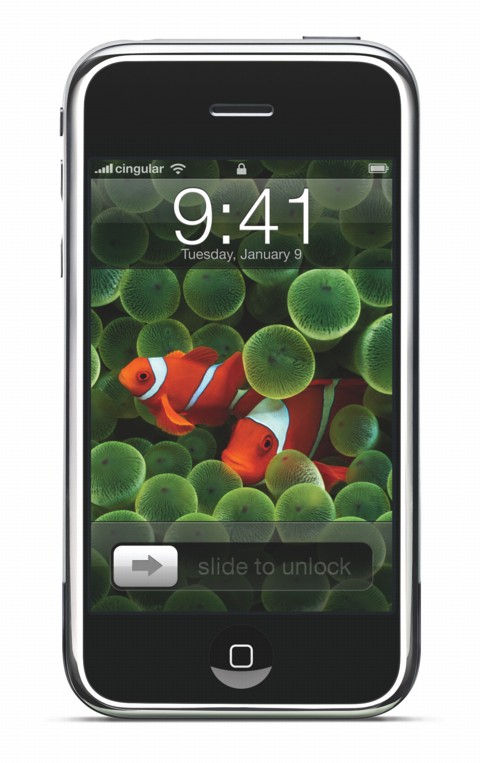
**Design** -- As we've come to expect from Apple's industrial design
  division, the look of the new device is both impressive and
  distinctive - it looks nothing like any other phone on the market,
  nor does it look like an iPod or any of the supposedly leaked
  mockups that appeared before the announcement. Measuring 2.4 inches
  (61 mm) wide, 4.5 inches (115 mm) tall, and just 0.46 inches (11.6
  mm) deep, it's only slightly larger than the current
  fifth-generation iPod with video. It weighs 4.8 ounces (135 grams).

<http://www.tidbits.com/resources/862/iphone_hero.jpg>

  Apple opted out of a physical keyboard, eschewing the tedious 10-key
  phone layout, the awkward mini-QWERTY keyboard on devices like the
  Blackberry and Palm Treo, and even the newer two-letters-per-key
  entry found on the Blackberry Pearl. Instead, you type with your
  fingers on a virtual keyboard that appears as needed on a
  touch-sensitive color display measuring 3.5 inches diagonally. The
  screen resolution is 320 by 480 pixels at 160 pixels per inch (ppi).
  Omitting the keyboard also allows nearly the entire face of the
  device to be used to view video or photographs.

  The iPhone can be viewed in landscape or portrait mode; a built-in
  accelerometer automatically shifts mode (when viewing photos or Web
  pages, for example) depending on how the phone is held. David Pogue
  of the New York Times noted that the phone can be used upright in
  portrait mode with the single front button at the bottom, and in a
  counter-clockwise landscape mode, but not 180 degrees from either of
  those positions.

  In addition to the accelerometer, the iPhone incorporates two other
  sensors. A proximity sensor above the screen turns off the backlight
  and disables the touchscreen feature when you bring the phone to
  your ear, to avoid, in Jobs's words, "spurious inputs from your
  face." An ambient light sensor automatically dims the screen in
  low-light conditions (thereby also reducing battery consumption).

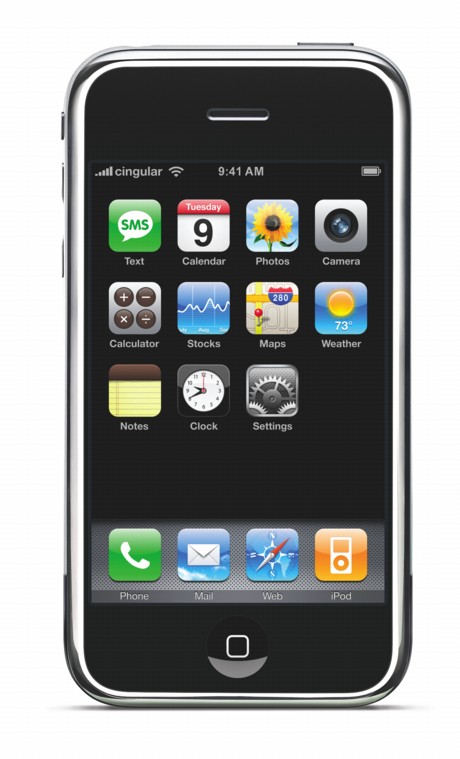
  A Home button below the display takes you to the iPhone's main
  screen, and is one of just a few physical switches; there's also a
  mute switch and a volume slider on the left side of the device, and
  a button on the top to put the phone to sleep and lock the
  touchscreen. The paucity of physical switches is important; the more
  of the iPhone's interface that's provided by software, the easier it
  is for Apple to change or add to it.

<http://www.tidbits.com/resources/862/iphone_home.jpg>

  The back of the unit is an expanse of brushed metal, interrupted
  only by a small camera lens - for its 2-megapixel digital still
  camera - and a mirrored Apple logo. (That logo is a good example of
  Apple's minimal design approach. Most camera phones include a small
  mirror near the lens, which you can use when framing photos of
  yourself. That reflective blob would be superfluous to Apple's
  designers, leading to the mirrored logo.)

  What you won't find on the back is a speaker, another departure from
  many cell phone designs. Instead, there's a speaker at the top of
  the front face where the iPhone meets your ear, along with a second
  speaker on the bottom edge for playing ringtones and other sounds,
  and for when you're using the iPhone as a speakerphone. You can
  listen to music through the speaker, too, and the quality was fine
  on a prototype unit. A microphone at the bottom captures voice
  input. As one would expect, the iPhone also includes two ports: a
  jack for headphones and microphones, and a 30-pin iPod connector for
  connecting to an included dock.

  Jobs advertised the battery life at 5 hours of talk time, video
  playback or Web browsing, or 16 hours for audio playback. (In a
  Saturday Night Live sketch, "Steve Jobs" was asked - after
  describing a range of hyperbolic features including iGenie for
  making iWishes - about battery life, and said, "20 minutes" to
  guffaws from the audience.)

  Apple also plans to release an optional wired headset (resembling
  iPod earbuds with a small microphone on the cord) or a tiny
  Bluetooth headset that would automatically pair with the iPhone; it
  was unclear if third-party headsets would be compatible. Given that
  Apple is using the term Bluetooth, it's reasonable to assume that
  other Bluetooth headsets would work, as the Bluetooth specification
  doesn't allow the use of the name and associated profiles - like
  headset - without allowing all compatible devices to be used.


**User Interface** -- Since the iPhone's screen takes up nearly the
  entire front of the device, most of the controls are offered through
  what Apple is calling the "multi-touch display." The proprietary
  technology ("And, boy, have we patented it!" exclaimed Jobs) allows
  the user to control the device with a hand, incorporating not just
  pointing, but also scrolling by dragging a finger across the
  touchscreen, and "pinching," a two-fingered gesture that zooms
  images and other content.

  Pressing the Home button takes you to a page of icons representing
  the main features. From there, everything operates via gesture. For
  example, a virtual left-to-right slider unlocks the rest of the
  interface (so you don't inadvertently activate the iPhone in a
  pocket or purse). Scrolling through the list of contacts functions
  like a physical wheel: run your finger up or down the screen and the
  list scrolls by at a speed based on how fast you dragged, slowing
  gradually and "rubber-banding" off the top or bottom if you hit the
  edge fast. On her Creating Passionate Users blog, Kathy Sierra has
  an excellent discussion of why this lack of abruptness in the
  interface is so important.

<http://headrush.typepad.com/creating_passionate_users/2007/01/iphone_and_the_.html>

  By not implementing physical buttons, Apple gains the capability to
  display whatever interface is most appropriate for a given task,
  such as context-specific buttons while talking on the phone,
  watching movies, listening to music, or browsing the Web. Watching
  Jobs demonstrate the device during the keynote provided half of the
  "wow" factor. View the keynote online or watch the QuickTours that
  Apple has set up on its Web site for a better sense of how
  multi-touch functions.

<http://www.apple.com/iphone/keynote/>
<http://www.apple.com/iphone/phone/>

  Jobs made much of the fact that the iPhone is actually running Mac
  OS X - not a stripped-down version, but the full operating system
  that powers your Mac. (David Pogue says that Apple told him
  otherwise - that it was a subset of Mac OS X.) However, don't expect
  to run it the same as a computer. The iPhone's features and
  interface are the only aspects of Mac OS X that are accessible, with
  the rest of the system locked away by Apple. This also means that
  developers are not going to be able to write their own applications
  or even widgets; if anything, Apple will approve future applications
  and distribute them itself. Given Apple's tight hold on the iPod, we
  anticipate that third-parties will be limited to cases, docks, and
  other accessories that can plug into the iPhone's 30-pin dock
  connector.

<http://pogue.blogs.nytimes.com/2007/01/13/ultimate-iphone-faqs-list-part-2/>


**Phone Features** -- Job announced that Cingular will be the
  "multi-year" exclusive provider of cellular service to the iPhone in
  the U.S., and guest presenter Cingular CEO Stan Sigman noted, in
  reading a speech from index cards, that the two companies forged a
  "multi-year" contract. Interestingly, according to Glenn Lurie,
  Cingular's president of national distribution, in a PC Magazine
  article, the deal was a win for Cingular, with Apple giving more
  than they got. (Cingular's name will start transitioning to AT&T
  today, as the acquisition of BellSouth by AT&T gave the telecom
  giant 100-percent ownership of Cingular. Formerly, it owned 60
  percent.)

<http://www.pcmag.com/article2/0,1759,2082059,00.asp>

  The iPhone goes way beyond the basics of placing and receiving
  calls, making it easy to look up phone numbers, put calls on hold,
  and create conference calls. Jobs demonstrated taking an incoming
  call and performing other features, such as looking up movie times
  from the Web, while the call remained active. These aren't unique
  features to smartphones, but Apple has made the interface extremely
  easy to use (especially setting up multi-party calls, which on most
  phones is frustrating).

  It also features Visual Voicemail, which provides nonlinear access
  to voicemail messages and avoids the dreaded menu trees used by most
  systems. Most phones and smartphones show, at best, the number of
  messages waiting for you to listen to. The rest of the process is
  aural: you listen and skip messages in the order they were left. On
  the iPhone, the process is both visual and random access. The
  messages appear in a list, each of which is accessible with a finger
  tap. The messages have a contact name if Caller ID matches someone
  in your address book. Apple was able to add Visual Voicemail through
  the partnership they've forged with Cingular, which had to
  re-engineer part of its network and storage system to provide this
  feature. It's a bar to entry for other non-U.S. Apple partners, to
  be sure, unless Apple makes that feature optional outside America.

  The iPhone also features SMS text messaging, and the iChat-like
  interface allows users to maintain multiple discussions, while
  typing on a small QWERTY key layout on the touchscreen. Text input
  is eased by automatic completion and other entry aids. There is no
  instant-messaging client planned for inclusion, oddly enough, not
  even a version of iChat.


**Internet Features** -- The new iPhone can connect to the Internet
  via super-fast 802.11n-enhanced Wi-Fi or a mobile connection using
  Cingular's EDGE service (which provides data speeds of about 50 to
  150 Kbps downstream). Jobs promised third-generation (3G) network
  support at some future point. Cingular has, to date, deployed UMTS
  (200-300 Kbps downstream) and HSDPA (350 to 500 Kbps downstream)
  spottily throughout the United States; European and Asian carriers
  have deployed those faster flavors aggressively. The supposition was
  that Jobs didn't want a phone that offered higher speeds but
  couldn't work at those higher speeds in all urban areas. Verizon and
  Sprint's incompatible 3G technology covers virtually all major
  cities and many smaller ones. AT&T will likely push HSDPA nationally
  as part of its overall strategy as a new, enormous entity.

  Once connected, the iPhone uses a version of the Safari browser to
  display Web pages. In contrast with most WAP-enabled browsers
  running on mobile phones, Web pages load with their layout looking
  as it would normally in Safari running on a Macintosh, but with tiny
  text and images. iPhone's Safari compares favorably with Opera's
  browser designed for mobile phones, too.

  Users can use hand gestures like double-tapping and "pinching" to
  enlarge portions of the page that they wish to view. Although, no
  doubt you wouldn't want to do huge amounts of Web surfing on such a
  tiny screen, it looked like an intelligent and useful way to use the
  Web, especially in comparison to any other mobile phone in
  existence.

  You can also send and receive HTML email from the device, which will
  apparently work with any IMAP or POP3 connection. In particular,
  Apple has partnered with Yahoo to provide free "push" IMAP email to
  all iPhone customers. Push email was one of the reasons that
  Research in Motion's Blackberry devices gained such quick
  acceptance: the instant you receive mail at a server, that server in
  turn pushes the message to your device, much as receiving voicemail
  causes an almost immediate notification on a phone. You can also
  pull messages through normal POP and IMAP.

  The iPhone's email interface looked like it would be familiar to
  users of Apple Mail, although no one will be typing long messages on
  the onscreen QWERTY keyboard. The device automatically recognizes
  phone numbers in email messages, and users can call a number by
  tapping it. It's likely that the Bluetooth support includes a
  keyboard profile, which would allow a compact keyboard to turn the
  iPhone into more of a computing device on the road.

  Jobs also demoed widgets (mini-applications, just like in Dashboard
  on the Mac) working on the iPhone to check stocks and weather, and
  he showed what appeared to be a special Google Maps application that
  provided mapping (but apparently not driving directions) in both a
  street map view and a satellite image view. While no mention was
  made of location-based GPS services in the phone, a federal mandate
  requires all cell phones to offer E911 coordinates to operators. The
  iPhone thus has to have some method of triangulating its location
  and sending it over the air - whether real GPS or cell-tower
  interpolation - and we might see a combination of mapping and
  location awareness.


**iPod Features** -- The iPhone software that enables it to play
  videos and movies has the same basic organization as what you'd find
  in an iPod, but it adds some new access methods. You won't find a
  click wheel; instead, you scroll using the multi-touch dragging
  method described earlier. The iPhone also inherits the CoverFlow
  feature from iTunes, which lets you browse albums by flipping
  through miniaturized versions of the album covers.


**Waiting for June** -- All in all, for anyone who is struggling to
  integrate data between different devices, or for anyone who wants to
  put more of the features found on a personal computer onto a mobile
  device, the iPhone looks like a winner, assuming the touchscreen
  works as well as advertised and doesn't show greasy fingerprints too
  much. Well... there are plenty of other open questions about the
  iPhone, and we'll be looking at those in an upcoming article.


iTouched an iPhone
------------------
  by Glenn Fleishman <[EMAIL PROTECTED]>
  article link: <http://db.tidbits.com/article/8811>

  Come, feel the hem of my garment, ye lowly. Or at least that's what
  it felt like at Macworld Expo when I would mention, offhandedly,
  that I had iFondled an iPhone. As a bona fide member of the print
  press - representing The Seattle Times at the show - I received an
  executive briefing, and spent 10 minutes with the iPhone. I joked to
  Macworld editorial director Jason Snell, who also touched an iPhone,
  that we could put up a sign that read, "Hear about what it's like to
  play with an iPhone: 25 cents."

<http://seattletimes.nwsource.com/html/practicalmac/>

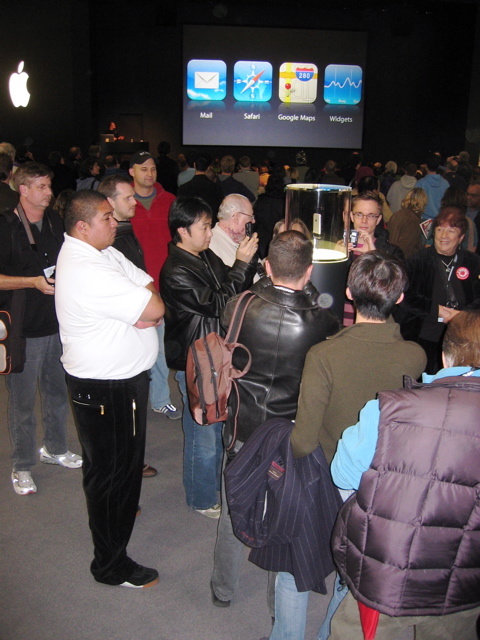
  I didn't realize then that Apple allowed only select press and
  partners to touch an iPhone. Samples were encased in glass pillars
  on the show floor. Demonstrations were continuous at Apple's booth
  with a specially equipped iPhone that had its display inserted into
  a mockup on screen.

<http://www.tidbits.com/resources/862/iphone-security.jpg>

  The iPhone feels like a device that fell through a wormhole from the
  future. I can safely say that I've never held anything but certain
  sculpted art objects that had the feel and nature of the iPhone.
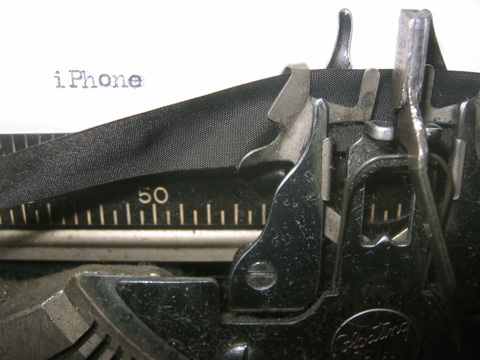
  It's definitely a work of art. [Writing about the iPhone on a
  current Macintosh feels a bit like this photo I took in the lobby of
  the W hotel. -Adam]

<http://www.tidbits.com/resources/862/iphone-typewriter.jpg>

  The touchscreen works as somewhat breathlessly promoted by Steve
  Jobs. Gestures result in almost instant responses. Learning to pinch
  and expand (or my preferred terms of "pucker" and "bloat," suggested
  by a colleague) takes a matter of seconds. Navigating a Web page
  requires a little more effort because you have to sort of grab the
  page and move it around, and then pinch to zoom in on a story.

  I didn't have a chance to try typing, which several colleagues who'd
  used the iPhone said was rather satisfying. It offers predictive and
  what I'd dub "postdictive" suggestions. If you typed, for instance,
  "t" it might add an "h" as a suggestion, but if you followed the "h"
  with an "f" - typing "thf" instead of "the" - the iPhone would
  helpfully recognize you probably meant "the." (I don't know if it
  prescriptively changes it or just offers the change, however.)

  The built-in speakers provided good sound, and navigating iTunes
  libraries was pretty straightforward. I'm not sure the navigation
  method of being able to scroll by throwing your finger - sliding it
  rapidly off the edge of the screen - is perfect, but it has a kind
  of artificial gravity to it that seems to work. There's also
  friction, so the speed at which you throw the page doesn't continue
  in pure Newtonian (the scientist, not the late Apple PDA) terms.

  The iPhone would sell remarkably well as an iPod with no Wi-Fi and
  no phone capability. But based on reports following its
  announcement, a phone sold for $500 by a cell provider and with a
  required two-year commitment would retail for as much as $1,000.
  It's likely the touchscreen represents a significant portion of that
  - perhaps a few hundred dollars. (Cancellation fees might require
  many hundreds of dollars to be repaid.)

  Those that don't opt to switch to Cingular and buy an iPhone may be
  waiting some time for costs to drop enough for the touchscreen and
  interface to make its way into the regular iPod lineup.


Apple TV Connects Macs and TVs
------------------------------
  by TidBITS Staff <[EMAIL PROTECTED]>
  article link: <http://db.tidbits.com/article/8812>

  Although the big news at Steve Jobs's Macworld Expo keynote was the
  iPhone, Jobs also introduced the Apple TV, previously codenamed iTV
  when it was previewed at a special press event in September 2006
  (see "Apple Updates iPods, Introduces Movies, Previews iTV,"
  2006-09-16). The $300 Apple TV sits between Macs and large-screen
  televisions, offering both local storage of audio, video, and photos
  on a 40 GB hard disk, and streaming of media using Ethernet or
  pre-standard 802.11n, which is not yet part of Wi-Fi. Media arrives
  on the Apple TV's hard disk by synchronizing from a single Mac
  through iTunes, just like syncing to an iPod. For media that either
  doesn't fit on the Apple TV's hard disk or that exists only on a
  visiting Mac, the Apple TV can stream audio and video from other
  copies of iTunes, from up to five different computers. Apple is
  currently taking orders for Apple TV, and plans to begin shipping in
  February. The Mac mini-shaped Apple TV is 7.7 inches (19.7 cm)
  square, but only 1.1 inches (2.8 cm) high, making it 1.2 inches (3.0
  cm) wider in two dimensions, and 0.9 inches (2.3 cm) thinner than
  the Mac mini.

<http://www.apple.com/iphone/>
<http://www.apple.com/Apple TV/>
<http://db.tidbits.com/article/8676>
<http://www.tidbits.com/resources/862/appletv_frnt_rem.jpg>

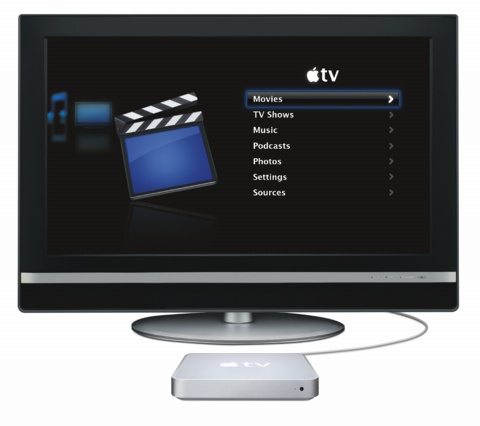
  On the TV, the media is accessed via a Front Row-like interface,
  controlled by a slim Apple Remote. Interspersed with menu choices
  for playlists and albums, and other methods of browsing the local
  content, are choices that play movie trailers from Apple's Web site,
  connect to the iTunes Store, and more. When you're not actively
  using the Apple TV, a screen saver kicks in, with a new multi-photo
  display of your synced photos.

<http://www.tidbits.com/resources/862/appletv_interface.jpg>

  Output ports include HDMI (encrypted digital audio and video),
  component video, analog audio, and digital optical audio. In terms
  of connectivity, the Apple TV sports a 10/100 Mbps wired Ethernet
  port, and 802.11n wireless networking that can also hit 100 Mbps in
  real world throughput. 802.11n is backwards compatible with 802.11b
  (AirPort) and 802.11g (AirPort Extreme) wireless networks as well,
  but 802.11n isn't yet final, which casts a cloud of doubt over
  industry-wide compatibility. We anticipate that Apple will ensure
  compatibility with at least existing and future wireless-enabled
  devices also from Apple.

  A USB 2.0 port is also present, which Apple's specifications page
  lists as being "for service and diagnostics." That's a pity, because
  it would be nice to plug in an external hard disk or
  network-attached storage drive to augment the internal 40 GB drive,
  as is possible on the new AirPort Extreme Base Station. 40 GB simply
  isn't much when it comes to storing video, so it remains to be seen
  if the Apple TV is more of a media center or a media relay.


AirPort Extreme Updated
-----------------------
  by Glenn Fleishman <[EMAIL PROTECTED]>
  article link: <http://db.tidbits.com/article/8813>

  Missing from last week's Macworld Expo keynote address was Apple's
  one other announcement from the show. The company updated its
  AirPort Extreme Base Station with a Mac mini/Apple TV form factor
  and 802.11n networking - a new, not-yet-standardized form of faster
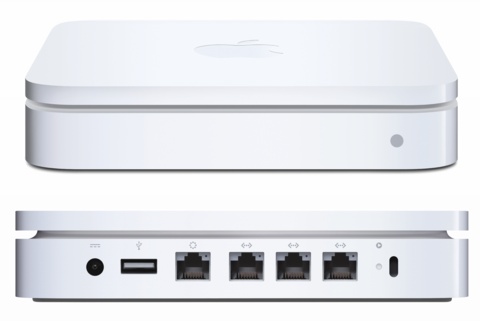
  wireless data networking. The new device - which retains the AirPort
  Extreme Base Station name - includes the first Ethernet switch found
  in an AirPort base station, sporting three local area network (LAN)
  ports offering just 10/100 Mbps Ethernet. There's also a USB port
  and a wide area network (WAN) Ethernet jack for a broadband
  connection. Only a single model is being offered so far, and it
  lacks an external antenna jack for reasons I'll explain shortly.

<http://www.apple.com/airportextreme/>
<http://www.tidbits.com/resources/862/airportextreme.jpg>

  Apple claims a speed boost of about five times with twice the range
  of 802.11g, which is the standard underlying the previous AirPort
  Extreme and still-current AirPort Express base stations. This is
  consistent with 802.11n's capability to achieve a real throughput of
  about 100 Mbps versus the real throughput of about 20 Mbps for
  802.11g.

  The new base station is due to ship in February 2007 for $180. It
  appears that the separate AirPort Extreme Card will not be updated,
  because Apple has already included 802.11n in certain shipping Macs,
  and will include 802.11n in all future desktops, laptops, phones,
  and the Apple TV. Using AirPort Extreme and 802.11g on an 802.11n
  network will slow the network down, but not to the same extent as
  when older 802.11b devices were used on 802.11g networks. However,
  using 802.11b will dramatically slow an 802.11n network.

  A number of companies will offer USB, PC Card, and ExpressCard
  802.11n adapters. Belkin started shipping an ExpressCard adapter for
  $100 just a couple of weeks ago, although Mac drivers weren't
  mentioned. In any case, within a few months there should be options
  costing $50 to $100 for most older Macs - the USB adapters will be
  especially appreciated this time around due to so many Macs having
  no expansion slots.

  Apple says in a footnote on their site that all Core 2 Duo and Xeon
  Macs except a single model - the iMac with 1.83 GHz Intel Core 2 Duo
  - support 802.11n. An "enabler" firmware updater comes with the new
  AirPort Extreme. It was widely reported last year by Mac users who
  disassembled parts of their computers that early 802.11n chips were
  installed, but the functionality wasn't enabled in firmware.

  No antenna jack exists in this new AirPort Extreme Base Station, as
  was in a previous configuration. 802.11n uses multiple-in,
  multiple-out (MIMO) antenna arrays that allow two or more radios to
  send distinct data across different radio reflective paths at the
  same time. This approach enables the reuse of spectrum across space.
  However, the internal antennas must be carefully placed and tuned in
  design phases, making attaching external antennas pretty much
  impossible. The MIMO approach produces far better coverage range by
  listening better (distinguishing more signal out of noise) and
  sending further (by focusing energy in specific directions).

  New to this model is network attached storage (NAS): plug in "almost
  any" external USB drive, as Apple puts it, and the drive turns into
  a networked resource. Apple says the drive can be configured for
  password-protected accounts, read-only access, and other forms of
  access control. You can also attach a USB hub to the AirPort Extreme
  and connect multiple printers and hard drives. Previously, only an
  education-focused AirPort Extreme Base Station model supported
  multiple printers. (So far, there's no word about a fire-resistant
  standard known as "plenum" that was also in the educational unit,
  and is required for many corporate and academic installations.)

  The new AirPort Extreme Base Station offers both 2.4 GHz and 5 GHz
  Wi-Fi. This is significant because 802.11n can operate over both
  frequencies. While 5 GHz signals travel shorter distances, there is
  more spectrum available that's less crowded. Before 802.11n, only
  802.11a - a spec designed at the same time as 802.11b, back in 1999
  - would work in 5 GHz, and generally only corporations using it for
  voice-over-IP had adopted that band.

  Steve Jobs dismissed 802.11a back in 2003 at the introduction of
  AirPort Extreme with a pre-standards version of 802.11g because
  802.11a used this different frequency range, and thus would break
  compatibility with 802.11b. However, it's essentially free to add
  802.11a along with 802.11n to support the full number of channels
  and purposes worldwide. AirPort Extreme can now use either 2.4 GHz
  (802.11b/g/n) or 5 GHz (802.11a/n), but not both simultaneously.

  Apple's technical specifications say that in the United States,
  channels 36 to 48 and 149 to 165 are available for use in 5 GHz.
  This is a bit confusing because channels in 5 GHz don't increment by
  one - that is, it's not 36, 37, 38, and so on - and because
  different channels are limited to indoor or outdoor use. It looks
  like the new AirPort Extreme Base Station provides seven indoor
  channels (lower numbers) and five outdoor channels (upper numbers).
  There should be a total of 23 indoor and outdoor channels in 5 GHz
  in the United States, however, so I'll be looking into that.

<http://www.apple.com/airportextreme/specs.html>

  The utility necessary to configure one of these new AirPort Extreme
  Base Stations requires Mac OS X 10.4.8, although devices using
  technology as old as that shipped in 1999 - the original AirPort
  Card and 802.11b, for example - can associate for a network
  connection just fine using their older 802.11a, b, or g connections.

  The 802.11n standard is still in progress at the IEEE engineering
  standards group, but a number of companies released early versions
  of the protocol in equipment that was widely criticized for a lack
  of compatibility with each other and for faulty, early firmware.
  However, in recent months, chipmakers and the IEEE task group
  responsible for the standard have coalesced around a proposal that
  should be released this week, and possibly approved as a working
  draft in March as it edges toward release.


Macworld Expo SF 2007: The Mac is Back!
---------------------------------------
  by Adam C. Engst <[EMAIL PROTECTED]>
  article link: <http://db.tidbits.com/article/8814>

  The last few Macworld Expos in San Francisco may have shown a
  rebound from the doldrums of the previous years, but that was in
  large part due to the number of vendors showing iPod-related
  products and to Apple releasing exciting new hardware and software.
  In short, the Macintosh industry, not including Apple or
  iPod-related products, hasn't made strong showings at Macworld Expo
  for quite some time.

<http://www.macworldexpo.com/>

  Thus there was some cause for concern when Steve Jobs led off the
  show with a keynote address that, rather than setting the tone for
  the rest of the week, served as notice that Apple Computer, Inc. was
  de-emphasizing its computer roots by becoming Apple, Inc. and
  announcing the Apple TV media center and the truly amazing iPhone.
  Jobs not only didn't announce any new Macintosh hardware or
  software, he didn't so much as say the words "Leopard," "iLife," or
  "iWork."

  (My analysis of the lack of the iLife and iWork suites is that both
  probably rely heavily on Leopard-specific technologies, such that
  even if they function in a more-limited way in Tiger, Apple won't be
  releasing them until Leopard is out. Several Keynote transitions
  that appeared in Jobs's keynote may have required the CoreAnimation
  technology in Leopard, indicating that Jobs was relying on the
  latest and greatest, even if it's not ready for the unwashed masses.
  As to when we can expect Leopard, and potentially updates to iLife
  and iWork as well, I'm guessing late April or early May of 2007.)

  As a result, the Apple booth, though it had decent traffic, wasn't
  the mob scene it has been in previous years. Sure, it was hard to
  see the two iPhone models on display in their clear lucite columns
  and watched over by security guards, but I never had trouble walking
  through the Apple booth, as I have at other shows.

  As for the vendors of iPod products, they were certainly out in
  force again, but it felt as though they were a smaller proportion of
  the 356 total exhibitors (down ever so slightly from last year's 361
  vendors, but covering much more space). A friend has run a contest
  on a private mailing list to guess the number of iPod case vendors
  at Macworld SF the last few years, and there were 45 such booths
  this year, down from 49 last year.

  Despite the lack of new Mac-related products from Apple and as much
  iPod emphasis from exhibitors, this was by far the strongest
  Macworld Expo I've attended in many years, thanks to the leadership
  of new IDG World Expo vice-president Paul Kent. To jog my memory, I
  read our Macworld Expo coverage back through 1998, and it was
  instructive to see how I was attempting to put a brave face on some
  of the rougher shows, and how the resurgence from those shows was
  due mostly to Apple and to iPod vendors. Along with plenty of
  vendors I've known for years, there were booths from companies I'd
  never heard of before. Attendance was very good - reportedly up more
  than 30 percent on pre-registrations alone (we won't know final
  attendance figures for some time yet). Crowds in the South Hall,
  where the larger companies were located, made walking slow at pretty
  much all times, and although the North Hall was never as full, I
  talked with a number of people who never even realized there were
  more vendors in the North Hall, which wasn't used in 2006 or 2005
  (and shouldn't have been used in 2004).

  Other aspects of the show were also well handled, with the only
  shadow being IDG World Expo's low estimate of attendee numbers in
  sessions the first few days, which led to some people being turned
  away and sessions being repeated. Seating was reconfigured at some
  point to eliminate the tables that had reduced the number of
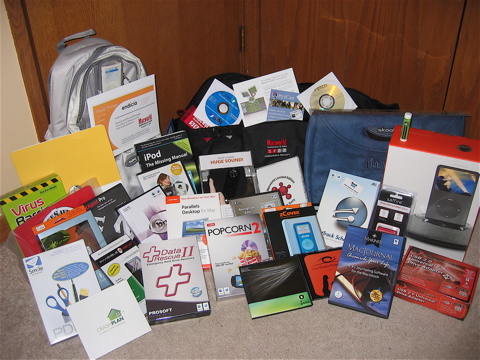
  available seats in each room. Most notable was the the swag bag
  given to speakers - it was a huge piece of rolling luggage stuffed
  to the gills with software, iPod cases, speakers, and more.
  Rewarding speakers, who in previous years received only a shirt or
  jacket with a Macworld Expo logo for their efforts, in this way was
  pure brilliance, since it makes industry experts much more positive
  about the effort necessary to prepare and present a talk, and it
  enables many companies to get their products in front of some of the
  most influential people in the Mac world. As full as the bag was,
  there was a rumor circulating that twice as many companies had
  wanted to include their products, with half being turned away for
  lack of space.

<http://www.tidbits.com/resources/862/speaker-swag-bag.jpg>

  My only regret was that there wasn't another day in the show
  schedule, since I didn't get to spend as much time as I would have
  liked on the show floor, and had to rush past some booths where I
  could have happily watched a demo or grilled a company
  representative for product details.

  Much of my lack of time was due to all the panels, presentations,
  and interviews I had scheduled. Apart from my appearance at the
  MacTech booth, which was unfortunately stuffed in the far back
  corner of North Hall, to discuss and sign the new TidBITS Archive
  CD, my other presentations and panel discussions were standing room
  only, and often not even that. Many of the panels were with other
  Mac luminaries who have become ever more friendly over the years,
  which turned previously dry panels into spirited exchanges that
  bordered on improvisational theater, all while revolving around the
  events and announcements of the week. We'll be posting links to
  appearances that were recorded as they become available, and I
  strongly encourage you to give them a listen.

<http://www.tidbits.com/cd/>

  Perhaps some of the enjoyment of this year's show, from the keynote
  to the MacBrainiac Challenge (my team lost on the final, fuzzily
  worded question) to the Netters Dinner, was that we had no
  middle-of-the-year Macworld Boston, nor a MacHack/ADHOC conference,
  thus focusing everything onto this show. (If you want to try your
  hand at the MacBrainiac Challenge, Chris Breen has posted all of the
  questions online, and will be adding the answers later in the week.)

<http://www.macworld.com/weblogs/expo/2007/01/macbrainiac/>

  For many people in the Macintosh community, these expos are an
  essential time for in-person networking and reconnecting with
  friends. We met John Moltz of the Crazy Apple Rumors Site for the
  first time (and it was his first time at a Macworld Expo), and also
  got a chance to spend some time with Dan Pourhadi, from whom we hope
  you'll be reading more in upcoming issues. And I can't count the
  number of times someone would come up to me and say, "You don't know
  me, but I've been reading TidBITS for <insert some large number>
  years, and I just wanted to say 'Thank you.'" I'm always extremely
  grateful to hear such kind words, and I love meeting readers at the
  show, so thanks back to all of you who took the time to introduce
  yourselves. I hope next year will be even bigger and with even more
  great people.

<http://www.crazyapplerumors.com/>
<http://db.tidbits.com/author/Dan+Pourhadi>


Hot Topics in TidBITS Talk/15-Jan-07
------------------------------------
  by TidBITS Staff <[EMAIL PROTECTED]>
  article link: <http://db.tidbits.com/article/8815>

**Macworld 2007 keynote** -- What did the TidBITS audience think of
  this year's Macworld Expo keynote address? (11 messages)

<http://emperor.tidbits.com/TidBITS/Talk/1082/>


**Younger Than Thou: "When I was your age..."** Readers respond to Dan
  Pourhadi's first Younger Than Thou column. (5 messages)

<http://emperor.tidbits.com/TidBITS/Talk/1079/>


**Younger Than Thou: Instant Messaging** -- A self-described "old
  fogie" suggests that Dan Pourhadi's article needed more information
  about why people use instant messaging, versus how it's used. (2
  messages)

<http://emperor.tidbits.com/TidBITS/Talk/1083/>


**MPEG4 audio and the Mac** -- Got an MPEG4 movie clip that's missing
  sound? Here are some suggestions for demuxing the file. (3 messages)

<http://emperor.tidbits.com/TidBITS/Talk/1084/>


**iTunes Backup** -- The recent addition of backup reminders in iTunes
  prompts discussion of good backup habits. (6 messages)

<http://emperor.tidbits.com/TidBITS/Talk/1085/>


**Trying to salvage LaserWriter** -- Yes, you can still use an old
  LaserWriter Select 360 printer on a modern Mac. Find out how. (6
  messages)

<http://emperor.tidbits.com/TidBITS/Talk/1086/>


**iPhone, is it an iPod or a Mac?** Will the iPhone follow the path of
  the Mac or of the iPod? In other words, how open is the iPhone going
  to be for outside development? (5 messages)

<http://emperor.tidbits.com/TidBITS/Talk/1087/>


**iPhone impressions and opinions** -- Opinions continue to fly about
  Apple's new phone, but it's important to remember that we're still
  six months away from the final product (not to say that speculation
  isn't fun). (10 messages)

<http://emperor.tidbits.com/TidBITS/Talk/1088/>


**Market for iPhone** -- A reader points to some good analysis about
  the iPhone's potential market. (1 message)

<http://emperor.tidbits.com/TidBITS/Talk/1089/>


**It's a Mac, Mac video production world** -- Adobe announces the
  return of Premiere to the Mac. What does this mean for Final Cut
  Pro? (1 message)

<http://emperor.tidbits.com/TidBITS/Talk/1090/>


**How to temporarily turn of TidBITS Auto Correct?** The auto-correct
  dictionary for Eudora seems to work too well for one reader. How to
  disable it? (4 messages)

<http://emperor.tidbits.com/TidBITS/Talk/1091/>


**GPS and MP3** -- A reader comments on the music-playing capabilities
  of recently reviewed GPS units. (1 message)

<http://emperor.tidbits.com/TidBITS/Talk/1076/>


**Support from GPS companies** -- Following up from Adam's most recent
  review of GPS units, a reader relates his take of dealing with
  Magellan. (2 messages)

<http://emperor.tidbits.com/TidBITS/Talk/1077/>


$$

This is TidBITS, a free weekly technology newsletter providing timely
news, insightful analysis, and in-depth reviews to the Macintosh and
Internet communities. Feel free to forward to friends; better still,
please ask them to subscribe!

Non-profit, non-commercial publications and Web sites may reprint or
link to articles if full credit is given. Others please contact us. We
do not guarantee accuracy of articles. Caveat lector. Publication,
product, and company names may be registered trademarks of their
companies. TidBITS ISSN 1090-7017.

Copyright 2007 TidBITS: Reuse governed by Creative Commons license.

Contact us at:    <[EMAIL PROTECTED]>
TidBITS Web site: <http://www.tidbits.com/>
License terms:    <http://www.tidbits.com/terms/>
Full text search: <http://www.tidbits.com/search/>
Subscriptions:    <http://www.tidbits.com/about/list.html>
Account help:     <http://www.tidbits.com/about/account-help.html>


--
If you want to unsubscribe or change your address, use this link
http://emperor.tidbits.com/webx?unsub@@.3c557dc4!u=306a67f9