TidBITS#869/05-Mar-07
=====================
  Issue link: <http://db.tidbits.com/issue/869>
  Does your mouse not behave as you'd expect? It's probably not the
  mouse itself, but Mac OS X's acceleration curve, which Apple changed
  from Mac OS 9 to Mac OS X - Parrish Knight explains what's going on
  and how to retrain your mouse to track your movements more
  appropriately. Also this week, Adam shares some surprising findings
  about Internet surveys and looks at Picnik, a Web site that provides
  most of iPhoto's image-editing features; Glen McAllister finds local
  music performances using iConcertCal; and Glenn Fleishman celebrates
  the expunging of the court case against security researcher Randal
  Schwartz. We also note the release of Parallels Desktop Build 3186
  (essentially, version 2.0), a security update for QuickTime, the
  availability of Macworld Expo session videos and audio files, and a
  new estimate of the number of Mac OS X users (22 million!).

Articles
    ExtraBITS Transitions to TidBITS Publishing System
    QuickTime 7.1.5 Patches Panther, Tiger, XP, Vista Exploits
    Parallels Desktop 2.0 Ships
    New Interviews with Adam and Joe
    22 Million Mac OS X Users
    Macworld Expo Sessions Available for Download
    DealBITS Winners: Panergy's docXConverter Premium
    Security Hacker Returned to Life
    Lessons on Internet Surveys
    iConcertCal: Your Gig-Going Pal
    Picnik Duplicates iPhoto on the Web
    Mac OS X's Mouse Acceleration Problem
    Hot Topics in TidBITS Talk/05-Mar-07


------------ This issue of TidBITS sponsored in part by: --------------

* READERS LIKE YOU! Support TidBITS with a contribution today!
  <http://www.tidbits.com/about/support/contributors.html>
  Special thanks this week to Ryoichi Morita, Gradus Wissenburg,
  David M. Douds, and Perpetual Ocean for their generous support!

* SMALL DOG ELECTRONICS: Featuring 4000+ Mac-friendly products.
  TidBITS Exclusive for Mar 5 - Mar 12: New MacBook 1.83 Core Duo!
  Never used, combo, 60 GB, Bluetooth, AP Extreme, iLife, 10.4,
  Order yours today for only $929 at <http://www.smalldog.com/tb/>

* FETCH SOFTWORKS: Fetch 5.2 introduces WebView, the easy way
  to view files in a browser and copy Web addresses from Fetch.
  Also with FTPS support, droplet shortcuts, and more.
  Download your free trial version! <http://fetchsoftworks.com/>

* WebCrossing Neighbors Creates Private Social Networks
  Create a complete social network with your company or group's
  own look. Scalable, extensible and extremely customizable.
  Take a guided tour today <http://www.webcrossing.com/tour>

* MARK/SPACE, INC: Introducing SyncTogether, Mac-to-Mac syncing
  of contacts, calendar events and tasks, notes and more. Perfect
  for a single user with multiple Macs or groups that need to sync
  selected iCal calendars. <http://www.markspace.com/bits>

* CheckIt System Performance Suite bundles three top Mac utilities!
  TechTool Platinum diagnoses and repairs your disk, Spring Cleaning
  organizes your files and Retrospect Express backs up your data.
  Buy today for only $79.99! <http://www.allume.com/tidbits/>

* Microsoft: Supporting professional Mac users with Office 2004.
  Supporting the Mac community through tech support newsgroups,
  user group appearances, our new team blog, and more!
  Save up to 25%! <http://www.microsoft.com/mac/go/promotions/>

* ROGUE AMOEBA SOFTWARE: With a Name Like Rogue Amoeba,
  It's Gotta Be Good. Good software with a bad attitude,
  only for Mac OS X. Free downloads from
  <http://www.rogueamoeba.com/ad/tb/>

---------- Help support TidBITS by supporting our sponsors ------------


ExtraBITS Transitions to TidBITS Publishing System
--------------------------------------------------
  by Adam C. Engst <[EMAIL PROTECTED]>
  article link: <http://db.tidbits.com/article/8895>

  Those of you who read our breaking news items in ExtraBITS may have
  noticed some changes this week. As part of the major overhaul to our
  back-end, something we're calling the TidBITS Publishing System, we
  can now make articles in our database available on our home page
  (and in searches) before they appear in a TidBITS issue. In the
  recent past, we did this by posting articles to a separate blog that
  wasn't connected to our searchable article database. But until we
  published the issue containing those articles, they wouldn't show up
  in searches, and after we published them, they appeared twice on our
  home page (once in the issue, once in ExtraBITS). It was functional,
  but inelegant.

<http://www.tidbits.com/>

  We're also working on a major redesign to our Web site, but until
  that's complete, headlines to articles that haven't yet been mailed
  out in a TidBITS issue will still appear on our home page in the
  ExtraBITS space. I've also redirected the ExtraBITS RSS feed to our
  main RSS feed, which now shows articles as they appear throughout
  the week, rather than only after being mailed out. If you're
  checking the main ExtraBITS Web page regularly or receiving its
  articles via email, this will be its last post, and I'll eventually
  redirect it back to the TidBITS home page.

<http://www.tidbits.com/channels/tidbits.rss>


QuickTime 7.1.5 Patches Panther, Tiger, XP, Vista Exploits
----------------------------------------------------------
  by Glenn Fleishman <[EMAIL PROTECTED]>
  article link: <http://db.tidbits.com/article/8899>

  Apple has released an update to QuickTime for Mac OS X 10.3.9 and
  later, Windows XP, and Windows Vista. QuickTime 7.1.5 fixes numerous
  bugs, along with a flaw that could enable a maliciously crafted file
  to crash a program employing QuickTime or to allow arbitrary code
  execution - a phrase that often means there's a potential for an
  attacker to gain control of a computer or, at least, install
  malware.

<http://docs.info.apple.com/article.html?artnum=305149>

  Affected file types are broad: 3GP videos, MIDI files, native
  QuickTime movies, images in the venerable PICT file format, and QTIF
  files. Apple's notes indicate that a user need only open a
  maliciously crafted file, which means that Web sites could be used
  to launch attacks by embedding QuickTime documents in the right
  format.

  There have been no reports of this flaw being exploited in the wild.
  A previous QuickTime flaw related to handling of JavaScript was
  exploited, notably on MySpace. Apple claims to have provided a
  temporary fix to MySpace, but it's unclear if that fix has made it
  into QuickTime 7.1.5.

<http://www.securityfocus.com/brief/375>
<http://news.com.com/MySpace+to+Apple+Fix+that+worm/2100-7349_3-6141031.html>


Parallels Desktop 2.0 Ships
---------------------------
  by Joe Kissell <[EMAIL PROTECTED]>
  article link: <http://db.tidbits.com/article/8891>

  Parallels has now released the official update to the Parallels
  Desktop virtualization software that began public beta testing at
  the beginning of December 2006. Confusingly, the company doesn't use
  normal version numbers (like "2.0," which this would be in
  conventional terms), but the now-available Build 3186 is the first
  version since Build 3036 three months ago that the company considers
  a full, non-beta release. (Parallels advertises the build number on
  the download page.)

<http://www.parallels.com/products/desktop/>

  Parallels hasn't added any major new features since we last reported
  on the beta version (see "Parallels Desktop Ups the Ante,"
  2006-12-04), but the company has enhanced and debugged the features
  that were added then. One of the new features I'd mentioned as being
  problematic in December was support for running a copy of Windows
  installed on a Boot Camp partition directly within Parallels;
  switching back and forth between the two modes of running Windows
  previously prompted repeated requests to reactivate Windows. Now the
  reactivation request should occur, at most, once.

<http://db.tidbits.com/article/8769>

  Among the numerous other new features is Coherence, a mode in which
  windows from Windows applications can intermingle with those from
  Mac applications, and even get individual icons in the Dock;
  Transporter, a tool for migrating an existing installation of
  Windows on a PC to Parallels; USB 2.0 support; an easy-to-use
  Installation Assistant; and the capability to copy files and folders
  between Windows and Mac OS X via drag-and-drop. Graphics performance
  is improved, but Parallels does not yet offer 3D graphics support,
  meaning that for now, users must still reboot using Boot Camp to
  play graphics-intensive games, or use the beta version of Fusion,
  VMware's competing virtualization environment, which has preliminary
  3D support.

<http://www.parallels.com/products/desktop/ga/features/>
<http://www.vmware.com/products/beta/fusion/>

  The new version of Parallels Desktop is a free update for registered
  users, who can obtain it either using the application's Help > Check
  for Updates command or by downloading it manually. The installer
  weighs in at 58 MB and can function as a 15-day free trial for those
  who have not yet purchased the program. Parallels Desktop sells for
  $80, but readers of "Take Control of Running Windows on a Mac"
  receive a coupon for $10 off. The current version of that book
  already covers the new features in Parallels, since it was released
  after beta testing began.

<http://www.parallels.com/en/download/desktop/>
<http://www.takecontrolbooks.com/windows-on-mac.html?14@@!pt=TB869>


New Interviews with Adam and Joe
--------------------------------
  by Adam C. Engst <[EMAIL PROTECTED]>
  article link: <http://db.tidbits.com/article/8898>

  Tune in to the latest podcast interviews with TidBITS editors! At
  Macworld Expo, Adam talked about the show announcements with host
  Harris Fogel of Mac Edition Radio, and more recently, Joe spoke with
  Gene Steinberg of the Tech Night Owl Live (he's in the final third
  of the 01-Mar-07 show).

<http://maceditionradio.com/index.php?module=Pagesetter&func=viewpub&tid=3&pid=89>
<http://www.techbroadcasting.com/>
<http://techbroadcasting.com/podcasts/nightowl_070301.mp3>


22 Million Mac OS X Users
-------------------------
  by Glenn Fleishman <[EMAIL PROTECTED]>
  article link: <http://db.tidbits.com/article/8892>

  We often wonder how many of us there are. While Apple occasionally
  shares the number of active Mac OS X users, it has been a while
  since the last update. Eight months ago in August 2006 at Apple's
  Worldwide Developers Conference, Steve Jobs said there were 19
  million active Mac OS X users. Keith Bachman, an analyst at Bank of
  America Securities, now quotes a higher number in an AppleInsider
  article: 22 million users of all versions of Mac OS X. Bank of
  America Securities estimates an increase of 6 million Mac users
  since the release of Mac OS X 10.4 Tiger in June 2005. It's also
  highly likely that there are uncounted millions of users still using
  Mac OS 9 and earlier.

<http://www.engadget.com/2006/08/07/live-from-wwdc-2006-steve-jobs-keynote/>
<http://www.appleinsider.com/article.php?id=2541>


Macworld Expo Sessions Available for Download
---------------------------------------------
  by Jeff Carlson <[EMAIL PROTECTED]>
  article link: <http://db.tidbits.com/article/8889>

  At Macworld Expo in January, I delivered a session called "Graduate
  from iMovie to Final Cut Pro" as part of the Users Conference track.
  I thought it went pretty well, especially since public speaking
  doesn't come naturally to me (but I'm working on it).

  As I was leaving, one man asked if the presentation would be made
  available online (and I'm sorry I didn't get your name, so I hope
  you're reading this). My plan was to take my Keynote file, export it
  as a movie, dump it into GarageBand, and re-do the session as a
  voiceover that could be downloaded. Unfortunately, I haven't had
  time to do that, but now I don't have to.

  The folks at IDG have started a new service called Macworld Encore,
  where you can download individual sessions as iPod-compatible
  QuickTime video or audio files. The sessions aren't free, but
  they're pretty reasonable: the Users Conference sessions (mine
  included) each cost $5; the all-day Power Tools Conferences cost
  $30; Mac IT tracks cost $7 apiece; Market Symposiums cost $15; and
  the Hands-on Mac Labs cost $10. (A DVD-ROM containing everything is
  also available for $300.)

<http://www.macworldencore.com/>

  My session includes the audio (and it seems as if they tempered the
  initial audio feedback we dealt with right at the beginning) plus
  everything that was shown onscreen.

<https://www.macworldencore.com/online/menu.asp?event=1030&session=&disc=Disc%201&pid=US945&id=1642&year=All&sortChoice=4&stype=asc>

  If you attended one of the paid conferences and weren't able to sit
  in on a session you wanted to catch, this is an inexpensive way of
  getting it; and if you weren't able to make it to Macworld Expo at
  all, a few individual downloads are much cheaper than a trip to San
  Francisco would have been.


DealBITS Winners: Panergy's docXConverter Premium
-------------------------------------------------
  by Adam C. Engst <[EMAIL PROTECTED]>
  article link: <http://db.tidbits.com/article/8890>

  Congratulations to Paul Schreiber of paulschreiber.com and Derrick
  Yamaura of axionet.com, whose entries were chosen randomly in last
  week's DealBITS drawing and who received a copy of Panergy's
  docXConverter Premium, worth $29.95. All entrants received a 20
  percent discount on docXConverter. Thanks to the 488 people who
  entered this DealBITS drawing, and we hope you'll continue to
  participate in the future!

<http://db.tidbits.com/article/8876>
<http://www.panergy-software.com/products/docxconverter/index.html>


Security Hacker Returned to Life
--------------------------------
  by Glenn Fleishman <[EMAIL PROTECTED]>
  article link: <http://db.tidbits.com/article/8886>

  Randal Schwartz was too curious for his own good. As a contractor at
  Intel in Oregon in the early 1990s, he poked and prodded a bit too
  much, especially in the area of demonstrating how poorly chosen -
  how weak - many account passwords were in the groups he worked for.
  Schwartz is best known as an expert in the programming language Perl
  that is widely used for Web applications alongside later arrival
  PHP. (In fact, big hunks of TidBITS are now powered by Perl.)

  Most system administrators view testing passwords for strength as
  one of many tests to ensure that a network and its associated
  computers are resistant against infiltration and compromise.
  However, disputes in the manner by which Schwartz ran his
  password-cracking tests and the permission he had to do so led to
  him being released from Intel, charged with a computer crime under
  Oregon law, and convicted of three felonies. He also had to pay
  restitution to Intel and a large pile of legal costs - hundreds of
  thousands of dollars in all.

  Those convictions have now been expunged, and I'm happy to spread
  the word. On 01-Feb-07, a court ordered that due to "the
  circumstances and behavior of the defendant since the date of
  conviction" and his completion of all provisions required of him,
  his conviction and arrest are to be removed from the record. In the
  words of the order, "the defendant...shall be deemed not to have
  been previously convicted or arrested."

  The conviction was a travesty of justice, one that I'm not convinced
  would have been upheld by Oregon's Supreme Court or higher courts.
  The judge noted in one part of the trial that the law appeared to
  characterize changing the background color of a computer's operating
  system display as a crime. (An appeal in 2001 resulted in a mixed
  bag of results.) And I don't believe anyone has been prosecuted
  since in Oregon in a remotely similar manner.

  The PDF of the expungement order can be found at the Friends of
  Randal Schwartz site, which has extensive archives of public
  statements on the matter by those involved, which make it pretty
  clear that Intel was running the prosecution, and that Schwartz was
  convicted partly on the basis of police recollection of one
  conversation while his home was being searched.

<http://www.lightlink.com/spacenka/fors/>

  Schwartz never said he acted intelligently in the matter. He was
  read his rights by the police during a quasi-raid of his premises,
  and he spoke without a lawyer present. He had been asked multiple
  times to not run cracking software and to turn off software that
  allowed him remote access for various purposes. And he held off
  reporting the flaws he found for so long that it looked like he was
  hiding something.

  But I have long maintained the prosecution was pretty much a farce.
  Schwartz had no criminal intent and the "restitution" he paid Intel
  was for them to fix problems that existed before he demonstrated
  them. In fact, Intel would have paid a huge price had criminal
  crackers gained access to their systems; they probably should have
  paid Schwartz a bonus rather than trying to get him put in the
  pokey.

  Schwartz never served jail time. In fact, the judge in the case was
  remarkably sympathetic to him but had to follow existing law. But he
  was, until a few weeks ago, a felon, and that's a cross to bear in
  the post-9/11 world. As an internationally recognized
  program-language expert, Schwartz's ability to work on certain
  government and corporate contracts was restricted, and traveling
  outside the United States was quite difficult.

  I met Schwartz through Geek Cruises's first Mac Mania cruise, a
  great week spent with lots of Mac writers I had long known or wanted
  to meet, and a fantastic set of attendees. Schwartz has been on
  every Geek Cruise, a sort of vocational hobby of his now, a fact I
  accidentally confirmed at Macworld Expo with CEO and "Captain" Neil
  Bauman, who runs the conference series.

<http://www.geekcruises.com/>
<http://www.stonehenge.com/merlyn/Pictures/Trips/2002/02-05-MacMania/>

  On the last day of the cruise, as we waited to get called to
  disembark, Schwartz sat in the lounge from which we had Wi-Fi access
  to a slow Internet connection explaining to people how they were
  sending their passwords in the clear over the Wi-Fi connection - and
  he would tell them a snippet of their password to prove it. It was a
  startling wake-up call to those present, and an ironic callback to
  what led to his difficulties in the first place.

  A few years ago, Schwartz asked me if I, along with a number of
  other people, would write a letter to the then-outgoing governor of
  Oregon asking for a pardon. In it, I described Schwartz's consistent
  white-hat behavior, his generosity with his time, and his strict
  adherence to the terms set at his sentencing. The governor declined
  to issue a pardon, but as I wrote at the time, Schwartz demonstrably
  never had any intent to cause harm, only to improve security, and
  erred only in violating company policies. There was never any proof
  - nor any needed under Oregon law, unfortunately - that Schwartz
  obtained any information he wasn't intended to have, either.

  I'm delighted that Schwartz has been rendered unconvicted. And I
  wrote this article in part to spread the word, in part to note how
  easy it could be to be charged and convicted of a computer crime for
  actions that may not seem problematic at the time, and in part to
  file this brief with Google - so that Schwartz's name is associated
  more with the absence of a conviction than the presence of one.


Lessons on Internet Surveys
---------------------------
  by Adam C. Engst <[EMAIL PROTECTED]>
  article link: <http://db.tidbits.com/article/8894>

  We've been watching the results of our reader survey roll in, with
  over 2,800 responses so far. You can still vote, but I can likely
  predict how you'll vote, based on current responses. In fact, the
  percentages of certain answers have been stable since the first few
  hours of the survey.

<http://emperor.tidbits.com/webx/?displaySurvey@@.3c8dc29b>

  This fact - that not much data is necessary to draw accurate
  conclusions - goes against the strongly held belief among many
  survey professionals that a high response rate is necessary. In
  fact, for a proposed survey to win a federally funded grant, one of
  the most important criteria is a predicted high response rate, and
  media pollsters performing quick surveys seldom report their
  response rates because they're so low. But according to Dr. Jon
  Krosnick of Stanford University, that belief turns out to be wrong,
  something that researchers are just coming to realize.

<http://communication.stanford.edu/faculty/krosnick.html>

  Dr. Krosnick spoke last week as part of a speaker series organized
  by the Cornell University Survey Research Institute, and although
  Tonya and I felt somewhat out of place in a room of academics, we
  were pleasantly surprised to find Dr. Krosnick's talk engaging and
  accessible even to those of us who have no formal training in
  surveying or statistics. If you're extremely interested in the
  topic, I encourage you to listen to the talk (26.6 MB MP3); for the
  rest of us, I thought I'd offer a quick summary of the non-intuitive
  lessons Dr. Krosnick imparted and a few other facts of interest to
  anyone who has been asked to complete a survey in person, over the
  telephone, or on the Internet.

<http://www.sri.cornell.edu/>
<http://www.sri.cornell.edu/sri/files/Krosnick_Lecture.mp3>

  1. Telephone interviews are not good substitutes for face-to-face
  interviews. They've become commonplace because their lower cost -
  between $1.50 and $6 per minute per respondent, compared with up to
  $1,000 for an hour-long face-to-face interview, once you factor in
  hiring and training interviewers, travel time, and so on. However,
  when examined on a number of scales, telephone interviews turn out
  to be significantly less accurate than face-to-face interviews.

  2. As much as telephone interviews aren't great, mailed paper
  questionnaires suffer from even worse accuracy. The thought is that
  people tend to whip through questionnaires too quickly, thus
  reducing their accuracy (in one telephone versus questionnaire
  survey comparison that asked pilots about dangerous experiences,
  those pilots who completed the paper survey rated their answers as
  less accurate than those who were interviewed on the phone, and
  remembered fewer dangerous incidents). The attraction of paper
  surveys is that they're cheap, but it turns out that once "the
  Dillman method" of sending reminders and multiple copies is
  employed, the cost savings over telephone interviews are minimal.

  3. I've already noted the third lesson - that low response rates
  aren't nearly as much of a problem as previously thought. That's a
  good thing, because Dr. Krosnick noted that telephone survey
  response rates are dropping precipitously; one ongoing survey that
  has traditionally had high response rates is seeing them drop by a
  half of a percent per month.

  4. Computer-based surveys turn out to be significantly more accurate
  than telephone surveys, perhaps because people subconsciously
  consider computers to be more human than a stranger on the phone.
  Plus, with computer-based surveys, if questions are asked one at a
  time, respondents can think about their answers without having the
  social awkwardness of telephone silence. There's also some thought
  that people are more honest when not speaking directly to another
  person. The lesson here is that computer-based surveying over the
  Internet is big business already, and will only get bigger as it
  takes over for telephone and questionnaire surveys.

  5. The problem faced by most Internet surveys is that they seldom
  rely on a random sampling of respondents. Most Internet survey firms
  recruit users in a way that can easily lead to non-random groups
  providing results that are less accurate than those from a truly
  random sample. Apparently, there's only one Internet surveying firm
  employing true random sampling - a company called Knowledge
  Networks, and in a test of a number of Internet survey firms and a
  well-regarded telephone survey firm, Knowledge Networks's results
  were overall more accurate than any others. In fact, Knowledge
  Networks goes so far as to provide panelists with an MSN TV Web
  browser and Internet connection if necessary. In contrast, many
  other firms rely on people who want to earn money taking surveys,
  and as with so many other things on the Internet, it's easy for
  these people to misrepresent themselves in order to participate in
  more lucrative surveys. Unfortunately, properly done Internet
  surveys end up being roughly comparable in cost to telephone
  surveys, though it would seem that costs could drop.

<http://www.knowledgenetworks.com/>


**A Novice's Conclusion** -- We found Dr. Krosnick's talk utterly
  fascinating, and although we didn't have time to chat with him
  beyond the Q&A session at the end, it would seem that some
  conclusions could be drawn from his lessons about the kind of
  Internet polls and surveys we see so frequently.

  First, although there is absolutely no disagreement that a random
  sample is ideal, the difference in accuracy was not huge. When
  applied to a question that is likely to have relatively divergent
  answers (such as the age of TidBITS readers), useful conclusions can
  easily be drawn without worrying that a self-selected sample would
  be horribly biased in one direction. Attempting to distinguish
  between answers separated only by a percentage point or two wouldn't
  be possible, though.

  Second, even if the response rate isn't huge, that wouldn't seem to
  make much of a difference. We might end up with a response rate of
  less than 10 percent in our survey, but the added accuracy gained by
  a larger response rate certainly wouldn't be worth harassing you all
  multiple times to answer our questions. Just how small that rate can
  be isn't entirely clear, but single digits don't appear to be a
  major problem.

  Third and finally, unlike a survey gauging national voting plans,
  most Internet polls don't attempt to use the results to predict the
  future, nor are the results likely to affect the future actions of
  other people. I can't quite put in words why this seems like a
  relevant difference, but it's related to the goal of the survey. If
  I learn what percentage of TidBITS readers regularly play computer
  games (28 percent), I can use that information when considering what
  articles to write, but I can't see the publication of this fact
  causing people either to start or stop playing games. However,
  compare that to surveys that ask who you plan to vote for in the
  next election; your answer has the power to help sway the opinions
  of other voters.

  And in that thought is where I think the answer to decreasing
  response rates lies. Surveys can be intrusive and badly timed, but
  if it's reasonable to complete them, they should be seen as a way of
  spreading your opinions to the rest of the world. It's the same
  reason I don't mind using grocery store shopper cards; I know
  they're tracking my purchases, and I want the fact that I'm buying
  more organic and less processed food to be recorded prominently. So
  the next time you're polled, consider it a chance not just to be
  counted, but also perhaps to nudge the world in the direction you
  want.


iConcertCal: Your Gig-Going Pal
-------------------------------
  by Glen McAllister <[EMAIL PROTECTED]>
  article link: <http://db.tidbits.com/article/8888>

  Until recently, I haven't been a regular visitor to Apple's Mac OS X
  Downloads page, but after coming across their latest featured
  download, I may make a point of checking more often. The program in
  question was a nifty iTunes plug-in called iConcertCal, which
  generates a personalized calendar of concert dates based on artists
  in your iTunes music library and your location.

<http://www.apple.com/downloads/macosx/>
<http://www.iconcertcal.com/>

  After installing the plug-in and (re-)launching iTunes, iConcertCal
  appears as an alternative to the normal iTunes visualizer. Choose
  View > Visualizer > iConcertCal, and then activate the Visualizer by
  choosing View > Turn on Visualizer (or press Command-T). Enter your
  city, state (or country for those outside the United States), and a
  radius (in miles) from that city (it's not inherently obvious that
  you can type in those fields, but you can).

  Once it knows your location, iConcertCal generates - within the
  iTunes window itself - an iCal-like calendar of concerts in venues
  within the area. What's truly neat is that it displays only concerts
  from artists already in your iTunes library. The calendar is
  generated by feeds from live music sites such as JamBase and is
  updated weekly. Clicking a concert link in the side list of upcoming
  shows or in the calendar itself takes you to the show's entry on
  JamBase. Pressing Command-T returns iTunes back to the normal view.

<http://www.tidbits.com/resources/2007-03/iConcertCal.jpg>
<http://www.jambase.com/>

  If you're interested in concerts by artists whose music you don't
  already own, you can tell iConcertCal to expand its search by
  putting those missing artists' names in a text file called
  "iConcertCalOtherBands.txt" in ~/Library/iTunes/iConcertCal (one
  artist per line). It's more likely that you'll have songs from
  artists who you'd never want to see live (imagine the free weekly
  downloads from the iTunes Music Store; you might like a song well
  enough to keep it, but not well enough to attend a concert by that
  artist). To restrict iConcertCal's searches, create a playlist - it
  can even be a smart playlist - called "iConcertCal" that contains
  just those artists you want to see.

  iConcertCal is only as good as its data source, which sometimes
  disappoints. It failed to report a scheduled concert I'm keen on
  attending - The National at London's Astoria on 22-May-07, which is
  by no means a low-profile show. However, you can join JamBase and
  add both artists and shows and, if accepted, they will show up next
  time your (and everyone else's) calendar is updated for that
  location. Then you will have the pleasure of making an already cool
  thing even cooler for everyone.

<http://www.americanmary.com/>

  [While editing Glen's article, I decided to see if adding an artist
  to JamBase was onerous, and I'm pleased to say that it wasn't. So
  hopefully JamBase will start reporting shows by my current favorite
  jazz group, the New York City-based Dave's True Story. -Adam]

<http://www.davestruestory.com/>

  iConcertCal is a universal binary requiring Mac OS X 10.3 or later
  in conjunction with the (encouraged) latest version of iTunes. There
  is also a Windows version. You can download the 340K installer from
  Mac OS X Downloads or the product's own page. It is freeware, but
  you can make PayPal donations on the iConcertCal site. I've already
  done so!

  [Glen McAllister is a licensed busker on the London Underground and
  freelance IT consultant.]

<http://www.myspace.com/iamgam>
<http://www.tfl.gov.uk/tube/arts/busking/>


Picnik Duplicates iPhoto on the Web
-----------------------------------
  by Adam C. Engst <[EMAIL PROTECTED]>
  article link: <http://db.tidbits.com/article/8887>

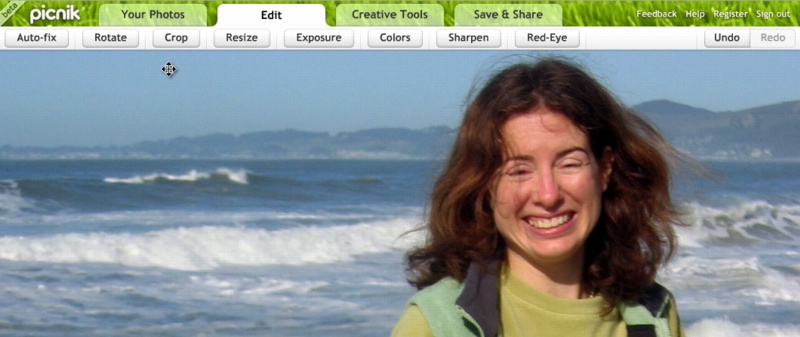
  For an impressive example of what can be done in a Web application
  these days, check out Picnik, an online photo site that provides -
  almost exactly - the same set of editing features as Apple's iPhoto,
  and some of iPhoto's sharing capabilities. Picnik offers, in its
  Edit tab, tools to auto-fix, rotate, crop, resize, adjust exposure,
  tweak colors, sharpen images, and remove red-eye. There's also a
  Creative Tools tab that provides special effects such as making a
  photo black-and-white or sepia, boosting color, softening the image,
  and applying either a matte or vignette effect. The controls are
  obvious and easy to use, and Picnik provides unlimited undo. You
  don't even have to feel constrained to the browser window; click the
  Picnik name in the upper left of the window to make the Picnik
  window full screen.

<http://www.picnik.com/>
<http://www.tidbits.com/resources/2007-02/picnik-interface.jpg>

  Photos can be brought in from your account on the online photo
  sharing site Flickr, from your computer, from any Web site, from
  Yahoo or Flickr searches, and even from a webcam. And when you're
  done editing, you can save photos to Flickr, send it to someone via
  email, save it to your Mac, email it to a Web site (useful for
  sharing to Ceiva picture frames; see "Ceiva and the Mac,"
  2005-02-14, for more on that), or print the photo on your own
  printer. I don't see any options for ordering prints from a service
  yet, but perhaps the assumption is that you'd do that via Flickr and
  their printing partner QOOP for now.

<http://www.flickr.com/>
<http://db.tidbits.com/article/7985>

  (To get Picnik working with an iSight camera, Control-click or
  right-click in the Picnik window, choose Settings, click the little
  video camera on the right side of the bottom icons, and choose
  either USB Video Class Video for internal iSight cameras or IIDC
  FireWire Video for external iSights from the pop-up menu; you may
  have to try choosing it several times.)

  The most amusing part of Picnik? Cute little messages, like
  "Painting sky" or "Buttering sandwiches," appear when certain more
  lengthy operations are taking place. It's a nice touch.

  Picnik's performance was extremely sprightly, and I didn't feel as
  though using Picnik within OmniWeb was problematic. It did crash
  OmniWeb once, but it is still in beta. Picnik recommends Mac OS X
  running on a Mac with a 1 GHz or faster processor; a relatively
  recent Web browser and Adobe Flash 9 are also required.

  During its beta phase, Picnik is free, and they promise the basic
  editing capabilities will remain free after launch, when there will
  be a for-fee premium version with advanced editing, more tools, and
  additional features. For now, I suspect most Mac users will think
  iPhoto is easier and more powerful than Picnik, given that iPhoto is
  a full-fledged application integrated into Mac OS X. But Picnik's
  tight integration with Flickr may cause it to be more interesting to
  those who use Flickr heavily, and it's possible that being a
  Web-based application may enable Picnik to evolve much more quickly
  than iPhoto, which Apple updates approximately once per year.


Mac OS X's Mouse Acceleration Problem
-------------------------------------
  by Parrish S. Knight <[EMAIL PROTECTED]>
  article link: <http://db.tidbits.com/article/8893>

  As wonderful as Mac OS X is, it has a grave defect that can have an
  immediate adverse impact on the computer's usability: the way it
  translates mouse motion into pointer movement. For many users,
  moving the mouse feels unnatural because of the peculiar way that
  Mac OS X performs that translation. In industry parlance, the
  translation is called the "mouse acceleration curve." What is a
  mouse acceleration curve, and how is its implementation problematic
  under Mac OS X?


**Speedy Gonzales** -- Mouse movement cannot be translated into
  pointer movement at a simple one-to-one ratio. If it were, you'd
  need to move the mouse 17 inches (43 cm) across your desk to move
  the pointer across the diagonal of a 17-inch monitor. That would be
  highly impractical because you'd need a tremendous amount of space
  to move the mouse around, and your arm would tire quickly. (Either
  that, or you'd have to constantly pick the mouse up and put it back
  down, which would also be both tedious and wearisome, though
  possibly amusing to watch.)

  Can you compensate by increasing the ratio so that, say, the pointer
  moves three inches for every inch the mouse moves? That simply
  trades one problem for another one. For example, on most displays,
  even at lower resolutions, the centers of the close and minimize
  buttons at the top of a standard window are typically about .25
  inches (6.4 mm) apart (at higher resolutions, it's even less than
  that). With a three-to-one pointer-to-mouse movement ratio, then,
  you'd have to move your mouse about .125 inches (3.2 mm), no more,
  no less, to move from the center of the close button to get to the
  center of the minimize button. That's roughly the thickness of three
  credit cards. Moving a mouse with such precision is difficult for
  most people, and if it were regularly required, it would make the
  computer cumbersome to use. So a simple "X-to-one" acceleration
  ratio won't work because if the value of X were too low, you'd still
  need lots of space to move the mouse around, but if the value of X
  were too high, precise pointer movement would be impossible.

  The solution is for the operating system to use both concepts: a
  higher X-to-one ratio for faster mouse movement, enabling the user
  to move the pointer across the screen quickly with little use of
  desk space, and a lower X-to-one ratio for slower mouse movement,
  enabling the user to move the pointer precisely without needing to
  be fantastically precise in moving the mouse.

  With this solution in place, users get the best of both worlds. If a
  user is moving the mouse very slowly - say, doing detailed work
  touching up a photo - the mouse-to-pointer ratio might be one-to-one
  (or even less than one-to-one), enabling precision movement with
  ease. Conversely, if the user then starts to move the mouse more
  quickly, wanting to jump to the other side of the screen, the
  X-to-one ratio changes dynamically, increasing as the user continues
  to increase the mouse's speed, until it reaches the other end of the
  X-to-one ratio, which might be as much as nine- or ten-to-one.
  Finally, as the user instinctively starts to slow the mouse down as
  the pointer nears the desired target, the operating system reverses
  the process, gradually decreasing the ratio once more and enabling
  the user to place the pointer precisely at the desired spot. (The
  math behind all of this is quite complicated. You may never look at
  your mouse the same way again.) The whole process makes it possible
  for the user to move the pointer from the photo he's touching up in
  the lower left of the screen to an icon in the upper right of the
  screen by moving the mouse only a short distance.

  If you were to take a sheet of graph paper and create a standard X-Y
  coordinate system - remember high school algebra? - with X
  representing the speed of the pointer and Y representing the speed
  of the mouse, and then map the ratio conversion process onto that
  graph, you'd end up with a sloping line, moving upward at first, and
  then flattening out with greater values of X. This line is called
  the "mouse acceleration curve."


**Sharp Curves Ahead** -- So what's wrong with Mac OS X's mouse
  acceleration curve? Simply put, it's the wrong shape. For mouse
  motion to feel natural (at least for most people), the curve has to
  start by moving upward fairly moderately, then gradually flattening
  out as the value of X increases. Mac OS X's, curve, however, starts
  off by being too steep, staying too steep for too long, and then
  flattening out too abruptly. In practical terms this means that,
  frequently, as a user tries to use the mouse to move the pointer
  from point A to point B, the pointer motion feels sluggish. The user
  then tries to compensate for the sluggishness by moving the mouse
  faster, and the pointer suddenly goes flying across the screen and
  overshoots point B. A comfortable and useful curve is actually
  shaped like a curve. Mac OS X's curve, however, is shaped more like
  a cliff.

  It wasn't always this way. Under Mac OS 9 and earlier, the curve was
  different and provided more natural mouse behavior. Then, for some
  reason, Apple apparently decided to fix something that wasn't broken
  and changed the curve. They made no announcement of the change and,
  to the best of my knowledge, it does not appear anywhere in their
  technical documentation. (Microsoft, conversely, explains how the
  Windows XP mouse acceleration curve works on a publicly accessible
  Web page.) For this reason, most people don't know about the change
  and are wondering "why the mouse feels funny" because they don't
  understand the esoteric details of the mouse acceleration curve.
  (And who can blame them? It's anything but simple arithmetic!)

  I was one such person myself for quite some time, experimenting with
  different mice and a variety of mouse pads and other surfaces,
  trying to figure out how I could get the mouse to "work right
  again." It was only after many months of Googling on a variety of
  search terms that I finally found out about acceleration curves and
  learned that Apple had quietly changed theirs. I was fortunate in
  that I had several years of experience with the Classic Mac OS that
  told me there actually was something that needed to be fixed. People
  who have only started using the Mac in more recent years have no
  such advantage.

  The unnatural motion of the new curve is troublesome for many users.
  User "Sludge" on the MacSlash Web site, for example, complains, "I
  can't believe how horrible mice feel on OS X compared to XP and
  Linux/XFree86." Scott Moschella of PlasticBugs.com opines, "[T]he
  mouse acceleration...makes OS X's mouse tracking feel like you're
  mousing through mud," referring to how the low end of the curve is
  too steep for too long.

  Of course, not all users have this complaint. Some say they actually
  prefer the new pointer behavior, and some even claim they don't
  notice any difference. For those who do have trouble with the new
  curve, though, it's highly problematic - often in ways beyond just
  the difficulty in getting the pointer to move to the desired
  location.

  When mouse movement feels unnatural, the user may subconsciously try
  to use hand and wrist muscles to compensate. At best, that's
  uncomfortable. At worst, it can be painful. In my own case, my wrist
  starts to cramp after only a moment or two. After about 20 minutes,
  most of my forearm is in extreme pain, and I have to stop using the
  mouse altogether.

  Over time, users with this type of difficulty using the mouse can
  suffer from the permanent damage known as an RSI (repetitive stress
  injury). I am one such sufferer. An anonymous user on MacSlash rails
  about "the RSI-inducing unpredictable madness that is the Mac mouse
  acceleration curve." And on LifeHacker.com, user "PhotoHobo"
  complains, "One of my biggest annoyances with OS X is the horrible
  mouse acceleration. As someone who is constantly battling RSI, I
  find this intolerable." Web searches find a number of other users
  voicing similar opinions and having similar difficulties.


**Realigning Your Curves** -- So the problem is certainly real and
  immediate - at least for some of us - but can anything actually be
  done about it? There is no setting in Mac OS X itself to modify the
  acceleration curve. Sometimes, well-meaning users suggest modifying
  the Tracking Speed setting in the Keyboard & Mouse pane in System
  Preferences, but that doesn't provide a complete solution. The
  problem isn't speed, per se, but the acceleration curve. Changing
  the tracking speed does not change the shape of that curve. It just
  makes the whole curve smaller or larger, rather like using a
  telephoto lens (or a wide angle lens) to take a photograph of the
  same cliff from the same location.

  Apple has left a void, then, in Mac OS X's settings. Fortunately,
  many third parties have tried to fill that void, and most do the job
  quite admirably. For example, several mouse manufacturers, such as
  Kensington, include their own mouse drivers and software that can be
  configured to override Mac OS X's mouse acceleration curve. The only
  drawback is that the software is usually specific to the hardware.

  For those who already have mice that they don't wish to replace,
  there are other solutions, each with advantages over the others.
  MouseFix (freeware) is a simple program that changes some of the
  numbers used in Mac OS X's mouse driver in an attempt to make the
  curve more natural. However, it can be difficult to install for the
  non-technically inclined, and its presets are not customizable.

<http://www.knockknock.org.uk/mac/>

  USB Overdrive ($20) is shareware with no trial period, and it offers
  an extensive variety of options for configuring mouse behavior, as
  well as the behavior of other USB devices. You can even configure it
  so that the mouse will behave differently depending on which
  application you're using. Its chief drawback, as the name implies,
  is that it supports only USB devices - if you use a Bluetooth mouse,
  you're out of luck. (The author, Alessandro Levi Montalcini, says
  that Bluetooth support is coming, but offers no time frame.)

<http://www.usboverdrive.com/>

  SteerMouse ($20) is also shareware that offers a wide variety of
  customization options for mouse behavior, and unlike USB Overdrive,
  SteerMouse supports Bluetooth mice. Its main disadvantage is that it
  was designed with Apple's Mighty Mouse in mind - it does work with
  other mice, but support may be more limited. Also, the trial period
  is only 15 days, which may not be long enough to fully explore the
  software, because finding the most comfortable settings can take a
  while. I ultimately chose USB Overdrive over SteerMouse for this
  reason. SteerMouse expired before I became comfortable with it,
  whereas USB Overdrive, having no expiration date, afforded me ample
  opportunity to find the mouse settings that worked best for me.

<http://plentycom.jp/en/steermouse/>

  Hopefully, Apple will realize that changing the mouse acceleration
  curve was a mistake and revert to the old one. Better yet would be
  to add a setting to the Keyboard & Mouse preference pane to enable
  the user to configure the acceleration curve as well as the speed.
  The likelihood of that is anyone's guess, but in the meantime, we
  can save our hands, our wrists, and our sanity by having a clear
  understanding of what the problem is and working around it with
  third-party solutions.

  Mac OS X, as we all know, is the Ferrari of operating systems.
  Unfortunately, the steering has a design defect, but with a little
  mechanical effort, we can modify it while we're waiting and hoping
  for the engineers to recognize the problem and fix it.

  [Parrish S. Knight is a systems administrator for an IT consulting
  firm in the greater DC area. His interests include politics, film,
  fantasy, and science fiction. In addition to getting the word out
  about Mac OS X's mouse problems, his causes include activism in
  autistic advocacy and civil liberties.]


Hot Topics in TidBITS Talk/05-Mar-07
------------------------------------
  by TidBITS Staff <[EMAIL PROTECTED]>
  article link: <http://db.tidbits.com/article/8897>

**Safari RSS problem** -- Here's a tip if Safari's RSS feeds don't
  seem to be updating regularly. (3 messages)

<http://emperor.tidbits.com/TidBITS/Talk/1158/>


**Encrypted e-mail question** -- A question leads to a great summary
  of how encrypted email works. (8 messages)

<http://emperor.tidbits.com/TidBITS/Talk/1159/>


**Frequent Tech Questions (Was: How much to quote?)** -- Technical
  questions come up all the time, but it's expected that people should
  do a little searching for answers on their own, first. But what do
  you do when an answer isn't easy to find? Readers discuss creating
  different resources. (11 messages)

<http://emperor.tidbits.com/TidBITS/Talk/1160/>


**Unofficial Daylight Saving Time Workaround for Entourage X** --
  Microsoft Office X isn't being updated for this year's changed
  Daylight Saving Time date, but here's a workaround for users of
  Entourage X. (1 message)

<http://emperor.tidbits.com/TidBITS/Talk/1161/>


**iPhone "Hello"** -- Apple's first television commercial for the
  iPhone (which doesn't include the word "iPhone") was broadcast
  during the Oscars. Was it successful? (3 messages)

<http://emperor.tidbits.com/TidBITS/Talk/1163/>


$$

This is TidBITS, a free weekly technology newsletter providing timely
news, insightful analysis, and in-depth reviews to the Macintosh and
Internet communities. Feel free to forward to friends; better still,
please ask them to subscribe!

Non-profit, non-commercial publications and Web sites may reprint or
link to articles if full credit is given. Others please contact us. We
do not guarantee accuracy of articles. Caveat lector. Publication,
product, and company names may be registered trademarks of their
companies. TidBITS ISSN 1090-7017.

Copyright 2007 TidBITS: Reuse governed by Creative Commons license.

Contact us at:    <[EMAIL PROTECTED]>
TidBITS Web site: <http://www.tidbits.com/>
License terms:    <http://www.tidbits.com/terms/>
Full text search: <http://www.tidbits.com/search/>
Subscriptions:    <http://www.tidbits.com/about/list.html>
Account help:     <http://www.tidbits.com/about/account-help.html>


--
If you want to unsubscribe or change your address, use this link
http://emperor.tidbits.com/webx?unsub@@.3c557dc4!u=306a67f9