TidBITS#870/12-Mar-07
=====================
  Issue link: <http://db.tidbits.com/issue/870>
  Who are you? We asked, you answered, and this week Adam starts
  looking at the results of our reader survey! Adam also takes the
  Nike+iPod Sport Kit for a run and realizes that serious runners
  might want to leave it at the starting line. Also in this issue,
  Apple releases iTunes 7.1 in anticipation of the Apple TV, Adobe
  announces an announcement date for Creative Suite 3, Glenn Fleishman
  buys a Windows Vista-equipped laptop for testing purposes and offers
  his first impressions of the competition, and Adam examines
  SonicLiving, a Web site for tracking your favorite artists. Lastly,
  if you're feeling a bit behind due to last weekend's Daylight Saving
  Time changeover in the United States, make sure you check out a
  short list of patches and fixes.

Articles
    DST Resources If You're Feeling One Hour Off
    iTunes 7.1 Prepares for Apple TV
    Universal Binary Adobe Creative Suite 3 Moves Closer
    SonicLiving Links Musical Resources
    TidBITS 2007 Reader Survey Results: Who Are You?
    Opening My Vistas
    Nike+iPod Only for Fitness Runners
    Hot Topics in TidBITS Talk/12-Mar-07


------------ This issue of TidBITS sponsored in part by: --------------

* READERS LIKE YOU! Support TidBITS with a contribution today!
  <http://www.tidbits.com/about/support/contributors.html>
  Special thanks this week to Sylvia Elliott, Allan Deering,
  Takashi Yoshida, and Paul Driver for their generous support!

* SMALL DOG ELECTRONICS: Featuring 4000+ Mac-friendly products.
  TidBITS Exclusive for Mar 12 - Mar 19: New MacBook 1.83 Core Duo!
  Never used, combo, 60 GB, Bluetooth, AP Extreme, iLife, 10.4,
  Order yours today for only $929 at <http://www.smalldog.com/tb/>

* FETCH SOFTWORKS: With Fetch 5.2, FTP and SFTP are simpler
  than ever. Use it on Mac OS X to upload, download, mirror,
  and manage your Web site, eBay images, and data sets.
  Download your free trial version! <http://fetchsoftworks.com/>

* WebCrossing Neighbors Creates Private Social Networks
  Create a complete social network with your company or group's
  own look. Scalable, extensible and extremely customizable.
  Take a guided tour today <http://www.webcrossing.com/tour>

* Bare Bones Software's BBEdit 8.6 -- Latest version offers a
  major interface overhaul, new prefs, text clippings, improved
  JavaScript, new Ruby/SQL/YAML/Markdown support, code folding.
  Over 160 new features in all! <http://www.barebones.com/>.

* MARK/SPACE, INC: New, from the makers of The Missing Sync, comes
  SyncTogether, a brand new app for syncing contacts, calendars,
  notes and more between multiple Macs and one or more user
  accounts. $49.95 for 3 Macs. <http://www.markspace.com/bits>

* CheckIt System Performance Suite bundles three top Mac utilities!
  TechTool Platinum diagnoses and repairs your disk, Spring Cleaning
  organizes your files and Retrospect Express backs up your data.
  Buy today for only $79.99! <http://www.allume.com/tidbits/>

* Microsoft's MacBU: Supporting Mac users with Office 2004.
  Supporting the Mac community through tech support newsgroups,
  user group appearances, our new team blog, and more!
  Check out our team blog at <http://blogs.msdn.com/macmojo/>

---------- Help support TidBITS by supporting our sponsors ------------


DST Resources If You're Feeling One Hour Off
--------------------------------------------
  by Jeff Carlson <[EMAIL PROTECTED]>
  article link: <http://db.tidbits.com/article/8905>

  Clocks in much of the United States ticked ahead one hour last
  weekend for the new Daylight Saving Time adjustment, which we
  explored in "Daylight Saving Time May Bite the Out-of-Date"
  (2007-01-29) and "Daylight Saving Time Saved" (2007-02-19). If some
  of your devices weren't updated for the change on 11-Mar-07, here
  are some quick resources to get you back on track.

<http://db.tidbits.com/article/8832>
<http://db.tidbits.com/article/8862>


**Mac Updates** -- For Macs to deal with the change automatically,
  make sure to install either Daylight Saving Time Update (Tiger) (for
  Mac OS X 10.4.8; Mac OS X 10.4.5 and later had some, but not all,
  updated DST info) or Daylight Saving Time Update (Panther) (for Mac
  OS X 10.3.9), which are available via Software Update and as
  separate downloads. If you're still using Mac OS X 10.2 Jaguar, look
  to a modified patch at AFP548.com. Apple also released updates for
  Java: Java for Mac OS X 10.4, Release 5 and Java for Mac OS X 10.3
  Update 5.

<http://www.apple.com/support/downloads/daylightsavingtimeupdatetiger.html>
<http://www.apple.com/support/downloads/daylightsavingtimeupdatepanther.html>
<http://www.afp548.com/article.php?story=20070128143720897>
<http://docs.info.apple.com/article.html?artnum=304586>
<http://docs.info.apple.com/article.html?artnum=304585>

  Microsoft fixed Entourage 2004's DST handling with the Microsoft
  Office for Mac 11.3.3 Update, and a group of anonymous users have
  contributed an unofficial fix for anyone still running Entourage X.

<http://www.microsoft.com/mac/downloads.aspx?pid=download&location=/mac/download/Office2004/Office2004_1133.xml>
<http://www.entourage.mvps.org/articles/unofficial_dst_workaround.html>

  For other computer- and operating system-related DST patches, check
  out the links on DSTPatch.com.

<http://dstpatch.com/>


**Other Devices** -- I own a Treo 650, and in the days leading up to
  the switchover I was bombarded with email, voicemail, and text
  messages urging me to upgrade my device. I'm guessing the cellular
  phone companies did everything they could to alert their customers
  to avoid a tech-support nightmare.

  Patches for some recent Palm OS handhelds and Palm-branded Windows
  Mobile smartphones are available at Palm's Web site.

<http://www.palm.com/us/support/downloads/dst.html>

  If you use a Blackberry device, Research in Motion (RIM) has posted
  a patch to download and install.

<http://www.blackberry.com/select/dst2007/>

  Do you rely on a TiVo to record your favorite television programs?
  This page at tivo.com discusses how the time change will affect
  customers, particularly those who have set up manual recording times
  on some devices.

<http://www.tivo.com/>
<http://customersupport.tivo.com/LaunchContent.aspx?CID=c04f6d88-895e-4334-b87f-427756927143>

  Lastly, if you're using an iPhone, well, "time" has no meaning while
  you work at Apple getting ready for that June launch. Don't worry,
  someone will deal with the DST adjustment and will be bringing
  emergency food and caffeine soon.

<http://www.apple.com/iphone/>


iTunes 7.1 Prepares for Apple TV
--------------------------------
  by Jeff Carlson <[EMAIL PROTECTED]>
  article link: <http://db.tidbits.com/article/8902>

  Apple has released iTunes 7.1, an update that doesn't appear to
  offer much on the surface, but incorporates compatibility with the
  upcoming Apple TV. A new Apple TV section in the preferences
  displays Apple TV units that have been authorized to work with
  iTunes. When the video streaming device is released this month, you
  will be able to use iTunes 7.1 to synchronize media to the Apple
  TV's 40 GB hard disk for playback on a connected television (see
  "Apple TV Connects Macs and TVs," 2007-01-15).

<http://www.apple.com/support/downloads/itunes71formac.html>
<http://www.apple.com/appletv/>
<http://db.tidbits.com/article/8812>

  Also new in iTunes 7.1 is the option to browse the library in a
  full-screen Cover Flow mode. A new Sorting tab in the Get Info
  dialog for individual tracks lets you set up nicknames, which can
  then be applied to related artists and sorted; for example, tracks
  composed by two artists can be sorted together with each artist's
  other works. (Chris Breen at Playlist offers more details.)

<http://playlistmag.com/weblogs/ipodblog/2007/03/newitunes71/>

  iTunes 7.1 is available via Software Update or as a 28 MB download;
  it requires Mac OS X 10.3.9 or later. Apple also released iTunes 7.1
  for Windows, but Windows Vista compatibility (which seems to be
  spotty) is not touted; Apple lists Windows XP with Service Pack 2
  and Windows 2000 with Service Pack 4 as system requirements.

<http://www.apple.com/support/downloads/itunes71forwindows.html>


Universal Binary Adobe Creative Suite 3 Moves Closer
----------------------------------------------------
  by Glenn Fleishman <[EMAIL PROTECTED]>
  article link: <http://db.tidbits.com/article/8901>

  Adobe continues to inch towards providing the scheduled release date
  of its suite of image, Web, and document handling tools known as
  Creative Suite 3 (CS3) by announcing that it has an announcement.
  CS3 comprises Photoshop, Illustrator, Dreamweaver, Acrobat, and
  InDesign, along with several support programs. GoLive will be
  dropped from CS3.

  The company said it will "launch" CS3 on 27-Mar-07, which one
  presumes means that they will start taking orders and provide a date
  for the actual release; shipment isn't expected until sometime in
  the second quarter of 2007. All the applications in CS3 will be
  universal binaries, enabling Intel-based Mac owners to take full
  advantage of the processing power of their new boxes. In December
  2006, Adobe released a public beta - with some provisos on how to
  activate it - of Photoshop CS3 to preview new features and the new
  speed possible on Intel-based Macs (see "Adobe Releases Universal
  Binary Beta of Photoshop CS3," 2006-12-18). One analyst predicts
  that Apple will see $900 million in revenue from computers sold due
  to the release of CS3.

<http://blogs.adobe.com/creativesolutionspr/2007/03/adobe_creative_suite_3_to_be_a_1.html>
<http://db.tidbits.com/article/8790>
<http://www.computerworld.com/action/article.do?command=viewArticleBasic&articleId=9012398>

  In an announcement filled with marketing-speak, Adobe said that
  Photoshop CS3 will come in two editions: plain and Extended. The
  plain version will be much as we've been accustomed to. The Extended
  release will be, you know, longer. Or something. Here's what Adobe
  told me via email:

<http://www.adobe.com/aboutadobe/pressroom/pressreleases/200703/030807Photoshop.html>

  Extended is "a completely new edition of Photoshop which allows
  cross-media creative professionals to stretch the limits of digital
  imaging." Okay, then.

  Drill down a bit, and you find that Extended integrates
  three-dimensional graphics (3D), motion graphics, measurement, and
  analysis, and thus makes Extended a better tool for audiences that
  Adobe wants to court, such as "professionals in architecture,
  engineering, medical, and science," as they put it.

  In an interview with Macworld, Adobe cited 3D model visualization
  and texture mapping, as well as measurement and analysis tools, as
  Extended features. We'll see what other practical examples emerge
  during the CS3 unveiling.

<http://www.macworld.com/news/2007/03/07/photoshop/>


SonicLiving Links Musical Resources
-----------------------------------
  by Adam C. Engst <[EMAIL PROTECTED]>
  article link: <http://db.tidbits.com/article/8900>

  Thanks to our EFF buddy Fred von Lohmann for a pointer to
  SonicLiving, a Web site that offers a service similar to the
  iConcertCal iTunes plug-in we covered recently (see "iConcertCal:
  Your Gig-Going Pal," 2007-03-05).

<http://www.eff.org/>
<http://sonicliving.com/>
<http://db.tidbits.com/article/8888>

  Like iConcertCal, SonicLiving can generate a calendar of concerts
  based on artists in your iTunes library, though it does this via a
  Java applet that reads your artist list and then lets you select
  which artists to watch for. That's actually a good thing, since
  options let you select all artists, artists with more than one song,
  and artists with five or more songs, easily letting you eliminate
  the one-hit wonders. SonicLiving can also pick up your favorite
  artists from music services such as Pandora (see "Pandora Beats
  iTunes for Holiday Music," 2005-12-05) and the similar last.fm.
  Unlike iConcertCal, SonicLiving shows concerts only in 11
  metropolitan areas, so it's most useful for those near certain major
  cities.

<http://www.pandora.com/>
<http://db.tidbits.com/article/8347>
<http://www.last.fm/>

  But what sets SonicLiving apart, and makes it worth a look for
  anyone interested in music, is the amount of information it
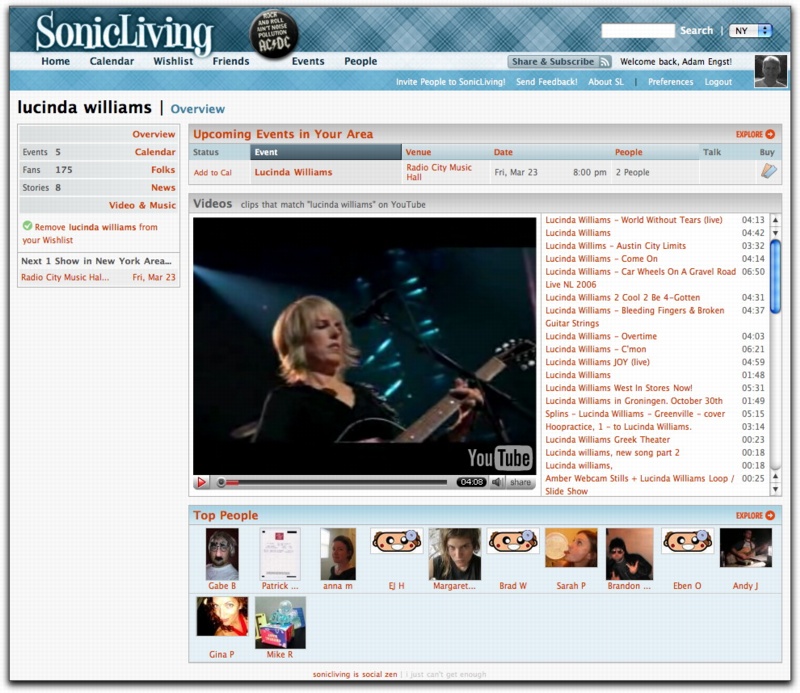
  integrates about any given artist. Once you've added all your
  favorites to your wishlist, clicking an artist's name displays an
  overview page containing the next few upcoming events, an area where
  video clips from YouTube are listed and can be played, and a summary
  of other people who like the artist. You can expand any of these
  sections to list all events, to show all the people who have this
  artist on their wishlists, to see news items about the artist, or to
  see what albums the artist has on the iTunes Store.

<http://www.tidbits.com/resources/2007-03/SonicLiving-overview.jpg>

  Although others may find the social networking aspects of
  SonicLiving compelling (you can easily see what shows others are
  interested in and set up friend connections), I was more struck by
  the way SonicLiving provides an easy interface for watching music
  videos on YouTube (many of which are undoubtedly copyright
  infringements, but which can provide low-quality, full-length song
  previews) and for playing all 30-second preview clips from the
  iTunes Store, one after another. I've always found the need to play
  each preview in iTunes separately annoying; I often want to hear all
  the clips on an album without fussing with something like the iTunes
  Music Store Player script. It is of course easy to jump to the
  iTunes Store to purchase a song or album.

<http://www.dougscripts.com/itunes/scripts/scripts02.php?page=3#itunesmsp>

  I was disappointed that SonicLiving lacked links to artist Web
  sites, and I was also surprised that it doesn't do the "people who
  liked X also liked Y" kind of recommendations. You can see the
  wishlists of people whose lists overlap with yours, which is sort of
  the same thing, but that seems a bit roundabout. Nonetheless,
  SonicLiving is the kind of site you can easily lose yourself in, so
  be sure to dive in when you have some time to burn.


TidBITS 2007 Reader Survey Results: Who Are You?
------------------------------------------------
  by Adam C. Engst <[EMAIL PROTECTED]>
  article link: <http://db.tidbits.com/article/8904>

  It's time to start analyzing the results of our TidBITS 2007 Reader
  Survey. In this week's look, I examine the answers to the first few
  questions, which attempted to ascertain what kinds of people read
  TidBITS. As of this writing, we've received 3,158 responses, and as
  I've said previously, the survey remains open if you haven't
  responded yet, but I doubt any of the percentages will move much.

<http://emperor.tidbits.com/webx?displaySurvey@@.3c8dc29b>

  There's a tendency in this world for each of us to believe that
  everyone is like us. It makes sense; we have the most experience
  being us, and we likely spend time with people who are more or less
  like us, whether we're talking about age, education level, income,
  or profession. That's one utility of surveys such as this - even
  within the TidBITS audience of Macintosh users, they can show both
  similarities and differences.

  As with any survey in which respondents are self-selected - we
  didn't pick a random sample of readers - we know that these results
  skew to those who have the time and interest to answer. Because we
  had such a large number of readers respond, however, we can make
  some conclusions without pretending that this is a statistically
  valid way to extrapolate these results to the full readership, and
  certainly not to the Macintosh community at large. (See last week's
  "Lessons on Internet Surveys," 2007-03-05, for more about online
  surveys and the validity of their responses.)

<http://db.tidbits.com/article/8894>


**Age Distribution** -- Take age, for instance. Tonya and I are 39,
  and we've been publishing TidBITS since we were 22 in 1990. When we
  started, we were undoubtedly younger than many of our readers, since
  purchasing a Mac back then required more financial means and
  interest than many people in their early 20s had. The logical
  extension, therefore, is that our readers were in their 30s and 40s
  when they started reading TidBITS and have, somehow, though none of
  us are quite sure when it happened, aged 17 years since TidBITS was
  started.

  As a result, the largest ten-year age group represented among those
  responding is the 51-60 age group, with the 41-50 and 61-70 age
  groups not far behind on either side. (Unfortunately, it was too
  hard to compare this to the U.S. population at large, because the
  2000 census figures report age groups oddly, switching between 5-
  and 10-year chunks and reporting the 10-year chunks as 25-34, for
  example, so the sets didn't match with ours.) You can see the
  results below; the numbers don't add up to 100 percent because some
  people didn't answer the question.

    Age           Percentage (# of votes)
    --------      -----------------------
    Under 21       0% (4)
    21-30          2% (91)
    31-40         14% (447)
    41-50         22% (698)
    51-60         29% (917)
    61-70         20% (618)
    71-80          7% (228)
    81-90          1% (50)
    91 and up      0% (3)

  I think this age distribution can provide a number of lessons.
  First, and most importantly, we should continue to eschew Leetspeak
  and cell phone SMS abbreviations, since only a handful of people in
  our audience would understand such slang abbreviations.

<http://en.wikipedia.org/wiki/Leet>
<http://en.wikipedia.org/wiki/SMS_language>

  More seriously, the age distribution also implies that most TidBITS
  readers are established, probably financially comfortable, and have
  spare time they can focus on reading about technology. Other
  conclusions can undoubtedly be drawn, but let's mix in other results
  first.


**Profession** -- Age is an easy question to ask and to answer, but I
  knew that asking about jobs was going to be trickier, especially
  since I was limited to 10 answers by the survey software, and a
  number of those questions lumped together jobs in different
  categories. In fact, over 500 people opted to write in their
  profession, and about 100 of them entered "Retired," along with a
  slew of highly specific jobs. Here are the results from those who
  were able to choose an option. (Again, not everyone answered this
  question.)

    Profession                                  Percentage (# of votes)
    -----------------------------------------   -----------------------
    CEO/President/Management                     9% (242)
    Network/System Administrator                 3% (105)
    Marketing/PR/Sales                           3% (81)
    Software Development/QA/Tech Support        11% (306)
    Writing/Editing/Journalism                   5% (146)
    Graphic Design/Illustration/Layout           6% (170)
    Audio/Video Production                       2% (57)
    Educator/Doctor/Lawyer/Other Professional   25% (690)
    Consultant/IT Support Provider               8% (232)
    Student/Retired/Hobbyist/Parent             24% (651)

  The only conclusions I'd draw are that we have a lot of readers who
  are retired (which matches some of the age results), that a large
  chunk of readers are professionals, and that quite a few people are
  involved with the computer industry in some way. Perhaps these
  conclusions are obvious, other than the percentage of retired folks,
  but they're still interesting.

  Even more interesting were the write-in answers. I don't have room
  to list them all here, but I'm truly pleased to learn that among our
  readers we have numerous artists, including a glass artist, a fine
  art portrait painter, a sculptor, a fiber artist (who wanted to know
  why these lists never include "Artist" as a profession: it's because
  so few people are able to make a living at it, unfortunately!), and
  numerous photographers. Musicians were also well represented, and
  it's nice to know that TidBITS is being read by an opera singer, a
  trumpet player in the San Francisco Ballet Orchestra, an English
  hornist from the Pittsburgh Symphony, and the bassist for Robert
  Cray.

  I was surprised at the number of people reporting aviation careers,
  including several airline pilots, a corporate helicopter pilot, and
  a jet test pilot, not to mention people in airline management,
  aircraft repair, and aerospace engineering, one of whom truly is a
  rocket scientist.

  In the category of professions that just sound interesting, readers
  reported being a lighting designer, a Broadway stagehand, a wine
  merchant, a nuclear scientist, a dairy worker (ironically, I have an
  elderly relative who has been both of those last two), a "Virtual
  Assistant," a jeweler who should perhaps meet the hard rock miner, a
  cartographer, a cryptographer, an espresso machine repair technician
  who should get together with the slot machine repair person, a
  defense analyst, a human rights activist, a fishery information
  specialist, and one person who wrote, "I'm actually a professional
  Girl Scout." I'm also dying to know how one becomes an "ordained
  humourist and multimedia performance artist."

  And in the joke come to life, we can count among our readers a
  pastor, a priest, a minister, a Buddhist monk, and a rabbi. We
  always knew that the choice of computer platform had something to do
  with religion, though clearly not any particular one.

  I'd love to figure out a way that I can publish stories about those
  of you with fascinating careers that involve the Mac in some
  non-obvious way. If you think you fall into that category, drop me a
  note via email with some details.


**Macs and Technology Budgets** -- It's clear that TidBITS is read
  largely by individuals who are responsible for a small number of
  Macs. 39 percent of respondents cared for only 1 or 2 Macs, with 41
  percent responsible for 3 to 5 Macs. A fair number of respondents -
  10 percent - handled networks of 6 to 10 Macs, but after that, the
  percentages drop off precipitously. That's not really surprising
  either. Although the Mac is coming back in business use, it's still
  relatively uncommon in large installations.

  Similarly, most respondents (66 percent) have an annual budget of
  less than $5,000, though 14 percent spend between $5,000 and $9,999.
  After that, the numbers tail off, though not as quickly as for the
  number of Macs, and a non-trivial number of people had budgets in
  hundreds of thousands or even millions of dollars.


**Computer Activities** -- For this article, I'll finish up with a
  look at the activities you reported. As with professions, being
  limited to only 10 was a problem, so there were lots of write-in
  responses. In this case, the percentages are of the total number of
  people who answered the question, so 99% of respondents use email,
  the Web, or chat, meaning that only a few people didn't answer.

    Activity                      Percentage (# of votes)
    --------------------------    -----------------------
    Email/Web Browsing/Chat       99% (3141)
    Word Processing               88% (2795)
    Spreadsheet                   63% (1990)
    Database Management           39% (1253)
    Web Design/Management         39% (1234)
    Network/Systems Management    28% (910)
    Graphic Design/Layout         39% (1250)
    Audio/Video Production        24% (786)
    Gaming/Educational            29% (917)
    Troubleshooting/Support       49% (1555)

  The results are self-explanatory, and honestly, I wasn't
  particularly surprised by any of them. I wish I had more answer
  space available in our survey tool, because a very large number of
  people included digital photography among the write-in answers, with
  software development also regularly added. Also common were write-in
  answers that revolved around listening to music, watching TV and
  movies, and downloading audio or video. Lots of respondents use
  their Macs for financial tasks: accounting, banking, taxes,
  financial planning, trading stocks, and so on. Hard-core activities
  that merited multiple mentions in the write-in section included
  research in a variety of fields, computer-aided design (CAD),
  scientific computation, and statistical analysis. And finally, a
  number of people reported blogging as a regular activity.

  In retrospect, the answers I provided were old-school. Of course
  digital photography is huge, and I should certainly have included an
  answer for audio/video consumption. And although I doubt a large
  percentage of TidBITS readers maintain blogs, I'm sure the raw
  number that do is still quite large. None of this should have been
  surprising at all, since we also use our Macs heavily for all of
  these modern-day activities.

  In future articles, I'll delve into other aspects of the survey
  results, first concentrating on how and what you read, and then
  finishing up with how all this relates to our content. Thanks again
  for participating!


Opening My Vistas
-----------------
  by Glenn Fleishman <[EMAIL PROTECTED]>
  article link: <http://db.tidbits.com/article/8896>

  I just bought a new laptop with Windows Vista pre-installed, and,
  hey, I kinda like it.

  As I dodge flaming arrows from regular TidBITS readers, let me note
  that it's not my main computer nor intended to be; that I've been
  using the Mac platform since 1985; and that I currently own
  something like five _working_ Macs. (Yes, we Mac owners know the
  difference: I have two other Macs of ancient vintage that haven't
  been powered on in years.)

  I purchased a Dell Inspiron 6400 laptop for two reasons. First, I'm
  a technology journalist, and Vista is destined to be the world's
  dominant platform within a year or two. I need to know how it works
  and how to use it. Second, I write quite a bit about Wi-Fi and
  wireless data. Invariably, new wireless cards come out with Windows
  drivers first; Mac drivers lag by weeks or years, and often lack
  full feature support.

<http://www.dell.com/content/products/features.aspx/inspn_6400>

  My criteria for a Vista system were fairly elaborate. I wanted a
  dual-core Intel chip - the one I got is a "budget" Core Duo chip
  with half the Core Duo's Level 2 cache - and I thought it would be
  nice to have a good platform on which to perform side-by-side
  comparisons with similar Mac platforms. I needed an ExpressCard
  expansion slot because that's the format in which new Wi-Fi and cell
  data modems will be issued. By the same token, I ordered the Intel
  Draft N (802.11n) internal card that's just been released because it
  will be among the most heavily sold Wi-Fi adapters this year.

<http://www.intel.com/pressroom/kits/wireless/kedron/>

  Finally, I wouldn't buy a PC that didn't have Vista pre-installed.
  From everything I've read, buying a machine with Windows XP today
  and upgrading tomorrow is a sucker's bet. Further, I needed at least
  the Vista Business flavor to get the networking options necessary
  for the kind of testing I would be performing.

  I looked at all the major manufacturers, and Dell came closest to
  what I needed at a reasonable price. Despite quite a lot of
  well-publicized missteps in the last couple of years - Dell used to
  be ranked a not-too-distant No. 2 behind Apple for customer support,
  but has slipped quite a bit - the company seems in the middle of a
  turnaround that includes Michael Dell resuming leadership.

  The Inspiron 6400 I settled on has a 15.4-inch screen, 2 GB of RAM,
  a 120 GB 5400 RPM hard drive, a dual-layer 8x DVD burner, a Draft N
  adapter, and a 1.6 GHz Pentium T2060 dual-core processor. It does
  not feature gigabit Ethernet. (A previous version of this article
  posted to the TidBITS Web site stated that the Inspiron 6400 had a
  Core 2 Duo processor rather than the "budget" Core Duo that it
  actually includes.)

  Along with the computer, I purchased a two-year subscription to a
  full McAfee anti-everything package: anti-spyware, anti-virus,
  firewall, and anti-this-and-that. Pre-purchasing that package meant
  the software is installed and supported, and was cheaper, too. I
  also bought a three-year extended warranty that includes
  24-hour-a-day phone support and next-day, on-site repair.

  For all that, I paid $1,500 including sales tax. That's not a
  terrible price.

  Dell made setup easy. Unpack the box. Plug in a power adapter. Press
  the power key. A simple one-sheet setup poster came with it, and I
  didn't need to refer to it. Initializing Vista involved answering
  just a few questions before it was up and running.

  My early experience with Vista, after spending only a couple of
  hours getting it set up and running, wasn't awful. Sure, it asks me
  about granting approval for programs more often than I'd like. It's
  weird that I can't easily say, "Hey, I trust this action for this
  particular program," since I've been able to do that with Zone Alarm
  Pro under Windows XP for years.

<http://www.zonelabs.com/store/content/catalog/products/sku_list_zap.jsp?dc=12bms>

  The McAfee package, however, did lock up my computer. A minimized
  window needed user approval to proceed, and that locked the whole
  minimized windows task bar at the bottom of the screen. I had to use
  the old Control-Alt-Delete trick to display the Process Manager, and
  then I was able to bring the McAfee program to the front and move
  ahead. That happened just once.

  Vista, as a whole, does conform to reports that at the surface it's
  Windows XP with fancier dressing. (Beneath the surface, there's a
  lot that's changed, but we will have to wait to see how it shakes
  out on the security and stability fronts.) There are some nice
  features, many of them familiar to me as a long-time Mac OS X user,
  but I don't find it offensive or confusing. The Aero interface,
  which offers translucency among other features, is attractive.
  Vista, so far, is just fine. (Wait until I start really using it, of
  course, to see how it holds up.)

  Now, you will ask me, "Why, Glenn, oh why did you not simply buy a
  MacBook Pro? It has a full Intel Core 2 Duo - not the budget Core
  Duo you got - along with an ExpressCard slot, and it can run
  Windows."

  My answer is that at the moment, you can only install Windows Vista
  under Boot Camp for a native boot - which would be needed to handle
  Windows drivers for the ExpressCard slot - with a bit of elbow
  grease. Boot Camp is still in beta; Apple doesn't support Vista with
  Boot Camp yet, either.

<http://www.apple.com/macosx/bootcamp/>

  Also, a similarly equipped MacBook Pro from Apple is nearly $2,400
  including sales tax. That's for a far superior 2.16 GHz Core 2 Duo
  processor with gigabit Ethernet and Apple-supplied RAM, but that's
  the cheapest and slowest MacBook Pro offered and I could shave only
  a few dollars by supplying third-party RAM myself. Further, given
  Apple's product cycles, I expect that we'll see new versions of the
  MacBook Pro in the next two to four months.

  The folks at Parallels told me at Macworld Expo that their Parallels
  Desktop virtualization software might be able to support Windows
  drivers working on devices inserted in the ExpressCard slot, just as
  they've improved USB support in their most recent release. However,
  that's speculative until it's available.

<http://www.parallels.com/en/products/desktop/>

  My insidious plan is to use the Dell laptop until the time comes
  that I can easily install and run Vista for all my needs using
  either Boot Camp or Parallels Desktop. The Dell should fetch a
  decent price when sold. And this is, of course, all a mental trick
  to justify buying a MacBook Pro in the future - but only when the
  time is right.


Nike+iPod Only for Fitness Runners
----------------------------------
  by Adam C. Engst <[EMAIL PROTECTED]>
  article link: <http://db.tidbits.com/article/8903>

  I've been putting off this review, because it doesn't thrill me to
  warn even a subset of people away from a popular product. But that's
  exactly what I have to do - in short, although the Nike+iPod Sport
  Kit can be a fun addition for anyone who runs with an iPod or wants
  a bit more encouragement to run, competitive runners shouldn't
  bother with it. It simply isn't worthwhile as a training aid for
  anyone who values ease-of-use, lap counter features, and distance
  and pace accuracy.

  First, some background. I'm a competitive runner. I train with the
  High Noon Athletic Club at Cornell four or five days per week, and I
  like to run about 40 miles a week. At least one of those days will
  be a speed workout and another will be a long run. In the summer and
  fall, I often race on weekends, at distances ranging from 5
  kilometers to 10 miles, including numerous trail races. In the
  winter, I run indoor track, concentrating on the mile and 2 mile
  races and their metric counterparts, the 1500 and 3000 meters.
  Although I'm sufficiently grown up that I don't need to win to feel
  good about myself, I do push hard, and one of my happiest moments in
  2006 came in December when I broke my 21-year-old high school
  personal record for the 2 mile by 2 seconds. For that race, I was
  planning lap splits to the second and taking into account the 18
  meter extension beyond 16 laps. For me, running is a hobby, a social
  activity, great exercise, and a needed mental break, but for what I
  do, accuracy also matters highly.

  What I'm trying to convey is how, as a competitive runner, my
  opinions are akin to those of a professional graphic designer faced
  with a program that claims to bring illustration to everyone.


**Design Problems** -- When Apple and Nike announced the Nike+iPod
  Sport Kit last May (see "Grab Your iPod and Run," 2006-05-29), I was
  excited at the chance to combine my running with my interest in
  Apple technology. The first negative came upon reading that Nike
  shoes were required, since I don't wear Nikes, and serious runners
  don't risk injury by switching brands or even models lightly. But I
  quickly learned that users had discovered many ways to attach the
  sensor to other shoes, so I purchased the $30 kit (I already had an
  iPod nano, the other requirement that would add at least $150 to the
  cost of getting started).

<http://www.apple.com/ipod/nike/>
<http://db.tidbits.com/article/8543>
<http://www.apple.com/ipodnano/>

  When the Nike+iPod Sport Kit arrived, I eagerly unwrapped it, read
  the instructions, and then stopped, flummoxed, since although I
  could figure out a way to stick the sensor into my Mizuno Wave
  Inspire running shoes, I couldn't figure out what to do with the
  iPod nano itself. I didn't want to hold the expensive little gadget
  in my hand for the 45 to 60 minutes I normally run, and all the
  standard ways of attaching it to one's body seemed to put it in a
  pocket or on an armband. Running shorts don't have pockets, and both
  pockets and armbands hide the iPod display and controls.

  That matters because I never run with earbuds or headphones of any
  sort and thus wouldn't hear the iPod's audible feedback. Most of my
  runs are with my High Noon friends, where listening to the iPod
  would simply be rude. But even when I run by myself, I don't wear
  them. I don't like the feel of things in my ears, I don't like wires
  dangling around my body, and it's dangerous to be on the road
  without being able to hear cars or dogs reliably (there's a reason
  headphones are banned in many races). So I need a visible interface,
  and I also need easy access to the controls for pausing the workout
  when I'm stopped at an intersection or if someone has to stop to
  re-tie a shoe.

  And, of course, I wanted something to protect the iPod nano from
  sweat and rain. Rain doesn't get in the way of running, and I can't
  necessarily predict when it will start raining in the middle of a
  run.

  I was blocked - I couldn't figure out how I'd use the Nike+iPod
  Sport Kit.


**Marware to the Rescue** -- Help soon appeared in the form of advice
  from iPod expert Dan Frakes, who covers the iPod world for Playlist.
  I had asked Dan privately if there were any wristbands for the iPod
  nano while it had the Nike+iPod receiver attached, and though he had
  initially answered negatively, he alerted me when Marware announced
  the $30 Sportsuit Relay, which seemed to answer all my problems.

<http://playlistmag.com/>
<http://www.marware.com/cgi-bin/WebObjects/Marware.woa/3/wa/selectedCategory?catalogCatID=238>

  The Sportsuit Relay provides a neoprene and rubber wristband case
  that almost completely covers the iPod nano with the Nike+iPod
  receiver attached (there's a small hole for the earbuds, but I'd
  only worry about water getting in during a torrential downpour),
  along with a little Sportsuit Sensor pouch that attaches the
  Nike+iPod sensor to one's shoelaces with Velcro. Marware also
  provides extensions for the wristband case if you wish to wear it on
  your upper arm. It's a good product, and I recommend it for anyone
  who wants a water-resistant case for an iPod nano with the Nike+iPod
  receiver attached.

  My main problem with the wristband is, unfortunately, out of
  Marware's control. The iPod nano is long and thin, and fits
  reasonably on my wrist. But the screen is deucedly hard to read in
  that orientation, and there's no way to rotate the iPod display 90
  degrees.


**Calibration and Testing** -- The Nike+iPod Sport Kit uses an
  accelerometer in the sensor to detect foot motion, and although it
  can be used out of the box, Apple suggests calibrating it by running
  a known distance while in calibration mode. According to Apple's
  Nike+iPod Technical FAQ, the accelerometer works by determining the
  amount of time your foot spends on the ground, which Apple claims is
  directly related to your pace. The question is, if you calibrate the
  Nike+iPod at one pace, does it work accurately at other paces?

<http://docs.info.apple.com/article.html?artnum=303934>

  To test this, I first calibrated it by running an easy 400 meters
  (.25 miles) at about 7:30 mile pace. The workout for the day was 5
  repetitions of 600 meters (.375 miles) at 4:40 per mile pace. For
  each of the 600s, the iPod instead reported the distance at either
  .31 or .32 miles, which is about 15 percent off. On the easy 400s I
  ran for rest in between each 600, the iPod was accurate, presumably
  since my pace was essentially the same as the calibration pace.
  Apparently, running at different paces can hurt the Nike+iPod's
  accuracy, though there's no way of knowing whether that's because my
  stride length was longer, my stride rate was slightly increased, or
  my gait was different at that pace.

  My track test was actually somewhat unfair, because the Nike+iPod
  interface on the iPod is worthless for a track workout anyway.
  Unlike nearly every digital watch aimed at runners and even the
  separate stopwatch feature built into recent iPods, the interface
  lacks a lap counter, forcing you either to start and stop your
  workout in between intervals, or to stop, reset, and start a new
  workout for each lap. That's just too hard, and although the
  interface is easy to understand, the iPod's controls are difficult
  to feel and press accurately while running, especially when hot,
  sweaty, and trembling with exertion.

  I also took the iPod out on the road for an 8 mile out-and-back run
  at a moderate pace. I couldn't recalibrate it for the moderate pace
  first, not having a measured track nearby, but I was more interested
  in whether or not terrain would make a difference, since this
  particular run was largely uphill on the way out and downhill on the
  way back. Alas, the Nike+iPod failed this test spectacularly;
  recording 3.53 miles on the way out and 1.86 miles on the way back
  for a total of 5.39 miles. Ignoring the fact that it was 33 percent
  off the actual distance, since it may have been poorly calibrated at
  that point, the out-and-back distances should have been the same.

  In and around these and other tests that confirmed my results, I ran
  with the Nike+iPod fairly regularly, comparing its results to known
  distances and to the reports from my Garmin Forerunner 201 GPS.
  (Yes, I was quite the sight with all those electronics strapped to
  my wrists.) In general, the Nike+iPod varied quite a bit, but since
  my pace for any given run also varies, often within the run, there
  was no way of predicting the results.

<http://www.garmin.com/products/forerunner201/>

  (As Paul Lightfoot reported in "Running with a Garmin Forerunner
  GPS," 2005-07-25, the Garmin Forerunner 201 is spotty; if it gets a
  good satellite lock for an entire run, it can be highly accurate,
  but if it has trouble - presumably due to cloud cover, satellite
  positions, or the color of your shorts - its accuracy drops
  precipitously. But the device is easy to read, includes a good lap
  counter, and is waterproof. Garmin also claims its newer models
  receive satellite signals better, and the $375 Forerunner 305 has a
  wireless heart rate monitor and an optional $100 accelerometer-based
  Foot Pod that reportedly kicks in automatically for indoor training
  or times when the satellites aren't aligning.)

<http://db.tidbits.com/article/8190>
<http://www.garmin.com/products/forerunner305/>
<http://www.garmin.com/accessories/footpod/>

  Since pace accuracy depends on accurate distance measurement, the
  Nike+iPod pace numbers are also suspect. For instance, if I ran 600
  meters in 1:47 (a 4:45 pace), and the iPod recorded the distance as
  .32 miles instead of .375 miles, the pace thus changes to a
  radically different 5:34. Confusingly, although the Nike+iPod manual
  never says this, while a workout is taking place, the pace reported
  is your current pace, not the pace for the workout so far. Thanks to
  TidBITS reader Mark Wickens for alerting me to this fact; I had been
  quite bothered that the reported pace seemed inaccurate during
  workouts.


**More Testing Needed?** Since initial Web publication of this
  article, I've received several comments about why my Nike+iPod
  provided inaccurate results. Mike Donato, an Australian computer
  consultant who's also an athletics coach, a champion rogainer, and a
  Green Beret (so I'm not going to disagree with him in person!),
  passed on the results of his testing, which put the Nike+iPod at
  about 99 percent accurate when used with the proper Nike shoes, and
  only about 75 percent accurate when used with Marware's sensor
  pouch. I can easily accept that the Nike+iPod would require
  calibration for accurate results with the Marware sensor pouch, but
  I can't see how using the Nike shoes would eliminate the problems I
  encountered. After all, when used at the calibration pace with the
  Marware sensor pouch, the Nike+iPod was entirely accurate on a flat
  course. Unfortunately, since I've had bad experiences with Nike
  shoes in the past, I'm uninterested in spending $100 or more for a
  pair of shoes that I wouldn't wear past a few test runs.

<http://en.wikipedia.org/wiki/Rogaine_(sport)>

  Mike Banks of Grantwood Technology also wrote to recommend his
  company's Shoe Pouch, a competing product that costs $6. Mike said
  that he had heard other criticisms of inaccuracies introduced by
  using the Marware sensor pouch, which he speculated might be due
  either to movement of the sensor on the shoe (attaching it firmly
  requires attention) or to improper alignment of the sensor (in
  comparison to how it was designed to fit in the Nike shoes). Mike
  believes that the Shoe Pouch solves these problems and will provide
  better accuracy. I'll test it and report back on my findings.
  Subsequent discussions with Mike Donato also pointed toward
  inaccuracy caused by looseness - specifically a comment about the
  Marware sensor pouch in a roundup of hacks for using the Nike+iPod
  Sport Kit with shoes from other manufacturers.

<http://www.shoepouch.com/>
<http://podophile.com/2006/11/30/nike-ipod-shoe-hack-and-sensor-accessory-round-up/>

  When I asked if they had received reports of inaccuracy, Lee
  Goldring of Marware told me that all the complaints Marware had
  received about the accuracy of the Nike+iPod when used with the
  Sportsuit Sensor pouch were related to incorrect orientation; as
  soon as the user placed the sensor in the pouch with the orange side
  down, as indicated in an insert that ships in the pouch and on
  Marware's Web site, the accuracy issues went away. I had been using
  the sensor in the correct orientation, so that wasn't my problem.

  Clearly, I'll have to try attaching the sensor to my shoe more
  firmly; perhaps I'll try digging a hole in an older pair of shoes as
  well. In a short out-and-back run after reading all these comments,
  with the sensor pouch firmly attached, I got exactly the same
  distances, though I was running at the calibration pace on a flat
  course.

  It's worth noting that even Apple admits to accuracy problems in
  various places. A support article on Apple's Web site makes clear
  the importance of consistent pace during calibration, saying, "If
  you run or walk with an inconsistent pace or travel a distance that
  is over or under the expected calibration distance, you may get
  unexpected results (such as incorrect distance of a workout)." Plus,
  the manual reads, "Even after calibrating, the accuracy of distance
  measurements may vary depending on gait, running surface, incline,
  or temperature." Fine, but all those things vary for serious
  runners.

<http://docs.info.apple.com/article.html?artnum=303965>


**Fine for Fitness Running** -- Don't misunderstand my criticisms
  here. The Nike+iPod Sport Kit does essentially what it says it will
  do. It provides some data about how far and how fast you run, and it
  can help you run for a specific (if not terribly accurate) distance
  and for a specific amount of time. You can upload your data to a
  Nike Web site whenever you sync with iTunes, and many people have
  found it encouraging to be able to compare their workouts, monthly
  distances, and race times with their online friends. And yes, if you
  have trouble being alone with your thoughts and the environment
  around you while running, you can listen to music or podcasts.

  In the end, anything that encourages more people to run is a good
  thing, and particularly when coupled with Marware's Sportsuit Relay,
  the Nike+iPod can do just that. But if you're a competitive runner
  looking for an easy-to-use training aid that provides accurate
  distance and pace measurements (particularly without forcing you to
  switch shoe models), you'll want to look elsewhere. And even if my
  criticisms of the Nike+iPod's accuracy turn out to be testing error,
  its awkward physical design and lack of a lap counter render it less
  useful than other devices.


Hot Topics in TidBITS Talk/12-Mar-07
------------------------------------
  by TidBITS Staff <[EMAIL PROTECTED]>
  article link: <http://db.tidbits.com/article/8906>

**For Exploring Your Unicode Fonts** -- A reader shares some tips on
  how to view Unicode characters. (1 message)

<http://emperor.tidbits.com/TidBITS/Talk/1167/>


**Appointment/room scheduling software** -- What options are available
  to schedule facilities among a small group without turning to
  enterprise-level software? Several options can be found here. (8
  messages)

<http://emperor.tidbits.com/TidBITS/Talk/1168/>


**Lessons on Internet Surveys** -- Adam's article from last week about
  the validity of Internet surveys leads to a discussion of random
  sampling and response rates. (13 messages)

<http://emperor.tidbits.com/TidBITS/Talk/1169/>


**Dragon Naturally Speaking under Parallels vs Bootcamp** -- A reader
  tests out Dragon's Windows-based speech transcription software under
  Parallels Desktop and Boot Camp. (4 messages)

<http://emperor.tidbits.com/TidBITS/Talk/1170/>


**Mac OS X's Mouse Acceleration Problem** -- Readers respond to last
  week's article on mouse behavior under Mac OS X, providing pointers
  to other software and queries about pen tablets. (19 messages)

<http://emperor.tidbits.com/TidBITS/Talk/1171/>


**USB adapter for Gigabit Ethernet** -- Attempting to gain 1000 Mbps
  Ethernet speeds with a USB adapter sounds promising for older Macs,
  but there may be some significant limitations. (2 messages)

<http://emperor.tidbits.com/TidBITS/Talk/1173/>


**22 Million Mac OS X Users** -- Readers look at the claim of how many
  Mac OS X users are out there and compare the number to populations
  such as Australia (around 21 million). (4 messages)

<http://emperor.tidbits.com/TidBITS/Talk/1174/>


**Opening My Vistas** -- The first reports of Mac users' experiences
  with Microsoft Vista begin to trickle in, spurred by Glenn
  Fleishman's article about buying a Vista-equipped laptop. (3
  messages)

<http://emperor.tidbits.com/TidBITS/Talk/1176/>


**Macworld Expo Sessions Available for Download** -- A reader has
  difficulty accessing Macworld Expo sessions online, but the problem
  was most likely a massive traffic surge directed from Macworld.com.
  (4 messages)

<http://emperor.tidbits.com/TidBITS/Talk/1177/>


$$

This is TidBITS, a free weekly technology newsletter providing timely
news, insightful analysis, and in-depth reviews to the Macintosh and
Internet communities. Feel free to forward to friends; better still,
please ask them to subscribe!

Non-profit, non-commercial publications and Web sites may reprint or
link to articles if full credit is given. Others please contact us. We
do not guarantee accuracy of articles. Caveat lector. Publication,
product, and company names may be registered trademarks of their
companies. TidBITS ISSN 1090-7017.

Copyright 2007 TidBITS: Reuse governed by Creative Commons license.

Contact us at:    <[EMAIL PROTECTED]>
TidBITS Web site: <http://www.tidbits.com/>
License terms:    <http://www.tidbits.com/terms/>
Full text search: <http://www.tidbits.com/search/>
Subscriptions:    <http://www.tidbits.com/about/list.html>
Account help:     <http://www.tidbits.com/about/account-help.html>


--
If you want to unsubscribe or change your address, use this link
http://emperor.tidbits.com/webx?unsub@@.3c557dc4!u=306a67f9