TidBITS#872/26-Mar-07
=====================
  Issue link: <http://db.tidbits.com/issue/872>
  This week we're featuring audio and video, music and TV. First, Adam
  reviews SpotDJ, a new Web-enabled service that puts the DJ back into
  iTunes with short audio spots that you hear after appropriate songs
  play in iTunes or on your iPod. Then, Jeff offers his initial
  impressions of the just-shipped Apple TV after a popcorn-fueled
  "testing" session. But we didn't spend the entire week goofing off,
  as Glenn looks at Other World Computing's 3 GB memory kit to max out
  the RAM on certain Macs along with how it might impact performance.
  Adam also examines Chax, a free utility that gives iChat a tabbed
  interface and a plethora of useful configuration options. In the
  news, we cover the release of SpamSieve 2.6 and how to get MacTech's
  VBA-to-AppleScript transition guide for Microsoft Office users.

Articles
    SpamSieve 2.6 Adds Thunderbird Support
    MacTech 25 Voting Open, VBA to AppleScript Guide Available
    DealBITS Drawing: BeLight Software's Art Text
    Enhance iChat with Chax
    Stick 3 GB of RAM in an Intel Core 2 Duo iMac, MacBook
    Add a DJ to iTunes with SpotDJ
    Apple TV: The Real Video iPod
    Hot Topics in TidBITS Talk/26-Mar-07


------------ This issue of TidBITS sponsored in part by: --------------

* READERS LIKE YOU! Support TidBITS with a contribution today!
  <http://www.tidbits.com/about/support/contributors.html>
  Special thanks this week to Pamela Tobey, Bryan Simcock,
  Allen Carter, and John Busteed for their generous support!

* SMALL DOG ELECTRONICS: TidBITS Exclusive for Mar 26-Apr 2:
  17" PowerBook G4, 1.67 GHz, 120 GB hard drive, SuperDrive,
  AP/BT, Tiger + Classic, Apple refurbished, one-year warranty
  Free shipping, $1389! Order at <http://www.smalldog.com/tb/>

* GET FETCH 5 FOR FREE! Fetch Softworks makes Fetch, the original
  Macintosh FTP client, free for educational and charitable use.
  Fetch 5.2 includes WebView, FTPS, and droplet shortcuts.
  Apply today at <http://fetchsoftworks.com/edapply>!

* WebCrossing Neighbors Creates Private Social Networks
  Create a complete social network with your company or group's
  own look. Scalable, extensible and extremely customizable.
  Take a guided tour today <http://www.webcrossing.com/tour>

* MARK/SPACE, INC: New, from the makers of The Missing Sync, comes
  SyncTogether, a brand new app for syncing contacts, calendars,
  notes and more between multiple Macs and one or more user
  accounts. $49.95 for 3 Macs. <http://www.markspace.com/bits>

* CheckIt System Performance Suite bundles three top Mac utilities!
  TechTool Platinum diagnoses and repairs your disk, Spring Cleaning
  organizes your files and Retrospect Express backs up your data.
  Buy today for only $79.99! <http://www.allume.com/tidbits/>

* Microsoft's MacBU: Supporting Mac users with Office 2004.
  Supporting the Mac community through tech support newsgroups,
  user group appearances, our new team blog, and more!
  Check out our team blog at <http://blogs.msdn.com/macmojo/>

* DealBITS: Get the word out about your product AND generate sales!
  It's easy: give away a few copies and offer a discount to entrants.
  A DealBITS drawing is quick to set up and can easily pay for itself.
  For more info and rates, visit <http://www.tidbits.com/dealbits/>.

---------- Help support TidBITS by supporting our sponsors ------------


SpamSieve 2.6 Adds Thunderbird Support
--------------------------------------
  by Adam C. Engst <[EMAIL PROTECTED]>
  article link: <http://db.tidbits.com/article/8920>

  Michael Tsai has released SpamSieve 2.6, a notable update to his
  popular spam-filtering tool. This version adds Mozilla Thunderbird
  to the extensive list of supported email programs and improves
  detection of image spam and phishing messages. Both are tricky to
  identify, the former due to either a complete lack of text or to a
  great deal of random text along with the image payload, and the
  latter because the text so closely mimics normal messages. Other
  improvements include more efficient AppleScript support, improved
  compatibility with pre-release versions of Mac OS X 10.5 Leopard,
  and a variety of minor tweaks to the Apple Mail plug-in. SpamSieve
  2.6 is a free upgrade for registered users; new copies cost $30 and
  there's a 30-day trial version. The program requires any version of
  Mac OS X after 10.2.8, with 10.4 or later recommended.

<http://c-command.com/spamsieve/>
<http://c-command.com/blog/2007/03/19/spamsieve-26/>


MacTech 25 Voting Open, VBA to AppleScript Guide Available
----------------------------------------------------------
  by Adam C. Engst <[EMAIL PROTECTED]>
  article link: <http://db.tidbits.com/article/8926>

  MacTech Magazine is once again accepting votes for the 2007 MacTech
  25, a roundup of the people who contribute the most technical
  assistance to the Macintosh community through their writing,
  speaking, and problem-solving. MacTech internal staff aren't
  eligible and Apple employees will be included only on an honorable
  mention list, so please, cast your votes for the people who provide
  you with the most useful technical information.

<http://www.mactech.com/mostinfluential/>

  Last year, Tonya and I made the list because of our work on TidBITS
  and Take Control, but please let me encourage you also to vote for
  our colleagues, since Matt Neuburg has done great work in the
  AppleScript world, Glenn Fleishman is the preeminent journalist
  covering wireless networking, Joe Kissell has written our
  top-selling Take Control ebooks, and Jeff Carlson is well known for
  his books on video and Palm OS handhelds.

<http://www.mactech.com/articles/mactech/Vol.22/22.08/2006MacTech25/>

  Also, if you don't currently receive MacTech and are interested in
  scripting Microsoft Office, you might wish to consider subscribing.
  For only $10 shipping and handling plus some answers to survey
  questions, you can receive six months of MacTech along with the
  150-page "Moving from Microsoft Office VBA to AppleScript: MacTech's
  Guide to Making the Transition." The next version of Microsoft
  Office for the Mac won't support Visual Basic for Applications
  (VBA), Microsoft's own scripting environment, and will instead rely
  on AppleScript, a move which will require changes in Office-based
  automation. The offer is good through 01-Apr-07.

<http://www.mactech.com/ms-survey/vba-applescript.php>


DealBITS Drawing: BeLight Software's Art Text
---------------------------------------------
  by Adam C. Engst <[EMAIL PROTECTED]>
  article link: <http://db.tidbits.com/article/8918>

  As a non-artist, I'm always a sucker for programs that let me create
  interesting graphical effects - especially with text - without
  requiring Photoshop. So BeLight Software's new Art Text is a
  dangerous program for me to launch, since I can waste way too much
  time playing with its many built-in and user-configurable options
  for turning text and simple vector graphics into cool logotypes. A
  few minutes of fiddling with various options produced this graphic
  of the word "TidBITS" in the Ransom font, along with an arrow
  dingbat pointing at a penguin, each in different styles. In the
  just-released Art Text 1.2, BeLight added new transformation types
  for squeezing text into particular shapes, additional shading
  materials, many new pictograms, and a set of styles for Web 2.0-like
  graphics, making it easy to generate those ray-traced logotypes that
  have become so popular on hip new Web sites. Personally, I like
  playing with the variables that control the color, light direction,
  depth, shadow, and glow, and Art Text can even import existing
  images as backgrounds, textures, or materials. Art Text requires Mac
  OS X 10.4 or later, and there's a free demo available as an 8 MB
  download; be sure to watch BeLight's screencast for a good overview
  of Art Text's features.

<http://www.belightsoft.com/products/arttext/overview.php>
<http://www.tidbits.com/resources/2007-03/TidBITS-penguin.jpg>
<http://www.belightsoft.com/productfiles/BS001-Art_Text_960x540.mov>

  In this week's DealBITS drawing, you can enter to win one of four
  copies of Art Text 1.2, each worth $29.95. Entrants who aren't among
  our lucky winners will receive a discount on Art Text, so be sure to
  enter at the DealBITS page linked below. All information gathered is
  covered by our comprehensive privacy policy. Be careful with your
  spam filters and challenge-response systems, since you must be able
  to receive email from my address to learn if you've won. Remember
  too, that if someone you refer to this drawing wins, you'll receive
  the same prize as a reward for spreading the word.

<http://www.tidbits.com/dealbits/art-text/>
<http://www.tidbits.com/about/privacy.html>


Enhance iChat with Chax
-----------------------
  by Adam C. Engst <[EMAIL PROTECTED]>
  article link: <http://db.tidbits.com/article/8921>

  iChat has increasingly become a necessary aspect of business and
  personal communication, but I still don't love the program. I remain
  peeved by its approach to status (see "iChat Status Report,"
  2004-03-29) and its general clumsiness. Oddly for an Apple program,
  iChat uses lots of individual windows, and since you often want to
  switch among them, having them in separate windows in the
  window-layered Mac OS X (as opposed to the way Mac OS 9 was by
  default application-layered) can require some additional fussing.

<http://db.tidbits.com/article/7606>

  A while back, I was turned on to Kent Sutherland's Chax, a free
  (donations gladly accepted) utility that extends and enhances iChat
  in numerous ways. It installs directly into iChat, so you can set
  its preferences in a tab of the normal iChat preferences window.
  I've seen no instability or odd behavior because of it, and as such
  I'd encourage anyone bothered by iChat to check it out. It is an
  Input Manager that injects itself into every application, which is
  entirely appropriate behavior, but if you install Chax and find that
  you're not using it, you can uninstall it as explained on its Web
  site. (For more information about Input Managers, see Matt Neuburg's
  "Are Input Managers the Work of the Devil?" 2006-02-20.)

<http://www.ksuther.com/chax/>
<http://db.tidbits.com/article/8430>

  Chax's feature list is as long as my arm, but here are the features
  I find most useful.


**Tabbed Browsing** -- This is Chax's marquee feature, and the single
  capability that makes it worthwhile for many people. Instead of
  every chat appearing in its own window by default, Chax can embed
  them all in one window, separating them with tabs that look and work
  just like tabs in Safari. You can also "tear off" a tab to make it
  into its own window, if you want to watch multiple chats
  simultaneously. Tab names change color if the other user in that tab
  is typing or if there's a new message you haven't yet seen, and the
  tabs contain both names and user icons. You can move between tabs by
  clicking or with keyboard shortcuts, and you can even set the edge
  of the window that should contain the tabs (top and bottom are good
  if you have relatively few active chats most of the time; left and
  right are good if you have tons of active chats).


**Improved Away Handling** -- Although Chax can't implement my
  suggestion of how iChat status should work, it does improve the
  situation. You can set Chax to make your status Away after a
  user-specified number of minutes, so if you're Available, then leave
  your computer, iChat first changes your status to Idle, then Chax
  later changes it to Away after the time you set elapses. In my case,
  you probably wouldn't see Idle as my state very often, since Chax
  can also switch the state to Away (with a custom message) when the
  screen saver activates, as it does on my Mac after about 5 minutes.
  I figure that if my screen saver is active, it's a good indication
  that I really won't see any incoming messages. Plus, Chax can
  automatically reply to incoming messages when you're away (once per
  conversation), and you can set a custom reply.


**Better Notifications** -- iChat has a variety of alert sounds you
  can set, but I find them annoying if I'm not actually sitting at the
  Mac, so I like the fact that Chax can disable them if I'm Away or
  Idle. If I really don't want to be interrupted audibly (such as when
  I'm recording a podcast), I can turn them off when Available too. I
  don't tend to think of the Dock as a place for changing information,
  but Chax has a variety of options for showing notifications there.
  More useful for me is its support for the universal Growl
  notification system; I really like seeing the first message of new
  chats appear briefly in a Growl notification that slides up from the
  bottom of my screen no matter what application I'm currently using.

<http://growl.info/>


**Chat Enhancements** -- Chax also provides some tweaks to how chats
  themselves work. You can set Chax to accept text chat invitations
  and incoming file transfers automatically, though it warns you that
  the latter is of course a security risk. It can warn you before you
  send a message to a mobile phone user, enable you to open received
  graphics in Preview with a double-click, and can require you to
  confirm quitting when there are open message windows (it's always
  embarrassing when you leave a chat because you thought you were
  quitting a different application). Chax can also hide the smiley
  button in the text input line and can embed a variety of status
  changes along with the chats themselves, so you can keep track of
  when people come and go. And lastly, it can disable
  picture-in-picture in video chats, though I quite like that aspect
  of iChat, and it can keep audio and video chats going during active
  file transfers. If you're disconnected by a flaky Internet
  connection, Chax can automatically try to reconnect you, and it
  provides a variety of options for modifying the look and feel of
  your chat and buddy list windows.


**Chax in the Box** -- Apple has promised numerous enhancements to
  iChat for Leopard, but the kind of configuration flexibility that
  Chax provides isn't usually the sort of thing Apple likes to inflict
  on undemanding users. But for those of us who prefer to configure
  our environments just so, Chax is an essential addition to iChat
  now, and I suspect it will continue to be equally as relevant in
  Leopard.

  Chax 1.4.8 is a universal binary and requires at least Mac OS X
  10.4.3 or later. It's a 1 MB download.


Stick 3 GB of RAM in an Intel Core 2 Duo iMac, MacBook
------------------------------------------------------
  by Glenn Fleishman <[EMAIL PROTECTED]>
  article link: <http://db.tidbits.com/article/8917>

  Other World Computing has a 3 GB memory kit that it says is a first
  for Intel Core 2 Duo MacBook laptops. Apple doesn't offer this
  option. The same $340 kit - a set of one 1 GB and one 2 GB PC5300
  DDR2 SO-DIMM modules - also works with the Core 2 Duo iMac and the
  15-inch, 2.16 GHz Core 2 Duo MacBook Pro. The other two standard
  MacBook Pro models include 2 GB as two 1 GB modules, and can be
  upgraded by swapping one of those modules for a 2 GB unit for $260
  from Other World Computing.

<http://eshop.macsales.com/item/Other%20World%20Computing/53IM2DDR3GBK/>

  Apple doesn't offer a 3 GB build-to-order configuration for either
  its MacBook or iMac models, although the 1 GB stock MacBook Pro can
  be upgraded to 3 GB for $750, while the 2 GB stock MacBook Pro
  models can be upgraded to 3 GB for $575.

  Other World Computing offers a trade-in rebate of between $44 and
  $60 for 1 GB of memory, depending on the Mac model it was pulled out
  of and the configuration (as two 512 MB modules or one 1 GB module).

<http://eshop.macsales.com/money-back-rebate/imacintel-memory#imac>

  Apple recommends or requires pairing identically sized RAM modules
  for all its Intel-based Macs. The Mac Pro and Xserve require paired
  modules, but the company emphasizes the benefits for those models
  that use system RAM for video operations instead of dedicated RAM
  for graphics purposes - the Mac mini, MacBook, and iMac. The Intel
  Core 2 Duo MacBook Pro models have no Apple recommendation for
  paired memory; the original Intel Core Duo models did, just to add
  to the confusion.

<http://developer.apple.com/documentation/HardwareDrivers/Conceptual/HWTech_RAM/Articles/RAM_implementation.html>

  With paired memory, the processor can access RAM at up to twice the
  speed of unpaired memory, which is especially important for video
  output. What that means for actual performance can be determined
  only through real-world benchmark testing.

  It's possible that increasing memory to the maximum 3 GB may trump
  the increased performance of paired memory, because additional RAM
  can prevent an operating system from moving data back and forth
  between RAM and hard disk-based swap files as it pages data and
  program pieces in and out. The more RAM, to some extent, the less
  time the computer spends performing relatively glacial hard disk
  operations.

  We recommend using TidBITS Contributing Editor Matt Neuburg's
  freeware program MemoryStick to see whether or not you currently
  rely on disk swapping enough that additional RAM might improve
  overall application performance.

<http://www.tidbits.com/matt/>

  Oddly, OWC's own benchmarking of a Core 2 Duo MacBook with varying
  amounts of RAM and varying tests doesn't seem to show that more
  memory produces substantially different results. However, the
  benchmarks they used look at sets of operations or program
  functions, rather than a typical Mac user's array of different
  programs in real-world usage scenarios.

<http://eshop.macsales.com/Reviews/MacBook/Testing/Memory_Benchmarks>


Add a DJ to iTunes with SpotDJ
------------------------------
  by Adam C. Engst <[EMAIL PROTECTED]>
  article link: <http://db.tidbits.com/article/8915>

  "There goes the last DJ, who plays what he wants to play, who says
  what he wants to say." -Tom Petty in "The Last DJ"

<http://phobos.apple.com/WebObjects/MZStore.woa/wa/viewAlbum?playlistId=161788&s=143441&i=161764>

  I've never been sufficiently involved with radio to quite understand
  Tom Petty's lament about the passing of the independent disc jockey
  as "the last human voice." But even if I missed hearing Wolfman Jack
  live in his prime, there are times when I'm listening to my favorite
  music in iTunes or on my iPod that it feels, well, a little
  repetitive. Sure, being able to play random selections from the
  4,800 tracks in my iTunes library means I'm not listening to the
  same songs over and over again, but in contrast to the days when I
  listened to the radio, even my favorite songs can sometimes feel a
  bit one-dimensional. The reason: no human voice introducing them, or
  relating a bit of background at the end to give some depth and
  background.

<http://en.wikipedia.org/wiki/Wolfman_Jack>

  Thanks to the Web-enabled SpotDJ, you can now add a panoply of human
  voices to your existing music, whether you play it in iTunes or on
  the iPod. SpotDJ comes from a tiny San Francisco company founded in
  part by Scott Kleper, who made a name for himself in the Mac world
  back in the late 1990s writing the KlepHacks shareware programs.

<http://www.spotdj.com/>
<http://www.printerport.com/klephacks/>


**Getting Spots Out** -- Once you sign up for a free account and
  download the SpotDJ software (available for both Mac OS X and
  Windows; nearly 40 percent of the users are Mac users), you simply
  play songs in iTunes, just as you normally would. Whenever the
  SpotDJ application detects that you're playing an artist or song for
  which someone in the SpotDJ community has recorded a "spot" - a
  short spoken piece - it waits until iTunes finishes playing the
  song, pauses iTunes, and streams the audio spot, starting iTunes
  again at the end of the spot. It's that simple.

  An option on the SpotDJ Web site let you control how often spots
  play, since hearing a human voice every so often is quite nice, but
  having someone talk after every song could become annoying. For the
  moment, SpotDJ is also restricted in how often it plays by whether
  or not it has any matching spots for a particular song or artist.
  The more esoteric your music, the less likely you are to hear spots.
  You can also choose to hear spots in English, in the language you
  record spots in if it's not English, or both.

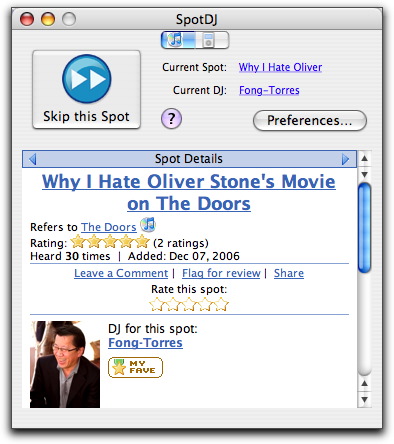
  Of course, not all spots are equally well done, so you can use the
  SpotDJ application (which is essentially a Web interface in a custom
  window) to rate the DJ from 1 to 5 stars, or add the DJ as a
  favorite. Your ratings and favorites help control which spots you
  hear; if you don't like a particular DJ's comments, rating them
  poorly will ensure that you won't hear from them again (to quote
  Lady Macbeth, "Out, damned spot! out, I say!"). You can also leave
  text comments about particular spots; SpotDJ is new enough that I
  haven't seen many comments yet, though I seldom watch the SpotDJ
  interface while listening to music.

<http://www.tidbits.com/resources/2007-03/SpotDJ-interface.jpg>

  Adding spots to your iPod requires a bit more work. Click the little
  iPod tab at the top of SpotDJ's window, select a playlist, and click
  Create Spotted Playlist. SpotDJ analyzes your playlist data, looks
  for associated spots, downloads the spots (normally they're
  streamed, but that won't work on the iPod, of course), and then
  creates a new playlist that interleaves the songs and the spots
  appropriately. After that it's merely a matter of syncing that
  playlist to your iPod and making sure that you're not shuffling
  songs.


**Getting Spots In** -- Of course, listening to spots is only half the
  fun. The entire point of SpotDJ is that anyone can be a DJ and can
  contribute spots about their favorite songs. When you find yourself
  wanting to record a spot for the current song, just stop it, switch
  to SpotDJ, and click the Spot This Song button. In the drawer that
  appears, you can record your spot and preview it, repeating those
  actions until it sounds the way you want. (Please use a decent
  headset or microphone!) Then click Upload and your spot is
  automatically uploaded for everyone else to listen to. Spots can be
  specific to a song or can apply to anything by a particular artist.

  Although it's easiest to record a spot directly in the SpotDJ
  application, you can also record spots on the SpotDJ Web site, by
  uploading a pre-recorded bit of audio, and even by calling the
  company on the phone and leaving a message.

<http://www.spotdj.com/create>
<http://www.spotdj.com/upload>
<http://www.spotdj.com/call>

  I don't have any particular recording experience, so I found that I
  had to write my spots out first and then read them into the headset
  mic, but after the first one, it was easy. I doubt my spots will be
  heard all that often, since I attached them to specific songs that
  probably aren't terribly popular right now, but you can listen to
  them on my DJ page.

<http://www.spotdj.com/adamengst>

  Once you've recorded spots, you can also use tools on the SpotDJ
  site to email a notification to friends or to create an HTML snippet
  for embedding a customized SpotDJ badge on your Web site.


**The Human Voice** -- Although SpotDJ isn't the most elegant
  application around, it's simple to use and is sufficiently
  unobtrusive that it's easy to leave running. I've been using it for
  a few weeks now, and I quite enjoy hearing the spots.

  The best ones I've heard so far are from Ben Fong-Torres, a fixture
  in the music world who wrote for Rolling Stone and who has many
  years of experience as a DJ. His many spots, apart from being
  impeccably recorded, also often feature recorded interview clips
  with famous musicians he was interviewing for Rolling Stone.

<http://www.spotdj.com/Fong-Torres>

  Perhaps the most obvious use of SpotDJ is for artists to record
  spots about their own songs - doing so both adds value and could
  serve as a marketing tool because SpotDJ plays spots after 30-second
  previews in iTunes as well. Other ways spots have been used is for
  relating trivia, providing reviews, pointing listeners to related
  music, offering interpretations of ambiguous lines, or just telling
  stories about the music. I could even see SpotDJ being used for
  music education classes.

  Right now, SpotDJ has thousands, but not tens of thousands, of
  spots, but that number only stands to grow as more people find
  SpotDJ and realize how easy it is to record spots. It's a little
  addictive, and great fun for anyone who is interested in sharing
  opinions about music. And like the iPod, I think SpotDJ is one of
  those services that somewhat transcends generations; aging hippies
  can participate just as happily as young hipsters. We'll see...

  SpotDJ is entirely free right now, and isn't currently doing much
  with the usual approach of advertising and affiliate sales. In part,
  I suspect that's because it makes more sense to license the
  technology and content database to a larger player - can you say
  "iTunes"? I'd certainly like to see Apple do so and build it into
  iTunes and the iPod directly.

  The more I think about SpotDJ, though, the more I think Scott and
  the SpotDJ folks are on to something larger. It's bigger than music,
  though music is a great start. What SpotDJ is enabling is ad hoc
  audio commentary on arbitrary virtual objects. Podcasting may be all
  the rage, but it's far harder to record a podcast than it is to
  contribute a spot to SpotDJ, and podcasts stand alone, whereas
  SpotDJ spots are linked to songs.

  What if SpotDJ could play spots when you visited particular Web
  pages, or viewed a particular book on Amazon.com? Most things on the
  Internet don't have obvious end points, so you'd need a little more
  control over when spots were played, but imagine loading a TidBITS
  article and having a SpotDJ menubar icon display a "5" badge to
  indicate that there were 5 comments about the article. Clicking the
  menu would reveal them, in order of relevance, based on your
  preferences and others' rankings, and you could play one or all of
  them, while you continue to go about your business. It would all be
  optional, of course, but it could provide an additional dimension to
  our everyday browsing.

  But that's all just possibility - for now, just check out what
  SpotDJ can do for you in iTunes and on your iPod.


Apple TV: The Real Video iPod
-----------------------------
  by Jeff Carlson <[EMAIL PROTECTED]>
  article link: <http://db.tidbits.com/article/8924>

  Although the iPod has been "video-enabled" for more than a year,
  Apple treats video playback on the portable device as an incidental
  extra feature. The upcoming iPhone comes closest to the video iPod
  that Apple fans have been waiting for, with its widescreen-capable
  display. However, it turns out that Apple's true video iPod was
  released last week - and it's the Apple TV.

<http://www.apple.com/ipod/>
<http://www.apple.com/iphone/>
<http://www.apple.com/appletv/>

  No one will mistake the screen-less, silver box for an iPod, of
  course, but in functionality - from the features to the menus - the
  Apple TV is the iPod's wireless, tricked-out cousin. Rather than
  build a box that would dominate your living room and take over your
  television (as the Windows Media Center attempts to do), Apple
  designed the Apple TV to be as familiar and easy to use as its
  multi-million-selling portable media player.

  The Apple TV started to become available last week after a
  three-week delay from Apple's original shipping estimate. I received
  mine on Friday, and although I've spent a fair amount of time doing
  research from the couch, I'm not ready to write a full review.
  Instead, I want to pass on my initial impressions, along with some
  valuable pointers and sources of other great information that have
  appeared online. For a rundown of the basic specs and capabilities,
  see our article from Macworld Expo, "Apple TV Connects Macs and TVs"
  (2007-01-15).

<http://db.tidbits.com/article/8812>


**The Good and the Bad** -- Bridging the chasm between the computer
  and the television isn't trivial. The Mac mini was a solid first
  step in the living room (and may be preferred by some people, as
  I'll explain shortly), but it was still a computer attached to a
  television. You interact with it like a computer, and the television
  just happens to be a different variety of monitor. Apple's Front Row
  software is helpful, certainly, but you have to switch out of
  "computer mode" into "Front Row mode" to get close to the simple,
  menu-driven method that most people use to operate their
  televisions.

  The Apple TV may be a Mac OS X computer at heart, but it operates
  with a singular focus as a menu-driven gateway to your media. Its
  interface is almost exactly like an iPod: a main screen containing
  categories (movie, music, photos, settings) that lead to lists of
  each item type, all listed as you would find them on an iPod. So,
  the first main benefit of the Apple TV is that it will be familiar
  to everyone who has used an iPod.

  But the Apple TV needs to overcome some hurdles, so let's get them
  out of the way first. It's not a TiVo that records broadcast
  television; the only link with any type of TV feed would be if you
  decide to stack the Apple TV on top of your TiVo or cable box. (I
  don't recommend putting anything on top of the Apple TV: it runs
  really hot!)

<http://www.tivo.com/>

  It's also not a DVD player. Its content comes from other computers
  on your home network (Mac or Windows), and only via iTunes. As a
  result, the image quality of movies is, practically speaking,
  limited to what Apple calls "near DVD quality": 640 by 480 pixels
  using H.264 encoding. That's actually not terrible, but it is
  noticeably worse than a DVD's output. For this reason, some people
  may choose to go with a Mac mini or a stand-alone DVD player.
  Another disadvantage is that the Apple TV supports Dolby Pro Logic
  audio, not Dolby Digital 5.1 surround sound.

<http://en.wikipedia.org/wiki/Dolby_Pro_Logic>
<http://en.wikipedia.org/wiki/Dolby_Digital_5.1_Surround_Sound>

  Of course, you can rip DVDs that you own using a program like
  MediaFork (formerly known as HandBrake), MPEG Streamclip, or
  VisualHub, import the movie files into iTunes, and then synchronize
  or stream the video to the Apple TV. However, Apple's tagline of "If
  it's on iTunes, it's on your widescreen" is a little misleading.
  Although iTunes can play a variety of video formats, it won't
  synchronize or stream material that isn't MPEG-4 video encoded with
  H.264. If you ripped your DVD library into a different format,
  you'll need to re-encode the movies.

<http://handbrake.m0k.org/?page_id=8>
<http://www.squared5.com/>
<http://www.techspansion.com/visualhub/>

  The device does support 720p HD video, which is 1280 by 720 pixels,
  but so far the only content at that resolution are HD movie trailers
  and samples from Apple (the 720p option) or video you provide. If
  you have an HD video camera and QuickTime Pro, you can export
  footage from iMovie or QuickTime Player into Apple TV format. I'm
  optimistic that Apple will provide HD movies from the iTunes Store
  at some point, but even with compression, the file sizes for
  feature-length movies would be large enough that it would take many
  hours to download them over a typical home broadband Internet
  connection. (A feature-length movie purchased from the iTunes Store
  is about 1.5 GB, while HD content would be about 16 times larger
  than that.)

<http://www.apple.com/quicktime/guide/hd/>

  And although it includes built-in 802.11n wireless networking
  (making it backwards-compatible with 802.11g and 802.11b networks;
  see "AirPort Extreme 802.11n Throughput Limits," 2007-01-29), the
  Apple TV can't download much content from the Internet, such as from
  sites like YouTube. It will stream 30 second previews of selected
  material from the iTunes Store (the day's top songs, movies, etc.),
  but you need to purchase the songs or movies from within iTunes on a
  computer. Direct purchasing and downloading is another feature that
  I wouldn't be surprised to see in the future once Apple TV gains a
  foothold in the market.

<http://db.tidbits.com/article/8834>

  Lastly, it won't work on most televisions. You need, in Apple's
  words, a "widescreen, enhanced-definition or high-definition TV
  capable of 1080i, 720p, 576p, or 480p resolutions." Some
  standard-definition TVs with component inputs will also work, as
  Paul Kafasis at Rogue Amoeba discovered when his Apple TV arrived.
  However, the display may appear scrunched; in a briefing last week,
  Apple told me that the interface has been designed for widescreen
  TVs, so hooking it up to a TV that falls outside the recommended
  specs may not be ideal.

<http://www.apple.com/appletv/connect.html>
<http://www.rogueamoeba.com/utm/posts/Article/appleTV-2007-03-22-21-30>

  So, that leaves us with a $300 device that plays media acquired
  primarily through iTunes. It sounds like a crazy move on Apple's
  part, but the widespread familiarity with the iPod, and by extension
  people's familiarity with iTunes, makes the Apple TV more appealing
  to people who see the value in accessing their digital content but
  don't want to feel like they need to operate a computer (or need to
  call on their tech-savvy friends) to do so.

  The Apple TV benefits from Apple design, which comprises much more
  than just the rounded-corner enclosure. Setup is easy and
  straightforward, including the process of pairing with computers on
  your network. As I mentioned earlier, the navigation system is
  similar to the iPod. (However, as with the iPod, you still have to
  get past the initial confusion of having a right-facing arrow icon
  (actually a greater-than symbol, or ">") indicating more content,
  but pressing the right-arrow button on the remote does nothing; you
  need to press the Play/Pause/Select button instead. It's one of the
  few odd design choices of the iPod system, but something that's easy
  to adapt to.)

  The interface's look is simple without appearing basic, polished
  instead of garish. In fact, the Apple TV seems to value restraint;
  the screen saver that appears after a couple of minutes, for
  example, is composed of photos (or album artwork) that drift slowly
  from the bottom of the screen to prevent burn-in on plasma displays.

  Another nice touch: when you resume playing a video, the two options
  (Resume Playing and Start from Beginning) are set against an
  out-of-focus version of the frame you last viewed when you stopped
  playback previously.

  Lastly, the Apple TV feels like a product designed for the near
  future. The U.S. changeover to digital television broadcasting in
  February 2009 will bring more widespread use of HDTVs, which
  continue to drop in price. Although you can't yet buy HD content
  from the iTunes Store, it makes sense that Apple would offer it in
  the future. And other capabilities, such as games like those found
  on the iPod (or even special versions of normal Mac OS X games),
  could be added by downloadable system updates. Perhaps the USB port
  on the back could be utilized for more than just diagnostics, as
  Apple currently states, perhaps even an adapter for a wireless game
  controller like the Wii Remote.

<http://en.wikipedia.org/wiki/Wii_Remote>


**Sync and Stream** -- Okay, enough speculation. When you first begin
  using the Apple TV, you'll want to jump in and start watching your
  movies and TV shows right away, but unfortunately there's a wait
  involved.

  The Apple TV synchronizes its content with one Mac or Windows PC
  running iTunes; once you've defined the sync machine, media is
  copied over the network and stored on the Apple TV's 40 GB hard
  disk. That's a lot of data to copy, even on an 802.11n network.

  Fortunately, you can also view content that's streamed over the
  network and not stored on disk. If you start watching a movie on the
  sync computer that hasn't been copied over, syncing gets put on hold
  while the movie is streamed. When the show is over, or if you're
  streaming audio only, syncing resumes.

  To transfer your media more quickly at first, connect the device to
  your computer via Ethernet instead of a wireless network.

<http://docs.info.apple.com/article.html?artnum=305254>

  Only one computer can sync to the Apple TV, but you can stream to it
  from up to five other computers.


**Remote Bleed** -- The Apple TV comes with an Apple Remote, the same
  type that's included in all recent Macs. Out of the box, the
  remote's infrared signal can work on any capable nearby Mac. My
  wife's MacBook would jump into Front Row while I was using the Apple
  TV.

  To avoid this inconvenience, pair each remote to its respective Mac.
  Hold the remote close to the IR receiver on the front and press and
  hold the Menu and right-arrow buttons. After a few seconds, an image
  of a remote with an interlocking chain link icon above it appears.
  On the Apple TV, go to the Settings menu and then choose Pair
  Remote.

<http://docs.info.apple.com/article.html?artnum=304991>

  As more Apple Remotes invade our house (this is the third), I'm also
  having trouble keeping them straight. My low-tech but effective
  solution is to wrap a different colored rubber band around each one.


**Apple TV Hacks** -- Early Apple TV recipients wasted no time in
  voiding their warranties. Within a couple of days, tinkerers had
  disassembled the Apple TV, figured out how to replace the internal
  40 GB hard disk with a larger one (which looks to be an involved
  process), and configured the device to play other video formats such
  as Xvid. In fact, it's amazing just how hackable this little unit
  is. The Apple TV Hacks Web site is a good source for tracking new
  developments, including ways to enable Remote Desktop on the Apple
  TV.

<http://www.anandtech.com/mac/showdoc.aspx?i=2951&p=3>
<http://www.appletvhacks.net/2007/03/23/apple-tv-harddrive-upgrade-process/>
<http://forums.somethingawful.com/showthread.php?s=&threadid=2391956>
<http://appletvhacks.net/>

  Still waiting for your Apple TV to arrive? You can get a taste of
  the snazzy startup animation by watching a QuickTime movie.

<http://www.mcwiggin.com/AppleTVHacks/Intro.mov>

  I don't have a burning desire to open up an Apple TV, so for the
  time being I'm content to keep testing it from the couch. With
  popcorn.


Hot Topics in TidBITS Talk/26-Mar-07
------------------------------------
  by TidBITS Staff <[EMAIL PROTECTED]>
  article link: <http://db.tidbits.com/article/8925>

**How to rationalize duplicates across 11 drives** -- With thousands
  of duplicated photos on 11 hard drives, where does one begin to cull
  the dupes? (9 messages)

<http://emperor.tidbits.com/TidBITS/Talk/1182/>


**UK Mac ads** -- The UK versions of Apple's Get a Mac ads use two
  actors who not only complement each other, but also bring a little
  edge to the Mac/PC relationship. But is that good or bad? (7
  messages)

<http://emperor.tidbits.com/TidBITS/Talk/1185/>


**We Are the Past** -- The TidBITS reader survey highlights some
  differences in how age groups perceive each other, and how some
  tools (like Web bookmarks) are adopted or ignored. (19 messages)

<http://emperor.tidbits.com/TidBITS/Talk/1186/>


**Automatically Attaching Network Drive** -- How can you make a
  network volume appear automatically when the Mac is restarted? (6
  message)

<http://emperor.tidbits.com/TidBITS/Talk/1187/>


**Macs in Science -- Feedback for Apple?** A reader is going to
  provide feedback directly to Apple about Mac use in science fields.
  (1 message)

<http://emperor.tidbits.com/TidBITS/Talk/1188/>


**Mail rule for empty (blank) Subject** -- In moving from Entourage to
  Apple Mail, a reader hits a stumbling block in trying to filter out
  messages with empty Subject lines. (4 messages)

<http://emperor.tidbits.com/TidBITS/Talk/1189/>


**Signed iWoz books for sale on Woz.org** -- Apple co-founder Steve
  Wozniak is selling signed copies of his book. (1 message)

<http://emperor.tidbits.com/TidBITS/Talk/1194/>


$$

This is TidBITS, a free weekly technology newsletter providing timely
news, insightful analysis, and in-depth reviews to the Macintosh and
Internet communities. Feel free to forward to friends; better still,
please ask them to subscribe!

Non-profit, non-commercial publications and Web sites may reprint or
link to articles if full credit is given. Others please contact us. We
do not guarantee accuracy of articles. Caveat lector. Publication,
product, and company names may be registered trademarks of their
companies. TidBITS ISSN 1090-7017.

Copyright 2007 TidBITS: Reuse governed by Creative Commons license.

Contact us at:    <[EMAIL PROTECTED]>
TidBITS Web site: <http://www.tidbits.com/>
License terms:    <http://www.tidbits.com/terms/>
Full text search: <http://www.tidbits.com/search/>
Subscriptions:    <http://www.tidbits.com/about/list.html>
Account help:     <http://www.tidbits.com/about/account-help.html>


--
If you want to unsubscribe or change your address, use this link
http://emperor.tidbits.com/webx?unsub@@.3c557dc4!u=306a67f9