TidBITS#874/09-Apr-07
=====================
  Issue link: <http://db.tidbits.com/issue/874>
  If you've been waiting for more Mac desktop power, now might be the
  time to buy Apple's new Mac Pro configuration outfitted with eight
  cores of processing power - but it will cost you. Speaking of price,
  Geoff Duncan, TidBITS editor at large and professional musician,
  offers his take on the Apple/EMI deal to offer DRM-free music at a
  premium. Also in this issue, Joe Kissell looks at the new Google
  Desktop for Mac beta, revisits the field of online backup services,
  and notes the release of VMware Fusion Beta 3. Adam passes along a
  simple but useful tip for locating strong Wi-Fi networks, cautions
  owners of third-generation iPods about using some speaker systems,
  and looks at a study that points out the dangers of using an iPod
  while driving. Lastly, Glenn Fleishman drives a stake through the
  heart of WEP security for Wi-Fi networks.

Articles
    Apple Introduces Eight-Core Mac Pros
    Find Strongest Wi-Fi Networks Easily
    More on Apple/EMI and DRM-Free Music
    Google Desktop Comes to the Mac
    VMware Fusion Beta 3 Draws New Parallels
    Step on a WEP Crack, Break Your Network's Back
    Use iPods Cautiously While Driving
    3G iPod Owners Beware Compatibility Claims
    Online Backup Options Expand
    Take Control News/09-Apr-07
    Hot Topics in TidBITS Talk/09-Apr-07


------------ This issue of TidBITS sponsored in part by: --------------

* READERS LIKE YOU! Support TidBITS with a contribution today!
  <http://www.tidbits.com/about/support/contributors.html>
  Special thanks this week to Evelyn Gatlin, Tad Davis, and
  LIMac, the Long Island Macintosh Users Group, for their support!

* SMALL DOG ELECTRONICS: TidBITS Exclusive for Apr 9-Apr 16:
  17" PowerBook G4, 1.67 GHz, 120 GB hard drive, SuperDrive,
  AP/BT, Tiger + Classic, Apple refurbished, one-year warranty
  Free shipping, $1389! Order at <http://www.smalldog.com/tb/>

* FETCH SOFTWORKS: With Fetch 5.2, FTP and SFTP are simpler
  than ever. Use it on Mac OS X to upload, download, mirror,
  and manage your Web site, eBay images, and data sets.
  Download your free trial version! <http://fetchsoftworks.com/>

* WebCrossing Neighbors Creates Private Social Networks
  Create a complete social network with your company or group's
  own look. Scalable, extensible and extremely customizable.
  Take a guided tour today <http://www.webcrossing.com/tour>

* MARK/SPACE, INC: New, from the makers of The Missing Sync, comes
  SyncTogether, a brand new app for syncing contacts, calendars,
  notes and more between multiple Macs and one or more user
  accounts. $49.95 for 3 Macs. <http://www.markspace.com/bits>

* Microsoft's MacBU: Supporting Mac users with Office 2004.
  Supporting the Mac community through tech support newsgroups,
  user group appearances, our new team blog, and more!
  Check out our team blog at <http://blogs.msdn.com/macmojo/>

* DealBITS: Get the word out about your product AND generate sales!
  It's easy: give away a few copies and offer a discount to entrants.
  A DealBITS drawing is quick to set up and can easily pay for itself.
  For more info and rates, visit <http://www.tidbits.com/dealbits/>.

---------- Help support TidBITS by supporting our sponsors ------------


Apple Introduces Eight-Core Mac Pros
------------------------------------
  by Jeff Carlson <[EMAIL PROTECTED]>
  article link: <http://db.tidbits.com/article/8941>

  For those who have been waiting for new Mac desktops to land, Apple
  has one message: eight is great. Last week the company added an
  8-core Intel Xeon processor configuration to the Mac Pro. The 8-core
  Mac Pro relies on two "Clovertown" 3.0 GHz quad-core Xeon 5300
  series processors, available as a custom option when assembling a
  system at the online Apple Store for $1,500 more than the default
  configuration of a pair of dual-core Xeons. Each processor features
  8 MB of L2 cache (16 MB total), 128-bit SSE3 vector engine, and
  64-bit data paths and registers. Otherwise, the specifications for
  the Mac Pro remain essentially the same as the quad-core
  configurations that are still available, including up to 3 TB of
  internal storage (increased from 2 TB thanks to Apple selling 750 GB
  drives), up to 16 GB of RAM, and a 16x SuperDrive with double-layer
  support.

<http://www.apple.com/macpro/>
<http://www.apple.com/macpro/specs.html>

  If you're wondering what difference eight cores makes to
  performance, you're not alone. Apple has not updated its benchmark
  listings for the new configuration, and the company didn't even
  issue a press release for the new Mac Pro. Macworld quotes an Apple
  spokesperson as saying that the new option for the Mac Pro gives
  software developers a platform from which they can prepare their
  applications for a future when eight-core technology is more
  prevalent. Our question: Is this really a custom Mac for Adobe's
  development team to ensure that the CPU-hungry Photoshop and friends
  will be able to chow down on eight cores in a forthcoming major
  update to the Mac Pro?

<http://www.apple.com/macpro/performance.html>
<http://www.macworld.com/news/2007/04/04/eightcore/>


Find Strongest Wi-Fi Networks Easily
------------------------------------
  by Adam C. Engst <[EMAIL PROTECTED]>
  article link: <http://db.tidbits.com/article/8934>

  Like most other Mac users, when I'm travelling, I often need to
  connect to a Wi-Fi network to access the Internet for email and Web
  browsing. But what if there are multiple available networks and I
  don't know which would be best to use? In the past, I would usually
  bring up iStumbler (MacStumbler hasn't been updated in years), but
  Take Control author Sharon Zardetto Aker alerted me to a simpler
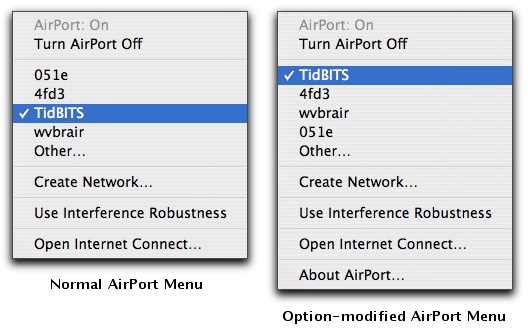
  method that's built into Mac OS X. If you hold down the Option key
  when dropping the AirPort status menu, it lists available networks
  in order of signal strength, rather than the usual (and useless)
  alphabetical sort. Simple, yet effective, although the signal
  strength sort should arguably be the default, not the hidden option.
  Alas, the AirPort menu doesn't indicate which networks require a
  password for access. If you run into that problem regularly and
  don't mind running extra software all the time, check out Christoph
  Sinai's CoconutWiFi, which provides a constantly updating indicator
  of wireless network accessibility (see "CoconutWiFi Reveals Nearby
  Networks, Status," 2006-09-11).

<http://www.istumbler.com/>
<http://www.tidbits.com/resources/2007-03/AirPortMenus.jpg>
<http://coconut-flavour.com/coconutwifi/>
<http://db.tidbits.com/article/8670>


More on Apple/EMI and DRM-Free Music
------------------------------------
  by Geoff Duncan <[EMAIL PROTECTED]>
  article link: <http://db.tidbits.com/article/8938>

  [Editor's Note: We weren't able to touch base with Editor-at-Large
  Geoff Duncan in time for last week's "Apple and EMI Offer DRM-Free
  Music via iTunes" (2007-04-02), but his extensive experience in the
  recording industry makes his commentary essential reading for anyone
  following the situation. -Adam]

<http://db.tidbits.com/article/8937>

  For folks who aren't regular watchers of the music industry: EMI is
  the third largest of the "big four" major music labels, and home to
  popular acts like Robbie Williams, Pink Floyd, The Rolling Stones,
  Norah Jones, Coldplay, and (of course) The Beatles. (If you're
  wondering when The Beatles music might be available for download
  purchase, there's still no timetable, although EMI CEO Eric Nicoli
  did say, "We're working on it.") EMI has always had a UK bent, but
  its roster also includes a number of well-known American artists
  like Bonnie Raitt, Lenny Kravitz, Liz Phair, and Wynton Marsalis.

  So what about the remaining big record labels? Right now, all
  indications are that they plan to let EMI set sail alone into the
  unchartered waters of offering unprotected music, then wait to see
  what happens. And no one knows what's going to happen: major labels'
  market research is essentially limited to a handful of tracks (many
  released by EMI) intended to promote specific artists or album
  releases. EMI obviously believes the results of those tests were
  positive enough to warrant making their entire catalog available
  without DRM, albeit at a premium.

  Right now, none of the other major labels feel so confident, but
  Steve Jobs has boldly predicted as much as half the music sold on
  iTunes may be DRM-free by the end of the year: that probably
  indicates he expects at least one other major label to come on
  board.

  EMI will be offering other digital music services the option to sell
  non-DRM content in AAC, Windows Media, and standard MP3 formats.
  Although the iTunes Store will be the first to offer EMI music
  without DRM, there's nothing exclusive about the deal. (A Microsoft
  spokesperson noted last week that the company is also in talks with
  other unnamed publishers.)

<http://playlistmag.com/news/2007/04/06/drmfree/>

  As a side note, yes, EMI's wholesale price to distributors for
  unprotected tracks is higher than for DRM-laden tracks, but EMI is
  offering the same wholesale price for complete albums regardless of
  whether they carry DRM protection. Music labels are seeing revenue
  from traditional CD sales declining sharply, and revenues from
  digital sales are failing to make up the difference. Industry
  analysis seems to indicate online music stores' a la carte
  purchasing systems are a contributing factor, encouraging customers
  to purchase just the handful of tracks they want rather than buying
  an entire collection. While consumers love being able to purchase
  individual tracks, the result is that, on an album-by-album basis,
  labels earn less money from digital sales than traditional CD sales
  - even from artists' fans. So both online music stores and music
  labels are looking for ways to encourage consumers to purchase
  entire albums - Apple's new "Complete My Album" feature is another
  example (see "iTunes, You Complete Me," 2007-04-02).

<http://db.tidbits.com/article/8933>

  But the bottom line here will be the bottom line. EMI believes it
  can increase digital sales and overall revenue by offering its music
  catalog without digital rights management - increasing the encoding
  rate on iTunes offerings from 128 Kbps to 256 Kbps is a value-added
  feature to sweeten/justify that 30 cents/.30 Euros premium. If the
  expected revenue fails to materialize, we can probably expect EMI to
  put a swift end to this experiment.

  When unprotected AAC tracks become available via iTunes, I'll be
  curious to see what turns up as they're inevitably deconstructed and
  analyzed. I wouldn't be surprised if Apple encodes purchase
  identifiers or other watermarks to monitor piracy and trace tracks
  as they promulgate to file sharing services... but my gut tells me
  they won't bother. Remember, it's all about the bottom line: at this
  point, it's no surprise that music is being copied and shared
  widely, and it doesn't matter much whether it comes from traditional
  audio CDs, unprotected tracks offered for sale, or other sources.
  The question is whether offering non-DRM tracks encourages more
  people to tap into legal, revenue-generating sources of music. EMI
  and Apple apparently believe the answer will be "yes."


**Hear Hear!** Speaking of that encoding rate improvement, Glenn
  Fleishman suggested in the Staff Roundtable section of last week's
  article that 256 Kbps AAC files "should be indistinguishable from
  the data encoded in a typical audio CD." Between "should be" and
  "will be" are an essentially infinite number of variables, but yes,
  generally speaking, if you can hear the sort of artifacts and
  soundstage compression that happens with typical 128 Kbps AAC
  encoding, in most cases you'll probably be happier with 256 Kbps AAC
  encoding.

  However, if you fall into this category, you've just separated
  yourself from 99.5 percent of the music listening public, and you've
  probably put a lot of time and money into your gear. Although there
  are many variables - not the least of which is the nature of the
  recorded material - most musicians I know can't tell the difference
  between a 128 Kbps MP3 and an audio CD until I start pointing things
  out. That said, once things are pointed out, musicians generally can
  hear them, which often isn't true of non-musicians.

  Glenn also postulated that optimizing the quality from the original
  digital masters could produce even better results. There are two
  main variables here: the encoding software and the masters. I
  haven't compared AAC encoders, but I'm told there are significant
  differences between them. MP3 encoders are still highly variable.
  So, yes: let's hope whatever third party does the encoding picks a
  good one and knows how to use it.

  As for the masters... for the time being, most listeners only have
  the possibility of seeing high-res masters on specialized releases;
  for instance, some material mastered for surround, DVD-Audio, or
  SACD. Those generally aren't the masters which will be used by EMI
  for iTunes or other music vendors. In the future, we may see digital
  services offering audiophile audio from high resolution masters, but
  the EMI non-DRM releases won't fall into that category - they're all
  about mainstream music. Audiophiles won't be happy with anything but
  high-res lossless formats anyway, and then they'll complain about
  the mastering gear ("At exactly 4:16.35 I can hear that
  characteristic 6072A tube ring in the left channel! Argh! The
  phasing is intolerable!") so I doubt it will happen.

  Even if you're able to acquire 256 Kbps AAC files with greater
  fidelity than 44.1/16-bit audio CDs, again, you won't be able to
  hear the difference without putting time and money into your gear
  and having good ears. Most consumers stand little chance of hearing
  the difference because the DACs - the digital-to-analog converter
  chips in Macs and other digital music players - just aren't up to
  the task. Without good ears and years of experience, users will have
  to get into systems with considerably better specs than what's
  available in even high-end consumer gear before they can reliably
  detect a quality difference.


Google Desktop Comes to the Mac
-------------------------------
  by Joe Kissell <[EMAIL PROTECTED]>
  article link: <http://db.tidbits.com/article/8940>

  Google has released the first public beta version of Google Desktop
  for the Mac, an application that rapidly searches files on your
  computer, messages in your Gmail account, and Google's existing
  index of Web pages, all in a single interface. The file is a 2.8 MB
  download, accessed through another new Google application, Google
  Updater, which provides a centralized interface for installing,
  opening, updating, and uninstalling Google's Mac software. Google
  Updater is a 1.0 MB download.

<http://desktop.google.com/en/mac>

  Google Desktop begins by indexing all your files in the background,
  a process that company representatives said should take a few hours
  on average. You can perform searches before the indexing is
  complete, however. Although it maintains its own index, separate
  from Spotlight's, Google Desktop makes use of any Spotlight
  importers installed on your system (which is why it requires Mac OS
  X 10.4 Tiger). That means it can search for and display such items
  as Mail messages, Address Book contacts, PDF files, and Safari
  bookmarks. Our testing has shown that Google Desktop's indexing can
  be significantly slowed by the presence of certain Spotlight
  importers; they can be disabled temporarily for now, and Google is
  working on a fix.

  Google Desktop adds indexing of new data types, including Gmail
  messages and your Web history. That's right: it indexes entire Web
  pages as you browse them, so you can quickly search for the content
  of pages you viewed last week or last month, even if you don't know
  the URL (and even if the pages' content has changed since then).
  Previously, this feature has been available only to OmniWeb users,
  or to those who have added St. Clair Software's HistoryHound or
  SmileOnMyMac's BrowseBack to their Macs.

<http://www.omnigroup.com/applications/omniweb/>
<http://www.stclairsoft.com/HistoryHound/>
<http://www.smileonmymac.com/browseback/>

  Perhaps even more interesting is the fact that Google Desktop
  indexes and caches copies of your local files (such as word
  processing documents) each time you open them. So it functions as a
  sort of version control system: even if you delete or modify an
  important file, you can search for a previous version and recover
  it.


**Keep Your Search to Yourself** -- Google Desktop respects
  Spotlight's privacy settings; any volume you've told Spotlight not
  to index will be ignored. You can also enable or disable indexing
  individually for each mounted volume, Gmail, and Web history; by
  default, Google Desktop won't index secure Web sites using https://
  URLs. A variety of other preferences can be set in a Google Desktop
  pane of System Preferences. Search results include only those items
  for which the currently logged in user has access privileges, and
  remote connections to the program's built-in Web server are
  disallowed.

  If you want to remove some file from Google Desktop's local index,
  you can search for it and then click a Remove from Index link in the
  Web interface. However, the program does not currently give you
  detailed control over the size of its index or the length of time
  old files are cached; Google says to expect a greater level of
  customizability in future betas.


**A Tale of Two Interfaces** -- You perform a search with Google
  Desktop in either of two ways. One is to use your favorite Web
  browser (as long as it's Safari, Firefox, or Camino - others are not
  yet fully supported) to open a special Web page delivered via Google
  Desktop's built-in Web server that only your computer can access. On
  this page, which looks almost exactly like the Google home page, you
  enter search terms and click either Search Desktop or Search the
  Web. The results are displayed almost instantaneously (in the
  standard Google format), just as if you had visited Google directly.
  You can also filter the results by email, Web history, files, and
  media, and sort by relevance or date.

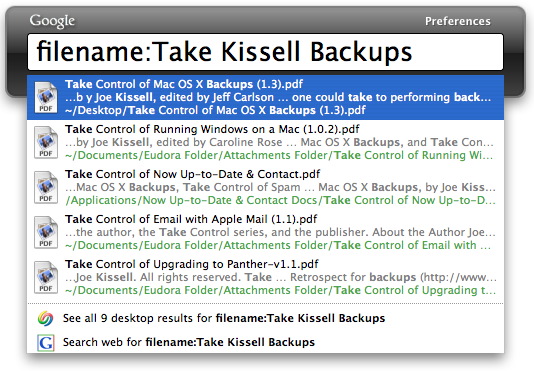
  An easier way to search is to use a user-definable keyboard shortcut
  (by default, press the Command key twice) to display a floating,
  translucent search box. As you type in search terms, results from
  your computer are displayed immediately; press Return to open the
  first result or click another to open the associated item. Or, after
  typing your search terms, select the Search Web menu command to
  perform a standard Google Web search on those terms in your default
  Web browser; you can also press the up arrow key to highlight the
  Web search option, and then press Return. (And if you're faster than
  Google Desktop, pressing Return before any results have appeared
  performs a Web search too).

<http://www.tidbits.com/resources/2007-04/Google-Desktop.jpg>

  When you perform a normal Google search in one of the supported Web
  browsers, Google Desktop also adds a few lines at the top of the
  search results that alert you to relevant files on your hard disk.

  Like application launchers such as Objective Development's
  LaunchBar, Quicksilver, and Many Tricks' Butler, Google Desktop
  includes a learning algorithm that reorders search results based on
  a variety of factors, including which items you've opened recently
  (in Google Desktop or otherwise). So if you typed "s" and chose
  Skype from among the options, even though Safari was at the top of
  the list, Skype would be ordered before Safari in future searches.
  However, the current version does not yet look for things like
  initials, so you could type "act" to search for Activity Monitor,
  but not "am."

<http://www.obdev.at/products/launchbar/>
<http://quicksilver.blacktree.com/>
<http://www.manytricks.com/butler/>


**Staff Roundtable** -- Several TidBITS staffers spent some time
  testing Google Desktop prior to its release. Although this is the
  first beta and our conclusions are only preliminary, we would like
  to share some of our initial impressions.

  [Joe Kissell] I have to say that my very first impression with
  Google Desktop was rather negative, because the initial indexing was
  freakishly slow while putting a big strain on my iMac G5's CPU.
  After discussing the problem with Google engineers, we narrowed it
  down to an old version of the Spotlight importer for MailTags that
  was installed on my system. Once the offending file was removed,
  indexing sped up immediately and I was able to test it properly. My
  _second_ impression was: Wow. This is so much faster than Spotlight,
  it's ridiculous. I was impressed not only by the speed of the
  searches but their quality; Google Desktop has been, so far, more
  likely than Spotlight to show the item I'm looking for high in the
  list. I'm also intrigued by the version control feature, though time
  will tell how well it stacks up against Time Machine and other
  third-party solutions, such as Acertant's Versomatic.

<http://www.acertant.com/web/versomatic/>

  [Jeff Carlson] Like Joe, my initial experience with the beta has
  been less than ideal. But to be fair, I haven't had a chance to
  troubleshoot much due to other active projects, and this is beta
  software. I found the indexing to be extremely taxing on my system
  (a MacBook Pro with a 2.33 GHz Intel Core 2 Duo processor). Also,
  disabling indexing and quitting the application didn't help until I
  restarted the machine; the hard drive continued to chug away as if
  it were still indexing. Those caveats aside, I'm optimistic about
  the tool, since I find myself rarely using Spotlight. At the very
  least, Google Desktop beats Spotlight in the capability to find a
  file by looking for its filename: type "filename:" and part of the
  name of a file (with no space after the colon).

  [Adam Engst] Initial indexing on my system was also very slow, but
  after hearing of Joe's rogue Spotlight importer, I disabled all
  Spotlight importers I could (find a list of them by entering the
  following command in Terminal). Then I uninstalled Google Desktop
  and deleted its indexes using Google Updater (which promptly
  uninstalled itself too, since the current version of Google Earth
  doesn't yet know about Google Updater, so Google Updater erroneously
  thought Google Desktop was the last Google application on my Mac)
  and reinstalled. After that, indexing proceeded much more quickly,
  and it completed in less than 12 hours (whereas previously it wasn't
  even half done after 24 hours).

    mdimport -L

  I am bummed that Google Desktop doesn't fully support OmniWeb, so
  although you can send a Google Web search to OmniWeb from Google
  Desktop, opening a file from the results loads a blank page, and
  Google Desktop results don't appear in pages with normal Google
  search results. I'll be interested to see if I end up using Google
  Desktop much, since finding things on my Mac isn't a problem I have,
  although I search the Web with Google many times each day. Because
  of that, I'd like to see a single keyboard shortcut like
  Control-Return for performing a Web search on the entered term
  because otherwise it requires pressing Command twice, typing a term,
  pressing the up arrow to select Search Web For... at the bottom of
  Google Desktop's search results, and then pressing Return. There's
  no reason to require two keystrokes for such a common user action
  when one would suffice.

  Most concerning about the current beta of Google Desktop is
  something that became obvious only in the days after it finished
  building the initial index. For reasons that Google's engineers are
  still attempting to figure out, some people (including me) see
  Google Desktop hitting the hard disk constantly, which is both
  disconcerting and a serious performance hit. I worked around this
  problem temporarily by turning off Google Desktop's indexing, so I
  can continue to search for items already in the index. Remember,
  even though Google has been bad about leaving services like Gmail in
  beta for years, Google Desktop for the Mac is a real beta at the
  moment, with all the possible downsides associated with that status.

  For more about the Google Desktop beta, be sure to check in on the
  TidBITS Talk discussion and part 1 and part 2 of my recent
  MacNotables podcast.

<http://emperor.tidbits.com/TidBITS/Talk/1214/>
<http://www.macnotables.com/wordpress/macnotables-721-adam-engst-on-the-new-8-core-mac-pro-the-apple-tv-and-google-desktop-part-1/>
<http://www.macnotables.com/wordpress/macnotables-722-adam-engst-on-google-desktop-security-drm-free-music-and-history/>

  [Updated the original Web post with more information about Spotlight
  importers causing slow indexing, system requirements, trouble with
  hard disk thrashing, and links to TidBITS Talk and MacNotables.]


VMware Fusion Beta 3 Draws New Parallels
----------------------------------------
  by Joe Kissell <[EMAIL PROTECTED]>
  article link: <http://db.tidbits.com/article/8943>

  Last week VMware released Beta 3 of its Fusion virtualization
  software for running Windows on an Intel-based Mac. Among several
  new features are two that are obvious attempts to overcome
  advantages offered by competitor Parallels Desktop: support for
  booting from a copy of Windows installed under Boot Camp and an Easy
  Install option to automate the process of running the Windows
  installer. This version also includes performance improvements and a
  simplification in the way virtual machines are packaged, among other
  changes. Fusion beta 3 is a 135 MB download.

<http://www.vmware.com/products/beta/fusion/>
<http://www.parallels.com/products/desktop/>


Step on a WEP Crack, Break Your Network's Back
----------------------------------------------
  by Glenn Fleishman <[EMAIL PROTECTED]>
  article link: <http://db.tidbits.com/article/8942>

  The oldest form of Wi-Fi network encryption, WEP (Wired Equivalent
  Privacy), is now truly, honestly, deeply dead. Yes, it was dead
  before, but now it's even more dead. German researchers have shown
  that they can crack a WEP key in one to two minutes of network
  sniffing and analysis; prior to this, WEP required at least 15
  minutes of capturing data from an active network.

  If you're still using WEP on your Wi-Fi network and believe that it
  provides any real security (rather than just erecting a No
  Trespassing sign), let me see if I can convert you to WPA (Wi-Fi
  Protected Access).


**WEP Cracking Background** -- WEP protects the local wireless link,
  the connection from a computer or other device to a base station.
  WEP was released in 1999 as part of the first high-speed wireless
  networking specs - 802.11a and 802.11b - as a first layer of defense
  against those who might want to peek into what's passing over your
  network. The name says it all: Wired Equivalent Privacy, or the
  level of privacy you would expect from an Ethernet network where
  someone would need to gain physical access to plug into your wired
  network.

  Starting in 2001, researchers discovered big flaws in the algorithms
  that make up WEP. While the specifics are highly technical, research
  revealed that several choices in WEP's design made it easy for a
  cracker to sit passively by, capture packets, and, through
  statistical analysis, recover the key that encrypted the data. While
  fixes to the most egregious problems with WEP kept it limping along,
  its days were numbered.

  By 2003, any moderately sophisticated user could use free and simple
  software to crack a network's WEP key by observing about 15 to 30
  minutes of active network traffic. (Both the 40-bit and 104-bit
  versions of WEP were equally vulnerable, with the latter taking only
  twice as long to break.)

  I had heard since 2003 that were there tools not in wide
  distribution that enabled WEP key cracking in just a few minutes.
  Because those tools were only rumored, WEP maintained a tiny amount
  of integrity. For instance, one corporate method of using WEP relies
  on individual login accounts to a Wi-Fi network, each of which
  receives a unique WEP key, and that WEP key changes as frequently as
  every five minutes. I'd hear colleagues defend WEP by noting that
  someone would have to linger near their house for some time to break
  their key.

  Researchers at the Technische Universität Darmstadt have now torn
  away that last shred of respectability for WEP. Three Darmstadt
  researchers in the cryptographic and computer algebra group
  developed and released a method of cracking WEP in as few as 40,000
  packets, taking just under a minute to capture and analyze the data.
  That yields a WEP key 50 percent of the time. Double the packets
  captured, and the score hits 95 percent.

<http://www.cdc.informatik.tu-darmstadt.de/aircrack-ptw/>

  Their method couples efficient cracking with a tool that forces a
  WEP-protected network to produce data, even when no computers on the
  network are actively transmitting and receiving.


**Use WPA, Really** -- Wi-Fi Protected Access (available as WPA and
  WPA2) was designed to replace WEP, although it's still easy to find
  WEP in use. WPA, announced in November 2003 by industry trade group
  The Wi-Fi Alliance, was an interim release of new security measures
  then in development as 802.11i by the IEEE, the engineering
  standards group responsible for all the 802.11 flavors.

  WPA had two goals: making sure that 802.11b devices released as far
  back as 1999 would be upgradable to a baseline level of security and
  ensuring that the same security method would work with 802.11g,
  which started shipping late in 2002 and appeared from Apple in early
  2003.

  WPA's TKIP (Temporal Key Integrity Protocol) works much like a WEP
  key - it was designed to have all the same basic characteristics -
  but plugs all of WEP's holes and repairs flaws that hadn't yet been
  exploited. WPA2, a 2004 update based on the final 802.11i standard,
  also supports TKIP and adds a stronger key type among other
  improvements; WPA2 only works on Wi-Fi gear released since late
  2002. All Wi-Fi equipment tested for Wi-Fi certification since early
  2006 must support WPA2.

  While WPA should be the minimum level of security available on new
  devices, I still often find that the first release of a piece of
  Wi-Fi-enabled hardware, like Kodak's first EasyShare-One Wi-Fi
  camera or the MusicGremlin, has only WEP support; WPA/WPA2 support
  tends to take weeks or months to appear. And WEP is apparently in
  wide use in retail where old point-of-sale and payment systems that
  otherwise work just fine can't be upgraded cheaply; a
  corporate-security firm just released a tool to fool statistical WEP
  cracking tools into analyzing lots of bad packets to help protect
  these older retail systems. The Darmstadt researchers noted in one
  interview about their project that this bad-packet method could
  defeat their approach.

<http://www.informationweek.com/showArticle.jhtml?articleID=172300667>
<http://wifinetnews.com/archives/006656.html>
<http://www.airdefense.net/newsandpress/04_02_07.php>


**Wireless Security and the Mac** -- Mac users have used WEP for a
  long time because Apple has such a long history with 802.11 specs
  and Wi-Fi. Apple built WEP into the very first 802.11b AirPort card
  and base station. And WEP is still an option for use with the latest
  AirPort Extreme Base Station that supports the 802.11n
  high-throughput protocol.

  However, Apple has also supported each release of WPA and WPA2
  through revisions to Mac OS X and firmware releases for its
  hardware. The original AirPort Card (1999-2004) can be upgraded in
  Mac OS X 10.3 to WPA; the original 802.11b series of AirPort base
  stations can't be upgraded past WEP. All AirPort Extreme and Express
  gear can handle WPA and WPA2 in Mac OS X 10.3.3 or later; see
  Apple's firmware and AirPort Software download page for more
  details.

<http://docs.info.apple.com/article.html?artnum=75422>

  The 802.11n standard, supported by certain newer Macs and the new
  AirPort Extreme Base Station, allows only WPA2 security. However,
  the new AirPort Extreme Base Station provides backwards
  compatibility for WPA with TKIP and for WEP. (In testing, the WEP
  compatibility mode, called WEP Transitional, doesn't seem to work
  reliably in allowing WEP-based connections.)

  The moral of the story is that WEP is now even more of a joke than
  before - anything that can be broken in one minute simply doesn't
  count as a security measure. It could still be considered a "No
  Trespassing" sign - the fact that even an easily broken password is
  necessary to access a wireless network makes it clear that visitors
  are unwelcome.

  But since WPA is widely supported, and since WPA2 is required if you
  want to connect via 802.11n from an enabled computer to Apple's new
  AirPort Extreme Base Station, there's almost no reason not to dump
  WEP in favor of WPA. If you're using it with an Apple TV, you really
  do want 802.11n's faster throughput for better speed in
  synchronization and streaming.

  If you're intimidated by all the technical aspects of security, you
  can find a more in-depth discussion about your risks in "Evaluating
  Wireless Security Needs: The Three L's" (2004-04-05) or in "Take
  Control of Your Wi-Fi Security," which I wrote with Adam Engst.

<http://db.tidbits.com/article/07626>
<http://www.takecontrolbooks.com/wifi-security.html?14@@!pt=TB874>

  For networks that involve a new 802.11n-capable AirPort Extreme Base
  Station, you can learn more about configuration, security, and
  mixing old and new networks in my just-released book, "Take Control
  of Your 802.11n AirPort Extreme Network."

<http://www.takecontrolbooks.com/airport-n.html?14@@!pt=TB874>


Use iPods Cautiously While Driving
----------------------------------
  by Adam C. Engst <[EMAIL PROTECTED]>
  article link: <http://db.tidbits.com/article/8939>

  A recently published study by Dario D. Salvucci, Daniel Markley,
  Mark Zuber, and Duncan P. Brumby in the Department of Computer
  Science at Drexel University has been making the rounds, since it's
  the first bit of research to confirm what everybody knows: that
  manipulating an iPod while driving isn't the safest of ideas. I'm
  willing to bet that most people who listen to iPods while driving at
  least occasionally select music or podcasts on the iPod when they
  should be paying attention to the road and surrounding traffic. (I
  confess - I've done it too, though after reading the full study, I
  plan to curtail iPod manipulation as much as possible while the car
  is moving.)

<http://viscog.cs.drexel.edu/projects/ipod/>
<http://viscog.cs.drexel.edu/publications/CHI07.pdf>

  The primary finding of the study was that the act of making media
  selections from the iPod caused significant "lateral deviation" - in
  other words, the car swerved from the center of the lane. The amount
  of deviation for making simple selections on the iPod were
  comparable to what was observed in drivers dialing a cell phone
  (another dangerous activity that all too many people perform
  regularly), and making a complex selection on the iPod caused even
  more swerving than dialing a cell phone.

  On the plus side, merely listening to audio and - I shudder to
  imagine this - watching video on the iPod while driving did not
  cause notable swerving, though test subjects who were watching video
  did slow down significantly, which probably accounted for why they
  could keep the car on the road. Selecting media on the iPod also
  caused drivers to slow down, which is good from the standpoint of
  reducing the mental requirements of driving, but bad if you consider
  that an unexpected reduction in speed is itself a traffic hazard.

  There is one simple thing Apple could do to make iPods easier to use
  in cars. When a podcast episode ends, the iPod stops and returns to
  the main menu, forcing the user who wants to listen to the next
  episode to navigate to it manually, which is far more effort than
  merely pressing the Pause button to stop the next one from playing
  automatically. As far as I can tell, the workaround for this is to
  create and sync to the iPod a smart playlist that selects all the
  episodes of a particular podcast. Or, on the iPod, select the
  podcast's name (one level up from individual episodes) and press and
  hold the center button for a second to create an On-The-Go playlist.
  Then if you play the podcast from the playlist rather than from the
  Podcasts menu, the iPod will play through all the episodes in the
  order listed. I always do this with especially short podcasts like
  NPR's Story of the Day, where each episode may be only three or four
  minutes long.

<http://phobos.apple.com/WebObjects/MZStore.woa/wa/viewPodcast?id=79684943>

  Although the Drexel study was performed with a 5G iPod, I'm sure the
  results are at least generally applicable to any other music player
  not integrated into the car's own interface. In fact, the iPod is
  likely among the safest, since it is generally considered to have
  one of the most fluid interfaces available in portable music
  players. Interfaces that are more difficult to use would undoubtedly
  require more attention that's best concentrated on the act of
  driving. Plus, the device used to hold the iPod at a usable position
  in the car also plays a role in ease of (and therefore safety of)
  manipulation; see my comparison of a number of iPod car adapters for
  details on those I thought were best; it's in "Simple iPod/Auto
  Integration" (2006-07-17).

<http://db.tidbits.com/article/8606>

  So hey, iPod users, be careful out there.


3G iPod Owners Beware Compatibility Claims
------------------------------------------
  by Adam C. Engst <[EMAIL PROTECTED]>
  article link: <http://db.tidbits.com/article/8929>

  I recently set up a JBL On Stage Micro speaker device with an old
  iPod for Tristan so he can listen to music when he goes to sleep and
  can wake up to music at the ungodly hour of 5:50 AM on weekdays.
  (He's 8 years old, wants control over when he wakes up, and his
  school bus comes at 7:00 AM sharp.) It was a frustrating experience,
  marred by confusing instructions (are batteries necessary even if
  you plug it into the wall?), difficulty finding four AAA batteries,
  an adapter that didn't fit a second-generation iPod nano, and an
  iPod with disk corruption issues.

<http://www.jbl.com/home/products/product_detail.aspx?prod=JBLONSTMBLK>

  All that fuss was preceded (and in essence caused) by the fact that
  although the JBL On Stage Micro states very clearly that it is
  "compatible with all docking versions of the iPod," it very
  obviously was not compatible with our oldest one, a 20 GB
  third-generation (3G) iPod. Although the iPod would play through the
  On Stage Micro, whenever it was docked, the controls became entirely
  unresponsive. Grrr...

  That caused me to think that batteries were perhaps necessary and
  precipitated the whole-house search for four AAA batteries that I
  eventually cannibalized from our unused TV remote control. When the
  problem continued even with batteries installed, I tried the next
  handiest iPod, a second-generation iPod nano, which worked fine, but
  wouldn't fit into the provided adapter. Then I had to fall back to
  an iPod photo that Tonya had completely wiped while editing the next
  version of "Take Control of Your iPod: Beyond the Music," and it
  needed to be plugged into the wall to restart, after which it needed
  to sync, during which time it complained about disk corruption.

<http://www.takecontrolbooks.com/ipod-btm.html?14@@!pt=TB874>

  I mentioned this experience toward the end of a recent MacNotables
  podcast, and a listener wrote in to say that the problem with 3G
  iPods is a bit more widespread, noting an incompatibility between
  the 3G iPod and the iHome iH5 clock radio. That product claims to be
  compatible with 3G iPods too, even more specifically than the On
  Stage Micro's "all docking iPods." A customer comment on
  Amazon.com's listing for the Memorex Mi4004 iWake Clock Radio for
  iPod makes the same criticism - that the specs claimed compatibility
  with all docking iPods but his 3G iPod didn't work. And then John
  Faughnan pointed me to a post he made about incompatibilities with
  the JBL Time Machine Alarm Clock.

<http://www.macnotables.com/wordpress/macnotables-716-repairing-keychains-upgrading-or-not-to-1049-and-ipod-voice-recorders/>
<http://www.ihomeaudio.com/products.asp?product_id=10015>
<http://www.amazon.com/gp/product/B000HZTGTO/tidbitselectro00>
<http://googlefaughnan.blogspot.com/2006/06/review-jbl-on-time-time-machine-alarm.html>

  I suspect these problems are cropping up because there's a single
  supplier whose mediocre firmware is used by all these devices.
  Regardless, the moral of the story for iPod users in general, and
  people with 3G iPods in particular, is to beware of compatibility
  claims and to make sure that any dock-based speaker system that
  turns out to be incompatible can be returned easily.


Online Backup Options Expand
----------------------------
  by Joe Kissell <[EMAIL PROTECTED]>
  article link: <http://db.tidbits.com/article/8923>

  A number of years ago, when the commercial Internet was still young
  and hard drive capacities were usually measured in megabytes rather
  than gigabytes or terabytes, I subscribed to an online backup
  service. For a modest monthly fee, I could back up all my important
  files to a secure server somewhere out there on the Internet and,
  without investing in any additional hardware or software, feel
  certain that my files were safe in the event of any disaster.

  Over time, the amount of data most of us had to back up increased
  dramatically. Conveniently, the availability of affordable,
  high-speed Internet connections also increased, while the cost of
  hard drives decreased. Nevertheless, several online backup services,
  including the one I used, went out of business because they simply
  couldn't make money. The cost of backing up all that data had
  increased to the point that few people could justify the price,
  especially when compared to that of common backup media such as
  external hard drives and recordable DVDs.

  A few of the old-school online backup services held on, but for
  individuals with large amounts of data to back up, they seldom make
  financial sense. Besides the cost, there's the issue of time - even
  with the fastest consumer-grade broadband connection currently
  available in the United States, it could take weeks to do a full
  online backup of a moderately large hard disk. Naturally, restoring
  files takes a long time too, and if your Internet connection happens
  to die, you're out of luck.

  For all these reasons, although I mention online backup services as
  an option in my book "Take Control of Mac OS X Backups," I've tended
  not to recommend them to most people. Over the course of even a few
  months, you can save considerable money and time by buying two or
  three inexpensive external hard drives instead. Yes, you'll have to
  rotate one of them offsite manually from time to time, whereas
  online backups are inherently stored offsite. But the gain in
  convenience and control surpasses that minor inconvenience.

<http://www.takecontrolbooks.com/backup-macosx.html?14@@!pt=TB874>

  Recently, however, the online backup landscape has been changing.
  Last week I decided to do a survey of currently available options
  for Mac users, and I found at least 12 ways to back up your Mac
  online. Many of these options are still too expensive, or too
  limited in their capabilities, to make them strong contenders in my
  book. But two categories of service have emerged that could make me
  seriously reconsider my stance. Although they're not yet mature
  enough to merit unreserved enthusiasm, they are certainly worth
  looking into.

<http://senselist.com/2007/03/21/12-ways-to-back-up-your-mac-online/>


**Price Breakthroughs** -- The first category includes two backup
  services with unusually low costs, but with a full set of backup
  features. I described one of these, CrashPlan, in "CrashPlan:
  Backups Revisited" (2007-02-26). Not only does CrashPlan offer
  inexpensive online storage, at just $5 per month for 50 GB (and
  $0.10 per gigabyte thereafter), it also gives you the option of
  storing your files on a friend's computer, with no monthly cost at
  all. But now even CrashPlan is getting a run for its money from
  Berkeley Data Systems' Mozy, which offers _unlimited_ storage for
  the same $5 per month. Mozy's Mac client is new - still in beta
  testing, pretty buggy, and missing some important features. But I've
  been in touch with the developer and it sounds like all my
  complaints are actively being worked on.

<http://db.tidbits.com/article/8882>
<http://mozy.com/>

  When these two programs evolve a bit, I could very well begin
  recommending one of them as a supplement to hard-drive-based
  bootable duplicates for most users. Already they're very close to
  the point where they make more sense than hard drives - in terms of
  both cost and security - for archives of frequently used files. I
  also wouldn't be surprised if some of the older, more expensive
  online backup services find a way to offer services that can compete
  with these in cost, and I hope they do: the more, the merrier.


**Gimme an S!** Another category of online backups makes use of
  Amazon.com's S3 (Simple Storage Service), which provides virtually
  unlimited online storage space. The price is reasonable: Amazon
  charges $0.15 per gigabyte per month plus $0.20 per gigabyte
  uploaded or downloaded. Thus, you pay very little simply to let your
  data live on their servers, and a bit more to move it there or back.
  Assuming you transferred an entire 50 GB (one way) in a single
  month, you'd pay $17.50 to store that data on S3 for a month. That's
  more than triple the cost of CrashPlan or Mozy, but it costs only
  $7.50 to store that same data the following month, which is easily
  in the same ballpark.

<http://www.amazon.com/s3/>

  S3 provides only storage space, and doesn't even offer an easy way
  for end users to access that space. In addition, Amazon currently
  disallows individual files larger than 5 GB, which is problematic
  not only if you have large files but also if your backup software
  combines multiple files into a single archive file. In my book I
  expressed the hope that mainstream backup programs, such as
  Retrospect and Data Backup, would add direct support for S3 at some
  point, solving both the access problem and the file size problem at
  once. They haven't yet, but in the meantime a few other options have
  appeared.

  First is Jungle Disk, an application that started out as a way to
  mount your S3 space as a network volume. Published by Jungle Tools,
  Jungle Disk has since added some backup capabilities. It can't yet
  store archives with multiple versions of each file, nor can it
  perform CrashPlan's neat trick of backing up only the portion of a
  file that has changed since the last backup, which saves a
  tremendous amount of time, bandwidth, and storage space. However,
  these features and more are reportedly in the works. Jungle Disk is
  free while still in beta testing; it will sell for $20 when it
  reaches version 1.0.

<http://www.jungledisk.com/>
<http://www.jungledisk.com/backup.shtml>

  Maluke's S3 Backup is also in beta testing and also free (final
  pricing, if not free, is undecided). Unlike the current beta of
  Jungle Disk, S3 Backup lets you set up several independent backups
  that are stored in separate folders (or "buckets," in S3 parlance)
  on Amazon's servers; it also lets you exclude files matching a
  wildcard pattern. However, it doesn't yet support scheduled backups,
  while Jungle Disk does.

<http://www.maluke.com/s3man/>

  I don't worry much about the current limitations of these programs
  because they both clearly have some distance to go before their
  final releases. However, I should note that neither makes any
  mention of a mechanism to deal with S3's 5 GB file size limit, and
  it's unclear whether either will create additive incremental
  archives in the manner of most desktop backup software.

  A third entrant in the S3 category is Xackup's Bandwagon, a service
  designed to back up your iTunes library. Bandwagon officially
  launched in mid-February 2007, only to be taken offline within less
  than a week when the company realized their pricing model (which
  provided storage on their own servers for a flat annual fee) was
  unrealistic. They plan to relaunch this month as a front end to S3
  and with new pricing. (I discussed the whole
  launch-unlaunch-relaunch debacle on my blog; see "Bandwagon Undo and
  Redo.") You'll pay between $1 and $3 per month for the use of their
  software, which they say will eventually back up files besides
  iTunes content and offer the choice of other storage destinations
  besides S3.

<http://ridethebandwagon.com/>
<http://alt.cc/jk/102>


**Back(up) to the Future** -- Alert readers will have noticed that of
  the software I've mentioned here, only CrashPlan is out of beta
  testing. Although I'm reasonably confident that Amazon isn't going
  anywhere, I can't comment on the likely long-term reliability or
  stability of the other companies involved. If you're considering
  entrusting your backups to one of these companies, that's worth
  pondering. And although the improved pricing is certainly
  attractive, it remains to be seen whether it's sustainable. Even if
  it is, online backups won't be anywhere near as fast as local
  backups in the foreseeable future, so you have any number of reasons
  to remain circumspect. However, despite these issues, I find myself
  cautiously optimistic that online backups are on their way to
  becoming a reasonable option once again.

  Another reason for optimism is that beyond the options I list here,
  there's a whole raft of other services that offer inexpensive online
  storage, accessible via such mechanisms as SFTP and WebDAV. Although
  these services don't include backup software, you can (with a bit of
  fiddling) get most of them to mount your storage space as a network
  volume, at which point almost any conventional backup software will
  work with them. (And several programs can already communicate
  directly with such servers even if they're not mounted in the
  Finder. Retrospect, for example, can talk to FTP servers; Intego's
  Personal Backup X4 can use WebDAV servers.)

  Of course, none of these solutions offers the spiffy user interface
  Apple has promised us in Leopard's Time Machine feature. But then,
  there may turn out to be a way to store your Time Machine archives
  using S3 or one of its competitors. I don't know how effective or
  speedy that would be, but it could be an intriguing option. In any
  case, it's clear that the backup scene, which seemed eerily static
  for so long, is rapidly evolving, and anything that makes backups
  easier, cheaper, or more secure is a good thing.


Take Control News/09-Apr-07
---------------------------
  by Adam C. Engst <[EMAIL PROTECTED]>
  article link: <http://db.tidbits.com/article/8945>

**New Ebook Covers AirPort Networking with 802.11n** -- 802.11n is a
  newcomer in the world of wireless networking standards, and it's
  also new in the version of the AirPort Extreme Base Station that
  Apple began shipping in February. If you own or are contemplating
  the purchase of one of these new base stations, the new "Take
  Control of Your 802.11n AirPort Extreme Network" has the information
  you need, whether you just want friendly guidance as you go through
  a basic setup or you need help with adding printers or USB drives to
  your base station, have a tricky Internet configuration, want to
  improve the range and coverage of your network, or want to secure
  your network against outsiders. The ebook also covers connecting to
  an Apple TV, using older Wi-Fi gear without hurting performance, and
  streaming music via an AirPort Express.

<http://www.takecontrolbooks.com/airport-n.html?14@@!pt=TRK-0050-TB874-TCNEWS>

  Owners of "Take Control of Your AirPort Network" should click the
  Check for Updates button on the cover of their ebook to access a
  discount on this new title.

<http://www.takecontrolbooks.com/airport.html?14@@!pt=TRK-0050-TB874-TCNEWS>

  You can hear Glenn chatting with host Chuck Joiner about the AirPort
  Extreme, the 802.11n Wi-Fi standard-making process, and the ebook in
  a recent MacVoices podcast.

<http://www.macvoices.com/wordpress/macvoices-glenn-fleishmann-takes-control-of-apple-80211n-airport-networking/>


Hot Topics in TidBITS Talk/09-Apr-07
------------------------------------
  by TidBITS Staff <[EMAIL PROTECTED]>
  article link: <http://db.tidbits.com/article/8944>

**SpotDJ** -- Readers test out SpotDJ, a service for recording and
  sharing your own radio spots that Adam wrote about recently. (3
  messages)

<http://emperor.tidbits.com/TidBITS/Talk/1208/>


**Digital watermarks** -- How difficult is it to circumvent a digital
  watermark, such as those that could be embedded within digital music
  files? (1 message)

<http://emperor.tidbits.com/TidBITS/Talk/1210/>


**Apple and EMI Offer DRM-Free Music via iTunes** -- With DRM-free
  music coming to iTunes in May, why bother selling 128 Kbps songs
  with DRM? Why not just remove the DRM entirely? (11 messages)

<http://emperor.tidbits.com/TidBITS/Talk/1212/>


**Use iPods Cautiously While Driving** -- Adam's article this week
  prompts the tale of a teenager who died after being struck by an
  ambulance because she was listening to an iPod while driving. (6
  messages)

<http://emperor.tidbits.com/TidBITS/Talk/1213/>


**Google Desktop Comes to the Mac** -- Readers test-drive Google's new
  Mac desktop search application, relating their initial experiences
  and discussing Google's use of Input Managers in the program. (23
  messages)

<http://emperor.tidbits.com/TidBITS/Talk/1214/>


**Online Backup Options Expand** -- Joe Kissell's article brings up a
  few other services that offer online data backups. (1 message)

<http://emperor.tidbits.com/TidBITS/Talk/1215/>


**Emacs on the Mac** -- How does one use emacs, which is included as
  part of Mac OS X's Darwin Unix installation? (9 messages)

<http://emperor.tidbits.com/TidBITS/Talk/1216/>


**EU probe into Apple music pricing** -- The announcement of Apple and
  EMI selling DRM-free music tracks seemed to cool down opposition to
  iTunes and the iPod in the European Union, but the EU is also
  looking at whether Apple's pricing model for songs is legal. (3
  messages)

<http://emperor.tidbits.com/TidBITS/Talk/1218/>


**RedHat/CentOS under Parallels?** Readers share their experiences
  installing and running Linux variants using Parallels Desktop for
  Mac (5 messages)

<http://emperor.tidbits.com/TidBITS/Talk/1219/>


**Google Book Search** -- Is Google's book scanning and searching
  service a violation of copyright? (3 messages)

<http://emperor.tidbits.com/TidBITS/Talk/1222/>


$$

This is TidBITS, a free weekly technology newsletter providing timely
news, insightful analysis, and in-depth reviews to the Macintosh and
Internet communities. Feel free to forward to friends; better still,
please ask them to subscribe!

Non-profit, non-commercial publications and Web sites may reprint or
link to articles if full credit is given. Others please contact us. We
do not guarantee accuracy of articles. Caveat lector. Publication,
product, and company names may be registered trademarks of their
companies. TidBITS ISSN 1090-7017.

Copyright 2007 TidBITS: Reuse governed by Creative Commons license.

Contact us at:    <[EMAIL PROTECTED]>
TidBITS Web site: <http://www.tidbits.com/>
License terms:    <http://www.tidbits.com/terms/>
Full text search: <http://www.tidbits.com/search/>
Subscriptions:    <http://www.tidbits.com/about/list.html>
Account help:     <http://www.tidbits.com/about/account-help.html>


--
If you want to unsubscribe or change your address, use this link
http://emperor.tidbits.com/webx?unsub@@.3c557dc4!u=306a67f9