TidBITS#877/30-Apr-07
=====================
  Issue link: <http://db.tidbits.com/issue/877>
  Apple reported another strong financial quarter last week, with a
  net profit of $770 million. At the same time, the company's stock
  option backdating scandal advanced as the SEC brought charges
  against two former Apple employees (neither of whom is named Steve
  Jobs). Also this week, Web design is on our minds due to the
  releases of MacRabbit's CSSEdit 2.5 and Panic's Coda, which Joe
  Kissell runs through its paces. Joe also notes public betas for two
  online backup services, a new initiative from Parallels, and the
  first Mac beta version of yet another virtualization environment. In
  other news, Apple releases Battery Update 1.2 for MacBooks and
  MacBook Pros, and Rogue Amoeba updates its Fission audio
  manipulation tool.

Articles
    Battery Update 1.2 Issued for MacBook and MacBook Pro
    Apple Reports Strong Q2 2007 Financials
    DealBITS Winners: Open Door Networks' DoorStop X Security Suite
    Wanted: Dutch Translators
    Two Online Backup Services Announce Public Betas
    Fission 1.5 Adds Full Audio Insertion
    Virtualization Options Expand
    CSSEdit 2.5 Makes CSS Even Easier
    Coda Plays Web Developers a New Tune
    Former Apple Employees Charged in Stock Option Backdating
    Take Control News/30-Apr-07
    Hot Topics in TidBITS Talk/30-Apr-07


------------ This issue of TidBITS sponsored in part by: --------------

* READERS LIKE YOU! Support TidBITS with a contribution today!
  <http://www.tidbits.com/about/support/contributors.html>
  Special thanks this week to Michael Knapek, Irma Johnson,
  John Biele, and Drew VanKrevelen for their generous support!

* SMALL DOG ELECTRONICS: Featuring 4,000+ Mac-friendly products.
  TidBITS Exclusive for Apr 30 - May 7: Save on Photoshop CS3,
  full version, FREE shipping - design faster with more features!
  Order today for only $609.99 at <http://www.smalldog.com/tb/>

* FETCH SOFTWORKS: Fetch 5.2 introduces WebView, the easy way
  to view files in a browser and copy Web addresses from Fetch.
  Also with FTPS support, droplet shortcuts, and more.
  Download your free trial version! <http://fetchsoftworks.com/>

* WebCrossing Neighbors Creates Private Social Networks
  Create a complete social network with your company or group's
  own look. Scalable, extensible and extremely customizable.
  Take a guided tour today <http://www.webcrossing.com/tour>

* Bare Bones Software's BBEdit 8.6 -- Latest version offers a
  major interface overhaul, new prefs, text clippings, improved
  JavaScript, new Ruby/SQL/YAML/Markdown support, code folding.
  Over 160 new features in all! <http://www.barebones.com/>.

* MARK/SPACE, INC: Introducing SyncTogether, Mac-to-Mac syncing
  of contacts, calendar events and tasks, notes and more. Perfect
  for a single user with multiple Macs or groups that need to sync
  selected iCal calendars. <http://www.markspace.com/bits>

* Microsoft's MacBU: Supporting Mac users with Office 2004.
  Supporting the Mac community through tech support newsgroups,
  user group appearances, our new team blog, and more!
  Check out our team blog at <http://blogs.msdn.com/macmojo/>

* DealBITS: Get the word out about your product AND generate sales!
  It's easy: give away a few copies and offer a discount to entrants.
  A DealBITS drawing is quick to set up and can easily pay for itself.
  For more info and rates, visit <http://www.tidbits.com/dealbits/>.

---------- Help support TidBITS by supporting our sponsors ------------


Battery Update 1.2 Issued for MacBook and MacBook Pro
-----------------------------------------------------
  by Jeff Carlson <[EMAIL PROTECTED]>
  article link: <http://db.tidbits.com/article/8970>

  Apple has released Battery Update 1.2 for MacBook and MacBook Pro
  models, and batteries for them, sold between February 2006 and April
  2007. The update fixes some unspecified performance issues. Apple
  notes the issues that prompt the update do not present a safety risk
  (unlike the last year's major battery recall; see "Apple Recalling
  1.8 Million Laptop Batteries," 2006-08-28). The problems appear to
  be a mixture of hardware and software, since another support page
  for the update notes a list of symptoms that could indicate a faulty
  battery (my favorite is "Battery pack is visibly deformed," a slight
  understatement compared to some recent photos of swollen MacBook
  batteries).

<http://docs.info.apple.com/article.html?artnum=305256>
<http://db.tidbits.com/article/8653>
<http://www.apple.com/support/macbook_macbookpro/batteryupdate/>
<http://www.flickr.com/search/?q=swollen%20macbook%20battery&w=all>

  Be sure to run the update with the laptop's power adapter connected;
  when other batteries are inserted, they will be automatically
  updated. Apple also notes that Intel Core Duo-based MacBooks and
  MacBook Pros gain an additional two years of warranty protection for
  the battery. Battery Update 1.2 is a 244K download from Apple or via
  Software Update.

<http://docs.info.apple.com/article.html?artnum=305256>


Apple Reports Strong Q2 2007 Financials
---------------------------------------
  by Adam C. Engst <[EMAIL PROTECTED]>
  article link: <http://db.tidbits.com/article/8966>

  Thanks to the holiday sales that boost Q1 profits, there's no way
  Apple's second quarter results could have competed with Q1 2007's
  record-setting numbers (see "Apple Posts $1 Billion Profit for Q1
  2007," 2007-01-22), but they're still awfully strong. For the fiscal
  quarter ending 31-Mar-07, Apple posted revenue of $5.26 billion (up
  from $4.36 billion in the year-ago quarter) and a net profit of $770
  million (up from $410 million). Gross margin also increased
  significantly, at 35.1 percent, up from 29.8 percent, showing that
  Apple is making more from each sale.

<http://www.apple.com/pr/library/2007/04/25results.html>
<http://db.tidbits.com/article/8816>

  The strong numbers resulted somewhat more from 1,517,000 Macs sold,
  up 36 percent over the year-ago quarter, than from the 10,549,000
  iPods sold, a 24-percent increase. Macintosh sales accounted for
  $2.27 billion in revenues (up 44 percent from the year-ago quarter),
  whereas iPods contributed $1.69 billion (down 1 percent). The iTunes
  Store, iPod services, and Apple's sales of Apple and third-party
  iPod accessories accounted for $653 million in revenues,
  outstripping the $309 million Apple brought in from sales of
  peripherals and the $345 million from software.

  It's interesting that Apple's unit sales of iPods grew by 24 percent
  over last year's second quarter, but revenues dropped by 1 percent.
  That would seem to imply that Apple is selling more of the cheaper
  iPods. Also worthy of note is that the shift in popularity from
  desktops to portables has continued. A year ago, the ratio of
  desktop units sold to portables was 55 to 45 percent, where it had
  been for at least a few quarters. But in Q3 2006, the ratio switched
  to 40 percent for desktops and 60 percent for portables, and that
  ratio has held steady ever since.

  The share of Apple's sales that came from international markets
  remained flat from Q2 2006, at 43 percent, mostly thanks to a strong
  showing in Europe that outweighed a drop in Japan. The international
  sales percentage dropped precipitously after Q2 2006 and has been
  rising ever since.


DealBITS Winners: Open Door Networks' DoorStop X Security Suite
---------------------------------------------------------------
  by Adam C. Engst <[EMAIL PROTECTED]>
  article link: <http://db.tidbits.com/article/8960>

  Congratulations to Michael Weyman of sympatico.ca and Stuart Munro
  of assumption.edu, whose entries were chosen randomly in last week's
  DealBITS drawing and who received a copy of Open Door Networks'
  DoorStop X Security Suite, worth $79. But don't fret if you didn't
  win, since Open Door Networks is offering everyone who entered this
  DealBITS drawing a $15 discount on DoorStop X Security Suite through
  09-May-07, dropping the price to $64. To take advantage of this
  offer, enter coupon code "Dealbits2007" in the Comments field of the
  order form when ordering. Thanks to the 802 people who entered this
  DealBITS drawing, and we hope you'll continue to participate in the
  future!

<http://db.tidbits.com/article/8959>
<http://www.opendoor.com/doorstopsuite/>
<http://www.opendoor.com/order.html>


Wanted: Dutch Translators
-------------------------
  by Adam C. Engst <[EMAIL PROTECTED]>
  article link: <http://db.tidbits.com/article/8973>

  Last quarter Apple saw strong Mac sales growth in Europe, which
  (among oodles of other things, I'm sure) means that there are more
  Dutch-speaking Mac users than ever before. If you can translate
  English into Dutch, our long-running and highly amiable volunteer
  Dutch translation team is looking for some fresh faces. You can
  learn more about what's involved and contact them on the Dutch
  version of our Web site. As an incentive, note that TidBITS
  translators receive all of our Take Control ebooks as thanks for
  their efforts.

<http://www.tidbits.com/tb-issues/lang/nl/tidbits-nl/over-vertalen.html>


Two Online Backup Services Announce Public Betas
------------------------------------------------
  by Joe Kissell <[EMAIL PROTECTED]>
  article link: <http://db.tidbits.com/article/8968>

  In "Online Backup Options Expand" (2007-04-09), I mentioned two
  potentially promising online backup services - Mozy and Bandwagon -
  that were not quite ready for prime time. Last week, both services
  announced that they are officially available for public beta
  testing.

<http://db.tidbits.com/article/8923>

  Berkeley Data Systems' Mozy offers unlimited online storage for a
  mere $5 per month. Their Mac backup client, previously in a limited
  beta, is now available for anyone to download. If you're not ready
  to spring for the monthly fee or have only a few files to back up,
  you can sign up for 2 GB of storage at no cost. Although the current
  version of Mozy is a bit better than the one I looked at a few weeks
  ago, it's still clearly a beta. Among the problems yet to be ironed
  out are aggravating delays (over an hour on my test machine) in
  opening the configuration window - every time you open it! - and
  occasional hangs during backup or when attempting to cancel a backup
  in progress. The Mozy download weighs in at 5 MB.

<https://mozy.com/>

  Bandwagon DIY from Xackup uses storage space you've set up
  separately on Amazon.com's S3 service to back up your iTunes content
  online. When the beta program ends sometime in May, prices (not
  counting storage space) will be $2 per month for the standard
  Bandwagon DIY service and $3 per month for Bandwagon DIY+, which
  also supports syncing iTunes content between two Macs. Bandwagon DIY
  beta 1 is a 4 MB download.

<http://ridethebandwagon.com/>
<http://www.amazon.com/s3/>


Fission 1.5 Adds Full Audio Insertion
-------------------------------------
  by Adam C. Engst <[EMAIL PROTECTED]>
  article link: <http://db.tidbits.com/article/8964>

  Rogue Amoeba has released an update to Fission, the company's simple
  audio manipulation program aimed at providing the most commonly
  needed subset of audio editing features (for more details, see
  "Fission Manipulates Audio Tracks of All Stripes," 2006-09-25, along
  with Andy Williams Affleck's "Take Control of Podcasting on the
  Mac"). Fission 1.5 extends the "trim, split, and clean up"
  capabilities of the original version by adding support for audio
  insertion, making it possible to copy and paste audio within a file;
  combine audio from multiple files, regardless of audio format; and
  drag and drop files from the Finder to append to existing audio.
  Other new features in Fission 1.5 include the capability to increase
  or decrease the volume of any file, full support for cue sheets,
  auto-complete in Inspector fields, a Zoom to Selection command, and
  the addition of the Album Artist tag in the Inspector. Updates are
  free to registered users; new copies of Fission cost $32. It
  requires Mac OS X 10.4 or later and is a 3.1 MB download.

<http://www.rogueamoeba.com/fission/>
<http://db.tidbits.com/article/8685>
<http://www.takecontrolbooks.com/podcasting-mac.html?14@@!pt=TB877>
<http://www.rogueamoeba.com/fission/features.php>


Virtualization Options Expand
-----------------------------
  by Joe Kissell <[EMAIL PROTECTED]>
  article link: <http://db.tidbits.com/article/8967>

  For those interested in running Windows on an Intel-based Mac, this
  week brought two interesting announcements. First, in the ongoing
  battle of one-upmanship between Parallels and VMware, Parallels
  announced a new initiative to help developers package and distribute
  virtual appliances - prepackaged virtual machines containing a full
  operating system and applications, configured to perform specific
  tasks and ready to run without any setup. The Parallels Technology
  Network provides developer support and documentation; developers who
  submit virtual appliances that meet the requirements created by
  Parallels can be listed in the Parallels Virtual Appliances
  Directory, which is very much like VMware's Virtual Appliance
  Marketplace.

<http://ptn.parallels.com/en/news/id,11293>
<http://ptn.parallels.com/>
<http://ptn.parallels.com/en/ptn/pva/home/>
<http://www.vmware.com/vmtn/appliances/>

  Meanwhile, Parallels Desktop and VMware Fusion now have another
  competitor: Innotek's VirtualBox, a free, open-source virtualization
  environment previously available only for Windows and Linux. Now
  available in its first public beta for Mac OS X, VirtualBox lets
  users of Intel-based Macs install and run numerous versions of
  Windows, DOS, and Linux, as well as other Unix-like operating
  systems. VirtualBox for OS X Hosts Beta 1 is a 16 MB download.

<http://www.parallels.com/products/desktop/>
<http://www.vmware.com/products/beta/fusion/>
<http://www.virtualbox.org/>
<http://www.virtualbox.org/wiki/Downloads>


CSSEdit 2.5 Makes CSS Even Easier
---------------------------------
  by Adam C. Engst <[EMAIL PROTECTED]>
  article link: <http://db.tidbits.com/article/8965>

  It's not Peter Cottontail hopping down the bunny trail, but
  MacRabbit Software, delivering a significant update to CSSEdit,
  their sleek and powerful tool for making, editing, and understanding
  Cascading Style Sheets. (See "CSSEdit 2 to the Rescue!" 2007-01-29.)
  It's easy to understand the theoretical elegance of CSS for building
  modern Web sites, but when you're faced either with a blank page or
  a jumbled-up mess of someone else's styles, CSS can seem
  overwhelming. CSSEdit 2.0 went a long way toward making CSS less
  forbidding, and the just-released CSSEdit 2.5 goes even further.

<http://macrabbit.com/cssedit/>
<http://db.tidbits.com/article/8836>

  Most obvious in CSSEdit 2.5 is the addition of horizontal tabbed
  navigation in both the preview window and the editor window. I
  usually need to have several pages from my sites open simultaneously
  while working on the site's CSS definitions, since a change that
  might work well on one page could cause trouble on another. This
  capability existed in the previous version, but was more
  rudimentary. Now, you can move the Safari-like tabs around, drag one
  off the tab bar to open it in a separate window, drag one into
  another window's tab bar to combine the two, and more. Also welcome
  is a navigation bar where you can enter or edit a URL directly.

  (The only hint of disappointment here is that CSSEdit 2.5 switched
  to horizontal tabs from vertical tabs, which I prefer from using
  OmniWeb as my primary browser. Vertical tabs can work better for
  people who work with many tabs open because you can see more tabs
  simultaneously and a scroll bar gives you a feeling for how many
  tabs are open but out of sight. Horizontal tabs are difficult to
  differentiate between, lack room for as much identifying
  information, and hide feedback about how many open tabs aren't
  visible in a menu.)

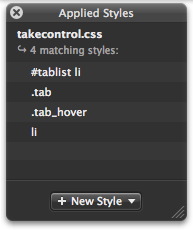
  The feature I've been longing for most in CSSEdit arrived in this
  update: an improved X-ray Inspector. Perhaps the hardest part of
  working with pre-existing CSS is figuring out why a particular
  element looked the way it did. Previously, CSSEdit's X-ray Inspector
  showed the size of the selected element, with its margins (indicated
  by arrows) and padding (indicated by dotted lines). It also showed
  the DOM hierarchy, but what it didn't do was tell you which styles
  applied to the element. Now it does, showing them in the cascade
  order with the most relevant styles at the top. Clicking a style in
  the X-ray Inspector selects the associated CSS code in the editor
  window, so you can easily step through the code to see what styles
  are being set and overridden.

<http://www.tidbits.com/resources/2007-04/X-ray-Inspector.jpg>

  The final major new feature is the Selector Builder, an
  Automator-like interface to building selectors that apply styles to
  specific elements in specific situations. I'm still wrapping my head
  around the Selector Builder, not because it's so complex (it uses
  English terminology wherever possible), but because I still don't
  have a full understanding of the role of selectors in CSS. I think
  the Selector Builder may be a significant help in this area, since I
  can select an element I want to style, and use the X-ray Inspector
  to create a new style for it using the Selector Builder. In the
  past, I've had to muddle through achieving the results I wanted
  essentially by trial and error.

<http://www.tidbits.com/resources/2007-04/Selector-Builder.jpg>

  CSSEdit 2.5 offers a number of other minor features, including a
  font picker, improvements to its CodeSense auto-completion, and a
  text shadow editor. Features that previously existed in CSSEdit 2.0,
  but that I hadn't paid much attention to before, include a CSS
  validator and a set of bookmarklets that make it easy to add a page
  viewed in a Web browser to CSSEdit's preview window. I'm also
  playing more with a feature called Milestones that lets you set a
  stake in the ground, experiment freely with major style changes, and
  return to the previously marked point easily if the experiment
  doesn't pan out.

  If you work with CSS at all, you need CSSEdit, and version 2.5 makes
  the program even more compelling. It's a free upgrade for registered
  users; new copies cost $30. It requires Mac OS X 10.4 or later, is a
  2.0 MB download, and works in a free trial mode for files of fewer
  than 2,500 characters.


Coda Plays Web Developers a New Tune
------------------------------------
  by Joe Kissell <[EMAIL PROTECTED]>
  article link: <http://db.tidbits.com/article/8969>

  I spend a fair amount of time doing Web development, and although I
  have access to graphical tools such as Dreamweaver, I've long
  preferred to do all my coding by hand - yes, even for complex CSS
  layouts, tables, and forms; it's just the way I'm wired. But even my
  two 20-inch widescreen monitors don't always provide enough pixels
  to display all the windows I want to see at once: my text editor
  (BBEdit), my FTP client (Transmit), a Web browser for previews
  (Safari, at least for a first pass), Terminal for tasks like running
  MySQL commands and fiddling with permissions on the server, and
  frequently, yet another browser tab or window showing the online
  documentation for PHP.

  Clearly, the good folks at Panic have been spying on me, because
  they used almost exactly that list of windows to illustrate the
  problem that their new Web-development tool, Coda, is designed to
  solve. For people like me who code Web sites manually, Coda combines
  a highly capable text editor, a visual CSS editor, an FTP client,
  WebKit-based previews, a terminal that supports SSH connections to
  remote servers, and even online documentation for HTML, CSS,
  JavaScript, and PHP - not just in a single application but in a
  single window.

<http://www.panic.com/coda/>

  It just so happened that I had a new Web site to create last week,
  so I've spent a number of hours getting to know Coda with a live
  project. Although I haven't delved deeply enough into the program
  yet to write a comprehensive review, I want to share some of my
  initial impressions. I can summarize them as follows: it's like
  buying your dream car, only to find out that the seats are kind of
  uncomfortable and there's no heater. Coda comes so close to being
  great that its shortcomings are especially annoying. Having tried
  this way of working, I'm loath to return to having four applications
  open all the time - and yet I keep running into issues that irritate
  me almost enough to give it up.


**A Quick Tour** -- The Coda window has multiple panes and tabs that
  let you interact with any given site in numerous ways; although a
  typical arrangement would be to have all of a site's elements in a
  single window, you can open multiple windows - one for each site, or
  even multiple windows per site.

  Coda lets you specify, for each Web site, a local folder, a remote
  folder, or both. (Remote folders are accessed using FTP, SFTP, or
  WebDAV, with the usual array of security options, as in Transmit.)
  You can edit your files locally and then upload them with a single
  click or, if you prefer, edit files directly on the server. (At
  least, that's how it appears: in reality, Coda caches a copy of each
  remote file you edit and uploads it each time you save.) You can
  add, remove, and rename files in a familiar list-view pane on the
  left side of the window, and switch back and forth between local and
  remote copies using tabs at the top of that pane. Click any file to
  open it in a new tab in the window's main pane.

  That larger pane, in turn, can contain multiple tabs, much like
  Safari's. By default, new tabs display a full-featured text editor,
  complete with syntax coloring for numerous languages, code
  completion, optional line numbering and line wrap, HTML validation,
  text clippings for frequently used blocks of code, and a
  grep-capable find-and-replace feature. This editor is based on
  SubEthaEdit, a collaborative text editor from TheCodingMonkeys that
  the TidBITS staff uses frequently for projects that require
  real-time group editing. In fact, you can share Coda documents with
  SubEthaEdit users and vice-versa. I'd personally find it awkward to
  edit a single HTML, CSS, or PHP file at exactly the same time as
  someone else, but I can imagine situations where this would be a
  useful feature for workgroups. Whether working individually or with
  others, Coda can track each document's changes, but (like
  SubEthaEdit) it displays only additions and changes, not deletions.

<http://www.codingmonkeys.de/subethaedit/>

  Because Coda's preview is based on WebKit, Web pages should appear
  exactly as they would in Safari. You can also preview your work in
  other browsers with a menu command or keyboard shortcut. Although
  previews refresh instantly as you work, they're not editable; if
  you're accustomed to working in a WYSIWYG Web-design program, you'll
  have to fight the temptation to edit in Preview mode. While in
  Preview mode, you can inspect a page's underlying hierarchy using a
  DOM Inspector feature - hover over an element and it appears in
  outline, with its logical structure shown in a status bar at the
  bottom of the window. Also available in Preview mode is a JavaScript
  console, complete with debugger support.

  The visual CSS editor lets you change any element's attributes by
  filling in a form (with helpful pop-up menus showing which options
  are available where). It's helpful if you're uncomfortable editing
  cascading style sheets manually or if you've forgotten some
  parameters, and is similar in concept to (though perhaps not quite
  as elegant as) MacRabbit's just-updated CSSEdit (see "CSSEdit 2.5
  Makes CSS Even Easier," 2007-04-25).

<http://macrabbit.com/cssedit/>
<http://db.tidbits.com/article/8965>

  The Terminal mode connects you to the server of your choice
  (typically, the one on which your site is hosted) using SSH; it can
  also run a shell on your local computer, just as Apple's Terminal
  utility does. It's just about what you'd expect from any terminal
  emulator: nicely functional and straightforward.

  The last mode is called Books; in it, Coda can display the contents
  of No Starch Press's "Web Programmer's Desk Reference," which covers
  HTML, CSS, and JavaScript, plus the complete PHP documentation.
  Unfortunately, this information is available only when online; if
  you try to access it while on a plane (as I did last week), you'll
  get an error message.


**Mixed Modes** -- Coda's interface has a way of subtly mixing
  metaphors that nearly always manages to surprise me - and not in a
  good way. For starters, the toolbar has buttons for Coda's six main
  modes of work: Sites (for manipulating the files that make up a Web
  site), Edit, Preview, CSS, Terminal, and Books. Given a document
  (such as an HTML file) visible in a tab, clicking one of these
  buttons, or pressing one of their associated keyboard shortcuts,
  switches that tab's view accordingly. So, if you're looking at raw
  code (in Edit view) and you click Preview, you see the final,
  rendered page. That makes perfect sense. Similarly, if you're
  looking at a style sheet in the visual CSS editor, you can click
  Edit to view that same file as raw text. Again: perfect. But if
  you're editing, say, an HTML file and you click Terminal, instead of
  opening a new tab with a terminal session - or perhaps giving you a
  view, within a terminal window, of that HTML document - you
  _replace_ your current document view with a new terminal session.
  (One could easily assume - as I did at first - that in so doing Coda
  had closed the HTML document, since it's no longer visible. But it
  hasn't; Coda thinks of that tab as still containing the same
  document.) Similarly, if you click the Preview button while editing
  a CSS file, you see a useless, word-wrapped text version of the CSS
  file.

  In other words: Coda's modes are a confusion between nouns and
  verbs. Sites, Books, and Terminal are nouns; Edit and Preview are
  verbs; and CSS means "Edit as CSS" - another verb. When you're
  viewing an HTML document (a noun), it makes sense to switch back and
  forth between an Edit mode and a Preview mode (performing either of
  two actions with that noun). But an SSH shell session with your Web
  server is not another view on that document - not another action you
  take with that noun - and so that shouldn't be the kind of thing you
  switch into, in the same tab, using exactly the same interface
  metaphor.

  Of course, you can open as many tabs as you want, and each tab can
  have a different kind of thing in it. One can be an HTML file, one a
  terminal session, and a third a PHP reference. And, in that HTML
  file's tab, you can either toggle between Edit and Preview modes or
  split the window (vertically or horizontally - even multiple times)
  and have a different mode displayed in each one. Plus, you can not
  only have multiple documents open at once, you can have a single
  document open in multiple tabs at once. So, it's not that you can't
  get Coda to display your information any which way you want. You
  can. But it really needs a rethinking of those toolbar buttons and
  the way it distinguishes between viewing modes (verbs) and data
  types (nouns). All too often I ended up switching my view when what
  I really wanted to do was open a new tab with a new type of data, or
  vice-versa.

  On yet another level of mixing, Coda's Sites view shows you all the
  sites for which you've configured settings, but once you open a
  site, that particular window can contain only files from that site.
  So even though you can mix and match tabs, splits, and views in all
  sorts of ways, you can't mix documents from two sites in a single
  window. In my opinion, this is another respect in which Coda tries
  too hard to force everything into a single window.

  Can this confusion be fixed? Sure, but it may require some
  rejiggering of the interface. As a quick, partial fix, Panic could
  force Coda to open a new tab each time someone clicks the Terminal
  or Books buttons. But better yet would be to stop treating nouns and
  verbs as being equivalent "modes" - keep the noun-like interface
  elements completely separate from the verb-like elements. When
  you're looking at an HTML document (or JavaScript or PHP or
  whatever), you should be able to choose between two verbs: Edit and
  Preview. For CSS documents, the relevant verbs are Edit as CSS and
  Edit as Text. My preference would be for each tab to be tied to one
  kind of noun (file, terminal session, documentation). Those tabs to
  which multiple verbs apply could switch modes - but the choices
  would be constrained by what makes sense for a given type of data.


**Preliminary Conclusions** -- Apart from the interface weirdness and
  a few cosmetic bugs, Coda performed for me as advertised. It enabled
  me to create my site, quickly and easily, without switching
  applications. But I can't shake the feeling that some important
  things are still missing.

  Panic has made no secret of the fact that they're deliberately
  keeping each of Coda's modules fairly lightweight. They're fighting
  feature bloat, and I respect that. The text editor isn't as
  full-featured as BBEdit, and the FTP client doesn't have all the
  bells and whistles of Transmit. Coda's main selling point is the
  integration of all these features. That's fantastic, but here's the
  problem: Panic's target market is Web-development geeks (like me!).
  The kind of person who has a bunch of different applications open at
  once to accomplish the sole task of hand-coding a Web site is also
  precisely the type of person who relies heavily on all those obscure
  features in a text editor or FTP client that Coda is missing.

  To cite just a couple of examples, I kept finding myself wanting to
  use BBEdit's Balance command, which highlights everything in the
  current block of code - useful if you have deeply nested brackets,
  parentheses, or braces and lose track of where something starts and
  ends. And I missed BBEdit's Find Differences command, which compares
  two versions of a document and highlights where they differ. I like
  to use this when two copies of a file are out of sync - say, one on
  a staging server and one on a live server - but doing so in Coda,
  even if it had a diff feature, would break the one-window-per-site
  model. (Coda does, by the way, let you open any of your files in an
  external editor, but that defeats the purpose of the integrated
  window.)

  And then there was the realization that switching from one
  application to another isn't any harder than switching from one tab
  to another. Yes, that means more window clutter, but not so much
  that Expose can't handle it. That's not to say Coda's benefits are
  illusory. But it's also not quite the melding of BBEdit, Transmit,
  Terminal, and Safari I'd envisioned when I started using it.

  The question for me - and, I suspect, for other Web developers of my
  ilk - is whether the integration benefits of Coda, minus its missing
  features, are worth $80 (or $70 if you already own Transmit). If I
  didn't already have BBEdit and Transmit, it would be a no-brainer:
  absolutely yes. But since I already have powerful tools that work
  well, the decision is less clear. You can decide for yourself with
  Coda's 15-day free trial. Coda 1.0 is a 15 MB download, and requires
  Mac OS X 10.4 or higher.interface


Former Apple Employees Charged in Stock Option Backdating
---------------------------------------------------------
  by Glenn Fleishman <[EMAIL PROTECTED]>
  article link: <http://db.tidbits.com/article/8963>

  The U.S. Securities and Exchange Commission (SEC) has accused two
  former Apple executives in two instances of illegal stock option
  backdating that Apple had previously disclosed after an internal
  investigation (see "Apple Releases Stock Option Backdating Report,"
  2007-01-08). Nancy Heinen, former general counsel of the company,
  was charged with improper actions in two sets of options grants and
  in altering company records to conceal what the SEC alleges was
  fraud. The full complaint is available as a PDF.

<http://sec.gov/litigation/litreleases/2007/lr20086.htm>
<http://db.tidbits.com/article/8803>
<http://sec.gov/litigation/complaints/2007/comp20086.pdf>

  Former chief financial officer Fred Anderson was separately charged
  with failure to ensure that Apple's financial statements were
  correct through a lack of observation in the first of those two sets
  of options grants. In that first set of grants, Heinen, Anderson,
  and four other executives benefited. In the second, only Steve Jobs
  stood to gain.

  Anderson immediately settled the charges without "admitting or
  denying the allegations," an approach the SEC allows when the agency
  perceives public interests are served by closing the affair instead
  of proving guilt or losing a case. Anderson will give up nearly $3
  million in stock option gains and nearly $700,000 in interest and
  penalties.

  Stock options convey the privilege, but not requirement, to purchase
  stock at a given price. Money is made by exercising the options
  (purchasing them) and then selling when the options' price is below
  the current market price of the stock. Options often come with a
  restriction on how soon the underlying stock may be purchased.

  In stock-option backdating, the date on which the option is granted
  does not reflect an actual board meeting or other event at which an
  option is granted. Rather, the option is set to a preferentially
  cheaper price by choosing a date on which the stock is cheaper than
  on the substituted option grant date, putting options immediately
  "in the money."

  Backdating is legal if acknowledged with proper record keeping,
  including financial charges that result from what is essentially a
  company gift of additional money captured from the stock market. The
  SEC stated that nearly $40 million in expense was improperly
  excluded from Apple's regulatory filings.

  Apple earlier found several instances of backdating, but cleared
  current management, including CEO Steve Jobs. The SEC said Apple
  cooperated in the investigation, and it has no plans to charge the
  company. Other charges against individuals could still come,
  including Jobs and other members of current management.

  Following the SEC's press release, Anderson's attorney released a
  statement in which the attorney said Anderson informed Jobs about
  potential accounting charges required for one of two grants to Jobs
  that were later canceled and replaced with grants of stock that
  required no exercise. Anderson's attorney said, in brief, that
  statements made to Anderson turned out to be false, although the
  attorney doesn't state it so bluntly. (So much for "neither admitted
  nor denied" the charges.)

<http://home.businesswire.com/portal/site/google/index.jsp?ndmViewId=news_view&newsId=20070424006168>

  Apple's board of directors, excluding chairman Jobs, released a
  statement the day after Anderson's, expressing full confidence in
  the company's own investigation and in Jobs.

<http://www.apple.com/pr/library/2007/04/25statement.html>

  While Anderson settled the charges, it's unclear precisely why, and
  the release doesn't explain his decision. It's easy to speculate
  that in Anderson's current role - alongside U2's Bono! - as a
  founder and director of investment firm Elevation Partners,
  protracted litigation would have been expensive and a distraction
  from his other duties. In the settlement, Anderson admitted no
  guilt, and can continue to serve as an officer and director of
  public firms. He sits on the board of eBay.

<http://www.elevation.com/EP_IT_FLASH.asp>
<http://investor.ebay.com/documentdisplay.cfm?DocumentID=728>

  The Associated Press says that Heinen will contest the charges.

<http://news.yahoo.com/s/ap/20070424/ap_on_hi_te/apple_stock_options>


Take Control News/30-Apr-07
---------------------------
  by Adam C. Engst <[EMAIL PROTECTED]>
  article link: <http://db.tidbits.com/article/8972>

**Extend the iPod's Capabilities with Advice in New Book** -- Much has
  happened in the iPod world of late, so if you haven't been keeping
  up on the many things you can do with your iPod other than play
  music, check out the second edition of "Take Control of Your iPod:
  Beyond the Music," by Steve Sande. Almost completely rewritten, the
  134-page book covers the latest in iPod technology, explains the
  basics for new users, and helps everyone find more ways to get the
  most out of their iPods. You'll learn about over a dozen major iPod
  uses, ranging from reading email and RSS feeds to running Keynote
  and PowerPoint presentations.

<http://www.takecontrolbooks.com/ipod-btm.html?14@@!pt=TRK-0025-TB877-TCNEWS>

  Steve begins with colorful comparison charts of the various iPod
  models to help you figure out which you have, since you may not
  realize that the iPod you bought few years ago is considered a
  "second-generation iPod" or you may have received your iPod as an
  unidentified hand-me-down. After a brief look at charging, syncing,
  and troubleshooting, Steve jumps into the many things you can do
  with an iPod, including obvious uses like listening to podcasts,
  watching video downloaded from the Internet, and exercising with the
  Nike+iPod Sport Kit. But the real fun comes in putting an iPod to
  less obvious uses like recording lectures or podcast interviews,
  reading text-based electronic books, and displaying maps.

  Owners of the first edition of the ebook should click the Check for
  Updates button on the cover to download a free update (available to
  those who purchased after 01-Sep-06) or to access an update
  discount.


Hot Topics in TidBITS Talk/30-Apr-07
------------------------------------
  by TidBITS Staff <[EMAIL PROTECTED]>
  article link: <http://db.tidbits.com/article/8971>

**Everybody Sync now** -- Michael E. Cohen's article about
  SyncTogether brings up a question: is it possible to sync two
  computers completely (or one user account on multiple computers)? (3
  messages)

<http://emperor.tidbits.com/TidBITS/Talk/1257/>


**Problems after Security Update 2007-004** -- A reader runs into
  AirPort connection problems after running the latest security
  update, and others are there to help. (7 messages)

<http://emperor.tidbits.com/TidBITS/Talk/1258/>


**Using two anti-surge plugs** -- A combination of two
  surge-protecting power strips blacks out a reader's house. Are the
  plugs to blame, or is it the 20-year-old wiring in an old house in
  France? (6 messages)

<http://emperor.tidbits.com/TidBITS/Talk/1259/>


**Joel on VBA for Macintosh** -- Programmer and author Joel Spolsky
  writes about the disappearance of Visual Basic for Applications in
  the upcoming version of Microsoft Office, bringing up a discussion
  of various automation systems. (11 messages)

<http://emperor.tidbits.com/TidBITS/Talk/1261/>


**Getting Streaming Audio from Mac to Amplifier** -- A reader who
  wants to listen to streaming music on his stereo system looks for a
  solution, since the Apple TV won't stream music over the network. (8
  messages)

<http://emperor.tidbits.com/TidBITS/Talk/1262/>


**Apple Data Detectors (was: Re: Address Book utilities)** -- Talk of
  this old Apple technology brings up the point that the company's
  research and development is now so secret that you don't get the
  same public sense of real technological innovation going on as
  during the late 1990s. (3 messages)

<http://emperor.tidbits.com/TidBITS/Talk/1263/>


$$

This is TidBITS, a free weekly technology newsletter providing timely
news, insightful analysis, and in-depth reviews to the Macintosh and
Internet communities. Feel free to forward to friends; better still,
please ask them to subscribe!

Non-profit, non-commercial publications and Web sites may reprint or
link to articles if full credit is given. Others please contact us. We
do not guarantee accuracy of articles. Caveat lector. Publication,
product, and company names may be registered trademarks of their
companies. TidBITS ISSN 1090-7017.

Copyright 2007 TidBITS: Reuse governed by Creative Commons license.

Contact us at:    <[EMAIL PROTECTED]>
TidBITS Web site: <http://www.tidbits.com/>
License terms:    <http://www.tidbits.com/terms/>
Full text search: <http://www.tidbits.com/search/>
Subscriptions:    <http://www.tidbits.com/about/list.html>
Account help:     <http://www.tidbits.com/about/account-help.html>


--
If you want to unsubscribe or change your address, use this link
http://emperor.tidbits.com/webx?unsub@@.3c557dc4!u=306a67f9