TidBITS#876/23-Apr-07
=====================
  Issue link: <http://db.tidbits.com/issue/876>
  Security news has overtaken us once again, with a $10,000 challenge
  to break Mac OS X's security that looks like it will be collected,
  Apple's release of Security Update 2007-004, and a DealBITS drawing
  in which you could win a copy of the DoorStop X Security Suite by
  Open Door Networks. But those are all short bits, so for more
  thoughtful coverage this week, we talk with a group of TidBITS
  readers about how they provide Mac tech support for their families.
  Then, we turn to Michael E. Cohen for a detailed review of
  Mark/Space's new SyncTogether, which provides many of the same
  features as .Mac syncing, but for multiple users and without an
  annual subscription fee.

Articles
    Security Update 2007-004 Released
    Money Meets Mouth on Mac Exploits
    DealBITS Drawing: DoorStop X Security Suite
    InterviewBITS: Family Tech Support
    Everybody Sync Now: SyncTogether Stands in for .Mac Sync
    Take Control News/23-Apr-07
    Hot Topics in TidBITS Talk/23-Apr-07


------------ This issue of TidBITS sponsored in part by: --------------

* READERS LIKE YOU! Support TidBITS with a contribution today!
  <http://www.tidbits.com/about/support/contributors.html>
  Special thanks this week to Marc Chavannes, William Lesllie,
  Craig Sutherland, and Bob Dain for their generous support!

* SMALL DOG ELECTRONICS: TidBITS Exclusive for Apr 23-Apr 30:
  17" PowerBook G4, 1.67 GHz, 120 GB hard drive, SuperDrive,
  AP/BT, Tiger + Classic, Apple refurbished, one-year warranty
  Free shipping, $1389! Order at <http://www.smalldog.com/tb/>

* GET FETCH 5 FOR FREE! Fetch Softworks makes Fetch, the original
  Macintosh FTP client, free for educational and charitable use.
  Fetch 5.2 includes WebView, FTPS, and droplet shortcuts.
  Apply today at <http://fetchsoftworks.com/edapply>!

* WebCrossing Neighbors Creates Private Social Networks
  Create a complete social network with your company or group's
  own look. Scalable, extensible and extremely customizable.
  Take a guided tour today <http://www.webcrossing.com/tour>

* MARK/SPACE, INC: New, from the makers of The Missing Sync, comes
  SyncTogether, a brand new app for syncing contacts, calendars,
  notes and more between multiple Macs and one or more user
  accounts. $49.95 for 3 Macs. <http://www.markspace.com/bits>

* Microsoft's MacBU: Supporting Mac users with Office 2004.
  Supporting the Mac community through tech support newsgroups,
  user group appearances, our new team blog, and more!
  Check out our team blog at <http://blogs.msdn.com/macmojo/>

* DealBITS: Get the word out about your product AND generate sales!
  It's easy: give away a few copies and offer a discount to entrants.
  A DealBITS drawing is quick to set up and can easily pay for itself.
  For more info and rates, visit <http://www.tidbits.com/dealbits/>.

---------- Help support TidBITS by supporting our sponsors ------------


Security Update 2007-004 Released
---------------------------------
  by Adam C. Engst <[EMAIL PROTECTED]>
  article link: <http://db.tidbits.com/article/8958>

  Apple has released Security Update 2007-004, which fixes a wide
  variety of obscure security holes and includes new versions of
  several open source components of Mac OS X, including fetchmail and
  ftpd. Of particular interest are fixes to Mac OS X's file sharing
  client software, the elimination of several bugs identified by the
  Month of Apple Bugs project, and fixes for holes in the Login Window
  authentication dialog. Academic users should also note that Security
  Update 2007-004 addresses three different exploits aimed at the
  Kerberos secure authentication support in Mac OS X. The update is
  available in four versions, for Mac OS X 10.4 for PowerPC-based Macs
  (9.3 MB) and for Intel-based Macs (16.1 MB), and for Mac OS X 10.3.9
  Client (37.6 MB) and Server (54.1 MB). Or just let Software Update
  do the job for you.

<http://docs.info.apple.com/article.html?artnum=305391>
<http://www.apple.com/support/downloads/securityupdate2007004ppc.html>
<http://www.apple.com/support/downloads/securityupdate2007004universal.html>
<http://www.apple.com/support/downloads/securityupdate20070041039client.html>
<http://www.apple.com/support/downloads/securityupdate20070041039server.html>


Money Meets Mouth on Mac Exploits
---------------------------------
  by Glenn Fleishman <[EMAIL PROTECTED]>
  article link: <http://db.tidbits.com/article/8957>

  Two hackers were able to meet a challenge at CanSecWest by gaining
  access to one of two fully patched MacBook Pros (one 15-inch, one
  17-inch). The computers were updated with the latest security
  release from Apple (Security Update 2007-004, released 2007-04-19).
  Shane Macaulay and Dino Dai Zovi combined efforts to compromise one
  of the Macs. Dai Zovi developed the exploit off-site, relaying it to
  Macaulay at the conference. (Other reports indicate that remote
  attackers were also eligible, but later reporting seems to
  contradict that.)

<http://www.infoworld.com/article/07/04/20/HNmachackedatconference_1.html>
<http://cansecwest.com/>
<http://docs.info.apple.com/article.html?artnum=305391>
<http://news.zdnet.com/2100-1009_22-6178131.html>

  The contest was originally set up to offer attendees a chance to win
  either of the two MacBook Pro laptops, but 3Com's TippingPoint
  division upped the ante by adding a $10,000 prize after the
  challenge started. TippingPoint hasn't yet confirmed that it will
  award its prize. The company told ZDNet it needs to determine that
  the exploit was previously unknown.

  The first challenge originally required the winner to retrieve a
  file protected with root permission on the root filesystem. The
  organizer planned to change the computers' configuration each day,
  adding behaviors like polling a wiki page every five minutes or
  checking email.

<http://www.securityfocus.com/archive/142/464216/30/0/threaded>

  After TippingPoint put its money on the line and the challenge
  progressed to include riskier behavior, the winning exploit
  appeared, requiring that a URL received via email was opened using
  the default Safari Web browser (relying on user interaction was a
  change from the original rules, after no one had been able to break
  in previously). However, the exploit wasn't based on Safari's "Open
  'safe' files after downloading" preference, as was originally
  suspected. According to security researcher Thomas Ptacek, the
  attack was based on a flaw in Java, which would affect other Mac
  browsers as well; turning off the Enable Java preference in Safari
  or other browsers will protect against the vulnerability.

<http://www.matasano.com/log/806/hot-off-the-matasano-sms-queue-cansec-macbook-challenge-won/>

  The malicious page caused Mac OS X to give user-level privileges to
  the attacker, if I read the explanation at the conference site
  correctly. Dai Zovi told ZDNet he discovered the exploit and
  implemented it in about nine hours overnight. The second computer is
  still unexploited, and requires that root privileges be obtained.

<http://cansecwest.com/post/2007-04-20-14:54:00.First_Mac_Hacked_Cancel_Or_Allow>

  The contest was apparently designed to tweak Apple for what one
  organizer said was its lack of participation in the security
  industry. Dragos Ruiu told InfoWorld, "I hear a lot of people
  bragging about how easy it is to break into Macs," and this contest
  gave them a chance to show their stuff.

  3Com's TippingPoint offers bounties via its Zero Day Initiative,
  which tries to reward researchers by providing exploits that could
  be immediately put to use in a malicious fashion. TippingPoint then
  updates its own security software and notifies the affected vendor.
  The firm later notifies its competitors, too.

<http://www.zerodayinitiative.com/>


DealBITS Drawing: DoorStop X Security Suite
-------------------------------------------
  by Adam C. Engst <[EMAIL PROTECTED]>
  article link: <http://db.tidbits.com/article/8959>

  Despite the CanSecWest exploit (see "Money Meets Mouth on Mac
  Exploits," 2007-04-23), Macs have proven remarkably secure in
  comparison with the myriad problems that afflict Windows. But anyone
  who wants to increase their level of security and knowledge about
  attacks and vulnerabilities can turn to tools like the DoorStop X
  Security Suite, from Open Door Networks. It brings together the
  recently updated DoorStop X Firewall 2.0, Who's There? Firewall
  Advisor 2.1, and an updated version of the accompanying ebook,
  "Internet Security for Your Macintosh: A Guide for the Rest of Us."
  (For what's new, see "Open Door Networks Updates Security Products,"
  2007-02-05.)

<http://db.tidbits.com/article/8958>
<http://www.opendoor.com/doorstopsuite/>
<http://db.tidbits.com/article/8846>

  In this week's DealBITS drawing, you can enter to win one of two
  copies of DoorStop X Security Suite, each worth $79. Entrants who
  aren't among our lucky winners will receive a discount on DoorStop X
  Security Suite, so be sure to enter at the DealBITS page. All
  information gathered is covered by our comprehensive privacy policy.
  Be careful with your spam filters and challenge-response systems,
  since you must be able to receive email from my address to learn if
  you've won. Remember too, that if someone you refer to this drawing
  wins, you'll receive the same prize as a reward for spreading the
  word.

<http://www.tidbits.com/dealbits/doorstop1/>
<http://www.tidbits.com/about/privacy.html>


InterviewBITS: Family Tech Support
----------------------------------
  by Adam C. Engst <[EMAIL PROTECTED]>
  article link: <http://db.tidbits.com/article/8954>

  Robert Movin's recent article "Switching My Mother to the Mac"
  (2007-04-02) generated a number of nice comments from people who had
  engineered similar switches for family members. That got me thinking
  about how many of us act as unofficial tech support for our
  Mac-using friends and family (and occasionally for Windows users as
  well). But I wondered how similar the experience was for different
  people, so I picked a few TidBITS readers and asked them to share
  how many members of their extended families they regularly provide
  tech support for. I also asked how they generally perform that
  support - in person, over the phone, or via remote control software
  - and what their last support job was. And just so you know I'm in
  exactly the same situation as everyone else, I'll lead off.

<http://db.tidbits.com/article/8922>


**Adam C. Engst** -- Publisher, TidBITS and Take Control Books

<http://www.tidbits.com/>
<http://www.takecontrolbooks.com/>

  My parents have an aging Power Mac G4 Cube and a 14-inch iBook G4
  that they use for all the usual personal tasks. My mother also reads
  her work email from home at times and works on Word and Excel
  documents at home as well, transferring them back and forth to her
  PC by sending them to herself in email.

  Even though they're primarily PC users, my sister and her husband,
  who have a two-year-old son, recently bought a Mac mini with an
  iSight camera for video iChats; it's a great way for the whole
  family to communicate, particularly with the little one (who wants
  to say that he also uses the Mac to look at pictures of rhinos).
  Plus, my aunt and uncle have a 20-inch iMac and a 14-inch iBook, and
  both of Tonya's sisters use laptop Macs. I also provide personal
  tidbits.com email accounts for a number of relatives, mostly because
  I started doing it well before there were good free alternatives
  like Yahoo Mail and Google Gmail. On the whole, everyone is pretty
  good with their Macs, and I never feel as though I'm explaining the
  obvious.

  Since my parents are local, they occasionally call with urgent
  problems, but more commonly, they invite us out for a weekend dinner
  with the warning that they have some computer questions. The last
  problem I solved involved Dad's iBook refusing to boot normally. I
  couldn't fix it, but I verified it was a hardware problem that would
  be covered by AppleCare. Luckily, I was able to boot the machine in
  FireWire Target Disk mode and make a full backup before Dad sent it
  in, since Apple replaced the hard disk along with other parts, even
  though that was almost certainly not the problem. Other relatives
  usually call with problems, although a visit to my aunt and uncle is
  never complete until I've answered any questions that have arisen
  since the last visit.

  Of course, Tonya uses the Mac constantly as well, and as much as
  she's highly capable, she last worked in tech support before Mac OS
  X appeared, so I end up dealing with any unusual problems she runs
  into, along with maintaining our network, keeping the backup system
  working, and fussing with the Internet connection whenever
  necessary.


**Peter N Lewis** -- CEO, Stairways Software

<http://www.stairways.com/>

  My parents and my sister both have Macs, and I regularly help my
  folks with tech support, although my Dad is pretty good at figuring
  things out himself. My most recent tech support job was purchasing a
  second-hand 12-inch iBook and setting it up for him (clean install
  of course, never trust a used computer's installation!), and showing
  him how to use it in FireWire Target Disk Mode to transfer files to
  it from his old iMac.

  I do most of my support in person as my folks live only a short
  distance away. Tech support over the email or the phone is always a
  challenge, and most problems can wait a few days until I next see
  them.


**Naomi Pearce** -- Owner, Pearce Communications

<http://pearce.com/>

  Both my parents use Macs, and my brother and random extended family
  members are also Mac users. Thankfully, my brother splits parental
  support duties with me, almost all of which take place over the
  phone.

  The last situation I remember having to help them with was fixing
  the settings when their DSL goes down; every time it drops, the
  settings in the DSL modem get all flubbed up.

  The most interesting note regarding my support-providing experience
  actually stems from a turnaround moment. My husband and I noticed
  that one of the MacMania cruises left from San Diego, which is
  within driving distance from my parents' house. We thought it would
  be a once in a lifetime experience to take them on a cruise, in
  style, and let them peek into our world a little bit. Cruises allow
  taking a vacation together without being too together or too apart.

<http://www.geekcruises.com/>

  So, after months and months of lobbying to convince my mother to go
  (another story altogether), we hiked the gangway to one of the most
  wonderful vacation experiences ever. Mom and Dad were encouraged to
  experience the inimitable Andy Ihnatko's Mac OS X overview sessions,
  and Janet Hill's "Life is Good, iLife Makes it Better" class.
  MacMania classes are relatively small, so people can ask questions,
  even outside of class should a question dawn later on. Participants
  are essentially in a week-long computer camp at sea, with the
  teachers right there, and I know for sure my father availed himself
  of the experts outside of class.

  And now that you ask about it, I just realized that I haven't
  received a support question since that MacMania trip. So, anybody
  who fancies an Alaskan adventure, particularly if their parents need
  Mac class and they're also interested in Aperture and real
  photography, might want to consider trying a last-minute sign-up for
  May, while there are still glaciers to see! Of course, the Panama
  MacMania looks fun too.

<http://www.geekcruises.com/top_b/mm06_top.html>
<http://www.geekcruises.com/top_b/mm07_top.html>


**Chris Pepper** -- [Chris Pepper babysits Unix systems at Rockefeller
  University for a living, and is still pleased and amused that a Mac
  is the best tool for his work.]

<http://www.reppep.com/~pepper/>

  My least computer-savvy family member has a grape iMac, which
  replaced a Mac Plus, largely because it would still run Word 5.1a.
  Her discomfort with the computer is best encapsulated by this quote:

  "I know the computer isn't really going to blow up on me, but I like
  the mouse because I know if it did it would just blow my hand off,
  while if the whole computer blew up, it would really hurt me, just
  like my car would kill me if it blew up."

  Her last few questions were: "Why can't I print?" Answer: Restart.
  "Why is my computer frozen?" (Luckily a rare occurrence.) Answer:
  Restart.

  She normally apologizes when she calls me at work, and sometimes
  calls my work voicemail at night to avoid disturbing me, but she's
  so stressed that everything feels like a crisis, especially since
  she tends to avoid updating her documents (teaching materials) until
  they're needed.

  My father, who has long read TidBITS, is, yes, Dr. Pepper. As a
  psychiatrist, he's also an MD, even though he doesn't really treat
  physical problems. So when I was growing up, every family gathering
  included at least one relative asking him about bunions or a bad
  back or a hurt finger. For a few years in and after college, when I
  still went to lots of these events, I briefly and shockingly became
  more popular, as those same relatives instead asked questions about
  what computer they should get, what the Internet was, or why their
  PC was misbehaving.


**David Shayer** -- iPod Software Engineer, Apple Computer

<http://www.apple.com/ipod/>

  My wife, my sister, and my mom use Macs. My kids use PCs, because
  they think more games are available. When they decided to get PCs
  instead of Macs, I told them they were pretty much on their own for
  tech support. They're pretty smart and are usually able to resolve
  their own problems.

  My sister is pretty tech savvy and rarely needs tech support.

  My wife can usually figure stuff out, and when I have to help her,
  being next to her so I can see the screen is invaluable. I
  occasionally have to help her with work email problems, because the
  IT people at Stanford can be slow.

  My mom is a very smart person, but just isn't computer savvy. I
  usually can't see her screen, since I generally help her over the
  phone. She doesn't know what specific user interface elements are
  called, but she knows the terminology, so she starts randomly
  throwing in "window" and "desktop" thinking she's helping, but she
  actually confuses me more. I suppose I should try Fog Creek's
  Copilot or other remote assistance software.

<https://www.copilot.com/>

  Last night, my mom called with a Quicken question. As far as I could
  tell she was doing the same thing I do, but not getting the same
  result. So obviously she was doing something different, but I never
  figured out what.

  Apple Stores are a godsend, because anyone can go in and get free,
  competent technical advice. This lets me redirect casual friends to
  good tech support without feeling like I'm abandoning them.
  Unfortunately, around here the Apple Stores have become so popular
  that you have to make a reservation to avoid long waits.

  Last week, by coincidence, I met a dozen newly hired Apple Geniuses
  from around the country, who were in Cupertino for their initial
  training. I was impressed by how smart, dedicated, and serious they
  all were.


**Eric Ullman** -- Director of Marketing, Mark/Space

<http://www.markspace.com/>

  Not as many members of my extended family use Macs as I would
  prefer. It's somewhere around half: My mom, my in-laws,
  brother-in-law's family, one step-sibling's family. On the PC side
  are my dad and his wife, brother's family, my two other
  step-siblings' families.

  The step-siblings have knowledgeable users who handle support in
  those families, and my dad and his wife use their small business
  support person. I am the IT guy for everyone else, including the PC
  users (either you get computers in general, or you don't - the same
  troubleshooting principles apply to Macs and PCs alike). I also
  provide "weekend support" for the five PCs and one Mac at the small
  office where my wife works and for many of my Mac-using friends.

  Most of my help-desk-type support can be done over the phone, but I
  also make use of VNC and Microsoft's Remote Desktop Connection for
  Mac. Networking and certain difficult or multi-computer issues
  require an on-site presence.

<http://www.macminicolo.net/Mac_VNC_tutor.html>
<http://www.microsoft.com/mac/otherproducts/otherproducts.aspx?pid=remotedesktopclient>

  The most recent support I provided was for my best friend of more
  than 20 years, who just switched to the Mac. Specifically, I helped
  him get a Windows-based flight bidding program for Southwest
  Airlines pilots working in CodeWeavers's CrossOver for the Mac
  (works great, by the way). That involved work (though mostly
  corrective - he was off to a good start) with some trial and error
  involved, so I performed it in person.

<http://www.codeweavers.com/products/cxmac/>

  A week doesn't go by without handling at least two or three
  requests, though most take less than five minutes over the phone. I
  enjoy doing this kind of thing for friends and family, and covering
  the Windows issues certainly keeps me on my toes and highly
  appreciative of my Mac. I've also developed a general hatred of
  anti-virus/spyware "solutions" on the Windows platform.


Everybody Sync Now: SyncTogether Stands in for .Mac Sync
--------------------------------------------------------
  by Michael E. Cohen <[EMAIL PROTECTED]>
  article link: <http://db.tidbits.com/article/8950>

  I'm a fan of Mark/Space's syncing products. The Missing Sync for
  Palm OS, for example, has made my wife's digital life much more
  pleasant now that she no longer has to deal with the
  not-always-reliable collaboration between Apple's iSync and Palm's
  HotSync conduit to get her Palm TX and her PowerBook G4 on the same
  page. So I was delighted when Adam asked me to review SyncTogether,
  the latest addition to Mark/Space's collection of syncing utilities.

<http://www.markspace.com/missingsync_palmos.php>
<http://www.markspace.com/synctogether.php>

  Am I still delighted? Read on.


**One Sync-ular Sensation** -- The $50 SyncTogether is based on
  MySync, an application that Mark/Space acquired last year from the
  delightfully named MildMannered Industries.

  Like its predecessor, SyncTogether lets you sync the same kinds of
  information that Mac OS X's .Mac syncing service does, but it
  eliminates the need for you to purchase a $100-per-year .Mac
  subscription. For those of you who haven't made your way to the Sync
  view in Mac OS X 10.4 Tiger's .Mac System Preference pane, these
  kinds of information include such Apple offerings as iCal tasks and
  events, Address Book contacts and groups, Safari bookmarks, and
  various Mail settings. Items from other programs, such as Bare Bones
  Software's Yojimbo, can appear in the list, too.

<http://www.barebones.com/products/yojimbo/>

  What makes this all possible is Tiger's Sync Services, a set of
  functions that Mac applications can use to sync information between
  devices and between other Mac applications.

  SyncTogether taps into the power of Sync Services to synchronize the
  same types of information as .Mac syncing between Macs, between
  different user accounts on the same Mac, or both. This capability to
  sync between different people's Macs and between user accounts
  enables SyncTogether to turn syncing into a form of data sharing - a
  significant difference from basic .Mac syncing. (You can read much
  more about Sync Services in my book, "Take Control of Syncing in
  Tiger" (shameless plug!), or by consulting a Mark/Space knowledge
  base article).

<http://www.takecontrolbooks.com/tiger-syncing.html?14@@!pt=TB876>
<http://support.markspace.com/?kb=2654>

  The one notable exception in SyncTogether's set of
  information-syncing capabilities is the Mac OS X keychain system:
  although you can sync keychains between Macs using .Mac,
  SyncTogether cannot. The SyncTogether documentation remains silent
  on exactly why keychains are excluded from the syncing party, but
  Mark/Space tells me that Apple does not provide third-party support
  for keychain syncing. This is likely a security measure, and a
  reasonable one, too - you don't want just any Tom, Dick, or Trojan
  messing with your keychains, do you?

  The license that accompanies SyncTogether allows up to three Macs to
  sync their information. That's three _Macs_, not three user
  accounts: it's possible to sync information from as many user
  accounts as you care to create on the three Macs that you can
  license. SyncTogether can also sync information over a local area
  network (it's Bonjour-savvy), and across the Internet. You can add
  more Macs to your SyncTogether sync-farm in groups of three by
  purchasing additional licenses.


**Set Up... and Do It Again** -- SyncTogether requires you to run an
  installer to get it on your Mac, and, even before you do that, you
  really, really, really want to read the Read Me file, the first
  section of which, labeled in bright red letters, strongly urges you
  to back up your data. Since it's all too easy with any syncing
  software to select the wrong option and blow away data, follow that
  advice. The Read Me provides some hints for backing up your iCal
  calendars and your Address Book contacts, and, once installed,
  SyncTogether's built-in Help offers more hints for backing up other
  kinds of data, such as your Safari bookmarks. I dutifully followed
  the Read Me's advice and was glad that I did, as you'll see.

  The installation procedure, while not time-consuming, is not
  trivial, and odds are that you'll have to go through the final part
  of it - the Setup Assistant - at least twice, since you have to
  configure SyncTogether on at least two Macs (or on two user accounts
  on a single Mac) to get any practical benefit.

  For this review, I used my desktop iMac G5, my MacBook Core Duo, and
  my almost-but-not-quite-retired 500 MHz iBook G3. All three machines
  were running Mac OS X 10.4.9. SyncTogether requires version 10.4.7
  or later, and claims to require at least a G4 processor, although it
  did install without complaint on the venerable iBook G3. On each
  machine, a SyncTogether folder was created in the Applications
  folder, containing the application, Read Me files, and an
  uninstaller.

  The first time you launch the SyncTogether application, a Setup
  Assistant also launches to help you configure the program. You can
  run the Assistant again later by choosing Setup Assistant from
  SyncTogether's Help menu.

  When setting up SyncTogether, you first must specify whether your
  Mac (called a "node" in SyncTogether parlance) will act as a
  "client" or a "server" and whether it will join an existing "Sync
  Group" or create a new group. These are new concepts for those who
  are familiar only with .Mac syncing or iSync, but they aren't hard
  to understand: a Sync Group is a set of individual nodes that sync
  with each other, and a server is the one node in the sync group that
  coordinates all the syncing with the client nodes. (In fact, iSync
  and .Mac implicitly organize syncing this way, too: for iSync, the
  Mac running iSync is the server and the devices connecting to that
  Mac are the clients; for .Mac, Apple's .Mac service is the server,
  and all the Macs that sync with it using the same .Mac account are
  the clients.)

  The Assistant enables you to set up SyncTogether nodes that aren't
  on the same local network. For one of these "remote" nodes, you must
  specify an IP address and a port number for the node. All the nodes
  in a Sync Group must be accessible by either Bonjour or IP address;
  if a firewall is present, the firewall must be set up to allow
  traffic on the specified port number. By default, SyncTogether
  chooses an available port number at random for you, though the
  built-in Help does suggest that port 50001 is a reasonable choice if
  you want to pick one manually.

  The Assistant then asks you to set a password that is used for
  encrypting the data among all nodes in the Sync Group.

  Next you specify which types of information you want to sync.
  SyncTogether uses plugins to handle the kinds of information it
  syncs, and several of its plugins offer more fine-grained syncing
  control than .Mac syncing offers. For example, you can choose to
  sync specific iCal calendars or Address Book contact groups with
  SyncTogether, instead of the all-or-nothing iCal and Address Book
  syncing choices that .Mac offers. You can use this enhanced syncing
  capability to create calendars and contact lists that, through the
  magic of SyncTogether syncing, you can share among family members or
  co-workers. For instance, now my wife and I can share our holiday
  card address lists and family birthday calendars.

  Once the Setup Assistant finishes its work you are ready for your
  node's first sync... that is, if your node belongs to an existing
  Sync Group. Otherwise, you have to set up at least one more node
  because, obviously, a node can't sync if it's the only member of the
  Sync Group.


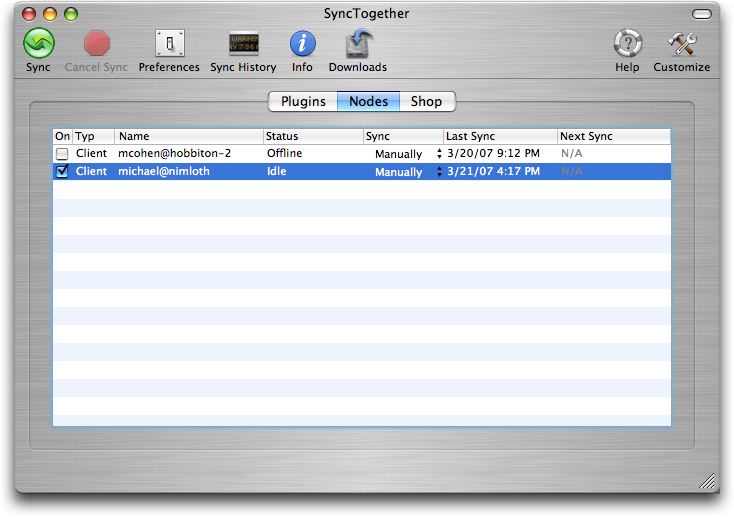
**And Your Bird Can Sync** -- The SyncTogether application window
  resembles the windows of other Mark/Space products: a metallic
  window containing a customizable toolbar along the top, and a main
  pane below it that can display several different views. In the case
  of SyncTogether's window, the three views available in the main pane
  are Plugins, Nodes, and Shop.

  In the Plugins view you can change both the types of data being
  synced and specific settings for some of the data types. In the Shop
  view, you can order other Mark/Space and third-party products (my
  copy is currently offering some twelve products).

  The Node view is the one you should have showing when you run a
  sync. It shows the status of the other nodes in your Sync Group, and
  provides controls for enabling and scheduling syncs with each node.

<http://www.tidbits.com/resources/2007-04/SyncTogether-window.jpg>

  Mark/Space recommends that a node's first sync be done manually, and
  that you have each node easily accessible during that sync so you
  can respond to the dialogs and alerts that Tiger's Sync Services
  generates during a first sync. With the update to Mac OS X 10.4.9,
  Sync Services no longer generates as many first-time-sync-related
  dialogs as it did in earlier versions of Tiger (nor does 10.4.9
  allow you to delete a node's data on the first sync), but giving
  yourself easy access to the syncing nodes so that you can watch for,
  and respond to, dialogs popping up on one node or another is still
  good advice.

  Easiest of all is monitoring a first sync between user accounts on
  the same Mac: just use Tiger's fast user-switching capability. Only
  slightly more difficult is monitoring each node on a local network,
  such as the small AirPort network I have at home: it's just a matter
  of walking from one room to another. Monitoring a first sync among
  remote nodes, or nodes on more geographically dispersed LANs,
  however, means that you may also need to install remote access
  software, such as a VNC client, on the nodes so that you can respond
  to the Sync Services dialogs.

  After all the set-up work, running an actual sync is almost
  anticlimactic. With SyncTogether running on the nodes you want to
  sync, you just click the Sync button on the SyncTogether toolbar on
  any of the nodes, and (if the network gods are smiling) the nodes
  sync. As a sync takes place, prominent progress messages appear in a
  new, blue pane that opens in the main SyncTogether application
  window on each node. When the sync ends, the progress pane vanishes.

  If you want a detailed view of what is going on during a sync, the
  toolbar's Sync History button brings up a log of syncing activity.
  You can also view this log, by the way, with Tiger's Console
  utility. It's in ~/Library/Logs/SyncTogether/, and, if you're hungry
  for syncing details, you can also use Console to check both the
  SyncTogether.log file in that directory and the main console.log,
  which also receives some Sync Services-related messages.

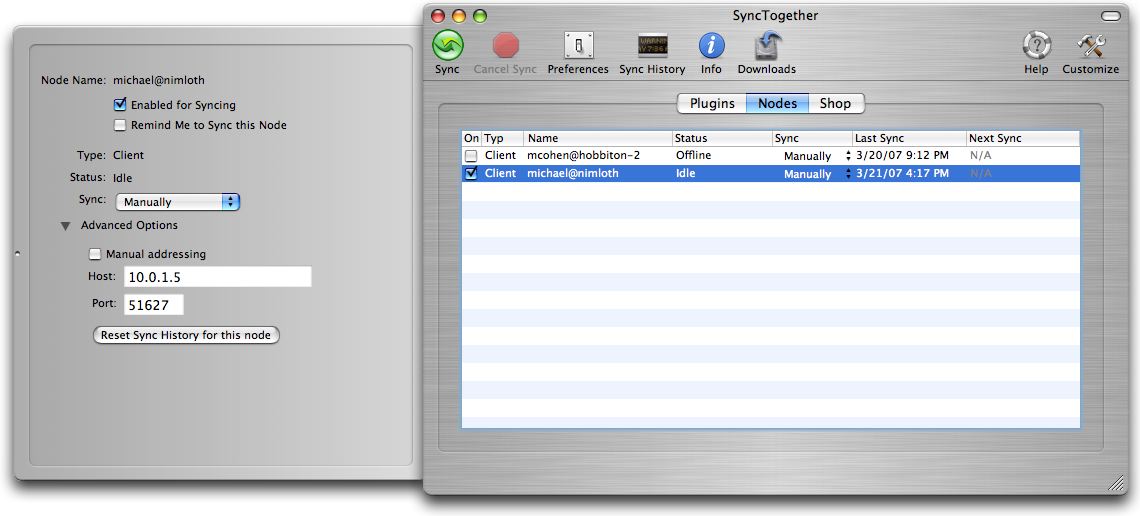
  Clicking the SyncTogether toolbar's Info button produces a drawer
  that shows detailed information about the selected plugin or node
  (the button is disabled in Shop view). In the Node view you can use
  the Info drawer's controls to set the sync schedule, IP address, and
  port number for a selected node, and to reset that node's sync
  history.

<http://www.tidbits.com/resources/2007-04/SyncTogether-info-drawer.jpg>

  Other tools on the SyncTogether toolbar include a Downloads button
  (used when you download an update or for purchases when you buy
  something in the Shop view), a Cancel sync button, and a Preferences
  button.

  SyncTogether's Preferences window offers just a few settings and
  most users can probably ignore them, since the defaults are
  sensible. If you need to tweak detailed network or security
  settings, you can access an Advanced preferences sheet by holding
  down the Option key when choosing Preferences; most users won't ever
  need (or desire) to see this sheet.


**Different Syncers, Different Song** -- Even though both .Mac and
  SyncTogether use Tiger's underlying Sync Services, the two have some
  different features.

  I've already mentioned that SyncTogether lets you separately sync
  iCal events and iCal tasks. In addition, SyncTogether provides three
  sync modes for each plugin: Normal, Publish Only, and Subscribe
  Only. You could create, for example, a master event calendar by
  syncing a Publish Only event calendar on one node: this calendar
  would send new events to other nodes but would not receive any from
  them. You could use a Subscribe Only tasks calendar on a home
  machine so that you could see tasks from your synced work machine
  when at home, but keep your personal home tasks private.

  One feature .Mac has that SyncTogether lacks is the advanced Reset
  Sync Data command. With .Mac you can reset the contents of your
  Mac's data items with those from .Mac - or vice versa - instead of
  merging them. SyncTogether offers only a Reset Sync History feature,
  and relies on Sync Services to offer you the choice of resetting the
  data the next time you sync - which it doesn't always do, in my
  experience. While I can understand the necessity of not allowing one
  SyncTogether node to reset the data on another SyncTogether node
  (for example, I don't think my wife would like me to replace all of
  her holiday contacts with mine without her say-so), I would like to
  be able to reset the data on my local client node if I think it
  needs a complete refresh drawn from the syncing group's shared
  wisdom.


**Incidents and Accidents** -- I did have some problems with
  SyncTogether. Although the first sync between my iMac and my MacBook
  went well, attempting to sync my old and unsupported iBook did not:
  syncs failed, processes stalled, and my synced data got rather
  confused on the other nodes. Fortunately, I did have backups of the
  data and was able to set things right, and although this was
  undoubtedly my fault, I would have been happier if SyncTogether had
  been smart enough to detect the unworthiness of my old iBook and
  simply refused to install or launch.

  As I dealt with the iBook fiasco, I attempted to uninstall and
  reinstall SyncTogether and discovered that the uninstaller does not
  do a complete job. Several folders that SyncTogether creates in
  ~/Library are not removed by the uninstaller. This is both
  intentional and common practice, according to Mark/Space, so the
  user's data and preferences are in place in case the application is
  reinstalled, but on the downside, if there is corrupt data in those
  folders, a fresh install of SyncTogether will pick them right up.
  (Note, by the way, that you must deauthorize your computer before
  uninstalling since you need the software to issue the Deauthorize
  Computer command.)


**Hints and Allegations** -- SyncTogether also has some deficiencies
  in its Help contents, and some confusing idiosyncrasies in its user
  interface.

  Although SyncTogether's built-in Help provides detailed explanations
  on how to set up and run the first sync, it maintains almost
  complete silence about subsequent syncs. For example, I couldn't
  find any Help topic that mentioned that you must have the
  SyncTogether application constantly running on the server node for
  scheduled syncing to work - that information appears only, and then
  by implication, on the last screen of the Setup Assistant.

  Another question on which Help is silent is whether or not
  SyncTogether is compatible with .Mac syncing. For example, I would
  like to sync my iMac using both .Mac (so I can access bookmarks and
  contents from any Web browser on any machine) and SyncTogether (to
  keep my MacBook current), but the Help doesn't give a clue as to
  whether syncing both ways would be clever or daft. (In fact, Tiger's
  Sync Services are designed to allow just such multi-way syncing; of
  course, if a sync messes up through one sync - say, an iSync sync
  with a flaky mobile phone's contact list - that mess will happily
  propagate through other syncs, such as a subsequent SyncTogether
  sync between Macs. So it goes.)

  On the user-interface side, SyncTogether makes it difficult
  sometimes for you to figure out which node a command affects. For
  example, the Reset Sync History dialog first says that the feature
  "will not affect any other sync clients" but later says that the
  history "will automatically be reset on the corresponding Server or
  Client as well." In fact, SyncTogether uses "Servers" and "Clients"
  to refer to the nodes in a SyncTogether group; a "sync client," on
  the other hand, is Sync Services terminology for an application that
  makes use of Sync Services (such as iSync or SyncTogether).

  SyncTogether also enhances confusion by employing a
  "[EMAIL PROTECTED]" convention to label each node, a convention
  which, though familiar to programmers and network administrators,
  probably looks an awful lot like an email address to the vast
  majority of users. (.Mac, by comparison, uses a somewhat less
  confusing convention: for example, in my syncing setup, the node
  labeled "[EMAIL PROTECTED]" in SyncTogether appears as "Nimloth -
  Michael Cohen" in the Advanced view of the .Mac System Preference
  pane.) Maybe I'm picky, but when programming conventions and
  terminology needlessly bubble up into the user interface of a
  consumer software product, it puts me off.


**Unsynchronized Emotions** -- So, was I delighted with SyncTogether?
  Not completely. Some of my lack of complete delight, to be sure, is
  not altogether SyncTogether's fault: after all, the program can only
  be as good as Tiger's Sync Services allows it to be, and Sync
  Services still has a few rough edges of its own. Plus, some of the
  problems I experienced were a result of coloring outside the lines
  by running SyncTogether on an unsupported machine, although I
  wouldn't have encountered those problems if the installer had been
  slightly more strict in its pre-flight analysis.

  Bottom line: I can and do recommend SyncTogether to any reasonably
  Mac-savvy person who doesn't want to pay for .Mac and who doesn't
  find the initial setup complexity daunting. I also recommend it to
  small groups of Mac users (families, work groups) who want to share
  some common, Sync Services-friendly information like calendars and
  contacts with a flexibility that .Mac currently doesn't provide.
  And, despite the flaws I found, I am confident that Mark/Space will
  do a good job of maintaining and improving SyncTogether over time.

  It wasn't quite love at first sight for SyncTogether and me, but I
  can honestly say I did like it a lot. In fact, next week we're going
  out again for lunch, and then maybe we'll catch a movie: I hear
  "Yojimbo" is playing at a revival theater nearby.

  SyncTogether costs $50 and is a 16 MB download; a 14-day demo is
  available.

  [Michael E. Cohen has worked as a teacher, a programmer, a Web
  designer, a multimedia producer, and a certified usability analyst.
  He's the author or co-author of several books, including "The Xcode
  2 Book," "AirPort and Mac Wireless Networks for Dummies," and of
  course, "Take Control of Syncing in Tiger."]

<http://www.takecontrolbooks.com/tiger-syncing.html?14@@!pt=TB876>


Take Control News/23-Apr-07
---------------------------
  by Adam C. Engst <[EMAIL PROTECTED]>
  article link: <http://db.tidbits.com/article/8961>

**.Mac Ebook Update Covers Latest in .Mac Webmail Access** -- We just
  released version 1.2 of our comprehensive guide to Apple's .Mac
  service, "Take Control of .Mac." Written by Joe Kissell, the
  204-page ebook provides everything .Mac users need to know to get
  the most of their $100-per-year subscriptions. Along with a
  smattering of general changes, this new version provides up-to-date
  advice and steps for using .Mac's webmail features. The update is
  free to current owners of the ebook (click the Check for Updates
  button on the cover to access it); new copies cost $15.

<http://www.takecontrolbooks.com/dot-mac.html?14@@!pt=TRK-0030-TB876-TCNEWS>

  To give you a taste of what's in the book, here are a few tips you
  might find useful:

* Email aliases behave a bit differently from member names. If you
  create an email alias and later delete it (as opposed to merely
  turning it off), that email address is reserved permanently, but you
  cannot reactivate it - and neither can anyone else.

* To make it even easier for others to access files in your Public
  folder, tell them to visit http://idisk.mac.com/membername-Public.
  That URL displays a Web page that provides download links for each
  item in your Public folder.

* Even if you use only a single Mac all the time, .Mac bookmarks can
  be very helpful if you use a variety of browsers. Instead of storing
  bookmarks separately in Firefox, OmniWeb, Opera, and iCab (or
  whatever browsers you use), you can simply open your .Mac bookmarks
  Web page in each of those browsers. You'll get access to your Safari
  bookmarks, and any new bookmarks you add using the .Mac Bookmarks
  window will also appear in Safari (after they've been synchronized,
  of course).

  If you're in need of up-to-date documentation of how to use .Mac's
  features, look no further.


Hot Topics in TidBITS Talk/23-Apr-07
------------------------------------
  by TidBITS Staff <[EMAIL PROTECTED]>
  article link: <http://db.tidbits.com/article/8962>


**iRemote** -- An Apple patent filing indicates that the iPhone (or
  other mobile phone) can be used to control software such as iTunes.
  Hmmm... (1 message)

<http://emperor.tidbits.com/TidBITS/Talk/1242/>


**Apple Store Traffic** -- If you're still undecided about Apple's
  retail store experiment, go hang out at an Apple Store for a while;
  boxes seem to exit at a brisk clip, according to readers. (1
  message)

<http://emperor.tidbits.com/TidBITS/Talk/1243/>


**Disabling "talking heads" in Flash?** If Flash-based ads and other
  automatic multimedia on the Web are driving you crazy, learn how to
  turn them off. (13 messages)

<http://emperor.tidbits.com/TidBITS/Talk/1244/>


**Little Snitch** -- This utility warns you when an application is
  attempting to "phone home" over the Internet. (2 messages)

<http://emperor.tidbits.com/TidBITS/Talk/1245/>


**Using Verizon Treo 650 as Modem from MacBook Pro** -- Alas, this
  capability doesn't appear to work on the Mac; some hacks exist, but
  they aren't reliable. (2 messages)

<http://emperor.tidbits.com/TidBITS/Talk/1246/>


**Battery drain during sleep** -- Is it normal for a MacBook lose 40
  percent of its charge while asleep during the weekend? (14 messages)

<http://emperor.tidbits.com/TidBITS/Talk/1248/>


**Hackers upgrading Apple TV's capabilities** -- The Apple TV has been
  the focus of intense hacker interest since its release: upgrading
  the hard drive, booting via the USB port, and more. (9 messages)

<http://emperor.tidbits.com/TidBITS/Talk/1249/>


**TidBITS Turns 17** -- A throwaway comment about getting hold of car
  keys turns into an interesting discussion of automobiles and the
  decreasing need for keys. Oh, and Happy Birthday, TidBITS! (25
  messages)

<http://emperor.tidbits.com/TidBITS/Talk/1250/>


**AirPort Extreme N Firmware 7.1 Update** -- Readers run into issues
  when updating the latest AirPort Extreme base station. (7 messages)

<http://emperor.tidbits.com/TidBITS/Talk/1251/>


**Current Apple Market Share** -- Where can you find current
  information on Mac market share? And will it increase? (3 messages)

<http://emperor.tidbits.com/TidBITS/Talk/1252/>


**Police attempt to emerge from the 19th century** -- Prosecuting
  computer crime is made more difficult by the fact that few police
  officers understand the technology. (1 message)

<http://emperor.tidbits.com/TidBITS/Talk/1253/>


**When to cut ties to the past** -- Sure, it would be nice if every
  program ever written for the Mac could run under Mac OS X, but
  that's not realistic. What's a reasonable cutoff point? (18
  messages)

<http://emperor.tidbits.com/TidBITS/Talk/1254/>


**Finding rogue invisible files** -- Mac OS X uses lots of invisible
  files for temporary storage, which can sometimes get out of hand.
  Several methods for tracking them down are offered. (17 messages)

<http://emperor.tidbits.com/TidBITS/Talk/1255/>


**What if Apple designed a car?** The talk of cars in another thread
  prompts the question of what an Apple-designed car would look like,
  and which features it would have compared to other cars on the
  market today. (8 messages)

<http://emperor.tidbits.com/TidBITS/Talk/1256/>


$$

This is TidBITS, a free weekly technology newsletter providing timely
news, insightful analysis, and in-depth reviews to the Macintosh and
Internet communities. Feel free to forward to friends; better still,
please ask them to subscribe!

Non-profit, non-commercial publications and Web sites may reprint or
link to articles if full credit is given. Others please contact us. We
do not guarantee accuracy of articles. Caveat lector. Publication,
product, and company names may be registered trademarks of their
companies. TidBITS ISSN 1090-7017.

Copyright 2007 TidBITS: Reuse governed by Creative Commons license.

Contact us at:    <[EMAIL PROTECTED]>
TidBITS Web site: <http://www.tidbits.com/>
License terms:    <http://www.tidbits.com/terms/>
Full text search: <http://www.tidbits.com/search/>
Subscriptions:    <http://www.tidbits.com/about/list.html>
Account help:     <http://www.tidbits.com/about/account-help.html>


--
If you want to unsubscribe or change your address, use this link
http://emperor.tidbits.com/webx?unsub@@.3c557dc4!u=306a67f9