TidBITS#884/18-Jun-07
=====================
  Issue link: <http://db.tidbits.com/issue/884>
  News from Cupertino this week isn't related to the Mac, with Apple
  announcing changes to the iPhone two weeks before its June 29th
  introduction and releasing a quick fix to several security exploits
  discovered in the public beta of Safari for Windows. Merging back
  into the Mac world, Joe Kissell looks at the VM2Go utility for
  managing Parallels virtual machines, and Glenn Fleishman introduces
  the Loki service for finding your current physical location via your
  Wi-Fi connection. Joe also reviews the 1Passwd password and Web
  form-filling utility, and Adam muses about being able to watch in
  real time what people around the world are seeing and saying.

Articles
    Apple Announces iPhone Changes
    Apple Updates Windows Safari Beta with Security Fixes
    Macworld's State of the Mac Reliability Survey
    DealBITS Winner: Tom Bihn Laptop Briefcase, Case, and Strap
    VM2Go Manages Parallels Virtual Machines
    Loki Here
    Visions of the Sublime and the Inane
    1Passwd Eases Password Pain
    Take Control News/18-Jun-07
    Hot Topics in TidBITS Talk/18-Jun-07


------------ This issue of TidBITS sponsored in part by: --------------

* READERS LIKE YOU! Support TidBITS with a contribution today!
  <http://www.tidbits.com/about/support/contributors.html>
  Special thanks this week to William Harris, Denise Small Concha,
   Mark Franklin, and Lawrence Orr for their generous support!

* SMALL DOG ELECTRONICS: TidBITS Exclusive for June 18 - June 25:
  MacBook 13" 1.83 GHz Core 2 Duo, 512 MB RAM, 60/combo/AP/BT,
  white, new, never used. Includes FREE 512 MB iPod shuffle (R).
  Now only $999, order at <http://www.smalldog.com/tb/>

* GET FETCH 5 FOR FREE! Fetch Softworks makes Fetch, the original
  Macintosh FTP client, free for educational and charitable use.
  Fetch 5.2 includes WebView, FTPS, and droplet shortcuts.
  Apply today at <http://fetchsoftworks.com/edapply>!

* WebCrossing Neighbors Creates Private Social Networks
  Create a complete social network with your company or group's
  own look. Scalable, extensible and extremely customizable.
  Take a guided tour today <http://www.webcrossing.com/tour>

* MARK/SPACE, INC: New, from the makers of The Missing Sync, comes
  SyncTogether, a brand new app for syncing contacts, calendars,
  notes and more between multiple Macs and one or more user
  accounts. $49.95 for 3 Macs. <http://www.markspace.com/bits>

* Microsoft's MacBU: Supporting Mac users with Office 2004.
  Supporting the Mac community through tech support newsgroups,
  user group appearances, our new team blog, and more!
  Check out our team blog at <http://blogs.msdn.com/macmojo/>

* DealBITS: Get the word out about your product AND generate sales!
  It's easy: give away a few copies and offer a discount to entrants.
  A DealBITS drawing is quick to set up and can easily pay for itself.
  For more info and rates, visit <http://www.tidbits.com/dealbits/>.

---------- Help support TidBITS by supporting our sponsors ------------


Apple Announces iPhone Changes
------------------------------
  by Joe Kissell <[EMAIL PROTECTED]>
  article link: <http://db.tidbits.com/article/9045>

  Less than two weeks before the iPhone's much-anticipated release,
  Apple announced two noteworthy improvements to its previously
  published specifications. First, Apple now claims a much longer
  battery life. According to Apple's statement, the iPhone will offer
  "up to 8 hours of talk time, 6 hours of Internet use, 7 hours of
  video playback or 24 hours of audio playback. In addition, iPhone
  will feature up to 250 hours - more than 10 days - of standby time."
  The second change is in the iPhone's top surface, including the
  touch-screen display, which will be made of optical-quality glass
  instead of plastic, thus making it more scratch-resistant.

<http://www.apple.com/iphone/>
<http://www.apple.com/pr/library/2007/06/18iphone.html>


Apple Updates Windows Safari Beta with Security Fixes
-----------------------------------------------------
  by Glenn Fleishman <[EMAIL PROTECTED]>
  article link: <http://db.tidbits.com/article/9039>

  Within three days of Apple's release of the Safari Web browser for
  Windows XP and Vista in beta testing versions, several significant
  security flaws were discovered, some of which were reported to
  Apple. The company responded quickly, issuing a bug fix release last
  week for three potential problems that involved specially crafted
  content at malicious Web sites that must be visited to trigger the
  vulnerabilities.

<http://www.apple.com/safari/>

  The bugs were discovered - at least in the descriptions provided by
  the coders who found them - through the use of fuzzing, a technique
  that throws piles of crud at targeted areas of a system or
  application to see what breaks. Fuzzing is a brute force method, but
  it has to be paired with more refined technical knowledge to
  understand how to take advantage of a flaw.

  A non-programmer could potentially use fuzzing to figure out how to
  crash a piece of software or even an operating system, but they used
  to have a harder time making use of that crash to tailor an attack
  that would allow them some sort of access. Programs like Metasploit
  provide a bridge between fuzzing and exploitation, however, and as
  they become increasingly powerful, "script kiddies" - relatively
  unsophisticated users who use prefabricated attacks - may have more
  disruptive power.

<http://framework.metasploit.com/>

  It's disturbing that Apple isn't stress-testing its public beta
  software with the same kind of readily available tools for fuzzing
  used by both researchers and the nefarious. Many of the Month of
  Apple Bugs flaws (see "MoAB Is My Washpot," 2007-02-19), as well as
  many recent AirPort and AirPort Extreme problems, were discovered
  through fuzzing.

<http://db.tidbits.com/article/8869>

  Apple's security update notice, which I cannot find archived online,
  notes, "This beta software is for trial purposes and intended to
  gather feedback prior to a full release." That is, "Bite us: This is
  beta software." The flip side, of course, is when Steve Jobs says,
  hey, go download the beta, it's hard to argue that serious security
  flaws aren't just as serious as they are in released software.

  Apple also said, "As with all our products, we encourage security
  researchers to report issues to [EMAIL PROTECTED]" No
  researchers were credited for the three fixed bugs.


Macworld's State of the Mac Reliability Survey
----------------------------------------------
  by Adam C. Engst <[EMAIL PROTECTED]>
  article link: <http://db.tidbits.com/article/9025>

  Macworld has done a huge survey of over 5,000 Macintosh users to see
  what they liked - and didn't like - about their Macs. The survey's
  findings on satisfaction and reliability, repair incidents, and
  quality of customer service are fascinating, and be sure to read Dan
  Miller's thoughts about what it all means as well. Unsurprisingly,
  respondents were much happier with their Macs than with their PCs,
  even when the PC was the primary computer, with 85 percent of Macs
  being rated as 9 or 10 out of 10, and only 15 percent of PCs
  receiving the same ranking. That's even though about 25 percent of
  the Macs had a problem that sidelined them for a day or more. Dan
  suggests that the reason is that people were highly satisfied with
  the service they received when having their Macs repaired - a likely
  possibility.

<http://www.macworld.com/2007/05/features/reliabilitysurvey/>
<http://www.macworld.com/weblogs/editors/2007/05/reliability_reax/>


DealBITS Winner: Tom Bihn Laptop Briefcase, Case, and Strap
-----------------------------------------------------------
  by Adam C. Engst <[EMAIL PROTECTED]>
  article link: <http://db.tidbits.com/article/9042>

  Congratulations to Roger Schreiber of speakeasy.net, whose entry was
  chosen randomly in last week's DealBITS drawing and who received a
  Tom Bihn Empire Builder Briefcase, Brain Cell Hard-Sided Laptop
  Case, and Absolute Shoulder Strap, collectively worth $225. Alas, we
  could have only one winner, but Tom Bihn is using their experience
  in designing laptop bags to cushion the blow - if you order anything
  over $25 from Tom Bihn before 26-Jun-07, use coupon code MPTIDBITS
  to receive a Mini Organizer Pouch for free. Thanks to the 1,298
  people who entered this DealBITS drawing, and we hope you'll
  continue to participate in the future!

<http://db.tidbits.com/article/9033>
<http://www.tombihn.com/page/001/PROD/700/TB0730>
<http://www.tombihn.com/>


VM2Go Manages Parallels Virtual Machines
----------------------------------------
  by Joe Kissell <[EMAIL PROTECTED]>
  article link: <http://db.tidbits.com/article/9044>

  As I've been using, and recommending, Parallels Desktop more
  frequently as a way to run Windows on Intel-based Macs, the question
  of how to back up, move, delete, and otherwise manage Parallels
  virtual machines has come up regularly. One utility designed to
  address this need is BriteMac's $15 VM2Go, a 1.5 MB download.

<http://www.parallels.com/>
<http://www.britemac.com/>

  At its most basic level, VM2Go copies virtual machines - which
  comprise at minimum a configuration file and one or more disk images
  - to another volume (another hard disk, an iPod, a USB flash drive,
  or a DVD). Obviously, since we're talking about a grand total of as
  few as two files, you can easily do the same thing in the Finder or
  in any backup program. However, VM2Go does a few other things that
  make it more useful than it might appear at first blush.

  For one thing, VM2Go almost instantly finds, and lists, all your
  Parallels virtual machines on any mounted volume. If you have many
  virtual machines, if you've stored them in nonstandard locations, or
  if you've lost track of where they are, this is a handy way to
  locate them all. Furthermore, if you manually move a virtual machine
  from one location to another, in some situations it won't run from
  the new location because the old, no-longer valid path to the disk
  image is hard-coded into the configuration file. VM2Go automatically
  corrects this, when necessary, so you don't need to edit the file
  yourself to reflect the new disk image location. VM2Go also provides
  an easy way to delete all the pieces of a Parallels virtual machine
  (including a Desktop icon, if any).

  The current version of VM2Go, 1.22, only partially supports the
  just-released Parallels Desktop 3.0. That is to say, it'll copy the
  configuration file and disk images just fine, but it doesn't yet
  know how to handle new features such as Snapshots, and can't
  correctly report the size of disk images formatted for Parallels
  Desktop 3. The developer says that a new version, which will correct
  these and other issues, is under development, with an expected
  release in the next several weeks.

  At the moment, VM2Go is most useful for people with more than one
  Parallels virtual machine - and the more of them you have, the more
  useful it becomes. (If you have just one virtual machine, it seems
  to me that copying the appropriate files in the Finder is simple
  enough that you should save your $15.) On the other hand, the more
  virtual machines you have, the more likely you are to be highly
  technically proficient, and therefore outside VM2Go's target market.
  Still, I could foresee being much more enthusiastic about VM2Go in
  the future if it also supported VMware Fusion virtual machines
  (something the developer says he's looking into), if it could split
  backups across more than one DVD, or if it could create additive
  incremental archives of virtual machines - automatically backing up
  only the changed bytes of a virtual machine's disk image on each run
  (rather than copying the whole file every time). The combination of
  all those capabilities would make for a truly interesting utility.


Loki Here
---------
  by Glenn Fleishman <[EMAIL PROTECTED]>
  article link: <http://db.tidbits.com/article/9017>

  Wi-Fi signals permeate our cities. A newly revised tool, now
  available for Mac OS X, lets Web sites determine your location from
  those ubiquitous Wi-Fi networks found around your computer. A free
  package called Loki - the Norse god of mischief and a play on the
  word "loci" - asks your permission before revealing your location to
  Web sites that can use that location for various actions, such as
  identifying your position on a map. But how does Loki determine your
  location? Through a lot of brute force up front and elegance
  thereafter.

<http://www.loki.com/>

  Skyhook Wireless, the firm behind Loki, started a few years ago with
  the mission of providing a location service with a high degree of
  precision by identifying the latitude and longitude of typically
  static Wi-Fi networks in homes and businesses. The company has
  dozens of trucks collecting data in major cities across the United
  States, Canada, and Australia, covering 70 percent of the population
  of those three countries so far, and a few cities in Asia and
  Europe. Wi-Fi gateways seldom move after networks are turned on,
  although gateways burn out or are replaced, and new ones installed
  all the time. But that's all a slight degree of motion compared to
  an ocean of stability.

<http://www.skyhookwireless.com/>

  Each truck is equipped with a Wi-Fi radio hooked up to a high-gain
  antenna, a GPS receiver, and a computer. As the trucks drive
  predetermined routes through a city, they collect snapshots of the
  Wi-Fi signals and map them to the current GPS coordinates. All that
  information is then combined into a massive database.

  When Loki is installed on your computer and you're connected to a
  Wi-Fi network with an Internet connection, the software asks the
  operating system for the current network names and signal strengths.
  Loki passes that information to Skyhook's servers, which engage in
  quick mathematical magic and come up with a rough idea of where you
  are. In my testing in Seattle, even with just one or two distant
  Wi-Fi networks visible, the software was as accurate as a GPS,
  placing me within 30 feet, sometimes less. Loki also sends
  information back to Skyhook, allowing them to supplement their
  GPS/Wi-Fi scanning with user scans that can be incorporated as
  additional data points.

  One of Loki's limitations is that the software can only produce a
  useful result if you are, in fact, connected via one of those Wi-Fi
  networks to the Internet: it sends a Wi-Fi snapshot of your
  vicinity, and Skyhook sends back the coordinates (if available).
  With more devices appearing that include both cell data modems and
  Wi-Fi - such as the iPhone, some other smartphones, and dozens of
  fresh cell/Wi-Fi voice handsets - Skyhook's software could take a
  Wi-Fi snapshot even without your device being connected to a Wi-Fi
  network, and then send that snapshot to their servers through the
  cell data connection. (Steve Jobs said last week that the iPhone
  would ultimately be opened to "secure" applications from third
  parties, and Loki would be an obvious one.)

  Skyhook originally intended to make their location-mapping results
  available as a service to firms that would want to incorporate it
  into products; they've had a little success on that front. They
  recently released a plug-in for AOL that would allow
  instant-messaging buddies to see each other's locations, with
  permission controls.

  Instead they decided to popularize their technology by releasing
  their first Loki product a year ago: a free toolbar for Windows XP.
  That toolbar allowed you to pre-fill location information into
  mapping sites, photographic sites that support geotagging (adding
  coordinates to the metadata of a photo), and store locators for
  companies like Starbucks or Office Depot.

  Last week's second release goes much further, adding developer tools
  that can work with the underlying location technology. A set of
  JavaScript commands enables a Web site builder to create a page that
  requests Loki results; the Loki software prompts a visitor before it
  allows that visitor's location information to be passed to the Web
  page or, via AJAX (Asynchronous JavaScript and XML) back to a Web
  server. The JavaScript script tells a visitor how to install Loki,
  which should increase Loki's reach.

<http://loki.com/developers/>

  Skyhook has partnered with the dominant GPS chip maker, SiRF, so an
  equipment maker like TomTom or Garmin could enhance GPS reception
  with Wi-Fi positioning. GPS signals tend to be hard to receive in
  urban canyons, where a fix on the three satellites necessary to get
  good data can be difficult to achieve, and that's exactly where
  Wi-Fi is most abundant. As GPS chip prices fall and more gadgets
  feature Wi-Fi as a connectivity tool, you could see a camera that
  automatically tags photos with the best coordinates it can calculate
  and then uploads those photos when it can reach a Wi-Fi hotspot.

  While the Windows XP version 2.0 of Loki updates both the toolbar
  and adds this lower layer, the Mac release includes just the
  programmer support. A Windows Mobile release is a freestanding
  application. Skyhook told me that a Mac toolbar will follow shortly,
  as well as an update for Windows Vista. For now, the Loki finder
  works only in Firefox 2 or later for Mac, or Internet Explorer 5
  through 6 or Firefox 1.5 or later for Windows XP.


Visions of the Sublime and the Inane
------------------------------------
  by Adam C. Engst <[EMAIL PROTECTED]>
  article link: <http://db.tidbits.com/article/9013>

  Thanks to the Internet, it's becoming possible not just to
  communicate with people around the world but to see what they're
  thinking, or at least what they choose to share with the world.
  Flickr has long enabled people to share their photos either with
  small groups of friends and family or with any other Flickr user,
  and while there's a wide range of pictures on Flickr, it seems that
  most people practice some level of selection and filtering, choosing
  only the best or most interesting. While I can't pretend that I have
  much time to spend on Flickr, when I'm directed there for one reason
  or another, I'm often impressed by the photos I see. There's
  something both specific and universal about them, even when you
  don't know the places or people pictured.

<http://www.flickr.com/>

  In contrast with Flickr is the latest hot service for mobile
  navel-gazers: Twitter. Twitter defines itself well as "A global
  community of friends and strangers answering one simple question:
  'What are you doing?'" You've heard of solutions looking for a
  problem? Twitter is thousands of answers looking for a question that
  no one cares about. For instance, did you need to know that as I
  wrote this, laurennmcc is off to the dogpark? Or that
  thatguynamedtom has to go to class but would rather sleep in all
  day? Oh, the drama of it all!

<http://twitter.com/>

  What's ironic is that what Twitter users are doing is wasting time
  informing the world of just how mundane most of our lives really
  are. There are a few interesting uses, such as comedian Steven
  Wright's one-liners, a timer service that reminds you of events via
  Twitter, and someone who is twittering the first lines of books. And
  of course, in a very small circle of Twitter-using friends, there
  could be the occasional bit of status information that would be
  actually useful.

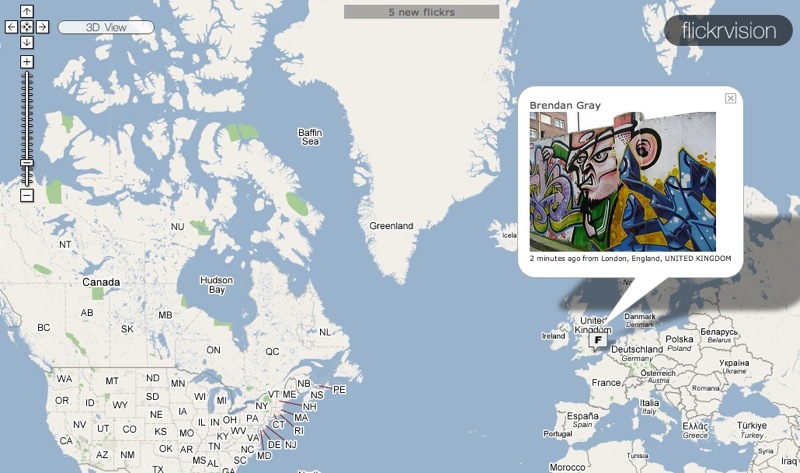
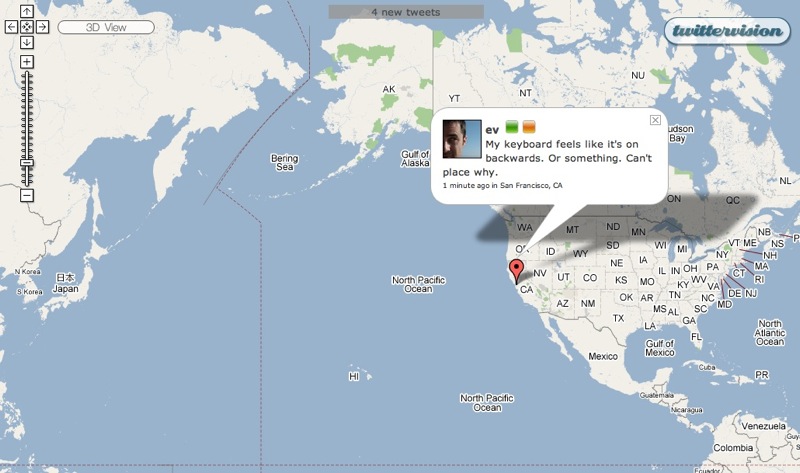
  Why would I be comparing Flickr and Twitter? Because of a pair of
  new services from David Troy: Flickrvision and Twittervision. Both
  services display a world map, scrolling around in it to display
  either a photo recently posted on Flickr or a message recently
  posted to Twitter. I watched one service, then the other, for a few
  minutes.

<http://flickrvision.com/>
<http://twittervision.com/>

  I was first mesmerized by the photos flickering by in Flickrvision,
  providing a pictorial glimpse into the lives of total strangers
  across the world. It was a bit like flipping through the
  participatory 24/7 photo books created by Rick Smolan and David
  Elliot Cohen - I didn't know any of these people, nor did I
  recognize any of the places pictured, but that was as much the charm
  of it as anything else. I could build stories in my head around the
  people in those pictures, and I could imagine staring out at the
  landscapes shown. By providing a geographic context for these random
  photos, I was able both to learn more about another part of the
  world and to add my own take on each photo in some small way, giving
  it yet another level of meaning, at least for me. Want to see
  Flickrvision without browsing to it directly? Download Chris
  Bailey's Visionary screen saver.

<http://www.tidbits.com/resources/2007-05/Flickrvision.jpg>
<http://www.247mediagroup.com/projects/america.html>
<http://codeintensity.blogspot.com/2007/05/twittervisionflickrvision-screen-saver.html>

  The dialog balloon messages in Twittervision, using exactly the same
  map interface, gave me an entirely different feeling. I watched it
  with horrified fascination, trying to figure out from each message
  why the person had chosen to share that particular thought, or just
  who might actually care one whit to read the message. Occasionally I
  could divine some utility to a message, but most seemed purely to be
  the result of random neurons firing. And worse, while I particularly
  enjoyed seeing photos from other parts of the world via
  Flickrvision, Twittervision made me realize that random neural
  firings from other countries are, not surprisingly, in other
  languages - making them even more nonsensical. Amazingly, I once saw
  a message from someone with whom I've exchanged email in the past,
  saying that he was taking the bus home, apparently in Ann Arbor,
  Michigan. Alas, I don't know him nearly well enough to care.

<http://www.tidbits.com/resources/2007-05/Twittervision.jpg>

  The human brain is in constant activity, and we all have innumerable
  thoughts throughout the day. One aspect of growing up is learning
  just which of those thoughts is worth sharing with the people around
  you, and in what fashion. Flickr, particularly given life via
  Flickrvision, shows how the interpretation of thoughts and
  experiences via still photos can prove sublime. Twitter, especially
  when laid bare via Twittervision, makes clear just how important it
  is for us to filter our internal thoughts to avoid polluting the
  infosphere with them.


1Passwd Eases Password Pain
---------------------------
  by Joe Kissell <[EMAIL PROTECTED]>
  article link: <http://db.tidbits.com/article/9043>

  When I was writing "Take Control of Passwords in Mac OS X," I
  thought long and hard about what sorts of strategies I could
  recommend for creating strong yet memorable passwords. Security
  experts will tell you that, all things being equal, longer passwords
  are safer than shorter ones; random passwords are better than those
  that contain words or follow other patterns; good passwords should
  include a mix of lowercase and uppercase letters, numbers, and
  special characters; and you should not reuse a password in more than
  one context. From a security point of view, that's all true, but all
  those practices also make passwords harder to create and harder to
  remember. So I outlined some ways to lighten one's password workload
  without seriously compromising security, but I also recommended that
  readers save themselves some mental effort and simply let their
  computers do all that work for them. And, of all the tools available
  for doing this sort of thing on the Mac, I mentioned that my current
  favorite is 1Passwd from Agile Web Solutions. For anyone who has
  struggled with passwords, 1Passwd is the best $30 you can spend.
  (It's only $25 if you use the coupon at the back of "Take Control of
  Passwords in Mac OS X," which is of course the best $10 you can
  spend!)

<http://www.takecontrolbooks.com/passwords-macosx.html?14@@!pt=TB884>
<http://1passwd.com/>

  The first time I heard about 1Passwd, though, I was completely
  mystified as to why anyone would need it. It was described as a
  password manager that stores items in the Mac OS X Keychain and
  fills forms (particularly user names and passwords) in Web browsers
  automatically. And I was thinking: Safari can do that. Almost every
  browser can do something like that. Why exactly do I need something
  else to do the same thing? But I decided to try it anyway, and I'm
  glad I did. It's become indispensable to me in a subtle but
  important way, and it performs a whole list of password management
  tricks that make my day-to-day Web browsing much easier.


**Plug It In** -- 1Passwd consists of an application in which you can
  browse and edit passwords and adjust settings, and a set of
  browser-specific plug-ins. For Firefox and Flock, the plug-in is a
  conventional extension; for other browsers, 1Passwd relies on
  SIMBL-based Input Manager plug-ins (see "Are Input Managers the Work
  of the Devil?," 2006-02-20). If you object to the use of Input
  Managers on philosophical grounds, turn away now. However, I think
  the utility, in this case, outweighs the potential risk - and it's a
  method that enables 1Passwd to do its magic not only in Safari,
  Firefox, and Flock but also Camino, OmniWeb, NetNewsWire, and
  DEVONagent.

<http://culater.net/software/SIMBL/SIMBL.php>
<http://db.tidbits.com/article/8430>

  The browser plug-ins enable 1Passwd to record user names, passwords,
  and other form data when you enter them (either automatically or on
  request); fill in form data when needed (only at your request); and
  generate strong new passwords. It can even generate, fill in, and
  store a new password with as few as two clicks. Like Safari, 1Passwd
  uses the Keychain to store its data, but it uses its own keychain -
  not your default keychain - giving you an extra layer of security,
  at least if you choose a different password for your 1Passwd
  keychain.

  Here's a typical example of how I might use 1Passwd: A site asks me
  to come up with a user name and password. I type in my standard user
  name and then choose Generate Strong Password from the 1Passwd
  pop-up menu. In the dialog that appears, I can select password
  length and how many numbers and special characters to include.
  1Passwd immediately displays the password it has generated; changing
  any setting produces a new password choice. Usually I leave those
  sliders set at my default preferences and simply click Fill. 1Passwd
  then enters the newly generated password in the appropriate field
  (repeating it in a confirmation field, if necessary) and saves all
  the data from that form (including my user name) in its keychain. My
  work is done: I never had to give any thought to creating a
  password, and I don't have to remember it, either. The next time I
  return to that login page, I can choose a menu command or press a
  keystroke to fill in the form and log me in.


**Form Factor** -- To explain why 1Passwd is useful beyond merely
  generating and storing passwords, let me describe a couple of the
  problems it's designed to solve, both of which involve Web-based
  forms.

  One problem is any domain for which you have multiple sets of user
  names and passwords. In my case, google.com is such a domain: I have
  one user name/password combination for Gmail, another for AdSense,
  and a third for Google Docs & Spreadsheets. If I were to let Safari
  (or any other browser) remember my passwords, it would be unable to
  distinguish between different URLs in the google.com domain. So, if
  I've saved three sets of credentials and I go to log in to, say,
  Gmail, Safari may not fill in my Gmail user name and password -
  instead, it'll use whichever set of credentials I saved most
  recently.

  1Passwd solves this problem by enabling you to save, and restore,
  any number of forms for a given domain - you can choose the one you
  want to use, when it's time to fill out a form, using a pop-up menu
  or keyboard shortcuts. This means that, by default, form fields
  won't be pre-filled when the form loads (though you can re-enable
  this feature in Safari or OmniWeb if you prefer), but in exchange
  for perhaps one additional click or keystroke, you avoid the hassle
  of having to enter your credentials manually if your browser chooses
  the wrong ones. You can also store multiple identities - sets of
  information about yourself, including address, phone number, and
  even credit card information - and fill in data from any identity
  when a site asks you for your information (even when a password is
  not actually required).

  A second problem I've frequently encountered is that passwords saved
  in one browser aren't available in another. For example, I always
  have both Firefox and Safari running - I generally prefer Safari,
  but there are certain sites I can access only using a Mozilla-based
  browser, and I'm also fond of several useful Firefox extensions. So,
  if I happen to log in to a certain site in Firefox, and allow it to
  save my user name and password, they're stored in Firefox's internal
  list. When I later visit the same site in Safari, it knows nothing
  about my credentials, which I then have to type in manually (or, if
  I've forgotten them, go fishing for them in Firefox's preferences
  window).

  Because 1Passwd uses a single keychain, accessible via all supported
  Web browsers, one need store a given set of credentials only once.
  It can then be accessed as easily in one browser as in another. It
  can even import your existing passwords from just about any browser,
  so cross-browser compatibility issues disappear almost instantly.


**Further Tricks** -- Another thing I've appreciated about 1Passwd is
  that it can often fill in passwords even on pages where autofill is
  otherwise disabled. Bank Web sites, in particular, typically disable
  the use of autofill as a security measure, the rationale being that
  if your computer falls into the wrong hands, an unscrupulous person
  could log into your bank account and do considerable damage without
  ever knowing your user name or password. Because I can (and do) take
  other security measures to prevent that problem, I bristle at the
  inconvenience of having to remember, and manually type, my passwords
  for such sites. In general, 1Passwd can transparently handle sites
  where conventional autofill is disabled, though I do have an account
  at one bank where the password mechanism is so hyper-secure (and so
  novel) that not even 1Passwd can penetrate it.

  1Passwd claims to have an "anti-phishing" feature, which prevents
  you from entering your credentials on an illegitimate site
  pretending to be your bank, PayPal, eBay, or some other such
  institution frequently appearing in spam email. In reality, all this
  means is that if you click a link in an email message that purports
  to take you to your bank site, and 1Passwd sees that the domain name
  in the URL doesn't match the one in its keychain for your bank, your
  credentials won't appear as an autofill option. So 1Passwd doesn't
  explicitly alert you in any way that a site may be fraudulent, nor
  does it prevent you from manually typing in your login information,
  but it does at least provide a minimal level of protection.

  Among the numerous other interesting features in 1Passwd is the
  capability to lock just your 1Passwd keychain when you quit the
  1Passwd application; you can also (as for any keychain) set it to
  lock automatically after a user-defined period of inactivity or when
  your computer sleeps, as well as sync it using .Mac. Agile also
  offers an optional ($13) application you can buy to read (but not
  edit or add) passwords from your 1Passwd keychain on your Palm or
  Treo.


**What's Not to Like** -- As much as I like 1Passwd - and I truly do
  like it a great deal - it has a few irritating rough edges. One is
  the way it handles multiple identities: it seems like the wrong way
  to remember the wrong combination of data. For instance, suppose I
  want to use a single set of personal data - name, address, phone
  number, email address - on many different Web sites, but I want to
  store details about six different credit cards. In 1Passwd, that
  means creating six different identities, which will all be the same
  except for the page of credit card information. Not that this is
  hard - yes, there's a Duplicate button - but credit card information
  strikes me as the sort of thing that should be handled separately
  from other data. For that matter, the same could be true of other
  items: my name will always be the same, but I might use different
  email addresses on different forms. I'd like to see some mechanism
  for storing any given piece of data in just one place, which would
  entail slicing up the Identity feature in a different way. (Even so,
  I consider the Identity part of 1Passwd a relatively minor feature;
  you can ignore it completely and still get tremendous value from
  letting it handle user names and passwords.)

  Speaking of credit cards, 1Passwd often has trouble filling in
  credit card data in forms it has never seen before. I suspect the
  reason for this is that it's looking for form fields with specific
  names, and Web sites vary too much for 1Passwd to be able to
  perceive a match in many cases. You can still copy and paste your
  card number from 1Passwd, but that's barely easier than manually
  entering the data manually.

  Although 1Passwd can store multiple sets of credentials per domain,
  what I'd really like to see is an even finer level of granularity in
  the use of autofill. For example, even though the URL for Gmail and
  the URL for AdSense both start with "http://www.google.com/";, what
  comes after that is sufficiently different in the two cases that
  1Passwd should be able to determine which user name and password I
  want on a given occasion, rather than making me choose one or the
  other from a menu manually. I'd also like to see customizable
  keyboard shortcuts for absolutely everything (shortcuts are present,
  but limited, currently) and a way to access its password generator
  within the 1Passwd application itself (since sometimes I want to
  create new passwords for uses other than Web pages). And finally,
  I'd prefer that the documentation be provided locally; the other
  day, when I chose Help > 1Passwd Help, Safari attempted to open the
  help pages on 1Passwd's Web site, but as the site wasn't responding
  at that moment for whatever reason, I was unable to get a quick
  answer to my question.

  Nevertheless, I can't pretend that these are anything other than
  quibbles. 1Passwd is a fine example of intelligent and helpful
  programming at a reasonable price, and I recommend it heartily. The
  program is a 4.7 MB download; until it's registered, it functions as
  a free demonstration version that limits users to a single identity
  and 12 stored Web forms.


Take Control News/18-Jun-07
---------------------------
  by Adam C. Engst <[EMAIL PROTECTED]>
  article link: <http://db.tidbits.com/article/9040>

**Troubleshooting Ebook Now In Print** -- Troubleshooting a Mac with a
  serious startup problem is easy with the help in our new "Take
  Control of Troubleshooting Your Mac" ebook, but it certainly helps
  if you can read the text while you're having the problem. Although
  you could read the ebook on another computer or print it out
  yourself, you can also now order the print version - double-sided,
  professionally printed, and wire-bound - for $19.99 through QOOP,
  our print-on-demand service. For those who have bought the ebook
  already, click the Print link on the cover to purchase the print
  book for only $9.99.

<http://www.takecontrolbooks.com/troubleshooting-mac.html?14@@!pt=TRK-0051-TB884-TCNEWS>
<http://www.sqoop.com/corp_libraries/tidbits/TCtrblshtMac.php>


Hot Topics in TidBITS Talk/18-Jun-07
------------------------------------
  by TidBITS Staff <[EMAIL PROTECTED]>
  article link: <http://db.tidbits.com/article/9041>

**AirPort connection troubles** -- Are some connection problems that
  appear in old AirPort base stations solved by the newest models? (3
  messages)

<http://emperor.tidbits.com/TidBITS/Talk/1327/>


**Blowing Apple's Horn** -- The Economist devotes several articles to
  Apple in its latest issue. (1 message)

<http://emperor.tidbits.com/TidBITS/Talk/1328/>


**Constructive suggestions for better environmental policies** --
  Prompted by the interplay between Apple and Greenpeace over Apple's
  environmental policies, readers discuss practicalities of disposing
  of hazardous materials. (5 messages)

<http://emperor.tidbits.com/TidBITS/Talk/1329/>


**Losing the Color Palette** -- Which files need to be saved so that a
  consistent color palette can be re-used later? (4 messages)

<http://emperor.tidbits.com/TidBITS/Talk/1330/>


**Dictation / Verbal note-taking on iPhone?** Will the iPhone offer
  some way to record audio notes? Plus, readers offer suggestions for
  recording notes on other devices. (7 messages)

<http://emperor.tidbits.com/TidBITS/Talk/1331/>


**Videos crashing iTunes** -- What can be done for a reader whose copy
  of iTunes crashes whenever a video is played? (1 message)

<http://emperor.tidbits.com/TidBITS/Talk/1332/>


**New version of Eudora/Thunderbird?** Eudora is set to become part of
  the open-source email program Thunderbird, but what is its status?
  Penelope can tell you. (3 messages)

<http://emperor.tidbits.com/TidBITS/Talk/1333/>


**iPhone Fauxmercial** -- An unauthorized iPhone ad is just as good as
  Apple's advertisements. (6 messages)

<http://emperor.tidbits.com/TidBITS/Talk/1334/>


**AirPort, AirTunes, Security (advice needed)** -- A reader finds that
  AirTunes playback over an AirPort Express is disappointingly choppy,
  and looks to TidBITS Talk for advice. (1 message)

<http://emperor.tidbits.com/TidBITS/Talk/1335/>


**MS Exchange: Can Eudora for E-mail and Entourage for Calendaring
  Coexist?** With Microsoft Exchange being implemented at a reader's
  workplace, can Eudora be configured as the email reader? (10
  messages)

<http://emperor.tidbits.com/TidBITS/Talk/1336/>


$$

This is TidBITS, a free weekly technology newsletter providing timely
news, insightful analysis, and in-depth reviews to the Macintosh and
Internet communities. Feel free to forward to friends; better still,
please ask them to subscribe!

Non-profit, non-commercial publications and Web sites may reprint or
link to articles if full credit is given. Others please contact us. We
do not guarantee accuracy of articles. Caveat lector. Publication,
product, and company names may be registered trademarks of their
companies. TidBITS ISSN 1090-7017.

Copyright 2007 TidBITS: Reuse governed by Creative Commons license.

Contact us at:    <[EMAIL PROTECTED]>
TidBITS Web site: <http://www.tidbits.com/>
License terms:    <http://www.tidbits.com/terms/>
Full text search: <http://www.tidbits.com/search/>
Subscriptions:    <http://www.tidbits.com/about/list.html>
Account help:     <http://www.tidbits.com/about/account-help.html>


--
If you want to unsubscribe or change your address, use this link
http://emperor.tidbits.com/webx?unsub@@.3c557dc4!u=306a67f9